
 WhatsApp: +86 16626708626
 Email:
  Phone: +86 16626708626
Description
Key Technical Specifications
- Manufacturer: Reliance Electric
- Part Number: 61C22A
- Related Numbers: 803456-37RC and J-3671-1; verify against the physical unit label
- Series: Reliance Electric AutoMate local I/O system
- Product Type: Local I/O Head
- Primary Function: Interfaces AutoMate processor architecture with local I/O rails
- System Compatibility: AutoMate 20, AutoMate 20E, AutoMate 30, AutoMate 40, and compatible Local I/O Processor architectures; confirm project-specific compatibility
- Supply Voltage: 120 V AC
- Input Frequency: 50/60 Hz
- Published Input Current: 0.5 A; verify from physical nameplate or system documentation
- Rack/Chassis Installation: Dedicated AutoMate local I/O chassis or subpanel arrangement
- Local Rail Support: Up to four local I/O rail channels is reported by a secondary listing; verify the actual system architecture before relying on this value
- Status Indication: Power, communication, and rail-fault indications are reported by a secondary-market listing; compare actual faceplate
- Lifecycle Status: Obsolete / legacy automation hardware
The Reliance Electric 61C22A is consistently identified as an AutoMate Local I/O Head. Historical documentation identifies the 61C22 family for AutoMate 20/20E I/O systems, while market listings for the 61C22A revision identify 120 V AC, 50/60 Hz operation and related numbers 803456-37RC and J-3671-1. Because public secondary sources conflict on detailed electrical and rail-capacity data, verify the original unit label and the AutoMate system drawings before installation.
Product Introduction
The Reliance Electric 61C22A is a Local I/O Head for legacy AutoMate controller systems. It provides the rack-level interface between the AutoMate processor architecture and local I/O rails, allowing the controller to exchange data with installed discrete and analog I/O modules. It is used in long-service machine-control panels, process skids, drive systems, and manufacturing equipment built around AutoMate hardware.
The 61C22A is a configuration-specific I/O interface, not a generic power supply or AC drive module. Match the full part number, 120 V AC supply arrangement, local chassis type, I/O rail topology, processor family, installed I/O cards, and system wiring before replacement. Generic web pages that call this product an “AC drive module” are misclassified and should not guide procurement.
Troubleshooting Quick Reference
| Symptom | Possible Cause | Relevance to This Part | Quick Check Method | Recommendation |
|---|---|---|---|---|
| Local I/O rack has no power or indicators | Missing 120 V AC supply, open fuse, loose terminal, failed local I/O head, damaged chassis | ✅ High | Measure 120 V AC at the 61C22A input terminals using a properly rated meter; check upstream fuse, disconnect, and terminal tightness | Verify incoming power and wiring before replacing the module |
| Processor is running but all local I/O points are offline | I/O head fault, backplane/chassis fault, incorrect processor configuration, damaged ribbon or interconnect | ✅ High | Check processor diagnostics, inspect the local I/O chassis connection, and compare the I/O configuration against the saved project | Confirm the I/O head and chassis connection before replacing individual I/O cards |
| Only one I/O rail or group is not responding | Local rail fault, rail wiring issue, failed module, rail configuration error | ⚠️ Medium | Inspect LEDs or fault indicators if fitted; isolate the affected rail and check its supply and mechanical interconnect | Diagnose the affected rail before replacing the 61C22A |
| Input LEDs work but outputs will not energize | External output supply missing, output module fault, output fuse open, safety interlock active, logic condition not met | ❌ Low | Measure field-side output supply at the output card; review online logic, permissives, and safety circuit status | Do not replace the local I/O head based only on inactive outputs |
| Random I/O dropouts occur during machine operation | Loose chassis connector, poor grounding, failing power supply, vibration, damaged rack contacts | ⚠️ Medium | With equipment safely stopped, inspect connector seating and terminal torque; trend power quality and note whether faults align with VFD or contactor switching | Correct mechanical and power-quality issues before replacing hardware |
| New 61C22A powers up but I/O remains unavailable | Wrong module revision, incompatible local rack, incorrect mounting, configuration mismatch, damaged backplane | ✅ High | Compare full labels, terminal wiring, rack slot, connector keying, and configuration records with the removed unit | Stop the installation if anything differs. Obtain a verified exact replacement |
| Module gets hot, smells burnt, or has visible discoloration | Internal failure, shorted rail, loose high-resistance terminal, incorrect supply voltage | ✅ High | Shut down immediately; inspect the module, rack contacts, and connected rail for heat damage; measure rail resistance with power isolated | Correct downstream shorts or wiring faults before installing a replacement |
| I/O fault follows the same module after a rack move | Failed I/O head or internal power/interface fault | ✅ High | Test the 61C22A in a known-good compatible chassis, if your maintenance procedure permits | Replace or send for qualified evaluation if the failure follows the I/O head |
| I/O fault stays with the same rack location after module swap | Failed chassis, wiring, connector, or external supply issue | ❌ Low | Install a known-good local head only if approved, then observe whether the fault remains at the same location | Repair the rack or field wiring rather than replacing additional I/O heads |
❗ Do not pull the 61C22A while the AutoMate rack is energized. Isolate the 120 V AC supply, apply lockout/tagout, and verify zero voltage before disconnecting the module. Live removal can interrupt I/O communications, damage aged rack contacts, and create uncontrolled machine behavior.
Before removal, photograph the module faceplate, label, power terminals, chassis position, I/O rail links, processor model, and installed I/O cards. Record all controller diagnostics before power cycling. In legacy AutoMate panels, that documentation often matters more than the replacement hardware.
If you need technical support, provide the full processor model, 61C22A labels, I/O chassis photographs, supply-voltage readings, controller fault messages, local I/O LED status, and the current AutoMate project backup.
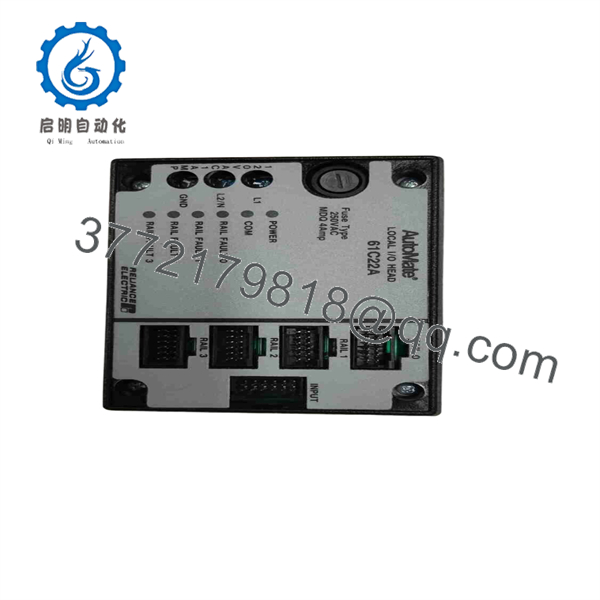
61C22A
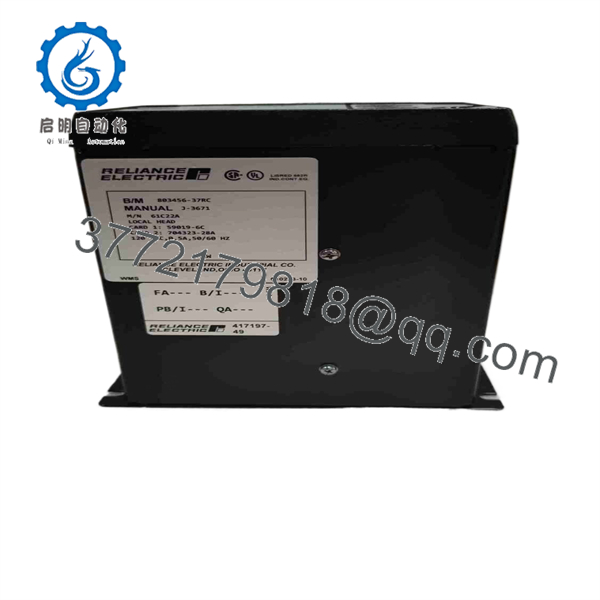
61C22A
Frequently Asked Questions
What is the Reliance Electric 61C22A?
The Reliance Electric 61C22A is an AutoMate Local I/O Head. It connects a compatible AutoMate controller architecture to local I/O rails and is used with the AutoMate 20/20E local I/O system. It is a rack interface module, not a standard discrete-input card, output card, PLC CPU, or AC drive.
What supply voltage does the 61C22A use?
Available part-specific marketplace listings identify the 61C22A as a 120 V AC, 50/60 Hz model, with one listing showing 0.5 A. Verify the actual module nameplate and panel wiring before energizing a replacement, particularly when the panel has been modified during its service life.
Is the 61C22A interchangeable with a 61C22?
Do not assume so. The A suffix identifies a specific revision, and older AutoMate systems may have differences in board layout, hardware revision, supply wiring, connector arrangement, or compatibility requirements. Match the exact full label, related assembly number, chassis type, and system documentation. If the original is a 61C22A, order a 61C22A unless an engineering review approves another variant.
Can I hot-swap the 61C22A?
No. Treat it as non-hot-swappable legacy control hardware. Place the machine in a safe state, shut down and lock out the 120 V AC supply, verify absence of voltage, and then remove the module. Hot-swapping can interrupt controller-to-I/O communication, corrupt operation of energized output circuits, and damage the rack or connector.
Why do my I/O modules remain dead after replacing the local I/O head?
The 61C22A may not be the source of the fault. Check incoming 120 V AC, upstream fuses, local chassis contacts, processor configuration, any inter-rack cabling, external output power, safety relays, and the individual I/O modules. A shorted output module or damaged chassis rail can prevent normal operation even with a working I/O head.
Is the 61C22A obsolete, and should I keep a spare?
Yes. The AutoMate platform is legacy hardware, and 61C22A availability is generally through New Surplus, used, refurbished, or repair-channel inventory. If your machine is production-critical, keep a tested spare, a documented I/O chassis diagram, the AutoMate programming environment, current application backups, and photographs of the installed wiring.
What condition and testing should I request before purchase?
For New Original / New Surplus stock, request photographs of the exact faceplate, full part number, related assembly label, power terminals, card-edge or chassis connector, and packaging. Ask the supplier to inspect for corrosion, heat damage, rework marks, broken latches, damaged pins, and altered jumpers.
For Refurbished stock, request a test on a compatible AutoMate local-I/O chassis. The report should verify 120 V AC power-up, rack/chassis communication, recognition of representative local I/O modules, rail-status behavior, fault indication, stable operation during a controlled thermal run, and final QC sign-off. Request actual test photos or video, a written condition statement, and warranty terms before shipment.



