
 WhatsApp: +86 16626708626
 Email:
  Phone: +86 16626708626
Description
Key Technical Specifications
| Parameter | Specification |
|---|---|
| Manufacturer | Rolls-Royce Marine |
| Model | H1127.0101 |
| Alternate Model Format | H1127-0101 |
| RR Part Number | 000068308 |
| Controller | H6045 |
| Processor Frequency | 433 MHz |
| PIC Code | Rev. 2.2, according to matching inventory records |
| Product Type | Marine Controller |
| Application | Shipboard marine automation and vessel control |
| Reported Weight | Approximately 4.45 lb / 2.02 kg |
| Memory Configuration | Configuration-dependent; verify whether the required memory card is included |
| Power Supply | Verify from vessel-specific documentation and controller nameplate |
| Communication Interfaces | Verify against the installed vessel configuration |
| Firmware / Application | Must be matched to the installed control architecture |
| Lifecycle | Discontinued by manufacturer according to Radwell’s product record |
The most consistently supported identification is H1127.0101 / 000068308 / H6045 / 433 MHz Marine Controller.
Several aftermarket sources publish additional electrical, I/O, communications, environmental, and certification specifications, but those details are inconsistent across listings. They should therefore be verified against the actual unit and vessel documentation rather than treated as universal H1127.0101 specifications.
Product Introduction
The Rolls-Royce Marine H1127.0101, also identified as RR Part No. 000068308, is a legacy H6045 marine controller identified in industrial inventory records with a 433 MHz processor platform. It is used within shipboard automation and vessel-control architectures rather than as a generic standalone PLC I/O module.
The H1127.0101 is primarily relevant when maintaining existing Rolls-Royce Marine control systems where an exact hardware replacement is required. Because configuration, memory-card status, PIC revision, and application software can affect compatibility, procurement should be based on the complete part number and installed-system configuration rather than physical appearance alone.
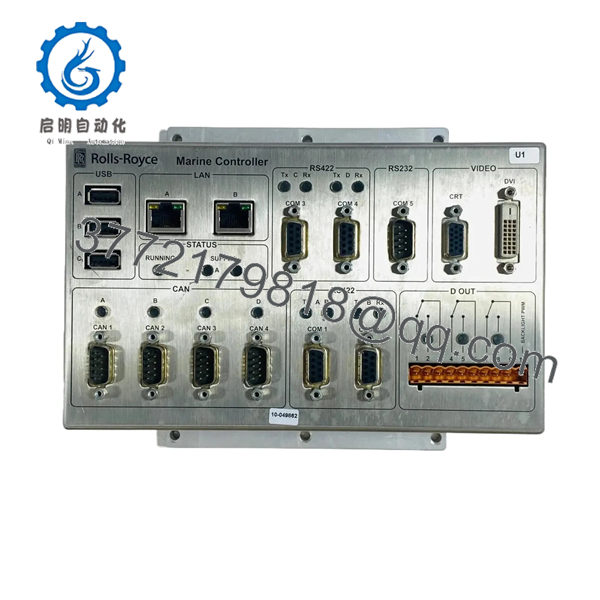
H1127.0101
Installation & Configuration Guide
Stage 1 — Pre-Installation Preparation
Estimated time: 30–60 minutes for preparation, excluding vessel-specific shutdown and commissioning.
- Place the affected vessel-control system into the approved maintenance state.
- Apply the vessel’s lockout/tagout and electrical isolation procedure.
- Prevent bridge, engine-room, remote, or automated control stations from issuing unintended commands.
- Record active alarms, controller status, and relevant configuration information.
- Photograph the installed .0101 and every connected cable.
- Record the complete identification label, including part number, revision, and PIC information.
- Verify whether the existing controller uses a memory card or other removable configuration hardware.
- Compare the replacement unit against the installed controller before removing the original.
⚠️ Do not use third-party voltage or interface specifications as the sole basis for energizing the replacement. Current aftermarket records disagree on detailed electrical and interface specifications. Verify the vessel wiring diagram and the actual controller documentation first.
Stage 2 — Removing the Old Controller
- Confirm that the vessel system is in a safe maintenance condition.
- Isolate the applicable controller power supply.
- Verify the absence of hazardous voltage with an appropriately rated meter.
- Label every connector before disconnection.
- Photograph connector locations and cable routing.
- Remove the controller’s mounting hardware or retaining mechanism.
- Disconnect cables without applying force to individual conductors.
- Remove the .0101 and place it on an ESD-safe surface.
- Inspect the connectors and surrounding wiring for:
- Corrosion
- Moisture ingress
- Loose terminals
- Bent contacts
- Damaged insulation
- Overheating or discoloration
- Retain the original controller until the replacement has completed commissioning.
Stage 3 — Installing the New Controller
- Use appropriate ESD protection when handling the controller.
- Confirm .0101 / 000068308 before installation.
- Compare the replacement’s hardware revision and PIC information with the original.
- Check whether the replacement includes the required memory card or configuration media.
- Inspect all connectors and mounting points.
- Install the controller in the original position.
- Reconnect cables according to the vessel documentation and your installation photographs.
- Verify that every connector is fully seated and mechanically retained.
- Confirm protective earth and power wiring against the approved wiring diagram.
- Verify communication connections and termination arrangements where applicable.
- Confirm that no cable is pinched or exposed to excessive mechanical stress.
⚠️ Do not assume that a bare .0101 contains the vessel’s application software or configuration. Current inventory records specifically indicate that some units may be supplied without a memory card. Treat memory configuration as a separate procurement and commissioning requirement.
Stage 4 — Power-On & Testing
- Complete a final wiring and mechanical inspection.
- Ensure personnel are clear of machinery and controlled equipment.
- Restore power according to the vessel’s approved procedure.
- Observe controller startup and status indications.
- Check for initialization or communication alarms.
- Confirm communication with the associated marine automation system.
- Verify that the expected application/configuration is loaded.
- Check remote and local control status.
- Test monitoring and command functions under controlled conditions.
- Verify alarms, interlocks, feedback signals, and control authority.
- Record controller revision, configuration status, and final alarm condition.
- Return the system to operational service only after the responsible marine automation engineer approves the test.
⚠️ A controller that powers up normally is not sufficient evidence of system compatibility. A complete commissioning test should verify the control path, communications, feedback, alarms, and interlocks associated with the vessel’s application.
Frequently Asked Questions (FAQ)
What is Rolls-Royce .0101?
.0101 is a Rolls-Royce Marine H6045 marine controller, commonly cross-referenced with RR Part No. 000068308 and identified with a 433 MHz processor platform.
Is .0101 discontinued?
Yes. Radwell’s current product record explicitly identifies .0101 as discontinued by the manufacturer. Aftermarket inventory continues to include unused and refurbished units.
Is .0101 a standard PLC CPU?
It should not be treated as a generic PLC CPU. Available records identify it specifically as a marine controller associated with Rolls-Royce Marine vessel-control architectures. Its application and configuration are therefore system-dependent.
Does the replacement include the vessel application or memory card?
Not necessarily. Current inventory records indicate that memory-card configuration can vary and that some .0101 units are supplied without a memory card. Verify the configuration of the replacement before purchase.
Can .0101 be installed as a direct replacement?
Only after verifying the 000068308 part number, hardware/PIC revision, memory configuration, connector arrangement, and vessel-specific application. Physical compatibility alone does not establish functional compatibility.
What conditions are available?
Current aftermarket records show Never Used Original Packaging, Never Used Radwell Packaging, and Refurbished versions. The condition and warranty depend on the supplier; for example, Radwell currently specifies its own two-year warranty for listed conditions rather than implying an OEM warranty.
What information should I provide when sourcing a replacement?
Provide the complete identification, RR Part No. 000068308, photographs of the nameplate and connectors, hardware/PIC revision, memory-card status, vessel automation system information, and the current fault symptoms. For an obsolete marine controller, these details are more useful than a generic claim of compatibility.



