WhatsApp: +86 16626708626
 Email:
 Phone: +86 16626708626
Description
Key Technical Specifications
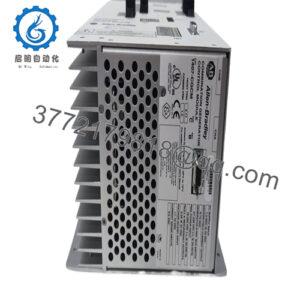
The MDB-8E is identified in Sartorius metal detector literature as a premium evaluation-electronics unit for industrial metal detection. The available brochure confirms its principal functions but does not provide a complete electrical specification table for the MDB-8E itself.
| Parameter | Specification |
|---|---|
| Manufacturer | Sartorius |
| Model | MDB-8E |
| Product category | Metal detector evaluation electronics |
| Primary function | Evaluates signals from compatible metal detector search coils |
| Processing architecture | Microprocessor-based |
| Detection technology | Multichannel technology |
| Phase adjustment | Flexible phase adjustment |
| User interface | Menu-driven operation |
| Internal diagnostics | Continuous self-test |
| Configuration management | Product-type memory; the brochure specifically lists 40 memory locations for the premium model |
| Compatible detector family | Sartorius MDB metal detection systems; verify the specific search coil and configuration |
| Supply voltage | Not confirmed in the available manufacturer brochure |
| Output and interface specifications | Require the applicable MDB-8E technical manual |
| Mounting and dimensions | Require verification against the actual hardware revision |
| Lifecycle status | Current production and support status not independently confirmed |
Source: Sartorius metal detector product brochure.
Technical clarification: The MDB-8E is evaluation electronics for a metal detection system, not a weighing terminal. Do not apply specifications published for similarly named weighing instruments or unrelated MDB products to this model.
Product Introduction & Supply Chain Strategy
The Sartorius MDB-8E is a microprocessor-based evaluation unit used in industrial metal detection systems. Its multichannel processing, adjustable phase settings, menu-driven operation, and continuous self-test support metal detection applications intended to protect production equipment and processes. Typical industrial metal detection applications include processing lines in the plastics, chemicals, textiles, wood, and food industries.
For installed legacy systems, verified replacement inventory can reduce downtime when compatible evaluation electronics are difficult to source. Assess Total Cost of Ownership (TCO), search-coil compatibility, commissioning requirements, and supplier traceability before purchasing. Set buffer stock according to the consequence of detector failure, actual lead time variability, and the availability of a qualified replacement rather than relying on the model number alone.
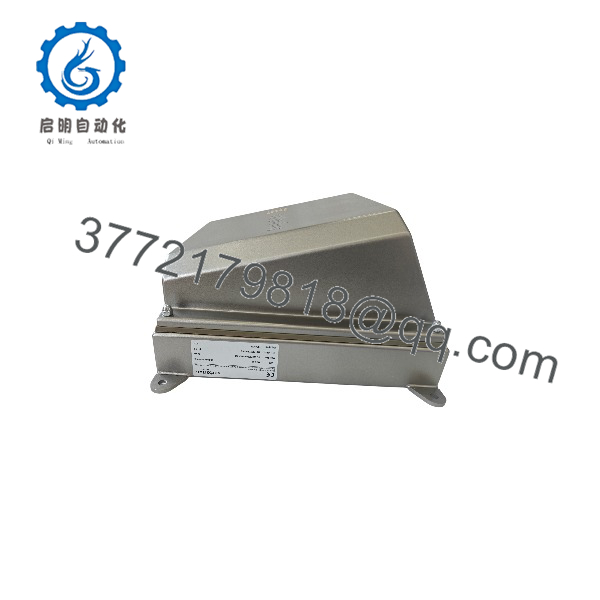
MDB-8E
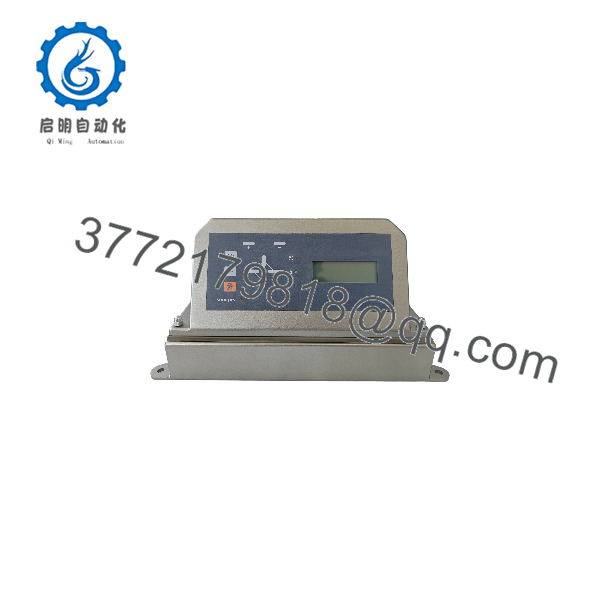
MDB-8E
Installation & Configuration Guide
The operates as part of a metal detection system. Replacement requires compatibility checks for the evaluation electronics, search coil, detector configuration, and associated rejection or machine-protection equipment.
Stage 1: Pre-Installation — Preparation and Safety
- Verify the hardware: Confirm the model, nameplate, terminal arrangement, and hardware revision.
- Apply lockout/tagout (LOTO): Isolate the detector and associated machinery according to the plant’s safety procedures.
- Record configuration: Document product-type memory selection, phase settings, sensitivity settings, and available diagnostic parameters.
- Document connections: Photograph the search-coil connections, power wiring, output terminals, and external interfaces.
- Confirm compatibility: Obtain the applicable Sartorius manual and verify that the replacement matches the installed detector system.
Stage 2: Removal
- Place the production line and connected equipment in an approved maintenance state.
- Isolate power and verify that the equipment is safe to service.
- Label all field connections before disconnecting them.
- Remove the evaluation electronics using the designated mounting and extraction points.
- Inspect the connectors, wiring, enclosure, and mounting hardware for damage.
Stage 3: Installation — Configuration and Connections
- Compare the replacement’s identification label and hardware revision with the original.
- Install the unit in the approved mounting position.
- Reconnect the search coil, power supply, and control interfaces according to the manufacturer’s wiring diagram.
- Restore the documented detector settings using the approved configuration procedure.
- Verify the selected product-type memory and phase adjustment settings.
- Confirm that connected rejection mechanisms, alarms, and machine-stop interfaces match the original approved configuration.
Stage 4: Power-On and Functional Testing
- Restore power according to the manufacturer’s startup procedure.
- Check the unit’s self-test results and available diagnostic indications.
- Verify communication with the search coil and other connected equipment.
- Run the manufacturer’s prescribed sensitivity and detection verification tests using approved test samples.
- Confirm that the correct alarms and rejection or shutdown actions occur when required.
- Document the test results and obtain the required maintenance approval before returning the line to production.
Important: Do not assume that the supports hot swapping. Never bypass metal detection or machine-protection functions to complete a replacement. Use the approved commissioning procedure to verify detection performance before resuming normal production.
Firmware/Software Versions & Upgrade Notes
The available Sartorius brochure confirms microprocessor-based operation, menu-driven control, and continuous self-testing. It does not establish a specific firmware version, programming utility, or upgrade procedure for the .
- Firmware identification: Record the installed hardware and software revisions, if displayed or documented.
- Configuration backup: Preserve the product-type memory selection, phase settings, sensitivity settings, and other documented parameters before removal.
- Search-coil compatibility: Verify that the replacement evaluation unit matches the connected detector coil and its electrical requirements.
- Parameter restoration: Restore only settings confirmed as valid for the replacement hardware and the installed detection application.
- Upgrade precautions: Do not load firmware from another MDB model or use an unverified software package.
- Functional validation: Repeat the prescribed sensitivity and rejection tests after replacement or any approved configuration change.
- Documentation: Request the correct manual and revision-specific instructions from Sartorius or a qualified service provider.
For legacy installations, also verify whether the required configuration tools, compatible search coils, and service support remain available. These can affect replacement lead time and the total cost of restoring the detector.
Frequently Asked Questions (FAQ)
Q1. What is the Sartorius used for?
The is evaluation electronics for an industrial metal detection system. It uses microprocessor-based, multichannel processing and provides menu-driven operation, phase adjustment, and continuous self-testing.
Q2. Is the a weighing controller?
No. The identified in Sartorius metal detector literature is an evaluation unit for metal detection. It should not be confused with weighing indicators or unrelated instruments that use similar model designations.
Q3. Is the Sartorius discontinued?
The current official lifecycle status has not been independently confirmed. Check with Sartorius or a qualified service provider for current availability, support options, and any recommended replacement before establishing a last-time-buy strategy.
Q4. Is the available as new-original or new-surplus inventory?
Availability and condition depend on the supplier’s actual stock. Request photographs of the physical unit, its identification label, written condition confirmation, and warranty terms.
For a legacy detector, also confirm whether the supplied evaluation unit has been verified for operation with the intended search coil and detector configuration.
Q5. Can I replace the without changing the search coil?
Possibly, but compatibility must be confirmed using the applicable Sartorius documentation. Check the search-coil model, electrical interface, detector configuration, and supported evaluation-unit combination before installation.
Q6. What should be tested after replacing the ?
At minimum, verify the unit’s self-test, search-coil operation, detector settings, sensitivity, alarms, and associated rejection or machine-stop functions. Use the manufacturer’s prescribed test procedure and document the results before releasing the equipment for production.
Q7. What warranty should I expect when purchasing a new-surplus ?
Warranty coverage depends on the supplier. Confirm the coverage period, exclusions, return procedure, and remedies for verified defects in writing. For critical applications, request inspection or functional-test records and confirmation of compatibility with the existing metal detection system.