
 WhatsApp: +86 16626708626
 Email:
  Phone: +86 16626708626
Description
Key Technical Specifications
| Parameter | Value |
|---|---|
| Manufacturer | Schneider Electric / Modicon |
| Part Number | 140CPU31110 |
| Product Family | Modicon Quantum automation platform |
| CPU Type | Unity processor with arithmetic coprocessor |
| Clock Frequency | 66 MHz |
| Application Memory | 548 KB internal RAM |
| Built-In Network | Modbus Plus |
| Integrated Serial Port | One serial port; configurable by slide switch for ASCII, Modbus RTU, or Memory mode |
| Programming Platform | Unity Pro / EcoStruxure Control Expert, subject to installed-version support |
| Module Format | Standard Quantum CPU module |
| Local Rack Support | Up to 2 local racks |
| Local I/O Capacity | Up to 27 slots, dependent on rack configuration |
| Distributed I/O Capacity | Up to 63 distributed I/O stations across up to 3 distributed networks |
| Remote I/O Capacity | Up to 31 remote I/O stations across up to 2 remote racks |
| Distributed Discrete I/O Capacity | Up to 8,000 inputs and 8,000 outputs per network |
| Remote Discrete I/O Capacity | Up to 31,744 inputs and 31,744 outputs |
| Distributed Analog I/O Capacity | Up to 500 analog inputs and 500 analog outputs per network |
| Remote Analog I/O Capacity | Up to 1,984 analog inputs and 1,984 analog outputs |
| Optional Communication Modules | Up to 6; Ethernet, Modbus, Modbus Plus, Profibus DP, and SY/MAX options listed |
| Integrated Connection Types | Modbus Plus, serial Modbus/ASCII, USB, and optional communication networks |
| Maximum Local Profibus DP Connections | 2 |
| Maximum RS-232/RS-485 Modbus Connections | 2 |
| Maximum Local Modbus Plus Connections | 2 |
| Latest Published Firmware Versions | SV 3.50 and SV 3.51 |
| Direct Migration Direction | Schneider lists BMEP581020 / BMEP581020H M580 processors as replacement or migration products; confirm conversion scope before purchase |
Schneider identifies the 140CPU31110 as a 66 MHz Modicon Quantum Unity processor with 548 KB RAM and Modbus Plus. Schneider’s firmware notice identifies SV 3.50 and SV 3.51 as the final firmware releases for this CPU.
Product Introduction
The Schneider Electric 140CPU31110 is a Modicon Quantum Unity CPU for legacy PLC control systems. It executes the plant control application, manages Quantum local and remote I/O, and includes Modbus Plus communication for integration with compatible controllers, operator stations, and distributed automation devices.
This CPU is used when an installed Quantum system needs an exact processor replacement without a full platform migration. It combines a 66 MHz processor, 548 KB internal RAM, integrated Modbus Plus, configurable serial communications, and support for optional Ethernet, Modbus, Profibus DP, SY/MAX, and Modbus Plus modules.
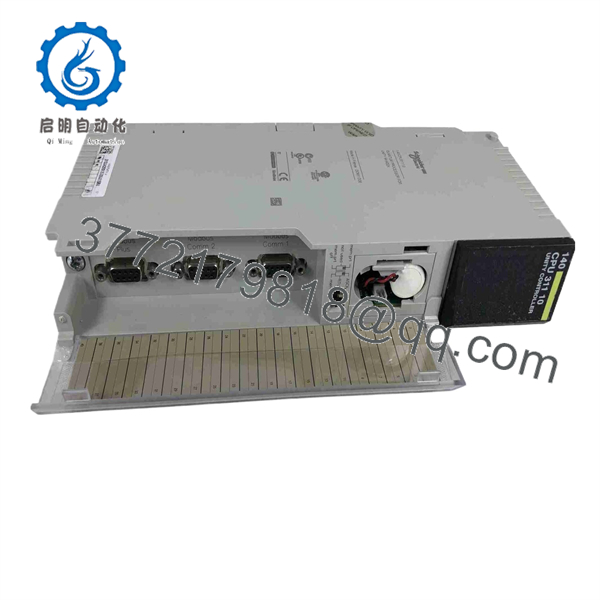
140CPU31110
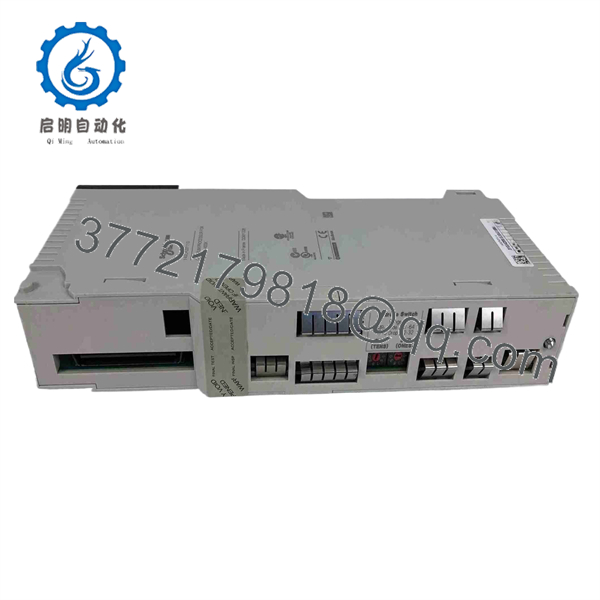
140CPU31110
Troubleshooting Quick Reference
| Symptom | Possible Cause | Relevance to This Part | Quick Check Method | Recommendation |
|---|---|---|---|---|
| CPU does not power up or shows no status indication | Rack power supply failure, poor backplane connection, damaged CPU, incorrectly seated module, or failed Quantum rack | ✅ Medium | Check the Quantum power supply’s PWR OK LED and measure the documented 5.1 V DC backplane supply. Power down under approved procedure, remove and reseat the CPU, then inspect the backplane connector for bent or recessed contacts. | Verify rack power and backplane condition before replacing the CPU. A CPU with no indication is often downstream of a power-supply or rack issue. |
| CPU enters STOP or HALT after power-up | Application error, missing I/O module, configuration mismatch, watchdog event, corrupted application, hardware fault, or bad memory | ✅ High | Connect with the approved Unity Pro or Control Expert engineering workstation. Read the CPU diagnostic buffer, controller state, application status, and I/O health before cycling power. Save the diagnostic log. | Diagnose from the first recorded fault. Do not clear or download over the application until a current backup exists. |
| CPU runs, but remote I/O is offline | Modbus Plus cable fault, incorrect network node address, terminator issue, remote drop power loss, network configuration mismatch, or remote I/O fault | ❌ Low to Medium | Check Modbus Plus cable shielding, connectors, node-address settings, and network termination against the site drawing. Verify remote rack power and inspect network diagnostics. | Troubleshoot network wiring and remote racks first. Replace the CPU only if diagnostics identify its Modbus Plus interface as the failed point. |
| CPU is RUN, but one I/O rack or module remains unavailable | I/O module fault, rack power supply issue, backplane fault, configuration mismatch, slot-address problem, or disconnected network | ❌ Low | Inspect affected module LEDs and rack supply status. Compare installed modules and slot order to the saved Unity hardware configuration. Check the network path to the remote rack. | Focus on the affected I/O rack, module, cable, or configuration. A healthy CPU cannot correct a local I/O hardware fault. |
| Application upload fails or program appears missing | Wrong software version, communication-port setting, password protection, missing backup, damaged memory, wrong cable, or CPU fault | ✅ Medium | Verify the serial-port slide switch is set for the intended communication mode: ASCII, Modbus RTU, or Memory. Confirm the engineering PC uses the correct driver, cable, port settings, and software version. | Do not overwrite the CPU until you confirm the current application backup and correct communications path. |
| CPU loses application after replacement or power cycle | No valid application backup, memory-card issue, incomplete transfer, battery/memory retention issue, firmware mismatch, or incorrect restoration procedure | ✅ High | Before removal, upload and archive the application, configuration, variable files, communication settings, and CPU firmware information. After replacement, compare CPU firmware and restore the validated project using the approved procedure. | Treat a CPU swap as a controlled software change, not just a hardware change. Keep the original CPU until the replacement runs through a verified startup. |
| Communication timeout appears after installing replacement CPU | Firmware mismatch, incompatible project version, node-address difference, serial-port slide-switch mismatch, missing optional module, or altered network configuration | ✅ High | Record the original CPU firmware, Modbus Plus address, serial-port mode, installed communications modules, and network configuration before removal. Confirm replacement firmware is compatible with the saved Unity project. | Request a specific firmware range when ordering. I have seen a controller swap become a two-day outage because the project expected one firmware behavior and the replacement CPU had another. |
| CPU runs intermittently or faults after cabinet warms up | Power-supply ripple, poor ventilation, loose CPU/backplane connection, aging hardware, noise, or CPU failure | ✅ Medium | Review event timestamps and cabinet temperature. Verify rack supply stability under load. Inspect fans, filters, grounding, and module seating. | Correct power and environmental issues first. If controlled substitution proves the fault follows the CPU, replace it. |
| CPU memory or logic errors occur after electrical disturbance | Ground fault, surge, poor cabinet bonding, unstable supply, corrupted application, or damaged CPU | ✅ Medium to High | Review event logs and upstream power events. Verify cabinet earth bonding and 5.1 V DC stability. Compare the running application checksum or version against the validated backup. | Restore the known-good application only after power-quality and grounding problems are addressed. |
| New CPU has no communication with HMI or SCADA | Wrong Modbus Plus address, incorrect serial mode, wrong port settings, firmware mismatch, HMI node configuration error, or broken network cable | ✅ High | Compare the old CPU’s address and slide-switch setting with the replacement. Verify HMI/SCADA driver, node address, baud rate, parity, and cable pinout. Check physical network continuity. | Copy all communication settings before removal. Do not assume a new CPU retains site-specific settings. |
❗ Application-backup warning: Upload and archive the running Unity project before removing the CPU. Save the application, hardware configuration, communication parameters, variable files, and any project documentation. A replacement CPU is not guaranteed to contain your plant logic.
❗ Firmware warning: Schneider identifies SV 3.50 and SV 3.51 as the final firmware versions for the 140CPU31110. Document the installed firmware before ordering. A firmware mismatch can create communications or project-compatibility faults even when the hardware number is correct.
❗ Serial-port warning: Photograph the CPU slide-switch position before removal. It selects ASCII, Modbus RTU, or Memory mode. A wrong setting can make the engineering connection or serial device appear failed.
❗ Network warning: Do not change Modbus Plus addresses, cable termination, or shield grounding during a CPU swap unless the change is documented and intentional. It is the most common rookie mistake, but it happens constantly. Take a picture before you touch anything. Seriously.
If you are stuck, provide technical support with the complete CPU label, firmware version, Unity/Control Expert project version, CPU diagnostic log, rack configuration, Modbus Plus node address, serial-port slide-switch photo, communication-module list, and HMI/SCADA error messages. Keep these checks in mind and you will save yourself 90% of typical rework time.
Frequently Asked Questions (FAQ)
What is the Schneider 140CPU31110?
The Schneider Electric 140CPU31110 is a Modicon Quantum Unity processor. It runs the PLC control program, manages Quantum rack I/O, supports Modbus Plus, and provides 548 KB internal RAM with a 66 MHz processor.
What software programs the 140CPU31110?
Use Schneider Electric Unity Pro or its current successor, EcoStruxure Control Expert, with a version that supports the installed Quantum CPU and firmware. Verify your existing project version before replacing the CPU. Legacy projects may require a specific Unity Pro release, library version, or firmware match for a clean restore.
Can I replace the CPU without losing the PLC program?
Only if you first create and validate a backup. The program and configuration must be uploaded from the original CPU or restored from a verified project archive. Save the Unity project, hardware configuration, communications settings, Modbus Plus node address, serial-port setting, documentation, and any memory-card data before pulling the original processor.
To be honest, this design is a bit of a hassle compared with a modern controller that supports managed backups, but the backup work is far cheaper than rebuilding a running Quantum application from drawings and online observations.
Are SV 3.50 and SV 3.51 compatible with every 140CPU31110 application?
Not automatically. Schneider identifies SV 3.50 and SV 3.51 as the final firmware releases, but application compatibility depends on the project’s Unity Pro version, installed communications modules, CPU configuration, and plant-specific logic. Record the old firmware before ordering, and ask the supplier to confirm the replacement’s firmware version.
Can I hot-swap the 140CPU31110?
No. Treat the Quantum CPU as non-hot-swappable. Removing it will stop PLC execution and can disrupt all communications and I/O updates. Place the process in a safe state, shut down according to plant procedure, confirm the rack is de-energized where required, use ESD controls, and then remove the CPU.
Is the 140CPU31110 obsolete, and what replaces it?
The Modicon Quantum platform is legacy hardware, and Schneider’s regional product information indicates the 140CPU31110 is scheduled for discontinuation by December 31, 2026. Schneider identifies the Modicon M580 BMEP581020 processor family as the replacement direction, but it is a system migration, not a plug-in CPU replacement. Migration requires engineering review of rack hardware, I/O, networking, application conversion, and commissioning risk.
Why is a New Surplus 140CPU31110 cheaper than a factory order?
New Surplus means unused original inventory sourced from canceled projects, plant storerooms, integrator stock, distributor liquidation, or legacy-system spares. The CPU may be original Schneider hardware, but it normally sits outside the current factory supply chain. The lower price can reflect packaging age, limited firmware selection, and no access to factory lifecycle support.
A credible supplier should verify source documentation, inspect labels, connectors, housing, and anti-counterfeit markings, then power the CPU in a genuine Quantum rack. Testing should confirm boot behavior, processor diagnostics, serial-port communication, Modbus Plus communication where a test network is available, application-memory behavior, and stable operation under load.
Request actual unit photos, full model and firmware details, a dated test report, serial-number visibility where available, confirmed stock quantity, shipping lead time, ESD-safe packaging confirmation, and written warranty terms before issuing a purchase order.



