
 WhatsApp: +86 16626708626
 Email:
  Phone: +86 16626708626
Description
3. Key Technical Specifications
| Parameter | Specification / Value |
| Manufacturer | Schneider Electric / Modicon |
| Part Number | 416NHM30030A |
| Module Type | Modbus Plus (MB+) PCI Adapter Interface Card |
| Bus Interface | Universal PCI / PCI-X (3.3 VDC & 5 VDC compliant) |
| Network Ports | 1 × DB9 Female (Modbus Plus Architecture) |
| Operating Frequency | 33 MHz |
| Software Drivers | Compatible with Schneider MBX Driver Suite |
| Operating Temperature | −10°C to +50°C (+14°F to +122°F) |
| Relative Humidity | 5% to 95% Non-condensing |
| Ingress Rating | IP20 Indoor Rated |
| Packaging | Factory Anti-Static Bag (ESD Shielded) |
4. Product Introduction & Supply Chain Strategy
This product is a Brand New Surplus unit. It is not used, not pulled from a decommissioned plant, and not refurbished. All modules undergo rigorous quality verification to ensure OEM-level reliability. The Schneider Electric / Modicon 416NHM30030A PCI card establishes direct Modbus Plus network connectivity between industrial PCs, SCADA workstations, and Modicon PLC networks.
Maintaining this card as New Surplus provides a vital insurance policy against unexpected system downtime. Because legacy Modbus Plus PCI cards are discontinued by the OEM, procuring replacement hardware during a SCADA server failure can take weeks through standard channels. Refurbished PCI cards often suffer from invisible trace oxidation, degraded capacitors, and worn golden edge connectors that cause network drops. Purchasing genuine New Surplus ensures factory signal integrity while keeping your Total Cost of Ownership (TCO) lower than market list prices.
5. Installation & Configuration Guide
Stage 1: Pre-Installation (Prep & Safety)
- Power down the host industrial PC and enforce full Lock-Out/Tag-Out (LOTO) protocols on the cabinet power feed.
- Wear a grounded ESD wrist strap before opening the computer chassis or handling the card.
- Record driver versions and node address settings in the host SCADA software configuration before hardware removal.
Stage 2: Removal
- Unscrew the DB9 serial connector cable from the rear bracket of the old Modbus Plus card.
- Remove the retaining bracket screw holding the PCI card to the expansion slot rail.
- Pull the card straight up out of the PCI slot using two hands to avoid flexing the motherboard bus socket.
Stage 3: Installation (Clone & Seat)
- Inspect the card edge connector on the new 416NHM30030A to ensure contacts are clean and gold plating is unmarred.
- Align the PCI card key notches with the 3.3V/5V slot keyways on the host motherboard.
- Press firmly on the top edge of the card until it seats fully into the slot, then secure the retaining bracket screw.
Stage 4: Power-On & Testing
- Securely attach the DB9 Modbus Plus network cable to the rear port.
- Boot the host PC and launch the Schneider MBX Driver suite to verify hardware recognition.
- Run a Modbus Plus token pass diagnostic test to confirm communication stability with connected PLCs.
1.Pre-Installation & Setup:Driver recording & ESD safety.
Shut down host PC power and observe LOTO protocols. Put on a grounded ESD strap and note current MBX driver parameters in the SCADA configuration.
2.Card Extraction:Bus protection.
Unscrew the rear DB9 network connector. Remove the chassis bracket fastener and pull the original card straight up out of the motherboard slot.
3.Hardware Insertion & Mounting:Alignment & seating.
Check keyways on the 416NHM30030A card for 3.3V/5V slot compatibility. Slide the card into the expansion slot evenly until flush, then tighten the bracket screw.
4.Validation & Network Test:MBX driver diagnostic.
Reconnect the DB9 cable. Power on the PC, open the Schneider MBX driver utility, and run a node ping to confirm active token passing across the network.
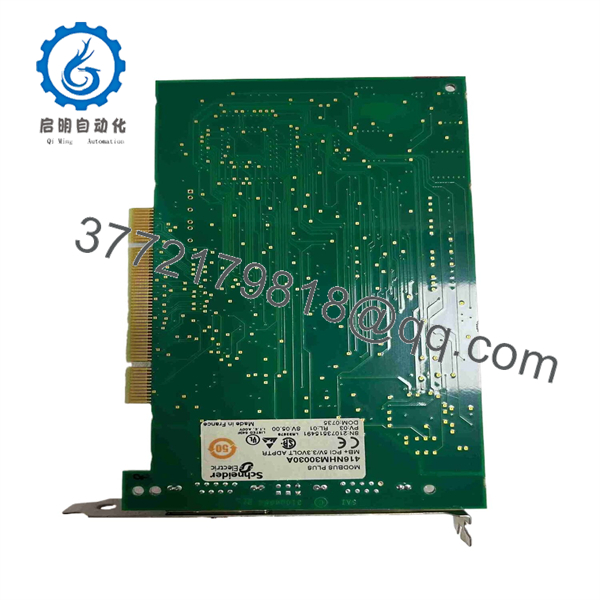
416NHM30030A
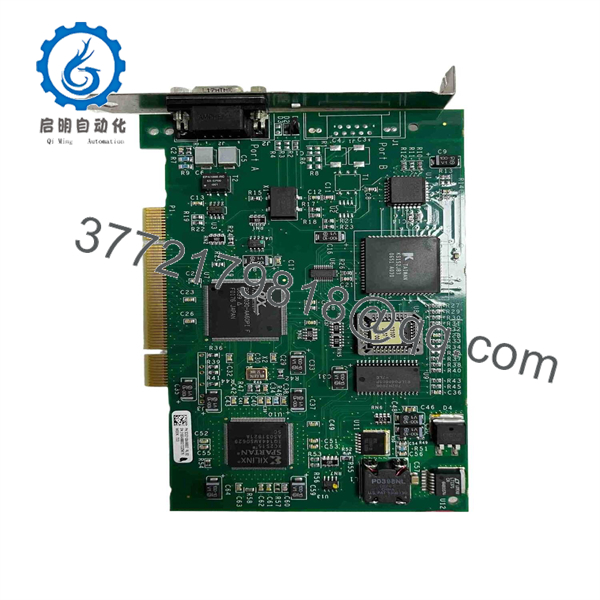
416NHM30030A
6. Firmware/Software Versions & Upgrade Notes
- Driver Suite Compatibility: Fully supported by Schneider Electric MBX Driver Suite (Virtual MBX and Modbus Plus Driver versions) on 32-bit and 64-bit industrial OS platforms.
- PCI Bus Requirements: Designed for universal 32-bit PCI and PCI-X slots supporting dual 3.3 VDC and 5 VDC power rails.
- System Upgrade Warning: Modern motherboards featuring only PCIe (PCI Express) slots cannot accept legacy PCI cards natively. Ensure target industrial computers contain a physical PCI or PCI-X expansion slot prior to deployment.
7. Frequently Asked Questions (FAQ)
Q: Is the Schneider Modicon 416NHM30030A card brand new or refurbished?
A: This unit is 100% Genuine New Surplus. It has never been installed in an active computer, shows zero insertion marks on gold edge contacts, and ships in protective ESD packaging.
Q: Why should I choose New Surplus over a refurbished PCI card?
A: Refurbished network interface cards frequently suffer from micro-fractures, degraded bus driver chips, and tarnished backplane pins that cause intermittent network dropped packets. In industrial process control, a communication loss leads to unmonitored alarms and downtime. New Surplus delivers OEM-grade reliability without long lead times.
Q: Can I plug this card into a 3.3V or a 5V PCI slot?
A: Yes. The 416NHM30030A features a universal PCI edge connector keying structure that fits both 3.3 VDC and 5 VDC PCI and PCI-X bus slots.
Q: Does this card require manual jumper settings to assign Modbus Plus node addresses?
A: No. Node address selection and network configuration for the 416NHM30030A are handled digitally through the Schneider MBX Driver configuration software within the host operating system.
Q: What warranty coverage applies to this module?
A: We back this 416NHM30030A card with a full 1-year replacement warranty, delivering total operational security compared to typical short-term used-equipment guarantees.



