
 WhatsApp: +86 16626708626
 Email:
  Phone: +86 16626708626
Description
Key Technical Specifications
| Parameter | Value |
|---|---|
| Manufacturer | SHINSUNG ENG |
| Model Number | MCUL32-PWM |
| Product Type | EFU Controller / PWM Control Board |
| Application | Equipment Fan Unit (EFU) control systems |
| Control Method | PWM (Pulse Width Modulation) |
| Controller Platform | MCUL32 Series |
| Main Function | Variable fan speed control |
| Motor Compatibility | BLDC / PWM-controlled fan systems (application dependent) |
| Installation Type | Cleanroom equipment panel mounting |
| Typical Industry | Semiconductor manufacturing, LCD, precision clean environments |
| Communication | Verify according to installed EFU system configuration |
| Operating Parameters | Confirm from equipment-specific documentation |
Note: Public technical documentation for the MCUL32-PWM is limited. Exact voltage ratings, I/O mapping, communication protocol, and firmware revision should be verified from the installed controller label and EFU equipment manual. Available market references identify the MCUL32-PWM as a SHINSUNG ENG EFU controller.
Product Introduction & Supply Chain Strategy
The SHINSUNG MCUL32-PWM is an EFU controller used in cleanroom ventilation equipment where PWM-based fan speed regulation is required. It manages fan operation within semiconductor and precision manufacturing environments where airflow stability directly affects process conditions.
For semiconductor facilities operating SHINSUNG EFU systems, maintaining New Original / New Surplus MCUL32-PWM inventory reduces downtime exposure caused by controller failures. Due to limited public documentation and specialized equipment integration, lifecycle tracking, supplier verification, and planned last-time-buy decisions are important for maintaining Total Cost of Ownership (TCO) control.
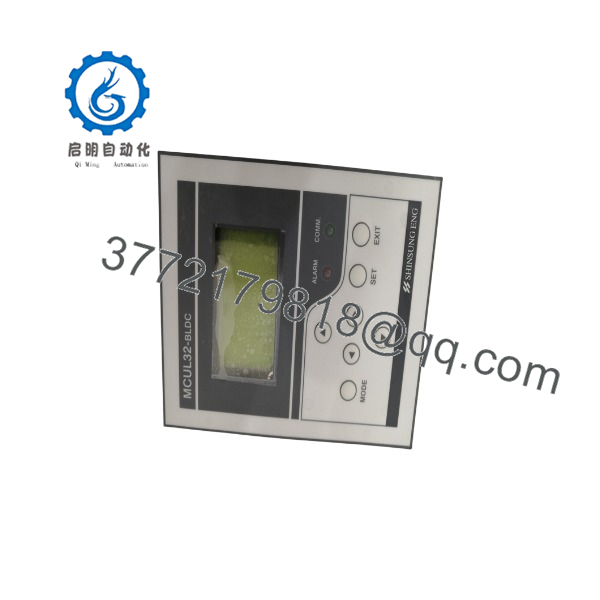
MCUL32-PWM
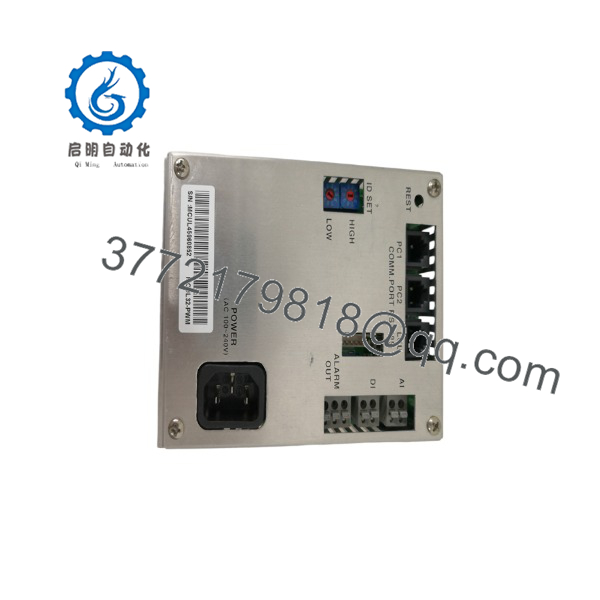
MCUL32-PWM
Installation & Configuration Guide
Stage 1: Pre-Installation (Prep & Safety)
- Apply facility lock-out/tag-out procedures before accessing the EFU control assembly.
- Verify the installed controller marking:
- SHINSUNG MCUL32-PWM
- Record:
- EFU model number
- Fan motor specification
- PWM signal settings
- Communication wiring
- DIP switch or jumper positions
- Photograph:
- Board layout
- Terminal wiring
- Connector locations
- Configuration switches
- Use ESD protection before handling the controller.
Required tools:
- ESD wrist strap
- Digital multimeter
- Insulated screwdriver
- Wiring labels
- Equipment maintenance manual
Stage 2: Removal
- Disconnect facility power supply.
- Confirm absence of voltage before removing connectors.
- Label all cables before disconnection.
- Disconnect:
- Power input
- Fan motor wiring
- PWM/control signal wiring
- Communication connections
- Remove the controller carefully from the mounting location.
Avoid touching exposed PCB components. Semiconductor equipment controllers are sensitive to electrostatic discharge.
Stage 3: Installation (Clone & Seat)
- Install the replacement controller in the original mounting location.
- Reconnect all wiring according to recorded documentation.
- Match:
- Connector positions
- Fan control parameters
- Communication settings
- Address configuration
- Verify mechanical mounting.
- Confirm grounding and shielding connections.
Stage 4: Power-On & Testing
- Check power rails before energizing.
- Apply system power.
- Confirm controller startup indicators.
- Verify:
- Fan rotation
- PWM speed response
- EFU airflow output
- System communication
- Monitor operating parameters before returning equipment to production.
Firmware/Software Versions & Upgrade Notes
- Firmware Version: Verify the installed firmware revision before replacement.
- Configuration Backup: Record controller parameters and EFU communication settings before removing the original module.
- Compatibility: Confirm compatibility with:
- EFU model
- Fan motor type
- Cleanroom control system
- Existing communication network
Upgrade Warning
Avoid firmware changes during a direct controller replacement unless required by the equipment manufacturer. Changing firmware and hardware configuration together can increase troubleshooting time.
Before replacement:
- Document original controller settings.
- Save equipment parameters.
- Record alarm history.
- Verify replacement board revision.
Frequently Asked Questions (FAQ)
Q1: Is the SHINSUNG a new unit or refurbished?
The supplied is a Brand New Surplus unit. It is not removed from operating equipment and is not refurbished.
Q2: Why choose New Surplus instead of refurbished inventory?
EFU controllers operate continuously in cleanroom environments. New Original inventory avoids unknown operating hours, thermal stress history, and previous installation conditions.
Q3: What equipment uses the ?
The is associated with SHINSUNG ENG EFU (Equipment Fan Unit) control applications, commonly found in semiconductor and cleanroom environments.
Q4: Is the obsolete?
The is a specialized legacy controller with limited public documentation. Facilities operating matching SHINSUNG EFU systems should evaluate spare requirements and maintain lifecycle records.
Q5: Can the controller be replaced while powered?
No. Disconnect power before replacement. Live replacement may damage the controller, fan drive electronics, or connected EFU system.
Q6: Will replacing the erase system settings?
The controller may contain configuration data depending on the EFU system design. Record all parameters before replacement and verify operation after installation.
Q7: What stocking strategy is recommended?
For semiconductor production environments where cleanroom airflow interruption can affect yield, maintain 1–2 units of on-site buffer stock. For multiple identical EFU systems, centralized spare inventory and vendor consolidation can reduce carrying costs while maintaining availability.



