
 WhatsApp: +86 16626708626
 Email:
  Phone: +86 16626708626
Description
Key Technical Specifications
| Parameter | Value |
|---|---|
| Manufacturer | Siemens |
| Article number | 6EQ2020-0AB12-5XX0 |
| Product type | APACS+ / QUADLOG Industrial Ethernet module |
| Hardware platform | SIMATIC Box PC 627B |
| Integrated communication hardware | MBI card |
| Ethernet interface | Onboard RJ45 Ethernet |
| External connection | MBI Y-cable, part number 16137-215 |
| Operating-system media | CompactFlash card |
| Software version | V2.1 |
| Supported control environments | APACS+, QUADLOG, and PCS 7-AS communication blocks |
| Documentation | PDF manual supplied on CD in the original configuration |
| USB flash drive | Not included in the original configuration |
| Power input | 120/230 VAC |
| Power cable | Shielded power cable with US plug |
| Net weight | Approximately 7.26 kg, according to distributor data |
| Lifecycle status | Discontinued / end of product lifecycle |
| Lifecycle date | August 10, 2018, according to distributor data |
| Successor | 6EQ2020-0AC03-5XX0 |
| Successor platform | SIMATIC Box PC 627C, with V3.0 software |
| UPC | 662643356328 |
Siemens identifies 6EQ2020-0AB12-5XX0 as an end-of-life product with no direct replacement shown on its product portal. Distributor data describes it as an APACS+ / QUADLOG Industrial Ethernet module based on the SIMATIC Box PC 627B, with an MBI card, onboard RJ45 Ethernet, CompactFlash operating system, MBI Y-cable 16137-215, and V2.1 software.
The listed successor is 6EQ2020-0AC03-5XX0, based on the SIMATIC Box PC 627C and using V3.0 software. Do not treat the successor as a drop-in replacement without checking application software, communication blocks, CompactFlash image, MBI hardware, and cabinet wiring.
Product Introduction
The Siemens 6EQ2020-0AB12-5XX0 is an APACS+ / QUADLOG Industrial Ethernet module built around a SIMATIC Box PC 627B. It includes an MBI card, onboard RJ45 Ethernet, CompactFlash operating-system media, MBI Y-cable 16137-215, and V2.1 communication software.
This is discontinued process-control hardware with a defined legacy software environment. It is suitable mainly for maintaining existing APACS+, QUADLOG, or PCS 7-AS installations. Verify the CompactFlash image, MBI card, Y-cable, software revision, and Ethernet configuration before ordering.
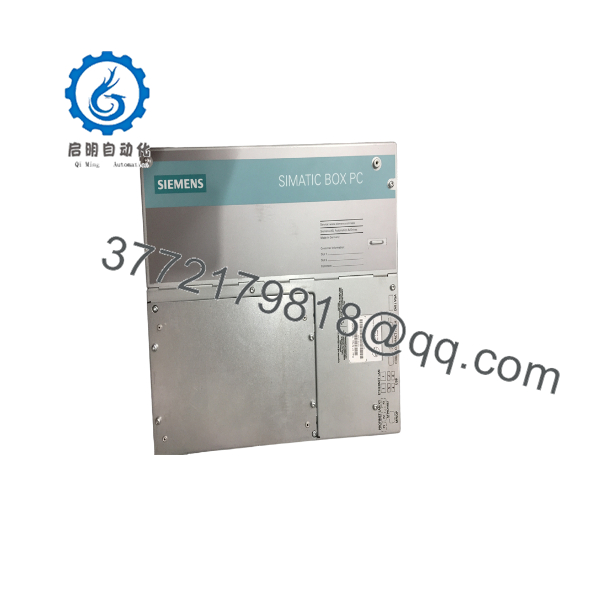
6EQ2020-0AB12-5XX0
Troubleshooting Quick Reference
| Symptom | Possible Cause | Relevance to This Part | Quick Check Method | Recommendation |
|---|---|---|---|---|
| Industrial PC does not power on | Missing 120/230 VAC, fuse failure, power-supply fault, or internal PC fault | ✅ Medium | Verify AC input at the power connector and inspect the cabinet fuse and power switch | Check the cabinet supply before replacing the module |
| SIMATIC Box PC 627B fails to boot | Corrupt CompactFlash, failed disk interface, BIOS issue, or internal hardware fault | ✅ High | Record POST messages and test the original CompactFlash in the same unit if safe | Back up the media and replace or clone it only with a verified compatible image |
| APACS+ or QUADLOG communication is lost | MBI card failure, missing Y-cable, incorrect driver, or Ethernet configuration | ✅ High | Check MBI card seating, cable part number 16137-215, link LEDs, and configured IP settings | Verify the complete communication path before replacing the PC |
| Ethernet link LED is off | Cable, switch port, NIC, power, or driver fault | ❌ Low to medium | Test the RJ45 port with a known-good cable and switch port | Repair the network path before condemning the Siemens unit |
| Controller reports an MBI communication fault | MBI card mismatch, damaged Y-cable, software-version issue, or card seating problem | ✅ High | Compare MBI card label and software revision; inspect both Y-cable connectors | Match the MBI hardware and V2.1 environment before replacement |
| PCS 7-AS communication blocks fail | Missing or incorrect communication blocks, incompatible software, or configuration mismatch | ✅ High | Confirm the installed block version and compare it with the archived project | Restore the approved V2.1 software environment and configuration |
| System starts but application does not load | CompactFlash corruption, missing startup files, or operating-system failure | ✅ High | Boot from approved service media and inspect CompactFlash contents offline | Preserve the original card image before attempting repair |
| Communication drops intermittently | Thermal issue, failing CompactFlash, loose connector, EMI, or network faults | ✅ Medium | Monitor temperature, link status, event logs, and supply voltage during operation | Check storage media, cooling, cables, and network switches |
| Replacement boots but does not match the plant system | Wrong software image, MAC/IP settings, MBI configuration, or controller project | ✅ High | Compare archived configuration, IP address, MBI parameters, and CompactFlash image | Do not connect to the live control network until configuration is verified |
| Wrong AC voltage or cable installed | Incorrect supply selection or incompatible regional cable | ✅ High | Confirm the cabinet voltage and inspect the shielded US-plug power cable | Verify 120/230 VAC compatibility and protective grounding |
| Data or configuration is lost after shutdown | Failed CompactFlash, battery-backed memory issue, or improper image | ✅ Medium | Review boot behavior and restore from an approved backup | Maintain a verified system image and configuration backup |
| Unit was handled without ESD controls | Damage to MBI, Ethernet, memory, or motherboard components | ✅ Medium | Perform visual inspection and controlled communication testing | Use ESD-safe handling and anti-static packaging |
Support note: If the fault remains, contact technical support with photos of the full Siemens label, SIMATIC Box PC 627B nameplate, MBI card, CompactFlash card, Y-cable, software version, boot messages, Ethernet settings, and diagnostic logs.
Frequently Asked Questions
What is Siemens 6EQ2020-0AB12-5XX0?
It is an APACS+ / QUADLOG Industrial Ethernet module based on the SIMATIC Box PC 627B. The original configuration includes an MBI card, onboard RJ45 Ethernet, CompactFlash operating-system media, MBI Y-cable 16137-215, V2.1 communication blocks, and PCS 7-AS support.
Is this a standard SIMATIC Box PC 627B?
No. It is a configured Siemens industrial-control package based on the Box PC 627B. The MBI card, CompactFlash image, communication blocks, Y-cable, and APACS+/QUADLOG application environment are part of the replacement specification.
Is 6EQ2020-0AC03-5XX0 a direct replacement?
It is listed as the successor, but it is based on the SIMATIC Box PC 627C and uses V3.0 software rather than the original 627B/V2.1 combination. Treat it as a migration candidate, not an automatic drop-in replacement. Validate communication blocks, MBI hardware, operating-system image, cabling, and application behavior.
Can I replace the CompactFlash card with a generic card?
Do not do that without a verified image and approved media specification. The CompactFlash card may contain the operating system, communication drivers, application startup files, and site-specific configuration. Clone and validate the original image before modifying the live system.
Can I hot-swap this module?
No. Shut down the industrial PC, isolate 120/230 VAC, wait for internal capacitors to discharge, and disconnect the Ethernet and MBI cables under the approved plant procedure. Do not remove the MBI card or CompactFlash card from an energized system.
Is the 6EQ2020-0AB12-5XX0 obsolete?
Yes. Siemens lists the product as end-of-life, and distributor data gives an end-of-product-lifecycle date of August 10, 2018. Current availability therefore depends on surplus, used, or refurbished inventory.
Why is this unit expensive compared with a normal industrial PC?
The value is not just the Box PC chassis. A usable replacement may require the correct MBI card, CompactFlash image, V2.1 software, Y-cable, communication blocks, and site-compatible configuration. A generic industrial PC without those items will not automatically operate as an APACS+ or QUADLOG Ethernet module.
What should the supplier test before shipping?
Request a complete power-on test, BIOS and operating-system boot test, CompactFlash verification, MBI card recognition, RJ45 link test, MBI Y-cable inspection, APACS+/QUADLOG communication test, PCS 7-AS block verification, and confirmation of V2.1 software. The supplier should state whether the unit is New Original (New Surplus), Factory Sealed, or Refurbished (tested), and provide warranty and return terms.



