
 WhatsApp: +86 16626708626
 Email:
  Phone: +86 16626708626
Description
Key Technical Specifications
| Parameter | Value |
|---|---|
| Manufacturer | SIGMATEK |
| Model | DCP161 |
| Order Number | 05-004-161 |
| Product Type | DIAS CPU / processor module |
| Processor | Intel 386EX |
| Control Platform | SIGMATEK DIAS legacy automation system |
| I/O Capacity | Up to 16 addressable DIAS I/O/P modules |
| Program Flash-PROM | 40 KB |
| Program SRAM | 112 KB |
| Data SRAM | 124 KB |
| Power Requirement | 5 V DC |
| Typical Current Consumption | 600 mA |
| Power Arrangement | Requires DIAS backplane power; no integral field-power supply |
| Compatible Power Modules | DPS001 (05-002-001), DPS211, and DPS221 reported for DIAS installations |
| Communications | 1 × CAN interface; 2 × serial interfaces; one serial channel reported switchable between RS-232 and RS-422/RS-485 |
| Backup Functions | Lithium battery-backed real-time clock and SRAM data retention |
| Diagnostic Features | Status LED indicators |
| Mounting | DIN-rail DIAS assembly |
| Environmental Protection | IP20; install inside a suitable control cabinet |
| Operating Temperature | 0 to +55 °C |
| Approximate Dimensions | 35 × 100 × 110 mm |
| Approximate Weight | 0.21 kg |
| Lifecycle Status | Discontinued by manufacturer |
The DCP161 is identified as SIGMATEK order number 05-004-161, a discontinued DIAS processor module with an Intel 386EX, 5 V DC/600 mA requirement, capacity for up to 16 addressable I/O/P modules, and 40 KB Flash-PROM with 112 KB program SRAM and 124 KB data SRAM. A detailed reseller specification also reports CAN, two serial interfaces, battery-backed RTC/SRAM, and a 0 to +55 °C operating range.
Product Introduction
SIGMATEK DCP161, order number 05-004-161, is the central CPU processor module for legacy DIAS machine-control systems. It executes the automation application, exchanges data with DIAS I/O and peripheral modules, and supports up to 16 addressable modules on the DIAS system architecture.
This is a legacy CPU, not a generic PLC replacement. The installed LASAL project, CPU firmware, DIAS power module, CAN wiring, serial-port settings, and battery-backed retained data all affect swap success. Document the old CPU before removal and verify the complete 05-004-161 identifier.
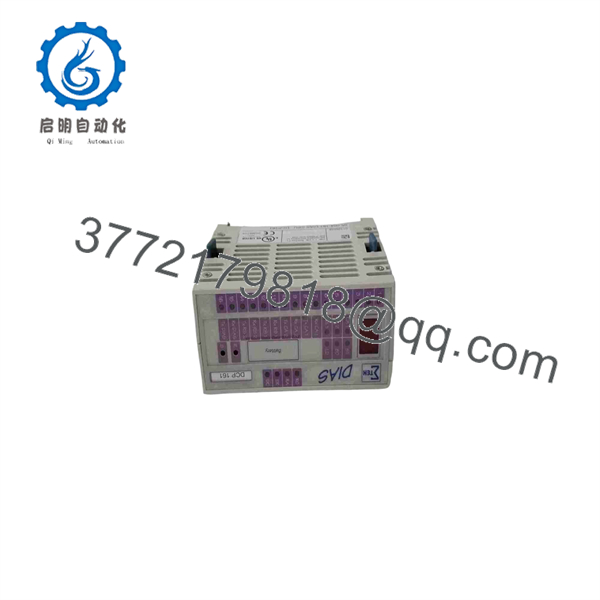
DCP161
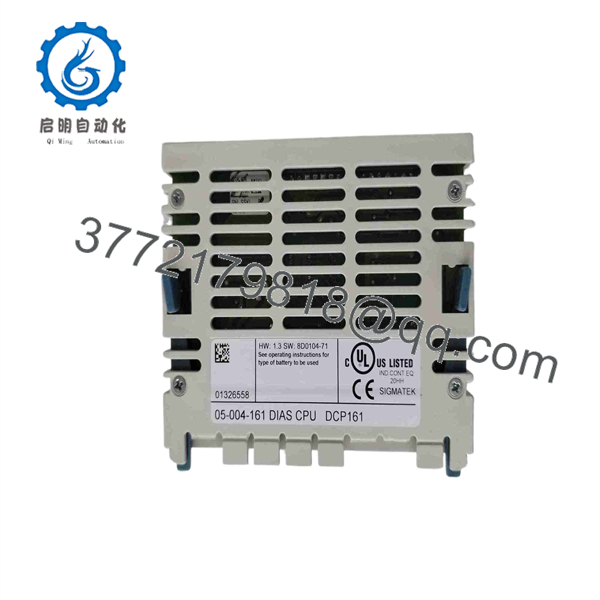
DCP161
Troubleshooting Quick Reference
| Symptom | Possible Cause | Relevance to This Part | Quick Check Method | Recommendation |
|---|---|---|---|---|
| CPU has no status LEDs | Missing 5 V DC backplane supply, failed DIAS power module, loose bus connection, failed DCP161, or damaged base assembly | ✅ Medium | Measure the DIAS supply at the power module and verify 5 V DC at the CPU position using the approved system wiring diagram. Inspect module seating and backplane contacts. | Check the DPS power module and supply distribution before replacing DCP161. |
| CPU LEDs are active but machine will not run | Program not loaded, application stopped, safety chain open, failed I/O module, inhibited machine state, or field-device fault | ❌ Low to Medium | Connect with the approved SIGMATEK programming tool. Check CPU run status, application state, I/O diagnostics, safety interlocks, and active alarms. | Do not assume the CPU is defective. Prove the application and machine permissives first. |
| DIAS I/O modules are missing or offline | CAN/bus wiring fault, loose module, bad bus termination, wrong node configuration, failed I/O module, or CPU communication fault | ✅ Medium | Inspect the DIAS chain and check power at the affected I/O module. Review bus diagnostics, module addressing, and cable condition. Compare with a known-good branch if available. | Repair bus wiring and verify the I/O module before replacing the CPU. |
| Machine loses time, recipes, counters, or retained values after power loss | Exhausted lithium backup battery, corrupted retained memory, project configuration issue, or CPU memory fault | ✅ Medium | Record current date/time and retained values, then review battery condition and service history. Follow the approved procedure for battery replacement and memory backup. | Back up the project before replacing the battery or CPU. Do not remove power casually if retention data is critical. |
| Program cannot be uploaded or connected | Wrong programming cable, incorrect serial-port mode, port settings mismatch, cable damage, PC driver issue, password protection, or CPU serial-interface fault | ✅ Low to Medium | Confirm the selected interface: RS-232 or RS-422/RS-485 as configured. Verify baud rate, parity, cable pinout, PC adapter, and programming software version. | Test with a known-good cable and engineering laptop before condemning DCP161. |
| CPU enters fault after a replacement | Firmware mismatch, incompatible application image, lost configuration, battery-backed data issue, incorrect DIAS module sequence, or wrong CPU type | ✅ High | Photograph and record the original label, firmware/version information, module order, and wiring. Compare every installed DIAS module with the project hardware configuration. | Restore the approved project and match the original revision. Do not commission a replacement CPU with undocumented settings. |
| Intermittent resets or random faults | 5 V DC ripple, weak power module, loose DIAS connection, cabinet heat, vibration, aging battery, or CPU hardware degradation | ✅ Medium | Trend the 5 V DC supply during machine startup and load changes. Inspect connectors, cabinet temperature, grounding, and event-log timing. | Correct power-quality and installation issues. If the fault follows the to a known-good DIAS station, replace it. |
| CAN communication errors increase | Improper termination, damaged CAN cable, shielding issue, ground-reference problem, duplicate node settings, or failed interface | ❌ Low to Medium | Inspect cable routing and shield termination. Check connector seating and compare communication errors before and after cable movement. | Resolve the physical-layer issue first. A CPU replacement rarely cures a wiring or termination fault. |
| CPU runs but outputs do not change | Program logic not commanding outputs, safety logic active, output module fault, missing field power, blown fuse, or actuator circuit issue | ❌ Low | Monitor the output command online, then measure field voltage at the output module and final device. | Troubleshoot the I/O and field circuit. replacement is not the first move. |
❗ Firmware and application compatibility come first. The is a legacy DIAS CPU. A spare that looks identical can still fail to commission if its firmware, application project, or DIAS module configuration does not match the installed system.
❗ Photograph the complete DIAS station before removal. Capture the front and side labels, CPU LEDs, every adjacent module, power module, cable connection, DIP-switch or jumper position, terminal tags, and serial/CAN wiring. Do it before removing anything. Seriously.
❗ Protect retained data. The CPU uses lithium battery-backed RTC and SRAM functions. If the machine stores recipes, counters, calibration data, or setup parameters in retained memory, back up the project and document critical values before a planned CPU or battery change.
❗ Use ESD controls. Wear a grounded wrist strap and place the card on an ESD-safe surface. I have seen an expensive legacy CPU fail immediately after being handled on a dry winter day without proper grounding. The replacement may be hard to source; do not ruin it before it reaches the DIAS rack.
If the fault remains unresolved, provide technical support with clear photos of the and power-module labels, 5 V DC measurements, LED states, DIAS module order, programming-software diagnostics, event logs, and a copy of the project backup.
Frequently Asked Questions (FAQ)
What is SIGMATEK ?
SIGMATEK is the CPU processor module for the legacy DIAS automation system. Its order number is 05-004-161, and it uses an Intel 386EX processor to execute the machine-control application and manage connected DIAS I/O and peripheral modules.
Is a complete part number?
The practical purchasing identification is / 05-004-161. Use both identifiers when sourcing. identifies the module family, while 05-004-161 is the manufacturer order number reported by industrial-parts suppliers.
Before ordering, obtain a clear photo of the actual side or rear label on the installed unit. Compare the label on the supplier’s unit, not just a stock product image.
How many DIAS I/O modules can the control?
The is reported to support up to 16 addressable DIAS I/O/P modules. Do not confuse that limit with the number of individual I/O points. The point count depends on the specific DIAS digital, analog, motion, and peripheral modules attached to the system.
Does have its own power supply?
No. The requires a 5 V DC supply through the DIAS system arrangement and does not provide an integral field-power supply. A reseller specification identifies DPS001, DPS211, and DPS221 as compatible DIAS power modules.
If the CPU is dead, begin by verifying the power module and 5 V DC supply quality. Replacing the CPU without checking the DIAS power supply is a common and costly mistake.
Can I replace with a newer SIGMATEK CPU?
Not as a direct drop-in substitution. A newer CPU may use a different bus architecture, power arrangement, programming environment, communications method, firmware generation, or mechanical format. Migration may require project conversion, I/O changes, wiring work, testing, and commissioning.
For an outage repair, source the exact 05-004-161. For a long-term modernization project, have a qualified SIGMATEK integrator evaluate a controlled DIAS-to-current-platform migration.
Will I lose the machine program when replacing the ?
You might. The answer depends on how the DIAS application, boot image, and retained data were stored and maintained by the machine builder. The module is reported to contain Flash-PROM, program SRAM, data SRAM, and battery-backed retention functions.
Before removing the old CPU:
- Back up the project using the approved SIGMATEK engineering software
- Record the CPU firmware and application version
- Save machine recipes, counters, calibration constants, and network parameters
- Photograph the DIAS module order and all cable connections
- Record the real-time clock setting if it affects batch, alarm, or production records
- Confirm that the replacement supports the installed project version
Do not assume that inserting a spare will restore the original application automatically.
Can I hot-swap the ?
No. Treat the CPU as a non-hot-swappable control-system component unless the original machine documentation explicitly states otherwise. Removing it energized can interrupt motion, drop outputs, corrupt retained data, damage the DIAS bus, and create unsafe machine behavior.
Stop the machine safely, isolate the DIAS supply as required, use lockout/tagout, confirm zero energy, and wear a grounded ESD wrist strap before touching the module.
Why is difficult to find?
is listed as discontinued by the manufacturer. It remains available through specialty spare-parts suppliers as new surplus, refurbished, or used inventory, but exact stock and condition can vary. For a production-critical machine, maintain at least one verified spare and retain an accessible, tested backup of the machine application.
What condition should I buy: New Surplus or Refurbished?
For a legacy CPU, test evidence matters more than a vague condition label.
- New Original / New Surplus: Unused legacy inventory. Request photos of all labels, original packaging, seals, housing, and connector contacts.
- Refurbished (tested): Previously used hardware that has been inspected and tested in a compatible DIAS fixture. Request details of the test procedure.
- Used, untested: Highest risk. Avoid it for outage-critical stock unless you can bench-test it before installation.
If the part protects uptime on a high-value machine, choose the unit with the clearest identification, firmware evidence, functional test record, warranty, and secure packaging.
What testing should I request before shipment?
Request a documented test for the exact 05-004-161 unit:
- Verify and 05-004-161 markings, revision labels, and serial number where present
- Inspect the enclosure, DIAS bus contacts, terminals, connector pins, and retention clips for corrosion, cracks, heat damage, or rework marks
- Test 5 V DC power consumption and startup in a compatible DIAS station
- Verify CPU boot, status LEDs, and execution state
- Check communication through the available CAN and serial interfaces where the compatible test fixture supports it
- Load or verify a compatible application image without altering the unit’s documented baseline
- Run the module under load with connected DIAS I/O and observe for resets or excessive heat
- Check RTC operation and battery-backed retention where safely possible
- Provide a dated QC report, ESD-safe packaging, and actual test photos or video on request
A CPU that merely powers up is not fully tested. For , the supplier should confirm boot behavior, communication, DIAS I/O addressing, and sustained operation.



