
 WhatsApp: +86 16626708626
 Email:
  Phone: +86 16626708626
Description
Key Technical Specifications
| Parameter | Specification / Feature |
| Model Designation | DPS001 |
| Part Number | 12.01.001 |
| Manufacturer | SIGMATEK |
| Primary Function | System power supply for DIAS bus rack assemblies |
| Input Voltage | 24 V DC (+18 V to +30 V DC range) |
| Output Bus Voltage | Regulated internal DIAS backplane system voltage |
| Short-Circuit Protection | Electronic current limiting with auto-reset |
| Status Indicators | Front LED indicators for Power Good / Bus Active / Overload |
| Isolation | Galvanic isolation between primary input and internal bus logic |
| Mounting Format | DIAS system rack / DIN rail mounting enclosure |
| Operating Temperature | 0 to +55 °C |
Product Introduction & Supply Chain Strategy
This product is a Brand New Surplus unit. It is not used, not pulled from a decommissioned plant, and not refurbished. All modules undergo rigorous quality verification to ensure OEM-level reliability. The SIGMATEK DPS001 (P/N: 12.01.001) is a dedicated system power supply module engineered for the SIGMATEK DIAS automation platform. It accepts a standard 24 V DC primary input and generates regulated system voltages to power the internal DIAS backplane communication bus, processing nodes, and connected I/O modules across automated manufacturing machinery and injection molding lines.
From a total cost of ownership (TCO) standpoint, maintaining a New Surplus SIGMATEK DPS001 on-site serves as an essential buffer stock insurance policy. Power supply cards are single-point-of-failure components; an internal short or voltage sag on the DPS001 instantly collapses the entire DIAS bus rack, causing a total machine shutdown. Sourcing this unit as New Surplus provides genuine OEM manufacturing standards, zero backplane connector degradation, and full component longevity at a fraction of standard factory lead-time costs. Sourcing refurbished power supplies introduces major hidden risks—aged electrolytic filter capacitors and stressed switching transistors in second-hand units frequently lead to voltage ripples, unexpected bus resets, or sudden component burn-outs under load. A packaging facility recently attempted to save 500 on procurement by buying a refurbished power module; three months later, an internal capacitor shorted, triggering a backplane fault that shut down the main assembly line and caused over 40,000 in lost production. Securing certified New Surplus inventory eliminates these catastrophic failure modes while guarding against unexpected supplier lead time variability.
Installation & Configuration Guide
Stage 1: Pre-Installation (Prep & Safety)
- Lock-out / Tag-out: Shut off incoming 24 V DC power feeding the DIAS rack. Use a calibrated multimeter to verify 0 V DC at the power input terminals before servicing.
- ESD Precautions: Wear a grounded anti-static wrist strap throughout handling to prevent static discharge to exposed backplane connectors.
- Documentation: Note cable connections, terminal wiring positions, and module order along the DIAS bus rack before extraction.
Stage 2: Removal
- Terminal Disconnection: Unplug or disconnect the main 24 V DC power supply plug from the front faceplate.
- Rack Extraction: Release the top and bottom retaining screws securing the DPS001 to the DIAS rack frame. Carefully slide the module straight forward off the backplane interface to avoid bending connector pins.
Stage 3: Installation (Clone & Seat)
- Visual Verification: Inspect the rear male edge connectors on the new DPS001 for straight pins and zero contamination.
- Module Seating: Align the card with the DIAS rack slot guide tracks. Slide the module backward until the backplane connectors seat firmly. Tighten top and bottom retaining screws to 0.6 Nm.
Stage 4: Power-On & Testing
- Resistance Checks: Measure resistance across the 24 V DC input terminals prior to energizing to confirm no low-impedance short circuit exists.
- Power Verification: Re-apply 24 V DC power. Verify that the front Power LED turns green without triggering any red overload or bus fault indicators.
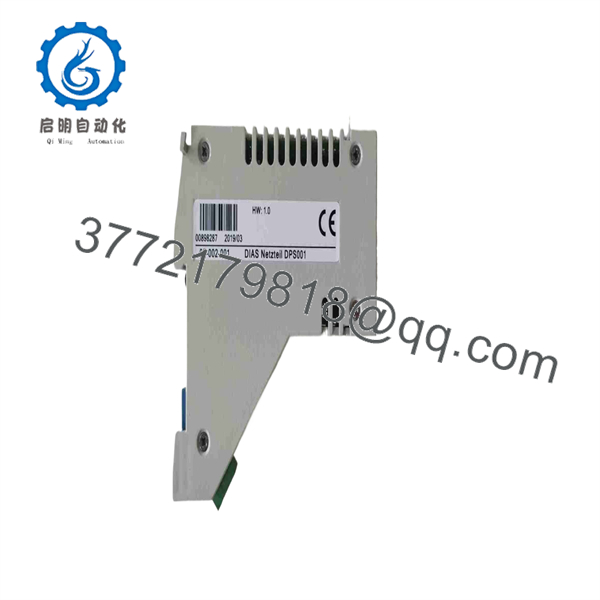
DPS001 12.01.001
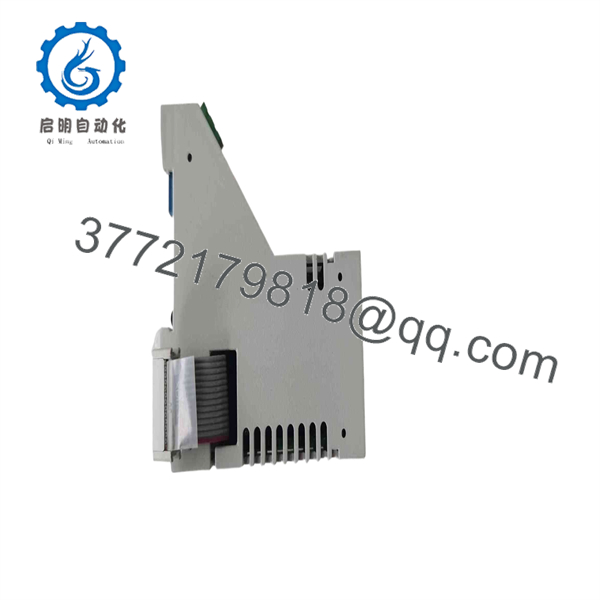
DPS001 12.01.001
Firmware/Software Versions & Upgrade Notes
- Module Independence: As a dedicated power delivery card, the SIGMATEK operates without internal programmable firmware or logic code downloads.
- Hardware Revisions: Verify that the part number 12.01.001 matches your original module specifications. Hardware revisions across the SIGMATEK DIAS series retain pin-for-pin drop-in replacement compatibility.
- Redundancy & Bus Loading: Ensure the total power consumption of all I/O modules connected along the DIAS backplane does not exceed the maximum output current rating of the . Overloading the backplane bus can cause localized voltage sags and thermal shutdowns.
Frequently Asked Questions (FAQ)
Q: Are these SIGMATEK modules genuinely brand new, or are they refurbished parts in clean condition?
A: These units are strictly Original New Surplus. They are completely unused, sourced from verified surplus inventory and authorized distribution channels, and preserved in original anti-static packaging. They have never been installed in an active machine panel, repaired, or refurbished. Every module undergoes inbound ESD-safe inspection and electrical testing before shipment.
Q: Why is New Surplus pricing lower than OEM list price but higher than second-hand alternatives?
A: Our pricing reflects the market value of obtaining authentic, zero-hour OEM components that are available for immediate shipment without standard factory lead times or EOL sourcing delays. It is priced higher than used or repaired parts because it contains factory-fresh internal components (capacitors, power switches) with full rated operating lifespans (10–15 years), eliminating premature failure risks.
Q: Can I hot-swap the power module while the DIAS rack is energized?
A: No. Power to the DIAS rack must be isolated before pulling or inserting the module. Hot-swapping risks voltage arcing across the high-density backplane pins, which can corrupt adjacent I/O communication cards or damage sensitive CPU modules.
Q: What is the primary cause of failure in legacy SIGMATEK modules?
A: Thermal degradation of internal switching power capacitors due to continuous cabinet heating is the leading cause of failure in older units. Sourcing New Surplus guarantees zero operational hours and eliminates thermal wear concerns.
Q: What warranty coverage is provided with this New Surplus power module?
A: Every SIGMATEK unit comes backed by a comprehensive 1-year functional replacement warranty. If the module fails under standard operational parameters within the warranty period, we provide an immediate replacement unit from stock to minimize plant interruption.



