
 WhatsApp: +86 16626708626
 Email:
  Phone: +86 16626708626
Description
Key Technical Specifications
| Parameter | 5136-PFB-PCI |
|---|---|
| Manufacturer | SST / Woodhead |
| Rockwell Association | Allen-Bradley / Rockwell Automation |
| Model | 5136-PFB-PCI |
| Product Type | PROFIBUS communication card |
| Host Bus | 32-bit PCI |
| PROFIBUS Protocols | DP Master, DP Slave, FDL Layer 2 |
| Master Class | Master Class 2 supported |
| Baud Rate | 9.6 kbit/s to 12 Mbit/s |
| Processor | Intel i960 RISC |
| Local RAM | 4 MB, 32-bit |
| Shared RAM | 2 MB, 32-bit |
| Flash Memory | 512 KB |
| Network Connector | 9-pin PROFIBUS D-sub |
| Auxiliary Connector | 5-pin Phoenix |
| Card Format | Half-length PCI |
| Operating Temperature | Approximately 0–50 °C in secondary technical records |
| Typical Application | PC-based PROFIBUS control and data acquisition |
The protocol and baud-rate capabilities are supported by SST/Rockwell-related documentation and configuration references. Rockwell documentation explicitly lists 5136-PFB-PCI MASTER as a PROFIBUS master device, including revision-specific configuration entries.
PROFIBUS Operating Modes
The card can be configured for multiple PROFIBUS functions:
- DP Master
- DP Slave
- FDL Layer 2 messaging
- Master Class 2
- Simultaneous operation of supported functions, depending on the software/application configuration
Available technical documentation lists standard PROFIBUS rates from 9.6 kbit/s through 12 Mbit/s, including 19.2, 93.75, 187.5, 500, 750 kbit/s and 1.5, 3, 6, and 12 Mbit/s.
PCI Compatibility — Critical Procurement Point
The original 5136-PFB-PCI is a PCI 2.1-era card. Documentation comparing it with the later SST-PFB3-PCI states that the 5136-PFB-PCI can operate in PCI 2.1 and PCI 2.2 systems, but does not support 3.3 V motherboard signaling and is therefore not PCI 2.3 compliant.
This distinction is important.
PCI is not PCI Express. A 5136-PFB-PCI cannot simply be installed in a modern PCIe x1/x4/x8/x16 slot.
Before purchasing a replacement, confirm that the host industrial PC actually contains a compatible conventional PCI slot.
Product Introduction
The SST Woodhead 5136-PFB-PCI is a PC-based PROFIBUS interface designed for industrial computers requiring direct access to PROFIBUS networks. Its onboard processor handles PROFIBUS communication functions while the host application exchanges process data with the interface through the PCI bus.
Typical applications include PC-based PLC control, SCADA systems, HMI stations, industrial test systems, data acquisition, and PROFIBUS master applications. Documentation for industrial software environments shows the 5136-PFB-PCI being used as a PROFIBUS board with board-level configuration, slave mapping, scan-cycle parameters, and diagnostic information.
The board is especially relevant when maintaining an older Windows-based industrial computer whose control software was developed specifically around the SST 5136-PFB driver architecture.
Software Compatibility Matters
The hardware alone does not define compatibility.
A replacement may require:
- Correct SST device driver
- Matching PROFIBUS configuration utility
- Correct GSD files
- Application-specific DLL/API
- OPC server or industrial communication driver
- Correct board revision
- Correct firmware
- Correct Windows operating-system support
Historical software documentation references the 5136-PFB-PCI MASTER device with revision-specific master definitions, demonstrating that the software configuration is tied to the card family and revision.
Installation & Configuration Guide
Stage 1 — Verify the Host PC
Estimated time: 15–20 minutes
- Shut down the industrial PC.
- Verify that the motherboard contains a conventional 32-bit PCI slot.
- Do not confuse PCI with PCI Express.
- Check the motherboard’s available 5 V PCI signaling.
- Record the operating-system version.
- Identify the installed SST/PROFIBUS software.
- Back up the existing configuration.
Warning: A modern PC with PCIe slots only is not a direct hardware platform for the original 5136-PFB-PCI.
Stage 2 — Verify the PROFIBUS Network
Estimated time: 15–30 minutes
- Identify whether the card operates as DP Master or DP Slave.
- Record the PROFIBUS station address.
- Record the network baud rate.
- Collect the GSD files for connected slave devices.
- Record the slave addresses.
- Document I/O data sizes.
- Check PROFIBUS cable and termination.
- Photograph the existing network connections.
For a DP Master installation, verify the complete slave configuration before replacing the card.
Stage 3 — Install the Card
Estimated time: 15–30 minutes
- Power down and isolate the industrial PC.
- Apply ESD precautions.
- Remove the PC chassis cover.
- Locate an appropriate PCI slot.
- Remove the existing interface card.
- Inspect the PCI connector and motherboard slot.
- Install the 5136-PFB-PCI.
- Secure the card mechanically.
- Reinstall the chassis cover.
- Reconnect the PROFIBUS network cable.
Warning: Do not force the card into a PCIe slot. The electrical and mechanical interfaces are different.
Stage 4 — Configure and Test
Estimated time: 30–90 minutes
- Start the industrial PC.
- Verify that the operating system detects the card.
- Install or verify the appropriate SST driver.
- Select the correct 5136-PFB-PCI board.
- Configure the PROFIBUS station parameters.
- Load the required GSD files.
- Configure the PROFIBUS master.
- Map slave process data.
- Verify the network scan.
- Check diagnostic/status information.
- Confirm cyclic I/O data.
- Test the application software.
- Perform a complete PC reboot.
- Confirm automatic network recovery.
For a production system, test the entire PROFIBUS communication path, not merely PCI card detection.
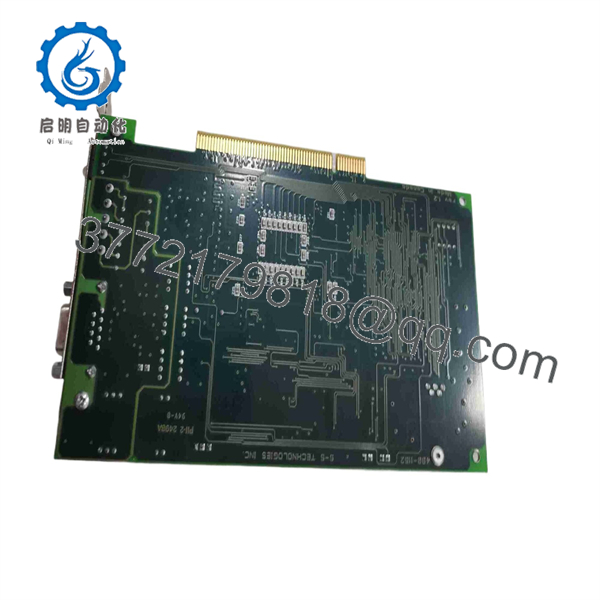
5136-PFB-PCI
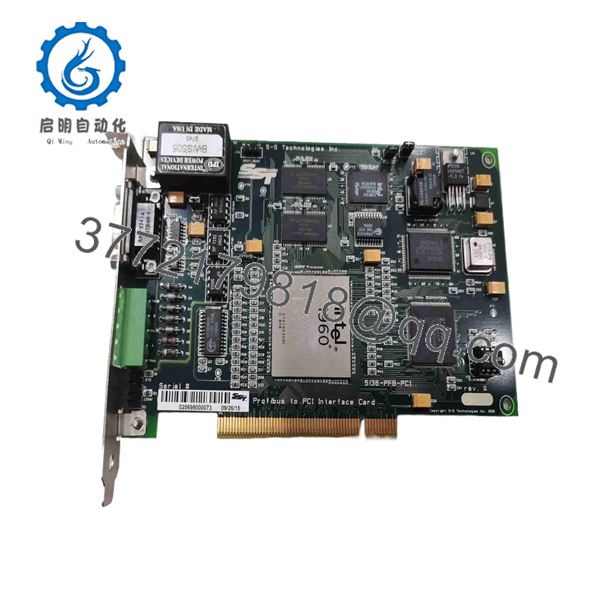
5136-PFB-PCI
Frequently Asked Questions
What is the 5136-PFB-PCI?
The 5136-PFB-PCI is an SST Woodhead PROFIBUS communication card for conventional 32-bit PCI industrial computers. It provides PROFIBUS DP and FDL communication capabilities.
Is 5136-PFB-PCI an Allen-Bradley module?
It is commonly cataloged in Rockwell/Allen-Bradley industrial automation inventories, while the hardware itself is identified as SST Woodhead. Rockwell documentation also includes the 5136-PFB-PCI in PROFIBUS master configuration libraries.
Is it a PROFIBUS DP Master?
Yes. The card supports PROFIBUS DP Master operation. It can also operate as a DP Slave and perform FDL Layer 2 communication.
What is the maximum PROFIBUS speed?
The supported standard baud rates extend to 12 Mbit/s.
Can the 5136-PFB-PCI be installed in a PCI Express slot?
No, not as a direct installation. The original card uses conventional PCI and is not a PCIe card. This is one of the most important compatibility checks when sourcing a replacement.
Is SST-PFB3-PCI a direct replacement?
Do not assume it is a drop-in replacement. Documentation comparing the two products explicitly states that the SST-PFB3-PCI is not a drop-in replacement for the existing 5136-PFB-PCI, even though backward compatibility is maintained where possible.
The PCI electrical requirements and software environment must be checked before migration.
Can the card operate as both Master and Slave?
The 5136-PFB-PCI supports DP Master, DP Slave, FDL Layer 2, and Master Class 2 functions, with simultaneous operation of supported modes depending on configuration.
What should I verify before purchasing a replacement?
For a legacy PC-based PROFIBUS system, verify:
- Exact part number: 5136-PFB-PCI
- Board revision
- Serial number
- Conventional 32-bit PCI host slot
- Motherboard PCI signaling compatibility
- PROFIBUS connector condition
- DP Master or Slave configuration
- PROFIBUS baud rate
- Slave count and addresses
- GSD files
- SST driver version
- Windows version
- Application/OPC/DLL dependencies
- Firmware version
- Configuration backup
- New, surplus, refurbished, or used condition
- Functional PROFIBUS test report
For procurement, do not substitute a PCI Express PROFIBUS adapter merely because the connector or product name appears similar. The legacy 5136-PFB-PCI is tightly coupled to its PCI host architecture and software environment.



