
 WhatsApp: +86 16626708626
 Email:
  Phone: +86 16626708626
Description
Key Technical Specifications
- Part Number: 4351B
- Module Type: Tricon Communication Module (TCM)
- Controller Family: Tricon / Triconex safety system
- Minimum System Version: Tricon v10.0 or later
- Serial Interfaces: Four serial communication ports
- Serial Port Connectors: DB-9
- Serial Communication: RS-232 and RS-485 configuration, application-dependent
- Serial Data Rate: Up to 115.2 kbps per serial port
- Network Interfaces: Two copper Ethernet ports
- Ethernet Connectors: RJ-45
- Ethernet Network Speed: 10/100Base-T Ethernet
- Port Isolation: 500 V DC
- Supported Protocols: TriStation, Modbus master/slave, TCP/IP, ICMP, SNTP, TSAA, UDP/IP peer-to-peer, and Trimble GPS time synchronization
- Operating Temperature: Reported as −25 to +70 °C; verify against the installed-system documentation and unit nameplate before deployment
- Weight: Reported shipping weight varies by supplier and packaging; verify actual module weight before freight booking
The 4351B is a copper-RJ-45 Tricon Communication Module for Tricon systems. It provides four serial ports, two 10/100Base-T Ethernet ports, and 500 V DC port isolation; sources also identify compatibility with Tricon v10.0 and later.
Product Introduction
The Triconex 4351B is a Tricon Communication Module used in Tricon safety-instrumented systems to connect a controller with engineering workstations, peer controllers, Modbus devices, plant networks, time sources, and external hosts. It is commonly installed in emergency shutdown, burner-management, fire-and-gas, and turbomachinery protection applications.
The 4351B combines four serial interfaces with two copper 10/100Base-T Ethernet ports. It suits sites that need TriStation engineering access, Modbus integration, network-based diagnostics, or controller-to-controller communications without changing the core Tricon safety application. Verify Tricon version, network architecture, protocol configuration, and cable type before replacement.
Troubleshooting Quick Reference
| Symptom | Possible Cause | Relevance to this Part | Quick Check Method | Recommendation |
|---|---|---|---|---|
| No module LEDs after power-up | Missing chassis power, module not seated, backplane fault, internal TCM fault | ✅ Medium | Isolate the cabinet, reseat the module, inspect connector pins, and compare the module’s LED state with a known-good TCM in the same chassis | Verify chassis power and slot condition before replacing the 4351B |
| Ethernet link LED is off | Bad RJ-45 patch lead, disabled switch port, speed/duplex mismatch, failed Ethernet port | ✅ High | Replace the patch cable, test the switch port with a known-good device, confirm switch-port status, and inspect the RJ-45 socket for damage | Check cabling and managed-switch configuration before condemning the TCM |
| TriStation cannot connect to the Tricon | Incorrect IP address, subnet mask, routing issue, firewall rule, old engineering workstation configuration | ✅ High | Ping the configured IP address, confirm the workstation subnet, inspect the switch MAC-address table, and verify TriStation project communication settings | Confirm network settings first; do not replace hardware solely because TriStation reports a timeout |
| Modbus master cannot poll the controller | Incorrect Modbus address, serial mode mismatch, baud-rate mismatch, wrong parity, missing termination | ✅ High | Compare the active serial-port configuration against the approved cause-and-effect or I/O communication drawing; verify baud rate, parity, stop bits, and node address | Photograph and document old configuration before swapping the module |
| One serial port does not communicate | Damaged DB-9 cable, wrong RS-232 versus RS-485 wiring, loose terminal adapter, port configuration error | ✅ High | Test with a known-good cable and device, verify pinout, measure RS-485 A/B continuity, and check whether the same device works on another configured port | Do not wire from memory; verify the port mode and pinout from the applicable Tricon documentation |
| All Ethernet and serial communications fail | Firmware/configuration issue, controller fault, network-wide outage, module failure | ✅ Medium to high | Check controller health indicators, inspect Tricon diagnostics, confirm other chassis communications, and test the TCM using a known-good engineering laptop and isolated cable | Capture diagnostics before replacement; a controller or configuration issue can mimic a 4351B failure |
| Intermittent communications | EMI, ground potential difference, shield termination error, damaged cable, overloaded network | ✅ Medium | Check event timestamps, inspect shield grounding, verify cable routing away from VFD output conductors, and review switch error counters | Correct field wiring and network errors before replacing the module |
| Communication fails after module replacement | Firmware or Tricon version mismatch, wrong IP settings, changed serial configuration, unrecorded port setup | ✅ High | Record the old module’s configuration, IP data, cable locations, controller revision, and TriStation project version before removing it | Configure and validate the replacement offline where possible before returning the SIS to service |
| Controller remains healthy but remote host alarms | Host PC fault, DNS/routing issue, switch VLAN error, external firewall block | ❌ Low | Test local ping and port connectivity from a laptop on the same VLAN; compare with another reachable Tricon node | Investigate the host network path first; the 4351B may be operating normally |
❗ The 4351B is part of a safety-related Tricon system. Do not replace it during an active safety demand, bypass safety logic casually, or alter controller communications without site authorization and an approved management-of-change process.
A veteran warning: a technician can lose days chasing a “dead” TCM when the actual problem is a replacement unit configured with the wrong IP address, serial baud rate, or RS-485 termination. Take a clear photo of every cable and configuration setting before you touch anything. Seriously.
If diagnostics remain unclear, provide technical support with photos of the chassis, module LED states, Ethernet switch-port status, serial wiring, Tricon diagnostic logs, TriStation communication messages, and the exact Tricon system version.
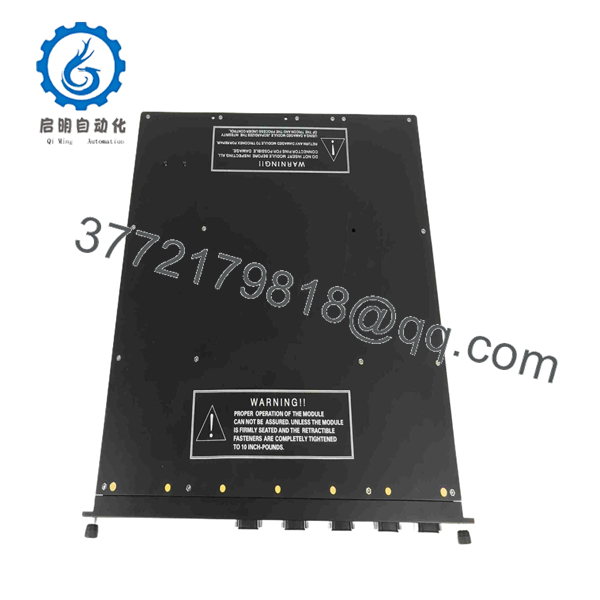
4351B
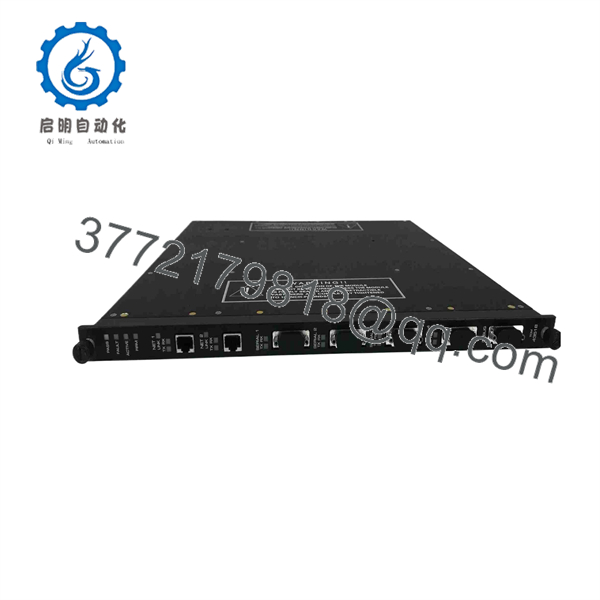
4351B
Frequently Asked Questions
What is the Triconex 4351B used for?
The Triconex 4351B is a Tricon Communication Module, commonly called a TCM. It connects a Tricon controller to engineering stations, external hosts, Modbus devices, other Tricon or Trident controllers, time-synchronization devices, and Ethernet networks. It provides four serial ports and two copper Ethernet ports for this purpose.
Is the 4351B a direct replacement for every Tricon communication module?
No. The 4351B is a copper Ethernet version with RJ-45 network connections. Other TCM variants may use fiber-optic Ethernet, different connectors, or different supported feature sets. Confirm the exact existing part number, installed Tricon version, copper-versus-fiber network requirement, software version, and port configuration before ordering.
Is Tricon v10.0 required for the 4351B?
Yes, published product information identifies the Tricon Communication Module as compatible with Tricon v10.0 and later systems. Do not assume an older Tricon installation will accept a 4351B. Verify the controller system version and engineering software before you schedule a shutdown.
Can I hot-swap a Triconex 4351B?
Do not assume that you can. The safe replacement procedure depends on your specific Tricon chassis, safety lifecycle documentation, application architecture, process state, and approved maintenance procedure. To be honest, this is not the place to take shortcuts. Shut down or place the system in its formally approved maintenance state, obtain site authorization, preserve the original configuration, use ESD controls, and follow the applicable OEM and plant procedures.
Will I lose the safety application when replacing a 4351B?
The Tricon safety application is not normally stored solely in the TCM, but communications settings, IP addressing, serial port parameters, protocol assignments, and engineering access can still be affected by a replacement. Back up the TriStation project, export or document communication settings, photograph cable connections, and record every serial-port setting before removing the old module.
Why does a replacement 4351B show link but still fail to communicate?
A link light only proves that the electrical Ethernet connection is present. It does not prove correct IP addressing, subnet mask, VLAN membership, gateway routing, firewall permissions, TriStation settings, Modbus mapping, or firmware compatibility. Check those items in that order before concluding that the module is defective.
Is this item New Surplus or Refurbished?
Confirm the offered condition on the quotation and purchase order. New Original / New Surplus means unused inventory that may originate from excess stock, canceled projects, distributors, or site inventory; it may not carry current factory support. Refurbished (tested) means a previously used module that has been inspected and functionally tested. Request unit photos, serial-number records, test results, warranty terms, and ESD-safe packaging details before buying.
Why is a surplus 4351B usually cheaper than a factory-supplied part?
Surplus pricing reflects age, secondary-market inventory, limited OEM support, and supply conditions rather than automatically indicating a defective module. The practical question is whether the unit matches your installed system and arrives with traceable condition evidence. For a safety-system spare, require documented inspection, functional communication testing, configuration verification, anti-static packaging, and a written warranty.



