
 WhatsApp: +86 16626708626
 Email:
  Phone: +86 16626708626
Description
Key Technical Specifications
| Parameter | Value |
|---|---|
| Manufacturer | Vibro-Meter / Meggitt |
| System Platform | VM600 Machinery Protection System |
| Main Card | MPC4 |
| MPC4 Part Number | 200-510-071-113 |
| Interface Card | 200-510-111-034 |
| Product Function | Machinery vibration monitoring and protection |
| Dynamic Inputs | 4 programmable channels |
| Speed Inputs | 2 tachometer channels |
| Signal Types | Acceleration, velocity, displacement, proximity signals |
| Filtering | Programmable broadband and narrowband filtering |
| Processing | DSP-based signal measurement and alarm processing |
| Rack Interface | VM600 VME backplane |
| Rack Compatibility | VM600 ABE04x series racks |
| Companion Card Requirement | IOC4T/interface card configuration |
| Front Panel | LED status indicators and buffered signal access |
| Input Range | Dynamic inputs up to ±10 V AC (typical configuration) |
| Common Mode Range | Approximately −50 V to +50 V |
| Input Impedance | Approximately 200 kΩ |
| Weight | Approximately 0.4 kg per MPC4 card |
The MPC4 provides four dynamic signal channels and two speed channels. Inputs can be configured for vibration, displacement, and related rotating-equipment measurements.
Product Introduction
The Vibro-Meter VM600 MPC4 200-510-071-113 with 200-510-111-034 interface card is a machinery protection solution used for continuous monitoring of critical rotating equipment. The MPC4 performs vibration signal acquisition, DSP processing, alarm evaluation, and protection logic functions inside VM600 rack systems.
This card combination is commonly found in turbine, compressor, and generator protection applications where vibration, shaft displacement, and speed signals must be monitored continuously. Replacement requires matching the version, interface card, rack slot configuration, and stored protection parameters.
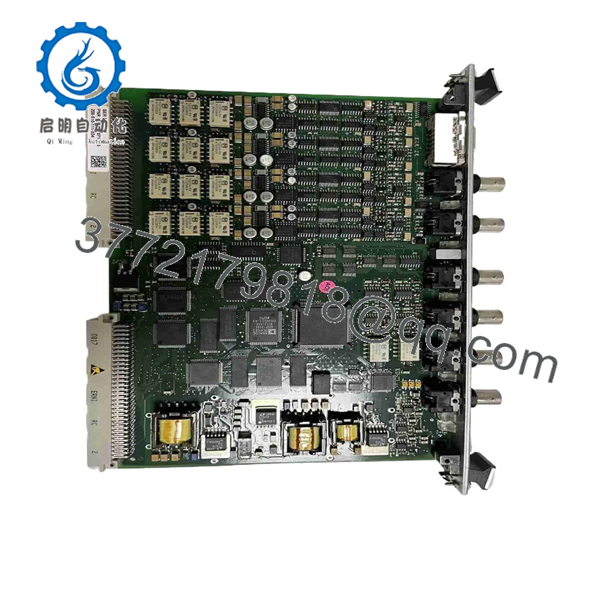
200-510-071-113 200-510-111-034 VM600 MPC4
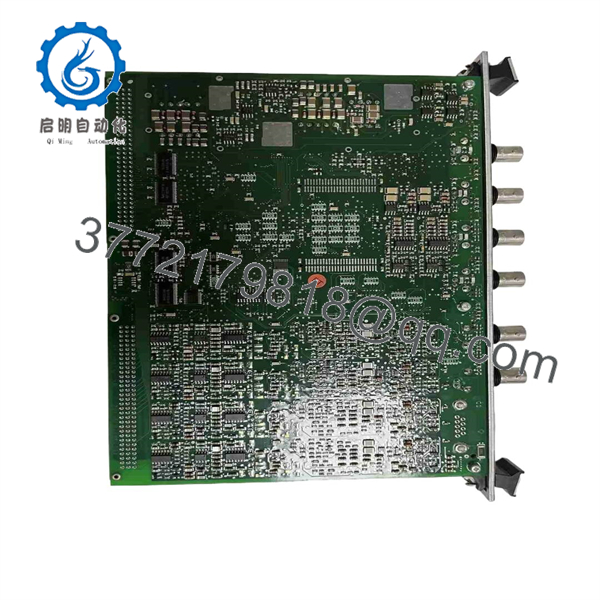
200-510-071-113 200-510-111-034 VM600 MPC4
Installation & Configuration Guide
Estimated replacement time: 30–60 minutes for a trained VM600 maintenance engineer.
Stage 1: Pre-Installation Preparation
⚠️ Safety First
- Notify operations before removing the machinery protection card.
- Confirm the monitored machine is in a safe operating condition.
- Apply lockout/tagout before accessing the rack.
- Verify that no unexpected turbine, compressor, or motor start command can occur.
- Use ESD protection before handling the .
Tools Required
- ESD wrist strap
- PH1 screwdriver
- Digital multimeter
- Wire labels
- Smartphone/camera
- configuration software access
Data Backup
Before removing the existing card:
- Record the complete part numbers:
- : 200-510-071-113
- Interface card: 200-510-111-034
- Photograph front labels and revision markings.
- Record rack slot position.
- Export existing configuration files.
- Record:
- Sensor type
- Channel assignments
- Alarm thresholds
- Trip logic
- Speed settings
- Filter parameters
⚠️ A replacement without the correct configuration can generate false alarms or fail to provide the intended protection function.
Stage 2: Removing the Old Module
- Open the rack access panel.
- Confirm the rack is safe for maintenance.
- Photograph the card position and wiring.
- Release the card locking handle.
- Pull the card straight out from the rack slot.
- Remove the associated 200-510-111-034 interface card if replacement is required.
- Inspect:
- Backplane connector
- Card guides
- Dust contamination
- Bent pins
- Oxidation
⚠️ Keep the original card until the replacement completes functional verification.
Stage 3: Installing the New Module
- Wear ESD protection.
- Verify the replacement part numbers.
- Confirm version compatibility.
- Check firmware/hardware revision where available.
- Insert the into the correct rack position.
- Ensure the locking handle engages fully.
- Install the interface card in the matching rear position.
- Reconnect field wiring carefully.
- Confirm shielding and grounding connections.
Self-Checklist
- part number verified
- Interface card verified
- Rack slot confirmed
- Configuration backup available
- Field wiring checked
- Grounding restored
- Locking handles secured
Stage 4: Power-On & Testing
- Restore rack power.
- Observe LED status.
- Verify the card is recognized by the system.
- Connect configuration software.
- Confirm:
- Channel configuration
- Sensor inputs
- Alarm settings
- Relay outputs
- Speed channels
- Perform signal simulation or controlled input verification.
- Confirm Alert and Danger alarm operation.
- Return the protection system to service.
⚠️ Do not modify trip thresholds during replacement unless approved by the responsible reliability or controls engineer.
Frequently Asked Questions (FAQ)
1. What is Vibro-Meter 200-510-071-113?
The 200-510-071-113 is a machinery protection card used for online monitoring of rotating equipment vibration and speed signals. It provides four dynamic measurement channels and two tachometer inputs.
2. What is the function of 200-510-111-034?
The 200-510-111-034 is commonly supplied as the companion interface card associated with the protection card configuration. It provides the field connection and signal interface functions required by the protection architecture.
3. Can I replace only the card?
Sometimes, yes. However, verify the existing interface card, firmware compatibility, and configuration before replacement. The is normally used as part of an /interface-card pair in protection systems.
4. Can the be hot-swapped?
The platform supports modular replacement procedures, but do not remove a protection card without following the plant maintenance procedure. Removing a protection module affects machinery monitoring availability.
For critical rotating equipment, perform replacement during an approved maintenance window.
5. Will I lose the machine protection settings when replacing ?
The card replacement may require restoring configuration parameters. Always save:
- Channel setup
- Alarm limits
- Sensor parameters
- Filter settings
- Relay logic
Do not assume a replacement card contains the same application configuration.
6. Is 200-510-071-113 still available from the OEM?
The is a mature product line. Many replacements are sourced through industrial automation spare-parts suppliers, refurbished inventory providers, and surplus channels.
Specify the required condition:
- Factory Sealed
- New Original / New Surplus
- Refurbished Tested
- Used Tested
7. What should I verify before ordering?
Provide:
- part number
- Interface card number
- rack model
- Firmware revision
- Existing sensor types
- Machine application
- Photos of card labels
This avoids ordering a visually similar version with incompatible configuration.
8. What industries commonly use ?
Typical applications include:
- Power generation turbines
- Gas turbines
- Steam turbines
- Petrochemical compressors
- Large rotating process equipment
- Industrial generators
The remains common where existing machinery protection systems are maintained rather than replaced.



