
 WhatsApp: +86 16626708626
 Email:
  Phone: +86 16626708626
Description
Key Technical Specifications
| Parameter | Value |
|---|---|
| Manufacturer | VIPA, a Yaskawa company |
| Part Number | 62K-NHC0-DH |
| Product Designation | TP 610LC |
| Product Family | VIPA ECO HMI / Professional Panel |
| Product Type | Industrial touchscreen operator panel |
| Display Size | 10 in class |
| Display Resolution | 1024 × 768 pixels |
| Touch Interface | Industrial touchscreen; verify touchscreen technology and condition from the actual unit |
| Processor | ARM Cortex-A8, 1,000 MHz |
| Flash Memory | 128 MB |
| Operating System | Windows Embedded CE 6.0 Core |
| Runtime Software | Movicon 11 CE Basic Runtime |
| Application Memory | 128 MB Flash; confirm remaining capacity from the installed HMI project |
| Programming Compatibility | Movicon 11 CE Basic project environment; verify version and license requirements |
| Replacement Status | VIPA identifies 62M-JID0-CB TP 612C as the replacement product |
| Lifecycle Status | Obsolete / legacy HMI hardware |
VIPA identifies the 62K-NHC0-DH as a TP 610LC 10 in ECO HMI with 1024 × 768 resolution, 128 MB memory, Windows Embedded CE 6.0 Core, and Movicon Basic Runtime. VIPA also marks the unit obsolete and identifies the 62M-JID0-CB TP 612C 12 in touch panel as the replacement product. A secondary listing identifies a 1 GHz Cortex-A8 processor and Movicon 11 CE Basic.
Product Introduction
The VIPA 62K-NHC0-DH is a TP 610LC industrial touchscreen HMI used for operator interface, alarm viewing, status monitoring, setpoint entry, recipe handling, and machine command functions. It runs Windows Embedded CE 6.0 Core and a Movicon Basic Runtime environment, making it a legacy operator panel that must be matched to the installed HMI application and communication driver configuration.
This panel is normally purchased to restore an existing machine without redesigning the operator interface. The physical panel may power up while still being unusable if the stored project, runtime license, PLC communication driver, Ethernet settings, serial-port parameters, or touchscreen calibration do not match the machine. Back up the application before replacing the unit.
Troubleshooting Quick Reference
| Symptom | Possible Cause | Relevance to This Part | Quick Check Method | Recommendation |
|---|---|---|---|---|
| Panel is completely dead | Missing DC supply, blown panel fuse, loose power connector, failed internal power circuit | ⚠️ Medium | Measure the exact DC supply voltage at the HMI power terminals using the panel wiring diagram; inspect the upstream fuse and polarity | Verify correct voltage and polarity before replacing the HMI |
| Backlight is on but screen remains blank | Corrupt boot image, failed display electronics, loose internal display connection, incorrect brightness setting | ✅ High | Power-cycle once under a controlled procedure; observe boot behavior, startup logo, and any audible or network activity | If the panel boots but has no image, record evidence and evaluate repair or replacement |
| Touchscreen does not respond | Touch overlay failure, calibration loss, contaminated screen, damaged cable, operating-system fault | ✅ High | Clean the screen using an approved non-abrasive method; test all screen areas during a maintenance window and attempt calibration if supported | Do not press excessively or use sharp tools. Replace or repair if touch failure persists |
| HMI boots but shows communication loss | PLC offline, wrong IP address, damaged Ethernet/serial cable, wrong driver, PLC fault, network switch issue | ❌ Low | Check PLC status first; verify IP address, subnet, serial settings, cable link LEDs, and communication parameters against the project backup | Diagnose the PLC/network before replacing the HMI |
| HMI project is missing after replacement | New panel has no application, wrong project version, failed project transfer, missing runtime/license component | ✅ High | Confirm project file version and target type in Movicon; compare the replacement panel’s runtime and firmware with the old panel | Load a verified backup only after confirming it is built for the TP 610LC target |
| Panel freezes intermittently | Aging Flash memory, corrupt project, overheating, unstable DC power, memory exhaustion | ✅ High | Check panel supply stability during machine operation; inspect enclosure temperature and review project size/logging behavior | Back up the project immediately. Test with a known-good power supply and consider replacement |
| Display is dim or has dark areas | Backlight aging, display damage, excessive heat, failing power section | ✅ High | Compare brightness at startup and after warm-up; inspect panel operating hours if available | A dim image may require display/backlight repair or complete panel replacement |
| Screen responds in the wrong location | Touchscreen calibration error, incorrect project resolution, failed touch overlay | ✅ High | Run the supported calibration procedure and confirm the application target resolution is 1024 × 768 | Do not use a project built for another resolution. Recalibrate before replacing the panel |
| New panel powers up but cannot load the application | Firmware/runtime mismatch, incompatible Movicon version, bad transfer cable, insufficient storage, invalid license | ✅ High | Record the old panel’s runtime and firmware versions; compare with the project development environment and transfer logs | Match runtime versions where possible and verify the project target before commissioning |
| Machine commands work but alarms/history are missing | Project archive not transferred, data logging path unavailable, storage failure, PLC tag mismatch | ⚠️ Medium | Compare the running project with the validated backup; check file paths, storage media, communication tags, and alarm configuration | Restore the complete approved project package, not only the screen files |
❗ Do not remove the old HMI before you have copied the application, runtime version, IP address, serial-port settings, communication drivers, user accounts, recipes, alarm archives, and any removable storage. I have seen an HMI swap turn into a multi-day outage because the old panel contained the only copy of the machine recipe database.
Before removal, photograph the rear label, power terminals, Ethernet and serial connections, panel cutout, mounting clamps, IP settings, and current HMI screens. Record whether the panel is communicating by Ethernet, serial RS-232, RS-422, RS-485, MPI, or another configured interface. Do not assume a physical connector proves the active protocol.
If you are stuck, send technical support photos of the rear label, boot screen, error message, wiring, HMI project-transfer log, PLC model, and communication settings.
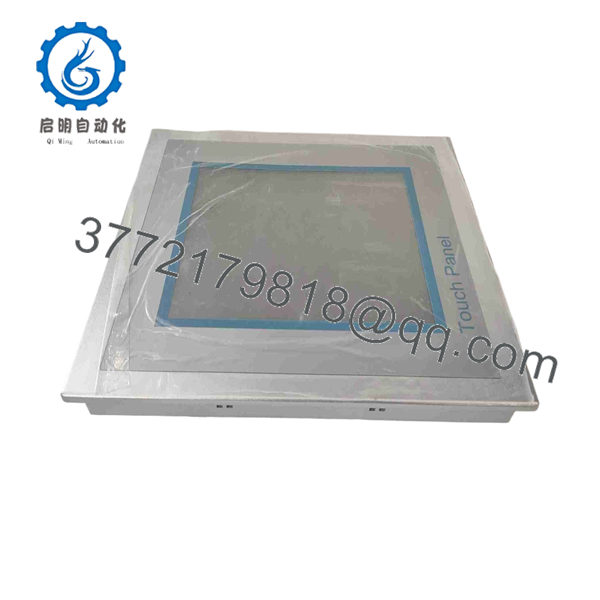
62K-NHC0-DH
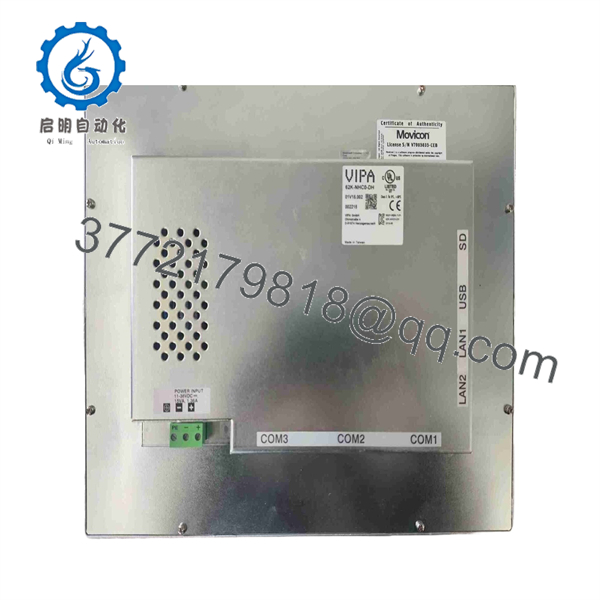
62K-NHC0-DH
Frequently Asked Questions
What is the VIPA 62K-NHC0-DH?
The VIPA 62K-NHC0-DH is a TP 610LC 10 in ECO industrial HMI. It provides a touchscreen interface for machine operators and is specified with 1024 × 768 display resolution, 128 MB memory, Windows Embedded CE 6.0 Core, and Movicon Basic Runtime.
Is the 62K-NHC0-DH obsolete?
Yes. VIPA marks the 62K- as obsolete. VIPA identifies the 62M-JID0-CB TP 612C 12 in touch panel as the designated replacement product, but it is not automatically a drop-in replacement. Screen size, panel cutout, application target, runtime environment, wiring, communications, and project conversion must be reviewed before migration.
Can I replace it with a VIPA 62M-JID0-CB TP 612C?
It is the manufacturer-identified replacement, but you must plan the swap. The TP 612C uses a 12 in panel format rather than the original 10 in format, so the panel cutout, mounting, bezel clearance, and operator enclosure may need modification. You also need to confirm that the HMI project can be converted, all PLC drivers are supported, and the new runtime has been validated before production startup.
Will the old HMI project run directly on a replacement panel?
Do not assume it will. The project was built for a specific target panel, display resolution, runtime, and driver set. A project for the 62K- may need to be opened in the appropriate Movicon development environment, checked for unsupported functions, rebuilt for the new target, transferred, and tested offline. Back up the original project before attempting conversion.
Can I hot-swap this HMI?
No. Shut down the machine or place it in a controlled safe state, isolate the HMI supply according to site procedures, and then remove the panel. Although the HMI is not usually a safety controller, disconnecting it during operation can interrupt commands, recipes, alarm acknowledgment, or communications used by the machine sequence.
Why does the panel show a communication error even after replacement?
The HMI may be healthy. Check the PLC power and run status, network switch, cable, IP address, subnet, gateway, serial port settings, baud rate, parity, PLC protocol driver, and tag configuration. Also verify that the transferred project targets the correct PLC address. A wrong IP address or serial setting can look exactly like a failed HMI.
Why is a New Surplus panel less expensive than an OEM replacement?
New Surplus normally means unused original stock from excess inventory, cancelled projects, machine-builder spares, or discontinued-product holdings. Its price can be lower because it is no longer supported as a current OEM product. Ask for actual photos of the full rear label, display condition, touchscreen condition, connectors, storage status, packaging, date code where available, and written warranty terms.
What testing should a supplier perform before shipment?
For New Original / New Surplus inventory, request exact part-number verification, inspection of the touchscreen and display for scratches or pressure marks, confirmation of intact mounting hardware, connector inspection, boot verification, label photos, and ESD-safe, impact-protected packaging.
For Refurbished stock, request testing on a correct DC supply with documented boot behavior, stable touchscreen response across the full active area, display brightness and pixel inspection, Ethernet-link verification, serial-port testing where fitted, project-download capability, runtime/firmware identification, and an extended thermal run. Ask for test photos or video, written condition details, and warranty terms before shipment.



