
 WhatsApp: +86 16626708626
 Email:
  Phone: +86 16626708626
Description
Key Technical Specifications
| Parameter | Value |
| Manufacturer | Woodward |
| Part Number | 5466-1145 |
| System Compatibility | MicroNet Plus 7-Slot or 14-Slot Chassis |
| Processor Core | High-Speed Integrated Real-Time Microprocessor |
| Ethernet Communication | Multiple RJ45 Ports (10/100/1000 Base-T auto-negotiating) |
| Fieldbus Protocols | Dual Isolated CAN Open Channels |
| Serial Ports | Configurable RS-232 / RS-422 / RS-485 |
| Application Loading | Woodward AppManager Utility via Ethernet |
| Cooling Profile | Standard Chassis Fan Tray Airflow Requirement |
| Operating Temperature | 0 to +60°C |
| Shock & Vibration | Industrial Grade Turbine Deck Specifications |
Product Introduction & Supply Chain Strategy
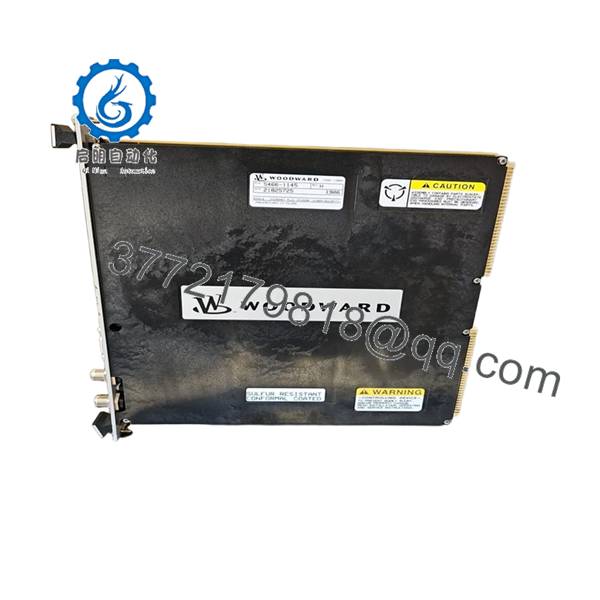
The Woodward 5466-1145 functions as the centralized processing core for high-density MicroNet Plus digital control architectures. This main CPU module executes the heavy computational workloads required for rapid fuel control, multi-variable governor sequencing, and absolute overspeed protection loops on modern industrial gas turbines, steam turbines, and large-scale reciprocating engines. By utilizing dedicated, isolated real-time communications through Gigabit Ethernet and CAN networks, the processor prevents loop jitter, reduces scan cycle overhead, and handles multi-channel analog and discrete I/O updates concurrently within deterministic schedules.
From a supply-chain standpoint, the 5466-1145 represents a severe single point of failure (SPOF) if an operating site does not maintain a hot standby or warehouse backup. Because this card runs the entire software control application, a CPU failure immediately stops asset operations, driving unexpected downtime costs that can scale exponentially by the hour. Procuring this card as a verified New Surplus component gives you instant asset protection without the premium factory-order lead times or the dangerous component vulnerabilities of a repaired or refurbished module. Keeping a factory-sealed unit on-site balances capital efficiency with true plant reliability.

- 5466-1145
Installation & Configuration Guide
Stage 1: Pre-Installation (Prep & Safety)
Ensure the turbine control package is completely disarmed and safely isolated. Implement full lock-out/tag-out (LOTO) protection on the main power feed panels. Secure a static-free station and wear a grounded anti-static wrist strap throughout the replacement process. Before removing the existing CPU, connect a service laptop using Woodward AppManager software to download and confirm a verified, compiled backup of the running application script, system parameters, and network IP addresses.
Stage 2: Removal
Loosen the upper and lower captive retention screws that secure the front plate of the 5466-1145 module to the chassis framework. If the card is in a simplex rack, confirm that operations are safe to drop. Firmly push both integrated injector/ejector handles outward simultaneously to unlock the high-density multi-pin connectors from the rear motherboard socket. Gently slide the processor board straight forward along the guide rails.
Stage 3: Installation (Clone & Seat)
Examine the backplane contacts of the New Surplus 5466-1145 for any pin misalignment or debris. Line up the card with the specific processor slot tracks inside the MicroNet Plus rack. Slide the card smoothly inward until you encounter positive backplane contact. Flip both faceplate handles inward until they snap flush against the module surface, forcing the module pins fully into the socket, and then lock down the captive retention screws.
Stage 4: Power-On & Testing
Plug all network communication interfaces back into their designated front-panel Ethernet and CAN links. Flip the main chassis breaker to restore system logic power. Observe the initialization LED diagnostics array: the green RUN status light must establish a steady lock, and the error indicators must remain off. Establish an online connection via AppManager, upload the saved application files, and verify communication parameters across all distributed I/O paths.
Firmware/Software Versions & Upgrade Notes
The 5466-1145 processor operates via dedicated real-time kernel operating systems managed through the Woodward GAP (Graphical Application Program) compiler environment. When performing a physical hardware swap, matching the replacement card’s kernel and bootblock configurations with your existing software build is paramount. A firmware mismatch between the new CPU hardware block and the compiled application blocks will cause communication faults on the backplane bus, block proper I/O handshakes, or prevent the CPU from completing its boot cycle.
Critical Safety Note: Never try to flash new firmware files or modify the GAP logic profile while the target card is inside a live or armed rack environment. Always execute configuration steps on an isolated test bench or while the primary industrial machinery is verified to be completely dead and offline.
Frequently Asked Questions (FAQ)
Why should I prioritize a New Surplus 5466-1145 over a refurbished version?
Refurbished processors run a high risk of hidden issues like micro-fractures in the circuit layers, dried-out surface capacitors, or degraded onboard flash memory blocks. Since the CPU controls your entire turbine safety framework, a refurbished card failure can cause sudden trips. Our New Surplus cards deliver pristine OEM build quality with zero prior run hours, providing maximum component longevity.
Can the 5466-1145 processor be hot-swapped while the turbine loop is running?
In a standard single-processor (simplex) MicroNet Plus layout, removing the CPU module will cut system communication immediately and trigger an emergency machine trip. Hot-swapping is only possible if the module is running as part of a dual-redundant (redundant CPU pairs) framework where the backup processor has successfully assumed master control of the loop.
How do I configure the network communication addresses on this module?
The module ships with default factory networking values. Once the card is physically seated and goes through its boot self-check, you must use the Woodward AppManager software over a direct Ethernet cable connection to load your specific network map, hostnames, and IP masks into the CPU’s non-volatile memory.
What do the distinct faceplate LEDs indicate during system operation?
The onboard LED block provides instant visual diagnostics. A steady green RUN LED means the operating system is running its loops normally. Flashing network LEDs show active data transfer over Ethernet and CAN, while a steady red ERR or FAULT LED indicates an internal hardware failure, boot failure, or a code execution mismatch.
What is the exact function of the isolated CAN ports on the processor?
The integrated CAN ports provide high-speed, noise-immune pathways to handle real-time communications with distributed expansion manifolds, actuator positioners, and digital valve blocks. This enables the central CPU to send out position demands and gather actuator feedback loop data within millisecond windows.
What type of warranty protection is included with this component?
We stand behind the quality of this genuine New Surplus Woodward 5466-1145 processor card with a solid 1-year replacement warranty, giving your operations and engineering teams total financial security and reliable operational backup.



