
 WhatsApp: +86 16626708626
 Email:
  Phone: +86 16626708626
Description
Key Technical Specifications
| Parameter | Value |
|---|---|
| Model | 5466-258 |
| Brand | Woodward |
| Product Family | MicroNet Digital Control |
| Module Type | Simplex Discrete I/O |
| Discrete Inputs | 48 |
| Discrete Outputs | 24 |
| Input Voltage | 18–32 VDC |
| I/O Architecture | High-density discrete |
| Input Isolation | Optically isolated |
| Front Status Indicator | 1 red Fault LED |
| Field Termination | Via high-density discrete FTM |
| FTM Configuration | Two 24/12 discrete FTMs, depending on installation |
| Chassis Compatibility | MicroNet / Vertex-Pro configurations |
| Installation | Plug-in chassis module |
| Lifecycle | Obsolete / discontinued |
| Original Replacement — Coder 5.04+ | 5466-1050, Simplex |
| Replacement for Coder 4.06+ Spare Applications | 5466-1158, Simplex |
Woodward’s parts documentation lists 5466-258 as a Simplex Discrete I/O module. Woodward’s obsolescence notice provides the replacement mapping and specifies that the existing MicroNet FTMs remain compatible with the replacement HDDIO modules.
Product Introduction
The Woodward 5466-258 is a high-density simplex discrete I/O module used in MicroNet control architectures. It provides 48 discrete inputs and 24 discrete outputs and interfaces with field devices through the associated high-density discrete field termination hardware. Secondary technical documentation identifies the inputs as optically isolated.
This module is now obsolete. Woodward replaced the 5466-258 with HDDIO hardware in 2010. For 5200/P1020 CPU systems running Coder 5.04 or later, Woodward specifies 5466-1050 as the preferred functional replacement; 5466-1158 applies to specified 5200/Coder 4 spare-part applications.
Installation & Configuration Guide
Stage 1: Pre-Installation Preparation — 5–10 Minutes
⚠️ Safety First: The 5466-258 is part of turbine/engine control equipment. Place the controlled machine in its approved safe state and follow the site’s lockout/tagout procedure before removing the module.
Tools Required:
- ESD wrist strap
- Appropriate screwdriver
- Digital multimeter
- Wire labels
- Smartphone or camera
- Current MicroNet system drawings
Data Backup:
- Record the complete 5466-258 part number and revision.
- Photograph the module and adjacent FTM connections.
- Identify the installed MicroNet CPU platform.
- Record the installed Coder version.
- Document which field termination modules are connected.
- Save the current control-system configuration before disturbing hardware.
⚠️ Coder version matters here. Do not order a replacement solely because it has the same 5466-xxx family designation. Woodward’s replacement mapping depends on the CPU and Coder version.
Stage 2: Removing the Old Module — 5 Minutes
- Place the control system in the approved maintenance state.
- Remove power according to the applicable Woodward maintenance procedure.
- Wear an ESD wrist strap.
- Label the associated field termination connections.
- Disconnect the high-density I/O cables carefully.
- Release the module’s retaining hardware.
- Use the module handles to disengage the board from the backplane.
- Pull the module straight out without twisting it.
- Inspect the backplane connectors for contamination or bent contacts.
Woodward’s 505DE documentation specifically records the historical replacement of 5466-258 with 5466-1158, confirming that the older module was used in this class of Woodward control hardware.
Stage 3: Installing the New Module — 5–10 Minutes
- Verify the replacement part number and CPU/Coder compatibility.
- Inspect the replacement connector pins.
- Confirm the FTM arrangement matches the application.
- Align the module with the chassis guides.
- Insert the module straight into the backplane.
- Use the module handles/retaining mechanism to seat it fully.
- Reconnect the high-density I/O cables.
- Verify cable routing and connector retention.
- Confirm the field termination wiring has not moved.
Self-Checklist:
- Exact part number verified
- CPU platform verified
- Coder version verified
- FTM type verified
- Backplane inspected
- Module fully seated
- I/O cables secured
- Field wiring unchanged
Stage 4: Power-On & Testing — 10–20 Minutes
- Check the control-system power supply before energizing.
- Restore power according to the Woodward procedure.
- Observe the module’s fault indication.
- Check the MicroNet controller for module diagnostics.
- Verify all expected discrete inputs.
- Verify discrete output commands using the approved test procedure.
- Confirm the FTM-to-module signal path.
- Check for unexpected input states or output activation.
- Compare I/O status with the control-system configuration.
- Return the machine to service only after the complete control loop has been verified.
⚠️ Do not force outputs simply to test the module while the machine is capable of moving an actuator or changing operating state. Use the site’s approved commissioning/test mode.
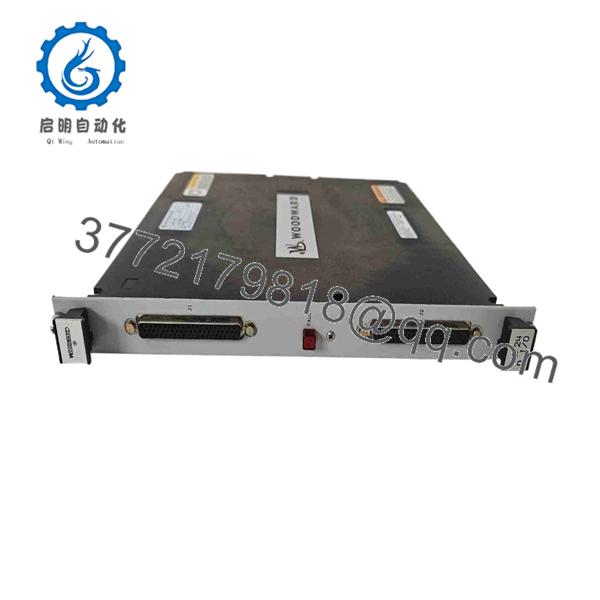
5466-258
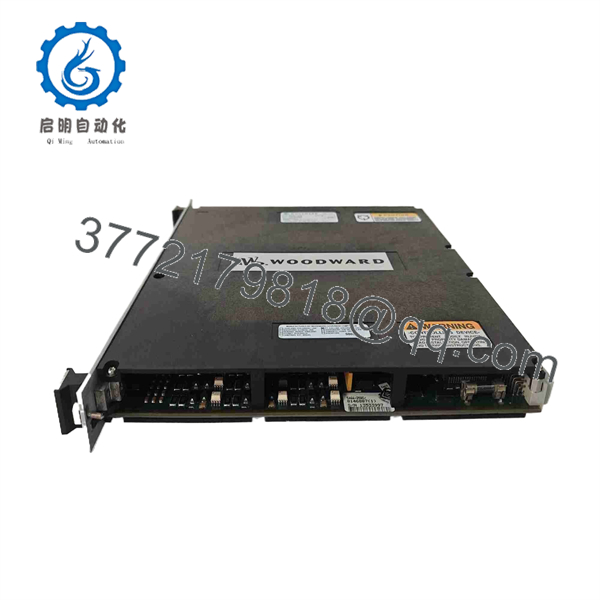
5466-258
Frequently Asked Questions (FAQ)
What is the Woodward 5466-258?
The 5466-258 is a MicroNet High Density Discrete (HDD) module configured as a simplex discrete I/O module. Woodward’s parts documentation identifies it as Simplex Discrete I/O.
How many I/O points does the 5466-258 provide?
The documented configuration is 48 discrete inputs and 24 discrete outputs, commonly described as a 48/24 discrete I/O module.
Is the 5466-258 obsolete?
Yes. Woodward’s Product Change Notification states that the 5466-258 and 5466-256 were replaced in 2010 by updated HDDIO modules.
What is the replacement for 5466-258?
For 5200/P1020 CPU systems running Coder 5.04 or later, Woodward identifies 5466-1050 as the preferred replacement for the 5466-258. For 5200 CPU systems running Coder 4.06 or later where a spare-part solution is required, Woodward specifies 5466-1158.
Can I use 5466-1050 as a direct replacement in every MicroNet system?
No. This is where checking the old configuration matters. Woodward’s replacement notice differentiates the replacement according to CPU platform and Coder version. Older 040 and Pentium NT systems require a different solution and may require a system upgrade.
Can the existing FTM be reused with a replacement HDDIO module?
Yes, within the replacement architecture specified by Woodward. The official change notice explicitly states that the existing MicroNet Field Termination Modules (FTMs) work with the new HDDIO modules.
What should I verify before purchasing a surplus 5466-258?
Verify at least:
- Exact part number: 5466-258
- Hardware revision
- MicroNet CPU platform
- Coder version
- Simplex versus redundant architecture
- Associated FTM
- Connector condition
- Fault LED condition
- New Original / New Surplus / Refurbished status
- Functional test report
For a legacy MicroNet installation, CPU platform and Coder version are compatibility data, not optional purchasing details. Woodward’s own replacement notice makes that distinction explicit.



