
 WhatsApp: +86 16626708626
 Email:
  Phone: +86 16626708626
Description
Key Technical Specifications
| Parameter | Value |
|---|---|
| Part Number | 9905-970 |
| Manufacturer | Woodward |
| Product Family | LinkNet |
| Product Type | 6-channel analog input module |
| Input Type | 100 Ω RTD |
| Number of Channels | 6 |
| Supply Voltage | 24 VDC |
| Signal Input Impedance | 33 kΩ, according to supplier documentation |
| Display | 24-character LED display |
| Operating Temperature | −40 to +85 °C, according to supplier documentation |
| Power Supply Transient Protection | 900 VDC, according to supplier documentation |
| Network Architecture | LON-based LinkNet |
| Typical Application | Turbine control and temperature monitoring |
| Lifecycle | Obsolete / discontinued |
Woodward’s official documentation identifies the 9905-970 specifically as a 6-channel 100 Ω RTD input LinkNet module. A Woodward manual also shows it as one of the LinkNet modules connected to the LON #1 data channel, with six total input channels.
Product Introduction
The Woodward 9905-970 LinkNet module provides six analog temperature inputs for 100 Ω RTD sensors in legacy Woodward turbine-control installations. The module belongs to the LON-based LinkNet distributed I/O family and communicates with the associated Woodward control system through the LinkNet network.
This is a legacy spare, not a current-generation LinkNet design. Woodward’s product-change documentation states that regular production of the LON-based LinkNet nodes ended and that newer modules use a different network architecture. That makes exact part-number matching important when maintaining an existing installation.
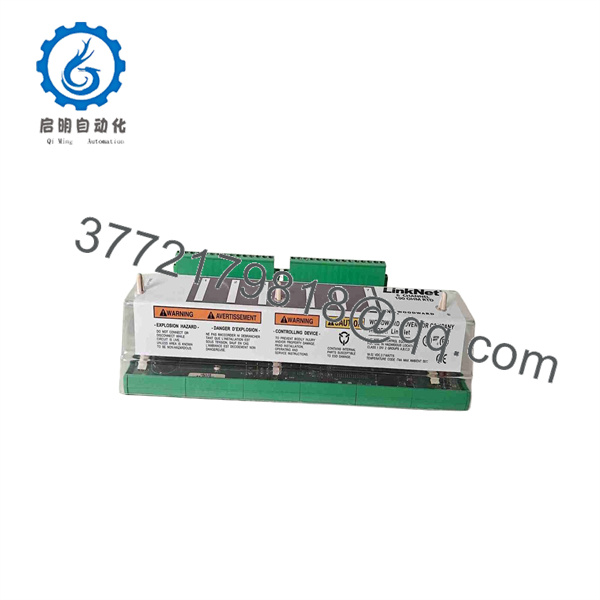
9905-970
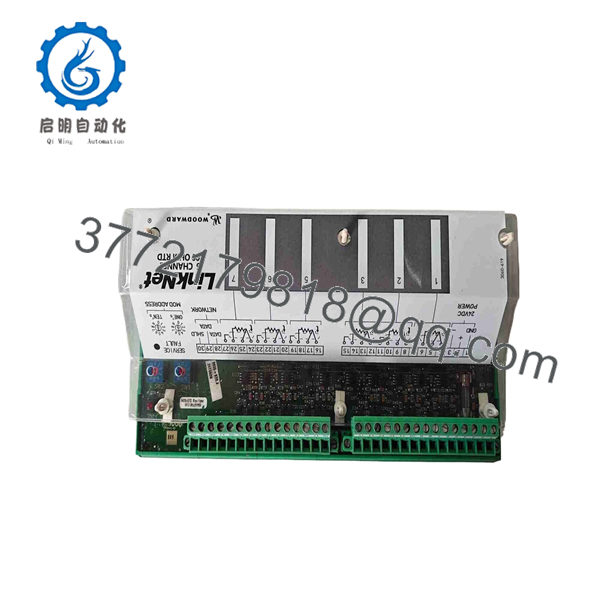
9905-970
Installation & Configuration Guide
Stage 1: Pre-Installation Preparation — About 10 Minutes
⚠️ Safety First: Put the turbine/control system into the approved maintenance state. Follow the site’s LOTO procedure and the applicable Woodward shutdown procedure before disconnecting the module.
Tools Required:
- ESD wrist strap
- Digital multimeter
- Appropriate screwdriver
- Wire labels
- Smartphone/camera
- Current Woodward LinkNet system documentation
Data Backup:
- Record the complete 9905-970 part number.
- Photograph the installed module and terminal wiring.
- Record the LinkNet node/network address.
- Identify each RTD channel and its corresponding process measurement.
- Record the existing sensor wiring arrangement.
- Keep the old module available until commissioning is complete.
Stage 2: Removing the Old Module — About 5–10 Minutes
- Confirm the controller is in the approved maintenance state.
- Isolate the module power.
- Verify the 24 VDC supply is de-energized.
- Label all six RTD channels before disconnecting them.
- Photograph the terminal arrangement.
- Disconnect the RTD wiring carefully.
- Disconnect the LinkNet/network connection.
- Release the module from its mounting arrangement.
- Remove the module without forcing the backplane or connector.
⚠️ Do not swap channel wiring from memory. A temperature channel can appear functional while reporting the wrong physical measurement.
Stage 3: Installing the New 9905-970 — About 10 Minutes
- Verify the replacement part number is exactly 9905-970.
- Confirm the module is configured for the same LinkNet installation.
- Check the physical connector and terminal arrangement.
- Install the module in the original location.
- Reconnect the LinkNet communication connection.
- Reconnect each 100 Ω RTD according to the photographs and drawings.
- Verify sensor polarity and lead configuration where applicable.
- Secure all terminals.
- Confirm the LinkNet node address/configuration matches the original installation.
Self-Checklist:
- 9905-970 part number verified
- Six RTD channels correctly identified
- 100 Ω RTD sensors confirmed
- LinkNet connection secured
- Node/address configuration verified
- 24 VDC supply verified
- Wiring checked against original photographs
Stage 4: Power-On & Testing — About 10–20 Minutes
- Perform a final wiring inspection.
- Verify the 24 VDC supply before energizing.
- Power the LinkNet module.
- Check the front-panel LED/status indication.
- Confirm the module appears correctly on the LinkNet network.
- Verify all six RTD channels.
- Compare each displayed temperature against a known process value or calibrated reference.
- Check for open-sensor or abnormal-input diagnostics.
- Confirm the turbine-control system receives the expected temperature values.
- Remove the maintenance bypass only after the approved functional checks are complete.
⚠️ Commissioning point: Do not validate the replacement only by checking that the module communicates. Verify that each RTD channel corresponds to the correct physical sensor.
Frequently Asked Questions (FAQ)
Q1: What is the Woodward 9905-970?
It is a LinkNet six-channel analog input module for 100 Ω RTD sensors. Woodward’s official documentation lists 9905-970 in its LinkNet module family.
Q2: How many RTD channels does the 9905-970 provide?
It provides six RTD input channels. The applicable Woodward documentation identifies the module as a 6-channel 100 Ω RTD input.
Q3: Is the 9905-970 still manufactured?
Woodward classifies the LON-based LinkNet modules, including 9905-970, as obsolete. Its product-change documentation states that regular production ended and recommends using newer architecture for new applications.
Q4: Can I replace 9905-970 with another LinkNet module?
Not automatically. The LinkNet family contains modules for thermocouple, RTD, 4–20 mA, discrete input, relay output, and analog output functions. The replacement must provide the required sensor type and channel configuration.
Q5: Is 9905-970 a 4–20 mA input module?
No. The 9905-970 is the 100 Ω RTD input variant. Woodward’s LinkNet documentation separately identifies 4–20 mA input modules with different part numbers.
Q6: What should I verify before purchasing a replacement?
Verify the complete 9905-970 part number, the six-channel 100 Ω RTD function, LinkNet network compatibility, physical connector arrangement, and the installed Woodward controller architecture. Because the module is obsolete, also confirm whether the offered unit is factory new surplus, unused original packaging, or refurbished. Current market listings show multiple conditions.
Q7: Is there a direct modern replacement?
Woodward states that the newer LinkNet replacement architecture requires hardware and software changes, so this should not be treated as a simple one-for-one module swap without an engineering compatibility review.



