
 WhatsApp: +86 16626708626
 Email:
  Phone: +86 16626708626
Description
Key Technical Specifications
| Parameter | Specification / Value |
| Manufacturer | Woodward |
| Model Number | EASYGEN-3200-5P1 |
| Part / Item Number | 8440-2088 (or equivalent variant configuration) |
| Supply Voltage | 12 / 24 VDC (8.0 to 40.0 VDC continuous) |
| Power Consumption | Max. 19 W |
| Generator Voltage Input | 100–480 VAC (True RMS), 3-phase 4-wire / 3-phase 3-wire |
| Generator Current Input | 1 A or 5 A AC (selectable), 3-phase |
| Frequency Range | 40 to 70 Hz |
| Discrete Inputs / Outputs | 16 Configurable Discrete Inputs / 12 Configurable Relay Outputs |
| Analog Inputs / Outputs | 4 Configurable Analog Inputs / 2 Analog Outputs (±10 V, 0–20 mA, PWM) |
| Communication Interfaces | 2x CANbus, 1x RS-485 (Modbus RTU), 1x Ethernet (Modbus TCP) |
| Display & Interface | Graphical LCD display with multi-language support and soft keys |
| Operating Temperature | −20 to +70 °C (−4 to +158 °F) |
| Protection Rating | IP65 (Front panel with gasket mounted), IP20 (Rear housing) |
Product Introduction & Supply Chain Strategy
The Woodward EASYGEN-3200-5P1 is an industry-standard generator set controller designed for complex load-sharing and paralleling applications. It manages single-genset island operations up to multi-unit utility-parallel power generation distribution systems, controlling speed governor and automatic voltage regulator (AVR) outputs via precise analog and CANbus signals.
Procuring the EASYGEN-3200-5P1 as New Surplus provides an immediate strategy to reduce Total Cost of Ownership (TCO) without sacrificing power grid reliability. Factory lead times for primary power control hardware can stretch beyond 16 to 24 weeks; procuring verified New Surplus units avoids costly plant downtime. Unlike refurbished controllers with degraded electrolytic capacitors and worn internal relays, our New Surplus inventory guarantees zero operating hours, full component service life, and immediate operational readiness.
Installation & Configuration Guide
Stage 1: Pre-Installation (Prep & Safety)
- Lock-Out/Tag-Out (LOTO): Isolate all AC voltage sensing lines (mains and generator busbar), DC control power supplies, and engine start circuits before servicing.
- Static Protection: Put on an ESD-grounded wrist strap connected to the enclosure chassis ground. Static discharge can destroy internal processor logic.
- Documentation: Take high-resolution photographs of all rear terminal block connections, DIP switch blocks, and wire labeling on the existing unit.
Stage 2: Removal
- Disconnect the removable terminal blocks by loosening the securing screws; do not yank individual wires.
- Disconnect the Ethernet, RS-485, and CANbus communication cables.
- Loosen the panel-mounting clamps surrounding the controller housing and carefully slide the controller forward out of the panel cutout to avoid scratching surrounding gear.
Stage 3: Installation (Clone & Seat)
- Verify panel cutout dimensions match the standard 219 x 171 mm cutout.
- Insert the EASYGEN-3200-5P1 into the cutout and tighten the mounting clamps evenly to achieve an IP65 front panel seal.
- Transfer DIP switch configurations (termination resistors for CANbus/RS-485) from the old unit to the new unit.
- Re-plug all terminal blocks into their respective sockets on the rear panel, verifying terminal numbers against the electrical wiring schematic.
Stage 4: Power-On & Testing
- Measure the incoming DC control power on terminals to ensure stable 12 or 24 VDC input before turning on the breaker.
- Apply DC power. Verify the controller boots up to the main display screen without triggering internal system fault alarms.
- Connect via ToolKit software using an Ethernet or RS-232 serial connection to load the matching parameter file (.w3p/.cfg) from the target generator set.
- Perform a dry-run test (engine crank signal check, voltage/frequency sensing verification) prior to closing the generator circuit breaker.
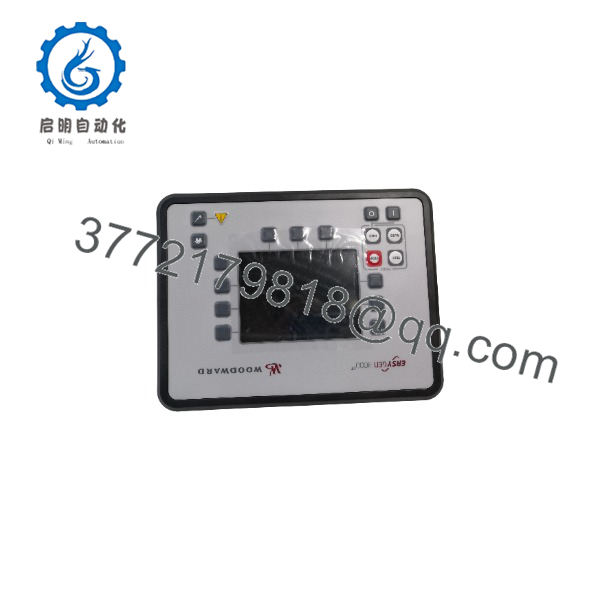
EASYGEN-3200-5P1
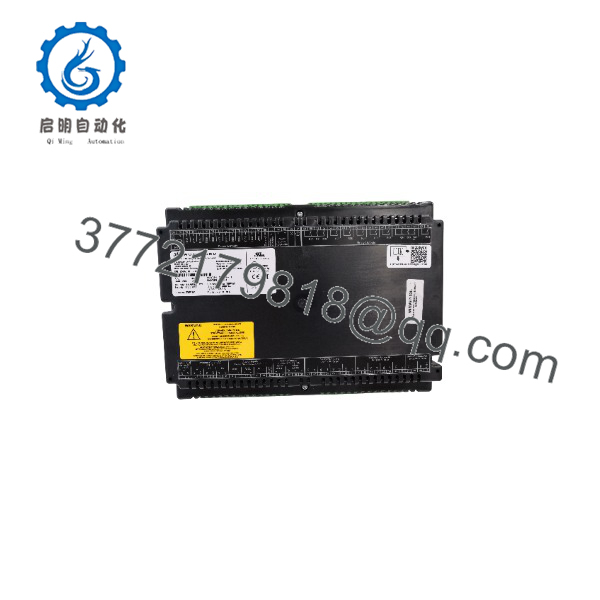
EASYGEN-3200-5P1
Firmware/Software Versions & Upgrade Notes
- Recommended Configuration Tool: Woodward ToolKit software (ensure installation of the specific EASYGEN-3000 series Device Definition Files / DDFs).
- Firmware Lineage: The EASYGEN-3200-5P1 relies on specific firmware revisions (e.g., V1.x vs. V2.x branches). Never cross-flash firmware across different hardware revisions (e.g., 3200-5P1 vs 3200-5P2) as hardware pin assignments and internal board layouts differ.
- Compatibility Warning: Parameter configuration files generated in newer ToolKit/Firmware versions cannot always be loaded into older controller firmware directly. Always save an unedited backup copy of the target unit’s existing configuration before flashing or modifying parameter settings.
- Hardware Replacement Protocol: When replacing an existing controller, flash the replacement unit to match the exact firmware release of the existing site units to maintain uniform load-sharing calculations over the CANbus load-share network.
Frequently Asked Questions (FAQ)
1. Is this Woodward EASYGEN-3200-5P1 unit brand new, or has it been used/refurbished?
This unit is guaranteed 100% Original New Surplus. It has never been installed in a control panel, energized in an operating power plant, or pulled from a decommissioned generator set. The module remains in original anti-static packaging, opened strictly for visual inspection and quality control testing.
2. Why buy New Surplus instead of ordering directly from OEM factory distribution or taking a chance on refurbished units?
New Surplus offers factory-grade reliability at a lower price point and with immediate off-the-shelf dispatch. Purchasing refurbished power generation controllers introduces significant risks—internal capacitors, relays, and optical isolators suffer thermal fatigue over time. A failure in a refurbished genset controller can result in out-of-phase breaker closure, destroying alternators or prime movers and costing tens of thousands of dollars in unplanned outage damages.
3. Will this unit drop directly into my existing control panel without modifications?
Yes, provided you are replacing an existing EASYGEN-3200 series controller with identical terminal pinouts (5P1 configuration package). The physical footprint, panel cutout, and terminal block assignments match the standard product specification. You will only need to upload your site-specific parameter file using Woodward ToolKit.
4. What happens to my custom parameters when I replace the controller?
Parameters are stored in non-volatile flash memory. A factory-new or new surplus controller ships with default parameters. You must back up the .w3p or configuration file from your existing unit via Woodward ToolKit and upload it to the new to ensure proper engine, generator, and system protection thresholds are maintained.
5. What warranty coverage comes with this controller?
We back this New Surplus Woodward with a full 1-year functional warranty. Every module undergoes comprehensive electrical verification and physical inspection before shipment to ensure complete operating integrity.



