WhatsApp: +86 16626708626
 Email:
 Phone: +86 16626708626
Description
Key Technical Specifications
| Parameter | Value |
|---|---|
| Manufacturer | Yaskawa Electric / Motoman |
| Part Number | JANCD-XCP01-1 |
| Board Type | XRC system CPU control board |
| Controller Family | Motoman XRC robot controller |
| Form Factor | VME plug-in board |
| Processor | Motorola XPC105 |
| Processor Frequency | 66 MHz |
| DRAM | 16 MB |
| SRAM | 1 MB |
| Service Interface | RS-232C |
| Storage Interface | CompactFlash slot |
| Daughter Board | JANCD-XIF03-1 commonly fitted |
| Ethernet Expansion | Verify installed interface board; listings reference JANCD-XIF03-1 or JANCD-XIF02 configurations |
| Battery | Toshiba lithium backup battery; remaining life must be checked |
| System Function | Robot program execution, interpolation, system logic, and servo-interface control |
| Operating Temperature | 0 to 45 °C, supplier-reported |
| Relative Humidity | 5 to 85% RH, non-condensing, supplier-reported |
| Approximate Board Weight | 0.48 kg, excluding cabinet hardware and accessories |
| Revision Examples | Rev B06, Rev C, and Rev C01 appear in market listings |
| Lifecycle | Legacy / obsolete |
| Replacement Requirement | Match board revision, daughter cards, battery condition, and XRC system compatibility |
The JANCD-XCP01-1 is identified in multiple supplier records as the XRC system control board, with a 66 MHz Motorola XPC105 processor, 16 MB DRAM, 1 MB SRAM, RS-232C, CompactFlash, and a JANCD-XIF03-1 interface card.
Product Introduction
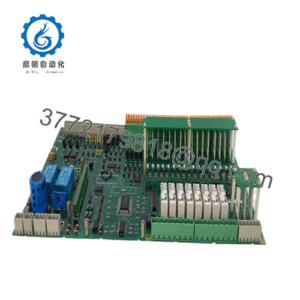
The Yaskawa JANCD-XCP01-1 is the central CPU control board for a Motoman XRC robot controller. It executes robot application programs, calculates interpolation and motion trajectories, manages system logic, communicates with the programming pendant, and interfaces with the servo-control circuitry.
This VME-format board is selected when an installed XRC controller requires an exact system-control replacement. Revision, daughter-card configuration, battery condition, CompactFlash contents, and stored CMOS data matter during a swap. Verify the complete assembly before ordering; a similar JANCD-XCP01C-1 is not automatically interchangeable.
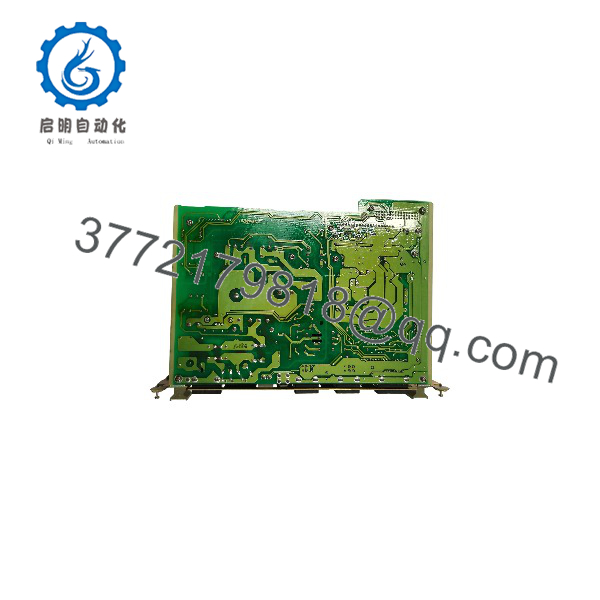
JANCD-XCP01-1
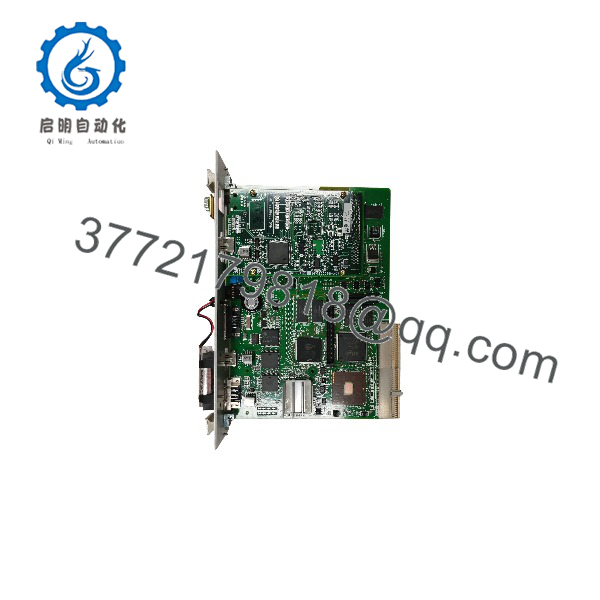
JANCD-XCP01-1
Troubleshooting Quick Reference
| Symptom | Possible Cause | Relevance to This Part | Quick Check Method | Recommendation |
|---|---|---|---|---|
| XRC controller does not boot | Missing rack power, poor VME seating, failed CPU board, or battery-backed data issue | ✅ High | Verify controller supply rails, inspect board seating, and record the complete startup or alarm sequence | Check power and connectors before replacing the CPU board |
| Programming pendant remains blank | CPU startup failure, pendant cable fault, or system power problem | ⚠️ Medium | Check pendant cable, controller LEDs, and boot diagnostics | Isolate the pendant and rack before condemning the JANCD-XCP01-1 |
| Robot controller shows system alarm at startup | Corrupt CMOS data, incompatible board revision, failed memory, or missing interface card | ✅ High | Record the exact alarm code and compare the board revision and daughter-card configuration | Preserve the original board data and match the replacement configuration |
| Robot programs are missing | CompactFlash issue, corrupted storage, lost CMOS data, or incorrect backup media | ✅ High | Inspect CompactFlash, verify backup files, and check battery status before removing the original board | Back up programs and CMOS data before replacement |
| Robot powers up but will not servo-on | Servo interface, safety circuit, amplifier, encoder, or CPU communication fault | ⚠️ Medium | Review XRC alarms and servo-interface status; verify E-stop and gate circuits | Check external safety and servo hardware before replacing the CPU board |
| Communication with external equipment fails | RS-232 cable, protocol, port configuration, interface card, or CPU serial port fault | ⚠️ Medium | Test the cable and port with the approved pinout and compare communication settings | Verify the installed interface card and protocol before replacement |
| Ethernet communication is unavailable | Missing or incorrect network daughter card, cable, configuration, or board fault | ⚠️ Medium | Identify the installed JANCD-XIF03-1 or other interface card and check link status | Do not assume every JANCD-XCP01-1 assembly has the same Ethernet option |
| Robot loses programs after power-off | Failed lithium backup battery or damaged SRAM retention circuit | ✅ High | Check battery age and measure it only with an approved procedure; verify backup files | Replace the battery using the Motoman procedure and back up data first |
| Intermittent controller resets | Loose VME connector, aging power supply, overheating, or board fault | ⚠️ Medium | Monitor rack supply rails, inspect connectors, and review alarm history during operation | Correct rack power and seating issues before board replacement |
| Replacement board gives immediate alarm | Wrong revision, missing daughter card, incompatible memory contents, or configuration mismatch | ✅ High | Compare original and replacement labels, revisions, option cards, and storage media | Match the complete board assembly, not just the base part number |
| Servo motion or interpolation behaves abnormally | Corrupt application data, incorrect controller configuration, or CPU memory fault | ✅ High | Compare program backup, system parameters, alarm history, and controller configuration | Stop operation and restore only a verified backup |
| Board has visible corrosion or battery leakage | Storage damage or battery failure | ✅ High | Inspect the PCB, battery area, VME contacts, and socketed devices under magnification | Reject questionable stock or require refurbishment documentation |
Critical warning: The JANCD-XCP01-1 contains battery-backed CMOS or system data associated with robot programs and configuration. Do not remove the original board or battery without a verified backup and the correct Motoman service procedure.
For technical support, provide photos of the complete board, revision marking, JANCD-XIF03-1 or other daughter card, battery, CompactFlash card, controller model, pendant alarm screen, and startup sequence.
Frequently Asked Questions (FAQ)
What is the Yaskawa ?
It is the system CPU control board used in the Yaskawa Motoman XRC robot controller. The board handles robot application execution, interpolation, system control, pendant communication, and servo-interface functions.
Is compatible with every Motoman controller?
No. It is associated with the XRC platform and should not be treated as a universal Motoman CPU board. Confirm the controller cabinet model, board revision, daughter-card configuration, CompactFlash arrangement, and installed software before ordering.
Is the same as JANCD-XCP01C-1?
No. The part numbers are similar, but the “C” variant may represent a different board revision or assembly. Compare the full part number, revision, option cards, connectors, and XRC controller compatibility before approving a substitution.
Will replacing the board erase the robot program?
It can, depending on the condition of the battery-backed memory, CompactFlash contents, and backup media. The original board contains important CMOS-backed file data, and incorrect handling can cause data loss. Back up robot programs, system parameters, and calibration-related data before removal.
Does the include Ethernet?
Not necessarily. The board includes RS-232C and a CompactFlash interface. Ethernet capability depends on the installed communication daughter card and XRC configuration. Verify whether the actual assembly includes JANCD-XIF03-1, JANCD-XIF02, or another interface option.
Is this board obsolete?
Yes. The is a legacy XRC control board. Market stock may include unused surplus, used boards, and refurbished assemblies with different revisions and option cards. Request photographs of the actual board and confirm the revision before purchase.
What should a supplier test before shipment?
Testing should include visual inspection, VME connector inspection, power-up on a compatible XRC controller, boot sequence, pendant communication, CompactFlash access, RS-232C operation, installed daughter-card verification, and battery-condition documentation. The supplier should identify the tested board revision and serial number in the test report.