
 WhatsApp: +86 16626708626
 Email:
  Phone: +86 16626708626
Description
Key Technical Specifications
| Parameter | Value |
|---|---|
| Manufacturer | Yokogawa |
| Full Model | AFV10D-S41101 |
| Product Type | Duplexed Field Control Unit, FCU |
| System Role | Core controller for a CENTUM VP Field Control Station |
| System Architecture | Vnet/IP and FIO |
| Mounting | 19-inch rack mount |
| Processor | VR5432 RISC processor, 133 MHz |
| Main Memory | 32 MB |
| Power-Failure Memory Protection | Rechargeable battery backup |
| Maximum Battery Backup | 72 hours |
| Minimum Battery Recharge Time | 48 hours |
| Communication Network | Dual-redundant Vnet/IP |
| Network Cable | CAT5e or better UTP to Layer 2 switch |
| Power Architecture | Dual-redundant power supply |
| Input Power | 100–120 V AC, 50/60 Hz |
| Power Consumption | 200 VA |
| Processor Architecture | Duplexed processor configuration using two CP451 processor modules |
| Power Modules | Two PW481, PW482, or PW484 modules in dual-redundant configuration |
| FCU Status Contact | Two terminals, NC and C |
| Status Contact Rating | 30 V DC, 0.3 A maximum |
| Failure Contact Behavior | Contact opens on FCU failure |
| Maximum Connectable Nodes | 14 total node units per FCU |
| ESB Bus Node Limit | Up to 9 ESB Bus node units |
| Standard LFS1500 Capacity | Up to 3 connectable nodes |
| Expanded Capacity | Up to 14 nodes with LFS1550 Node Expansion Package |
| Node Connection License | /NDEL license required for each connected node unit |
| Local I/O Capacity | Up to 8 I/O modules in the FCU |
| ESB Bus Interface | EC401 ESB Bus Coupler Module |
| EC401 Duplex Requirement | Install EC401 in slots 7 and 8 for duplexed processor configuration |
| ER Bus Interface | EB401 ER Bus Interface Master Module |
| Approximate Weight | 8 kg |
| ISA Environmental Option | ISA Standard G3 configuration identified by suffix position 1 |
| Required Control License | LFS1500 Field Control Station Control Function |
| SEM Requirement | Style 2 or later required for Vnet/IP Sequence of Events Manager use |
| Lifecycle Note | Verify exact suffix, installed licenses, style number, node configuration, and I/O interfaces before purchase |
The AFV10D-S41101 is a Yokogawa duplexed FCU for Vnet/IP and FIO, designed for 19-inch rack installation. Its suffix identifies dual-redundant Vnet/IP, dual-redundant power supply, 100–120 V AC input, basic type, ISA Standard G3 configuration, and the required LFS1500 Field Control Station control function.
Product Introduction
The Yokogawa AFV10D-S41101 is a duplexed Field Control Unit for CENTUM VP Field Control Stations using Vnet/IP and FIO. It executes regulatory control, sequence logic, interlocks, and I/O coordination while communicating through dual-redundant Vnet/IP connections. The unit is built for 19-inch control-room or equipment-room racks and supports both ESB Bus and ER Bus FIO node architectures.
This controller uses paired CP451 processor modules and dual power modules to maintain operation through a single processor, network, or power-path fault. The exact S41101 suffix matters: it specifies 100–120 V AC power, redundant network and power architecture, ISA Standard G3 environmental option, and LFS1500 control functionality. Confirm licenses, style number, installed node interfaces, and system database compatibility before replacing the complete FCU.
Troubleshooting Quick Reference
| Symptom | Possible Cause | Relevance to this Part | Quick Check Method | Recommendation |
|---|---|---|---|---|
| FCU has no power indication | Missing AC supply, open branch breaker, blown fuse, loose power terminal, failed power module | ⚠️ Medium | Measure 100–120 V AC at the M4 power terminals; inspect upstream breaker, fuse, and both PSU connections | Verify incoming power before replacing the FCU. The configured unit requires 100–120 V AC at 50/60 Hz |
| One power path reports a fault but the FCS remains online | One PW481/PW482/PW484 module failure, failed input feed, bad redundant PSU cable | ⚠️ Medium | Check each supply feed independently, inspect PSU LEDs, and review CENTUM hardware diagnostics | Replace the failed power module or restore its feed. Do not replace the complete AFV10D unless both power paths are verified |
| FCU failure status contact opens | Processor failure, system watchdog event, loss of both power paths, internal FCU fault | ✅ High | Measure the NC/C contact state; review controller diagnostics and event logs; verify both power supplies and CP451 modules | Treat an open status contact as a real controller-health alarm. Preserve diagnostics before restarting or swapping hardware |
| FCS is online but Vnet/IP redundancy alarm is active | One Vnet/IP cable disconnected, switch port down, duplicate network configuration, failed network interface | ⚠️ Medium | Check both CAT5e network paths, Layer 2 switch port LEDs, link status, VLAN configuration, and Vnet/IP diagnostics | Restore the failed network path first. Do not replace the FCU solely because one redundant path is unavailable |
| FCS cannot communicate with stations on Vnet/IP | Switch failure, incorrect VLAN or network configuration, bad cable, Vnet/IP address issue | ❌ Low | Verify Layer 2 switch operation, known-good UTP cables, network port link, and system configuration records | Troubleshoot the network infrastructure before replacing the FCU |
| Controller runs but field I/O is unavailable | Failed EC401/EB401 interface, ESB/ER bus cable issue, node power loss, node address/configuration fault | ⚠️ Medium | Identify whether the affected nodes are ESB or ER; check EC401/EB401 modules, bus connections, and node diagnostics | Isolate the node/bus fault. The FCU processor may be healthy even if remote I/O is offline |
| ESB Bus nodes are offline after maintenance | EC401 installed in the wrong slot, missing redundant coupler, bus cable issue | ✅ High | Confirm placement in slots 7 and 8 for duplexed FCU architecture; inspect ESB bus cabling and node power | Restore the specified slot arrangement. A duplexed FCU requires correct dual coupler installation |
| ER Bus nodes are offline after a module change | EB401 installed in an invalid slot position, paired slot not left empty, bus topology error | ✅ High | Verify the EB401 location; a single configuration requires installation in an odd-numbered slot with the adjacent right-hand slot empty | Correct the EB401 slot placement and verify ER bus topology before condemning the FCU |
| FCU fails after a short power outage | Backup battery depleted, battery not fully recharged, memory-protection issue | ⚠️ Medium | Check outage duration and battery service history; verify the unit received at least 48 hours of recharge time after previous discharge | The main-memory battery supports up to 72 hours under stated conditions. Replace or service the battery according to the approved Yokogawa procedure |
| Replacement AFV10D powers up but application will not run | Missing LFS1500 license, incompatible database, wrong system style, incomplete project restore | ✅ High | Verify LFS1500 control function, installed licenses, FCU style, CENTUM engineering database, and application download status | Do not treat the FCU as plug-and-play. Restore using the approved CENTUM project and license record |
| Replacement FCU does not recognize all nodes | LFS1550 expansion package missing, /NDEL licenses absent, node count exceeds base capacity |
✅ High | Count connected nodes and compare with licensing; supports up to three nodes unless expanded | Confirm LFS1550 and node licenses before commissioning. Hardware can be healthy while capacity is license-limited |
| Sequence of Events Manager does not function | FCU style number below Style 2, SEM configuration or licensing issue | ⚠️ Medium | Read the style number from the component tag and review SEM configuration | Vnet/IP SEM requires AFV10D Style 2 or later. A lower-style FCU requires a validated upgrade plan |
| FCS resets or reports CPU synchronization faults | CP451 processor mismatch, one processor module fault, poor seating, database mismatch | ✅ High | Review CPU health diagnostics, verify both CP451 modules are fully seated, and compare module styles/revisions | Preserve logs, then test processor modules according to the approved redundancy-maintenance procedure |
| Field outputs change unexpectedly during FCU replacement | Incomplete bypass plan, unsafe force handling, I/O nodes not isolated, application download mismatch | ✅ High | Review permissives, output states, forces, bypasses, and maintenance procedure before removal | Never replace an FCU without an approved process plan. Treat every connected output as potentially live |
❗ Architecture warning: The -S41101 is a complete duplexed Field Control Unit, not a simple plug-in I/O card. Replacing it can affect control logic, FIO node communications, permissives, sequences, alarm processing, and process outputs across the Field Control Station.
❗ License warning: The Control Function is required for operation. The base configuration supports up to three connected nodes; expanding to 14 nodes requires the LFS1550 Node Expansion Package and a /NDEL license for every connected node unit. Hardware alone is not enough.
❗ Power warning: This suffix is for 100–120 V AC. Do not apply 220–240 V AC or 24 V DC. Those inputs correspond to other suffix configurations and can damage the unit or create an unsafe commissioning event.
❗ Redundancy warning: Do not replace only one processor, one network path, or one power module without checking compatibility of style, firmware, and system engineering requirements. A redundant system can remain online with one hidden fault, but that does not mean it is safe to defer repair indefinitely.
If troubleshooting remains unresolved, provide technical support with photos of the full model tag, CP451 modules, power modules, FCU and node status LEDs, Vnet/IP switch ports, / interfaces, system alarm list, FCU style number, and the active CENTUM engineering project/version.
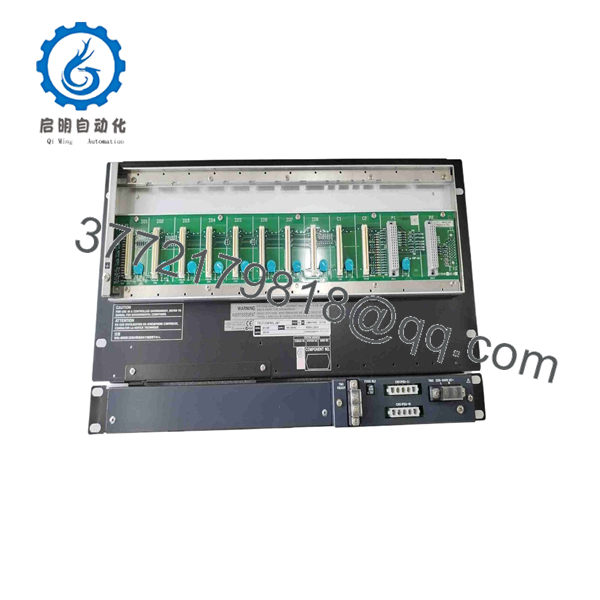
AFV10D-S41101
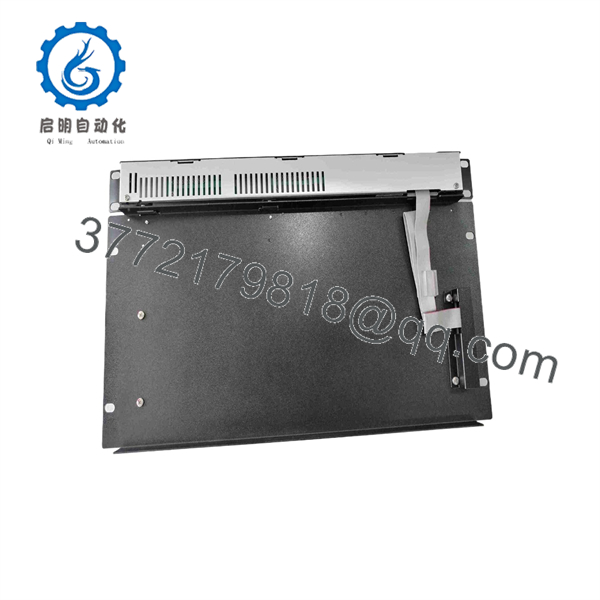
AFV10D-S41101
Frequently Asked Questions
What does the Yokogawa -S41101 do?
The – is the duplexed controller at the center of a Yokogawa CENTUM VP Field Control Station. It executes control and sequence applications, communicates over Vnet/IP, coordinates FIO node units, and provides a redundant processor, network, and power architecture.
What does the suffix mean?
The suffix identifies this exact hardware configuration:
S: Standard type4: Dual-redundant Vnet/IP and dual-redundant power supply1: Fixed suffix position1: 100–120 V AC power input0: Basic type1: ISA Standard G3 option1: Control Function for Field Control Station
This is why an model without the full suffix should never be treated as an automatic replacement.
Can I replace AFV10D-S41101 with any AFV10D unit?
No. Match the complete suffix, input-voltage class, redundancy architecture, environmental option, installed licenses, controller style, and system software requirements. An configured for 220–240 V AC or 24 V DC is not a direct substitute for this 100–120 V AC configuration.
What does the S41101 suffix mean?
Yes. The 4 configuration specifies dual-redundant Vnet/IP and dual-redundant power. The duplexed FCU architecture uses two processor modules and two power supply modules. Redundancy only works as intended when both paths are installed, healthy, correctly configured, and compatible with the active system.
How many FIO nodes can it support?
The can connect up to 14 total node units, including no more than nine ESB Bus node units. The control function supports up to three nodes in the base configuration. To expand to 14 nodes, the system needs the LFS1550 Node Expansion Package and a /NDEL license for each connected node unit.
Can I hot-swap the AFV10D-S41101?
Do not treat replacement of the complete FCU as a routine hot-swap operation. Follow Yokogawa’s approved maintenance procedure and the plant’s management-of-change and operating rules. Before any work, assess process risk, transfer or isolate control if required, record active alarms and forces, verify redundancy health, back up the engineering database, and establish the expected output behavior.
Will programming remain after replacing the FCU?
Do not assume it will. The replacement must be compatible with the existing CENTUM VP project, controller style, licenses, application configuration, and node definition. Back up the active project and all relevant system databases before hardware work. Verify the restored application against approved checkout steps before returning the process to normal control.
Why does a new FCU show correct hardware status but no field I/O?
Common causes are missing or LFS1550 licensing, absent /NDEL node licenses, incorrect or interface placement, disconnected ESB/ER bus cables, node-power issues, or an engineering database that does not match the installed hardware. Confirm system configuration before declaring the replacement defective.
Is the AFV10D-S41101 obsolete?
It is a legacy CENTUM VP Vnet/IP and FIO Field Control Unit configuration. Availability depends on Yokogawa lifecycle support and surplus inventory. For a long-term maintenance strategy, preserve validated controller spares, engineering backups, firmware/style records, licenses, interface-module details, and node topology documentation. A controller replacement without the associated project and licensing information can extend an outage.
What condition should I require for a production-critical spare?
Request New Original / New Surplus with full manufacturer label photos, complete suffix verification, style number, power-input confirmation, included processor modules, power modules, and accessory status. For Refurbished (tested) equipment, request documented testing of both power paths, both CPUs, Vnet/IP links, failover behavior, status contact, ESB/ER interface recognition, battery condition, and sustained runtime. Ask for exact stock confirmation, lead time, warranty terms, return terms, and test evidence before purchase.



