
 WhatsApp: +86 16626708626
 Email:
  Phone: +86 16626708626
Description
Key Technical Specifications
| Parameter | Specification |
|---|---|
| Model | AIP830 |
| Product Name | Operation Keyboard for Single-loop Operation |
| Manufacturer | Yokogawa Electric Corporation |
| System Application | Desktop Type HIS |
| Keyboard Type | Flat keyboard |
| Operation Interface | USB 2.0, full-speed, bus-powered |
| Sound Interface | USB 1.1, full-speed, bus-powered |
| USB Connectors | 2 × USB Type-A |
| Input Voltage | 5 V ±5% |
| Maximum Consumption Current | 1 A |
| Operating Temperature | 5 to 40 °C |
| Storage / Transportation Temperature | -20 to 60 °C |
| Ambient Humidity | 20 to 80% RH, non-condensing |
| Weight | Approx. 2.0 kg without VESA bracket; approx. 2.5 kg with VESA bracket |
| Cable Length | 2,300 ±100 mm |
| Mounting Option | VESA bracket available |
| Installation Category | IEC 61010-1 Class I |
The two USB connectors must be connected directly to the computer according to Yokogawa’s specification. The keyboard’s USB function and independent speaker use separate USB functions.
Common AIP830 Suffix Configurations
Yokogawa’s specification defines the suffix structure around the mode-selection switch and operation-confirmation key. Common configurations include AIP830-001, AIP830-011, and AIP830-111.
| Model | Configuration |
|---|---|
| AIP830-001 | Without mode-selection switch; operation confirmation key Type A |
| -011 | With mode-selection switch; operation confirmation key Type A |
| -111 | With mode-selection switch; operation confirmation key Type B |
| /VESA | VESA bracket option |
| /EIM | English instruction manual option |
| /JIM | Japanese instruction manual option |
Procurement note: Match the complete suffix, not just the base model , when replacing an installed keyboard.
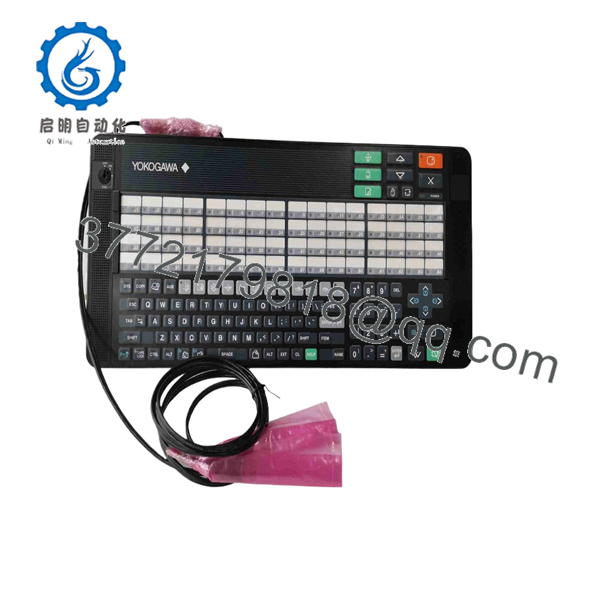
AIP830
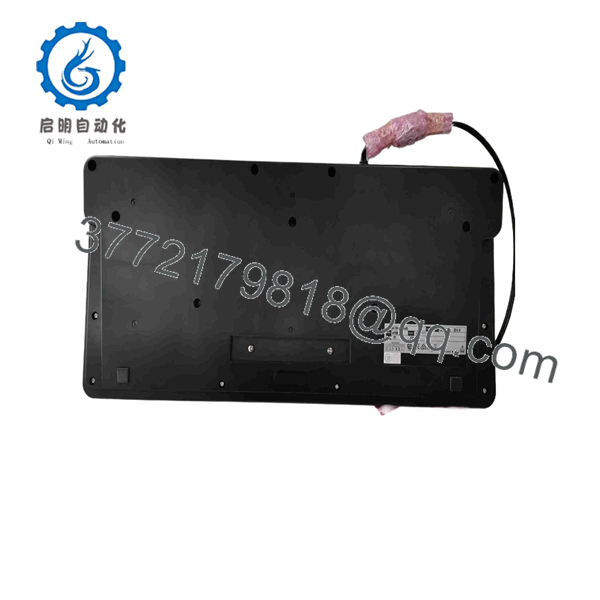
AIP830
Product Introduction
The is a flat operator keyboard designed for single-loop operation on a Desktop Type Human Interface Station (HIS). Yokogawa specifies two USB Type-A connections: USB 2.0 for keyboard operation and USB 1.1 for the independent USB speaker used for sound functions.
The unit is powered directly from the HIS computer’s USB ports and operates from 5 V ±5%, with maximum consumption of 1 A. can also be supplied with a VESA mounting bracket, making the exact suffix important when replacing an existing operator station keyboard.
Installation & Configuration Guide
Stage 1 — Pre-Installation Preparation (~10 min)
- Record the complete keyboard model, such as or .
- Check whether the existing unit uses a VESA bracket.
- Verify that the replacement matches the existing confirmation-key and mode-selection configuration.
- Shut down or place the Desktop Type HIS in the approved maintenance state.
- Prepare the replacement keyboard and inspect both USB connectors and cables.
⚠️ Do not connect or disconnect the keyboard while following a procedure that prohibits USB device changes during HIS operation. Follow the site’s Yokogawa maintenance procedure.
Stage 2 — Removing the Old Keyboard (~5 min)
- Exit the applicable HIS operator applications according to site procedure.
- Disconnect the two USB connections from the computer.
- Remove any VESA mounting hardware if installed.
- Label the USB connections if required by the maintenance procedure.
- Inspect the computer USB ports and keyboard cable for physical damage.
Stage 3 — Installing the New Keyboard (~5 min)
- Confirm the replacement is the correct suffix configuration.
- Position the keyboard on the desktop or install the applicable VESA bracket.
- ⚠️ Use the specified VESA mounting screws and verify that the mounting surface can support the assembly.
- Connect both USB Type-A connectors directly to the computer.
- Route the cable so that it cannot be pulled or pinched during operator use.
- Confirm that the keyboard is mechanically stable before operation.
Yokogawa specifies that both USB connectors must be connected directly to the computer.
Stage 4 — Power-On & Testing (~10–15 min)
- Start or return the Desktop Type HIS to its normal operating state.
- Confirm that the operating system recognizes the keyboard.
- Test the standard keyboard functions.
- Verify the dedicated operation keys required by the installed HIS configuration.
- Test the buzzer/alarm-related functions where applicable.
- Verify the independent USB speaker function.
- Confirm that the operator can perform the required single-loop operations.
- Record the replacement model and suffix in the maintenance log.
FAQ
What is Yokogawa ?
is a single-loop operation keyboard for Yokogawa Desktop Type HIS. Yokogawa’s official general specification identifies it as a flat keyboard with an independent USB speaker.
Is an analog input module?
No. is an operator keyboard, not an analog input or output module. Some third-party pages incorrectly associate with analog signal specifications; those descriptions conflict with Yokogawa’s official documentation and should not be used for procurement.
What voltage does use?
The keyboard is powered from the computer’s USB ports at 5 V ±5%, with a maximum consumption current of 1 A.
How many USB connections does require?
It has two USB Type-A connectors. Yokogawa specifies USB 2.0 for the operation-keyboard function and USB 1.1 for the sound function. Both connections must be connected directly to the computer.
What is the difference between -001 and -111?
The suffix identifies configuration options. is specified without a mode-selection switch and with operation confirmation key Type A, while includes a mode-selection switch and operation confirmation key Type B.
Can I replace an -001 with any ?
Not without checking the suffix. The keyboard variants can have different operator controls, so the complete model code should match the installed configuration whenever possible.
Does support VESA mounting?
Yes. Yokogawa documents an optional VESA bracket. The keyboard weighs approximately 2.0 kg without the bracket and 2.5 kg with it.



