
 WhatsApp: +86 16626708626
 Email:
  Phone: +86 16626708626
Description
Key Technical Specifications
- Base Model Function: ANB10D-425 — Node Unit for Dual-Redundant ESB Bus, dual-redundant power supply, Basic type, no explosion protection (per Yokogawa’s own model-number breakdown for this base code)
- Bus Type: Dual-redundant ESB bus connection directly to the Field Control Unit — this is a Local Node, not a Remote (ER bus) node
- Power Supply Configuration: Dual-redundant — accepts two power supply modules for continuous operation if one fails
- Explosion Protection: None on this base code — if your site requires Ex-rated hardware, this is not the right part number (compare against the -42E/-42F/-44G family instead)
- Environmental Option: Basic type — no ISA Standard G3 conformal coating; if your original hardware carried a “-3xx” or “-4xx” code ending in G3-rated suffixes, confirm you actually need that option before substituting this basic-type unit
- Connectable Equipment: Houses a bus interface module, power supply module(s), and I/O modules (analog, digital, or communication) per your project configuration
- Node Count per FCU: Node unit limits vary by FCU type — Compact/Basic FCS models typically support up to 3 local nodes, Enhanced FCS models with expanded databases support more; confirm the exact ceiling against your specific FCU model
- Suffix “CU2N”: This appears to be an additional style/option suffix beyond the base “-425” code (commonly used by Yokogawa for terminal block type, cable entry, or connector configuration). We could not independently verify the exact meaning of “CU2N” against a public specification — cross-check it against your original purchase order or Yokogawa’s GS 33Q06Q10 model-and-suffix-code table before assuming full equivalency
Product Introduction
The Yokogawa ANB10D-425CU2N is an ESB Bus Node Unit built for the FIO architecture behind CENTUM VP and CENTUM CS 3000 systems. It sits between the Field Control Unit and the field I/O, carrying the bus interface module, power supply modules, and I/O modules that actually touch your process signals. The “-425” base code specifies a dual-redundant ESB bus with dual-redundant power supply and no explosion protection — a common configuration for standard control room or non-hazardous field cabinet installations.
Buyers replacing an existing node unit should match more than just the base model. Power supply redundancy, explosion protection rating, and any environmental coating option all show up in the suffix, and getting one of those wrong turns a straightforward swap into a compliance or reliability problem down the line.
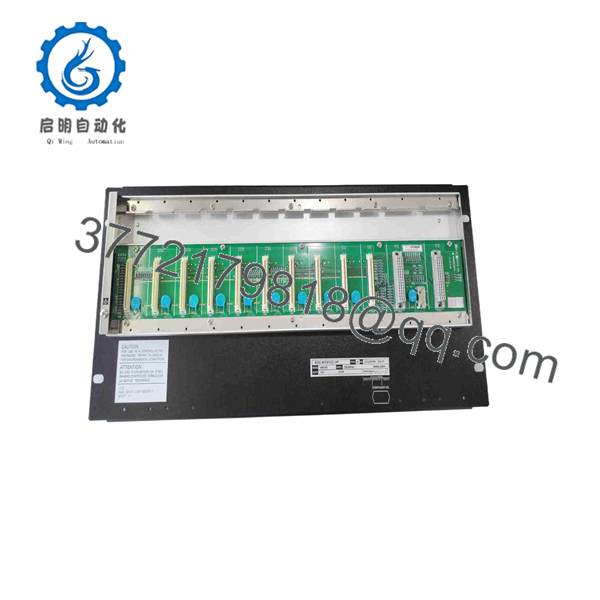
ANB10D-425CU2N
Troubleshooting Quick Reference
| Symptom | Possible Cause | Relevance to this Part | Quick Check Method | Recommendation |
|---|---|---|---|---|
| Entire node offline, no I/O modules responding | Node unit power supply or backplane failure | ✅ High | Check both power supply modules’ status LEDs and measure input voltage at TM1/TM2 terminals | If both supplies test good but the node still won’t come up, the node unit itself is a strong suspect |
| One I/O module in the node faults but others work fine | Individual I/O module failure, not the node unit | ❌ Low | Check the specific module’s diagnostic LED and swap it into a known-good slot if possible | Isolate to the individual I/O module before replacing the node unit |
| ESB bus communication error on one side of a redundant pair | Bus interface module, cabling, or connector fault | ❌ Low | Check ESB bus interface module status and inspect the ESB bus cable/connector | Often a cabling or bus interface module issue rather than the node unit chassis itself |
| Node reports power supply redundancy fault | One of the two power modules failed or lost input power | ✅ Moderate | Measure output voltage on each power supply module independently | Replace the failed power supply module first — only escalate to the node unit if the fault persists with known-good supplies |
| Physical damage, connector corrosion, or scorching visible on the chassis | Overvoltage event, moisture ingress, or age-related wear | ✅ High | Visual inspection of the backplane and connectors | This calls for full node unit replacement — don’t attempt to repair a scorched backplane |
| Node works but won’t accept a specific I/O module type | Module/node compatibility or capacity limit | ❌ Low | Check the node’s supported module list and current slot occupancy against your project design | Verify compatibility against Yokogawa’s I/O module GS documents before assuming a hardware fault |
If none of these checks isolate the fault, contact technical support with the node unit’s serial number, a photo of the backplane and any status LEDs, and the diagnostic log from CENTUM VP if the node ever came online.
Frequently Asked Questions (FAQ)
Is this a new unit or used surplus? This unit is sold as New Surplus — genuine Yokogawa stock pulled from decommissioned systems or excess project inventory, not fresh off the Yokogawa production line. It’s gone through inbound source verification and functional testing before listing. If you specifically need factory-sealed stock, ask before ordering so we can confirm exactly what’s in hand.
Why is this priced below a factory-new order from Yokogawa? Because it’s sourced from surplus and decommissioned system inventory rather than Yokogawa’s direct manufacturing channel. It’s genuine OEM hardware — the savings come from sourcing path and lead time, not from a different part.
Can I hot-swap I/O modules or a power supply in this node unit while it’s running? Depends on configuration. A dual-redundant power supply setup is specifically designed to allow one power module to be replaced while the other carries the load, but the individual I/O modules and bus interface modules have their own rules depending on whether they’re configured single or dual-redundant. Check your system’s installation guidance for the specific module types installed before pulling anything live.
Will I lose my I/O configuration or node addressing when I swap the node unit? The node unit itself is a chassis — the addressing and I/O configuration live in your CENTUM VP engineering database and in the modules installed inside it (bus interface module, I/O modules). Swapping the empty node chassis and moving your existing modules over is a very different job than swapping a fully populated node — plan for which scenario you’re actually doing.
Is the “CU2N” suffix something I need to match exactly? Treat it as a “verify before you buy” item rather than something to ignore. We can’t confirm the exact spec that suffix represents without cross-referencing Yokogawa’s model-and-suffix table for your specific GS revision. If your original hardware carries that full designation, send us a photo of the nameplate and we’ll confirm the match before shipping.
Do you provide test documentation for this unit? Yes — a test report covering power-on self-test, power supply redundancy switchover, and I/O module functional checks (using whatever modules were populated in the node during testing) is generated for every unit. Photos are available on request.
What’s the warranty on a surplus node unit? Standard warranty terms apply to functional failures found after receipt within the coverage window — ask for the specific term at checkout, since surplus stock typically carries a shorter warranty than a factory-new order.



