
 WhatsApp: +86 16626708626
 Email:
  Phone: +86 16626708626
Description
Key Technical Specifications
| Parameter | Specification |
|---|---|
| Model | CP461-50 |
| Manufacturer | Yokogawa Electric Corporation |
| Product Type | FCS Processor Module |
| DCS Platform | CENTUM VP |
| Field Control Unit | AFV300 / AFV400 |
| Processor | VR5532, 350 MHz* |
| Main Memory | 128 MB* |
| Redundancy | Dual-redundant configuration |
| Maximum I/O Modules | 8 |
| Backup Battery | S9548FA* |
| Main Memory Backup | Maximum 72 hours* |
| Battery Recharge Time | Minimum 48 hours* |
| Dimensions | Approx. 152 × 51 × 203 mm |
| Weight | Approx. 0.7 kg |
| Suffix -5 | Standard type, no explosion protection |
| Suffix 0 | Basic type |
| Replacement Reference | CP461-10 |
*The VR5532, 350 MHz, 128 MB, and battery specifications are reported by secondary CP461 documentation. Yokogawa’s official documentation confirms CP461 as a CENTUM VP FCS processor and identifies it with AFV30S/AFV30D, AFV40S/AFV40D, A2FV50S/A2FV50D, and A2FV70S/A2FV70D FCS families. Verify the complete style and revision before using secondary hardware figures for engineering work.
Product Introduction
The Yokogawa CP461-50 is a Field Control Station processor module for CENTUM VP systems. Supplier catalog references identify CP461-50 as the standard/basic processor variant for AFV300/AFV400 systems and describe it as a replacement for the earlier -10.
The family supports dual-redundant processor configurations and is used in Yokogawa FCS architectures where processor availability is maintained through redundant controller hardware. Yokogawa’s official documentation lists across several CENTUM VP FCS families, so the complete FCS model and processor style must be checked before substitution.
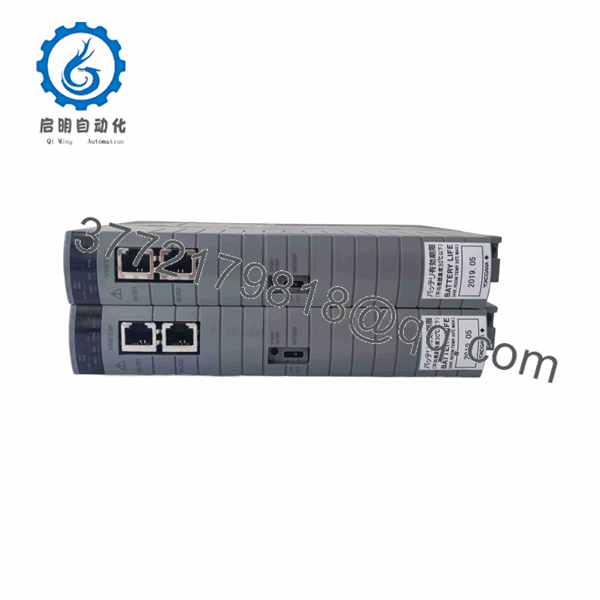
CP461-50
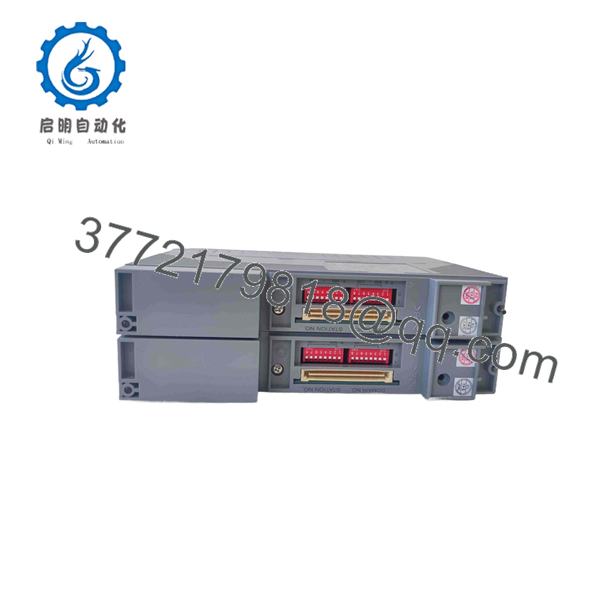
CP461-50
Installation & Configuration Guide
Stage 1: Pre-Installation Preparation — 5–10 Minutes
- ⚠️ Notify operations and place the affected process in the approved maintenance state.
- Apply plant LOTO procedures where electrical isolation is required.
- Confirm whether the FCS operates with one or two processors.
- Prepare:
- ESD wrist strap
- PH1 screwdriver
- Digital multimeter
- Wire labels
- Smartphone or camera
- Record the complete processor nameplate:
- -50
- Full style/suffix
- Hardware revision
- Serial number
- Firmware revision, if available
- Photograph the processor position, connectors, status LEDs, and rack arrangement.
- Back up the applicable CENTUM VP engineering and control configuration.
⚠️ Do not assume every processor has the same hardware configuration. Yokogawa identifies across several FCS generations, while the -50 supplier catalog references identify AFV300/AFV400 compatibility. Confirm the installed FCS before ordering or installing a spare.
Stage 2: Removing the Old Module — Approximately 5 Minutes
- Confirm the FCS is in the correct maintenance or redundant operating state.
- Verify electrical isolation if the applicable maintenance procedure requires it.
- Release the processor module retaining mechanism.
- Disconnect the relevant FCS/backplane connections carefully.
- Pull the processor straight out of its slot.
- Inspect the connector and backplane for contamination, bent contacts, or mechanical damage.
- Keep the original available until the replacement has passed commissioning.
Stage 3: Installing the New Module — Approximately 5 Minutes
- Wear a grounded ESD strap before handling the replacement.
- Compare the complete -50 ordering information with the removed processor.
- Confirm the FCS hardware family and processor position.
- Verify the replacement’s suffix and hardware revision.
- For redundant installations, confirm the correct processor position and pairing.
- Insert the module carefully into the designated slot.
- Secure the processor using the original retaining mechanism.
- Reconnect the applicable system connections.
- Inspect the module and connectors before energizing.
⚠️ A supplier catalog identifies -50 as the replacement for -10, but that should not be interpreted as universal compatibility across every installation. Check the actual FCS model and system revision first.
Stage 4: Power-On & Testing — Approximately 10–15 Minutes
- Before power-up, check the applicable supply circuit with a multimeter.
- Energize the FCS according to the Yokogawa maintenance procedure.
- Observe the processor status indicators during startup.
- Confirm normal processor initialization.
- Verify communication with the CENTUM VP engineering and operator stations.
- Check processor redundancy status where two processors are installed.
- Confirm that the expected FCS application is available.
- Verify representative I/O points.
- Check control loops, alarms, sequences, and interlocks.
- Monitor FCS diagnostics before returning the process to normal operation.
Field troubleshooting notes:
- Processor does not initialize: Check exact style, FCS compatibility, firmware, and backplane condition.
- Redundancy does not establish: Compare processor revisions and redundant-pair configuration.
- FCS communication fault: Check the applicable control-network interface and connectors.
- Application unavailable: Verify the CENTUM VP configuration and application download/recovery procedure.
- Unexpected control behavior: Stop further configuration changes and compare the replacement hardware and firmware against the removed unit.
⚠️ Yokogawa’s 2021 security advisory identifies as an affected CENTUM VP FCS processor and states that CENTUM VP R6.08.00 or later is a countermeasure; Yokogawa also identifies CP471 as an alternative processor not affected by that specific vulnerability. This matters when maintaining older installations.
FAQ
Q1. What is the Yoko?
is a Yokogawa CENTUM VP Field Control Station processor module. Secondary catalog references identify it as a processor variant used with AFV300/AFV400 systems.
Q2. Wha used for?
It performs the processor function of the applicable FCS, executing control applications and managing the FCS processing associated with the plant control system.
Q3 a replacement for -10?
Supplier catalog documentation explicitly identifies as a replacementCP461-10. The replacement should still be checked against the actual FCS model, style, firmware, and system revision before installation.
Q4. support redundant operation?
Yes. processor configurations can use two processors for dual-redundant operation. Yokogawa’s CENTUM VP architecture uses redundant controller configurations, and its documentation lists among the applicable FCS processor modules.
Q5 compatible with AFV30S and AFV30D?
The is officially associated with AFV30S and AFV30D, as well as AFV40S/AFV40D and later A2FV50/A2FV70 configurations. However, the spec ordering style should be checked against the FCS nameplate before treating it as a direct replacement.
Q6. have a known cybersecurity consideration?
Yes. Yokogawa published a security advisory identifying as an affected CENTUM VP FCS processor for the Meltdown/Spectre CPU vulnerability. The advisory recommends CENTUM VP R6.08.00 or later as a countermeasure, or replacement with CP471.
Q7. What information should I provide when sourcing a replacement?
Provide the comp nameplate, style/suffix code, hardware revision, serial number, FCS model, CENTUM VP revision, and processor redundancy arrangement. This information is more useful than the designation alone.
replacement work, verify the FCS family, complete style code, and CENTUM VP revision before installation.



