
 WhatsApp: +86 16626708626
 Email:
  Phone: +86 16626708626
Description
Key Technical Specifications
| Parameter | Value / Feature Specification |
| Part Number | DSQC322 |
| ABB Ordering Code | 3HAB7211-1 / 3HAB7211-1/1 |
| Primary System Family | ABB S4 Controller (IRB 1400, IRB 2400, IRB 4400, IRB 6400) |
| Component Category | Main Computer Processing Unit (Main CPU) |
| Backplane Bus Type | Standard VMEbus Architecture |
| Processor Architecture | Motorola 680×0 / Embedded RISC Core |
| Memory Features | Battery-backed CMOS RAM for system parameters and program backup |
| Communication Ports | Serial RS-232/RS-422 ports, Teach Pendant interface, Service port |
| Diagnostic Displays | Onboard 7-segment numerical display and LED status indicators |
| Operating Voltage | +5 VDC, ±12 VDC supplied via VME backplane |
| Operating Temperature | 0°C to +50°C (32°F to +122°F) |
| Compatible Modules | DSQC321, DSQC323, DSQC334, DSQC335 axis computer boards |
Product Introduction & Supply Chain Strategy
The ABB DSQC322 (3HAB7211-1) serves as the central processing unit inside legacy ABB S4 robot control cabinets, managing high-level trajectory calculations, system task execution, and real-time communication across slave axis boards. It processes real-time feedback loops and coordinates external automation I/O to maintain high-precision motion control for industrial articulated robots.
This product is a Brand New Surplus unit. It is not used, not pulled from a decommissioned plant, and not refurbished. All modules undergo rigorous quality verification to ensure OEM-level reliability. Holding a genuine New Surplus DSQC322 board is an essential risk-mitigation strategy for manufacturing facilities operating legacy ABB robotics. Because ABB has long transitioned away from the S4 platform, factory lead times for original replacement boards are non-existent. Sourcing a brand-new surplus board guarantees complete backplane compatibility, protects system parameters from memory corruption, and avoids the severe secondary downtime costs caused by worn or unstable second-hand boards.
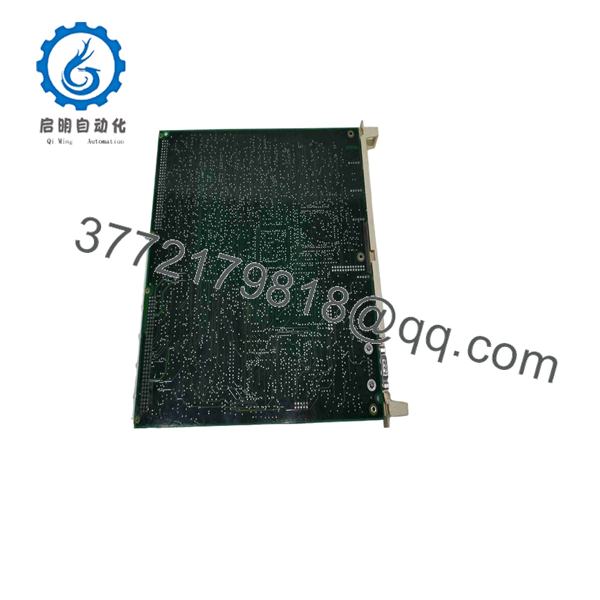
DSQC322
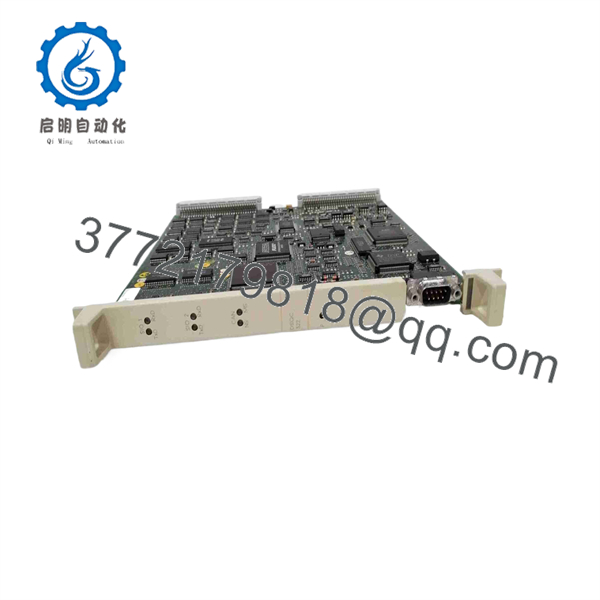
DSQC322
Installation & Configuration Guide
1.Pre-Installation Preparation & Safety:Prerequisite.
Perform a complete backup of the robot controller software, system parameters, and user routines (SYS.BU) via the teach pendant or service tool. Initiate complete Lock-Out/Tag-Out (LOTO) procedures on the primary cabinet breaker. Put on an ESD wrist strap grounded to the controller chassis before handling the replacement processor card. Document all jumper settings, DIP switches, and front-panel connections on the legacy board with photos.
2.Removal of Legacy Processor Board:
Disconnect all front-panel serial cables, teach pendant cables, and interface plugs, taking care to pull on connector hoods rather than wire looms. Unfasten the top and bottom retaining thumbscrews on the DSQC322 card faceplate. Gently pull the card extraction levers outward simultaneously to unseat the board from the rear VMEbus backplane, then slide the card along the plastic card guides out of the rack.
3.Jumper Mirroring & Board Insertion:
Inspect the new DSQC322 board and carefully configure all hardware jumpers and DIP switches to match the original board’s settings exactly. Verify that the rear VMEbus connectors show no bent pins or debris. Align the board edges with the top and bottom guide rails of the computer rack, slide it in smoothly until it meets the backplane, and press both extraction levers inward to fully seat the 96-pin DIN connectors.
4.Power-On, Firmware Load & Diagnostics:
Tighten the faceplate retaining screws to ensure solid chassis grounding. Reconnect all communication and interface cables. Restore cabinet power and observe the onboard 7-segment status display. The display should advance through the self-test sequence (1 through 8) and settle on a solid system status indicator. If prompted, perform a system cold start (B-start/C-start) and restore the system parameters from your backup media via the service port.
Firmware/Software Versions & Upgrade Notes
- BaseWare Compatibility: The DSQC322 main computer board supports specific ranges of ABB BaseWare 2.0 and 3.0 operating systems. Verify that your system boot ROMs and RAM configurations align with your current BaseWare release.
- Axis Computer Matching: The CPU must operate alongside compatible axis computer boards (such as the DSQC321 or DSQC334). Mixing mismatched hardware revisions between the main CPU and axis boards can trigger communication handshake errors (
System Failure 10024). - CMOS Battery Backup: The onboard battery preserves system parameters during power-off states. When installing a New Surplus board, verify or replace the RAM backup battery to prevent memory loss during long maintenance outages.
- Firmware Upgrade Hazards: Do not attempt BaseWare software upgrades on the during emergency board replacement without verifying memory capacity. Upgrading BaseWare beyond hardware support limits can cause flash corruption or unrecoverable boot-loop errors.
Frequently Asked Questions (FAQ)
Why should I choose a New Surplus over a cheaper refurbished board?
Refurbished robot control boards often suffer from degraded onboard capacitors, thermal stress micro-cracks, and worn connector gold plating that cause intermittent communication drops. A New Surplus unit offers pristine circuitry, factory-grade trace integrity, and uncompromised reliability, protecting your facility against unexpected line stops that can cost thousands of dollars per minute.
Is this ABB board guaranteed to be unused?
Yes. Our New Surplus inventory consists exclusively of genuine, un-used OEM boards. They are sourced from cancelled automation projects, spare parts reserves, or strategic inventory releases, featuring zero operating hours and clean backplane connector pins.
How do you verify the quality of legacy ABB boards?
Every board undergoes a strict multi-step inspection SOP. We perform microscopic trace inspections, verify power supply continuity, check RAM retention circuits, and test board boot sequences on dedicated VMEbus test stands to confirm full operational integrity before dispatch.
Do I need to reprogram the robot after replacing the board?
If your system parameters and user programs are backed up, you will simply reload the system backup (SYS.BU) after performing the initial cold start. The board itself houses the execution hardware; reloading your saved parameter files restores your exact robot calibration and program routines.
What should I do if the 7-segment display on the shows an error code during bootup?
An error code indicates a specific hardware or boot sequence fault. Check that the board is fully seated in the VME backplane, verify that all DIP switches match your original configuration, and ensure the power supply unit (DSQC328 or equivalent) is providing stable +5V and ±12V rails.
What warranty is provided with this New Surplus board?
This New Surplus module includes a full 1 year replacement warranty. In the unlikely event of a component failure under normal operating conditions, our team will dispatch a replacement unit immediately from our stock reserves.



