
 WhatsApp: +86 16626708626
 Email:
  Phone: +86 16626708626
Description
Key Technical Specifications
| Parameter | APEX3013 |
|---|---|
| Manufacturer | Advanced Energy |
| Model | APEX3013 |
| Product Type | RF Generator |
| RF Output Power | 3 kW |
| RF Frequency | 13.56 MHz |
| Application | Plasma processing / semiconductor equipment |
| RF Load | Typically 50 Ω system |
| Generator Family | APEX |
| Common Model Number | 3156113-006 |
| Other Reported Variant | 3156113-011A |
| Applied Materials Association | 0190-19021 series for certain configurations |
| Cooling | Configuration-dependent; verify exact unit |
| Control/Interface | Configuration-dependent |
| Exact AC Input | Not verified for every APEX3013 variant |
| Dimensions | Not verified for the exact legacy configuration |
| Weight | Not verified for the exact legacy configuration |
| Lifecycle | Legacy |
A critical distinction is necessary here: APEX3013 is not one universally interchangeable hardware configuration. Public equipment inventories identify 3156113-006, 3156113-011A, and other related part numbers under the APEX3013 name.
Advanced Energy’s current APEX 3K comparison material specifies 208 VAC, three-phase, 14.5 A per phase, 30–3000 W output, 13.56 MHz ±0.005%, and 60% typical AC-to-RF efficiency at 3 kW into 50 Ω for the newer Apex 3K Refresh. These figures should not automatically be treated as the electrical specification of every original APEX3013 unit.
Product Introduction
The Advanced Energy APEX3013 is a 3 kW RF generator used in semiconductor and plasma-processing equipment. The model is associated with 13.56 MHz RF power generation, providing the RF energy required to establish and maintain plasma during processes such as etching, deposition, and related wafer-processing operations.
For spare-parts procurement, the full model/part number is more important than the name alone. Records identify units under multiple Advanced Energy model and OEM part numbers, including 3156113-006 and 3156113-011A. The generator revision, interface configuration, cooling arrangement, and equipment-specific part number should therefore be matched before ordering.
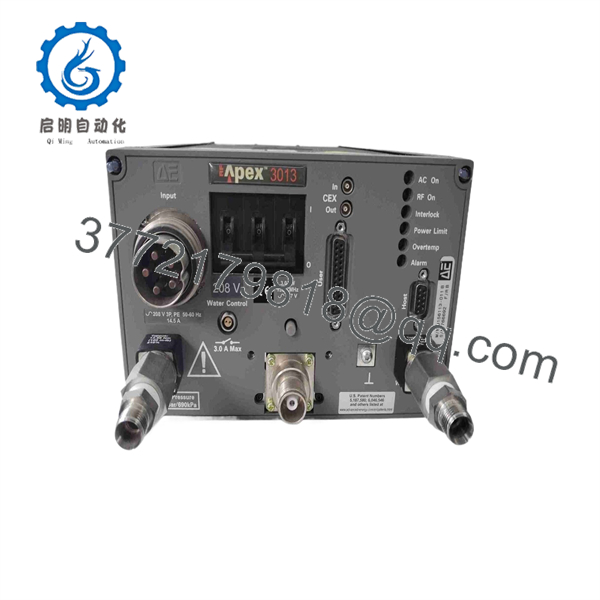
APEX3013
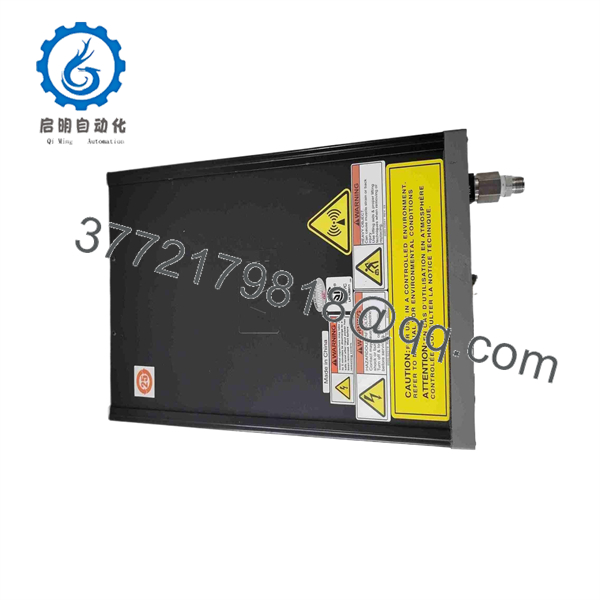
APEX3013
Installation & Configuration Guide
Stage 1 — Pre-Installation Preparation
- Confirm the complete nameplate information, including , model number, revision, and serial number.
- Record the OEM equipment part number if installed in an Applied Materials or other semiconductor tool.
- Back up the existing generator configuration and machine-level process parameters.
- Record RF frequency, power setpoint, control mode, interlock status, and matching-network configuration.
- Verify the RF cable, load/match network, cooling connections, and control interface.
- Follow the semiconductor-tool manufacturer’s lockout/tagout procedure before removing the generator.
⚠️ RF generators contain hazardous electrical energy and produce high-frequency RF power. Do not work on the RF output path while energized.
Stage 2 — Removing the Existing Generator
- Place the process tool in an approved maintenance state.
- Disable RF generation through the equipment control system.
- Isolate the AC input according to the service procedure.
- Allow the generator and associated power circuitry to discharge.
- Disconnect and label the RF output cable.
- Disconnect control, interlock, cooling, and utility connections.
- Remove the mounting hardware and carefully extract the generator.
⚠️ Do not assume that switching off the tool removes all hazardous energy. Verify electrical isolation according to the applicable service procedure.
Stage 3 — Installing the
- Verify that the replacement model and OEM part number match the removed unit.
- Inspect RF connectors for damage, contamination, or abnormal wear.
- Install the generator in the original mounting position.
- Reconnect cooling and utility connections where applicable.
- Reconnect control and interlock wiring.
- Connect the RF output path using the correct cable and connector configuration.
- Verify the RF load/matching-network configuration before applying power.
⚠️ Never operate an RF generator into an improperly terminated or unknown RF load. The RF output network must be compatible with the generator and process-tool configuration.
Stage 4 — Power-On & Testing
- Restore utility power according to the equipment manufacturer’s procedure.
- Verify that generator diagnostics report a normal startup condition.
- Confirm the equipment interlock chain is healthy.
- Verify the configured operating frequency is 13.56 MHz for the applicable configuration.
- Start at a controlled low RF power level.
- Confirm forward and reflected power behavior.
- Verify plasma ignition and process response.
- Gradually return the RF power to the qualified process setpoint.
- Check alarms, reflected-power protection, cooling status, and generator fault logs.
⚠️ A successful startup does not establish process qualification. RF power, matching-network behavior, reflected power, and plasma characteristics must be checked against the tool’s qualified process window.
FAQ
What is the Advanced Energy ?
The is a 3 kW RF generator designed for semiconductor and plasma-processing equipment, with 13.56 MHz operation associated with the model.
What is the output power of ?
The commonly documented configuration is a 3 kW RF generator. Semiconductor-equipment service records specifically list at 3 kW and 13.56 MHz.
What frequency does use?
The is associated with 13.56 MHz RF operation, a standard industrial RF frequency used in plasma-processing equipment.
Is an industrial automation PLC or power supply?
No. It is a specialized RF power generator. It supplies RF energy to a plasma process rather than performing PLC logic, conventional DC power conversion, or standard industrial I/O functions.
What is the difference between and Paramount 3013?
They are different Advanced Energy RF-generator platforms. Advanced Energy’s comparison documentation identifies the newer Paramount 3013 as a 3 kW, 13.56 MHz platform with different electrical, thermal, and dynamic specifications from the Apex 3K Refresh. Therefore, Paramount 3013 should not be treated as an automatic replacement for an original without equipment-level compatibility verification.
Which part numbers are associated with ?
Public service and equipment records associate with 3156113-006, 3156113-011A, and other configuration-specific numbers. One equipment database also associates 3156113-006 with Applied Materials P/N 0190-19021W and 0190-19021-001.
Can I buy an by model name alone?
For a semiconductor-equipment spare, that is not recommended. Match the complete Advanced Energy model number, revision, OEM part number, connector arrangement, cooling configuration, and equipment application. The available records demonstrate that multiple hardware variants exist under the designation.



