
 WhatsApp: +86 16626708626
 Email:
  Phone: +86 16626708626
Description
| Parameter | Specification Value |
| Catalog Number | 1747-L553 |
| Processor Type | SLC 5/05 Controller |
| User Memory Capacity | 64K Words (Data and Program) |
| Communication Ports | Channel 0: RS-232 (DF1, DH-485, ASCII, Modbus RTU Master)
Channel 1: Ethernet 10/100 Mbps (RJ45, EtherNet/IP & TCP/IP) |
| Ethernet Transfer Rate | 10/100 Mbps auto-negotiating |
| Backplane Current (5V DC) | 1.0 A |
| Backplane Current (24V DC) | 200 mA |
| Max Local I/O Capacity | 4,096 Inputs / 4,096 Outputs (max 3 chassis / 30 slots) |
| Program Execution Time | 0.9 ms per 1K instructions (typical) |
| Memory Retention | Lithium Battery (1747-BA) + Optional Flash Memory (1747-M13) |
| Keyswitch Positions | RUN, REM (Remote), PROG (Program) |
| Status Indicators | RUN, FORCE, FLT, ENET, RS232, BATT LEDs |
Product Introduction & Supply Chain Strategy
This product is a Brand New Surplus unit. It is not used, not pulled from a decommissioned plant, and not refurbished. All modules undergo rigorous quality verification to ensure OEM-level reliability. The Allen-Bradley 1747-L553 is the premier CPU module in the SLC 500 family, delivering 64K words of memory alongside integrated 10/100 Mbps Ethernet networking. Slotting into Slot 0 of a standard 1746 chassis, it connects legacy machine automation seamlessly into modern plant Ethernet infrastructure, SCADA/HMI platforms, and enterprise data historians.
Since Rockwell Automation has retired the entire SLC 5/05 line, acquiring the 1747-L553 as New Surplus is an essential Total Cost of Ownership (TCO) risk-reduction strategy. Refurbished processor cards often suffer from aged physical layer network transceivers, dried-out filtering capacitors, and board-level heat fatigue that cause spontaneous Ethernet disconnects and CPU lockups. Keeping a factory-fresh surplus unit on-site protects your facility against sudden, catastrophic downtime while avoiding the immediate, multi-million-dollar capital outlay of converting entire control cabinets to CompactLogix or ControlLogix platforms.
Installation & Configuration Guide
1.Stage 1: Pre-Installation (Prep & Safety):Back up logic files, isolate cabinet power, and attach static grounding.
- Perform strict Lock-Out/Tag-Out (LOTO) protocols on the incoming 1746 chassis power supply.
- Wear a grounded Electrostatic Discharge (ESD) wrist strap attached to unpainted enclosure steel.
- Connect to the processor via RSLogix 500 and perform a complete upload/backup of the program logic file (
.RSS) and network configuration.
2.Stage 2: Removal:Safely disengage the CPU card from Slot 0 without stressing backplane bus pins.
- Turn the faceplate key switch to PROG mode.
- Disconnect the RJ45 Ethernet network cable (Channel 1) and RS-232 serial cable (Channel 0).
- Squeeze the upper and lower extraction tabs on the 1747-L553 module housing.
- Slide the controller straight out of Slot 0 horizontally to prevent damaging backplane connectors.
3.Stage 3: Installation (Clone & Seat):Connect battery, transfer optional flash storage, and seat replacement unit.
- Connect a fresh 1747-BA lithium memory retention battery to the onboard connector lead.
- If using an optional 1747-M13 Flash memory socket module, install it firmly into the board socket.
- Align the board with guide tracks in Slot 0 (leftmost position next to the power supply).
- Push the module inward until both locking latches click firmly into the chassis frame.
- Reconnect the RJ45 Ethernet cable and RS-232 serial cable.
4.Stage 4: Power-On & Testing:Power up, assign IP parameters, and download operating program logic.
- Re-energize the chassis power supply and verify the BATT LED is OFF.
- If the new CPU has default factory settings, assign its IP address, subnet mask, and gateway using the BOOTP/DHCP Server Utility or direct serial connection via Channel 0.
- Download the target
.RSSproject file via RSLogix 500 over Ethernet or RS-232, clear active fault codes, and switch the key position to RUN.
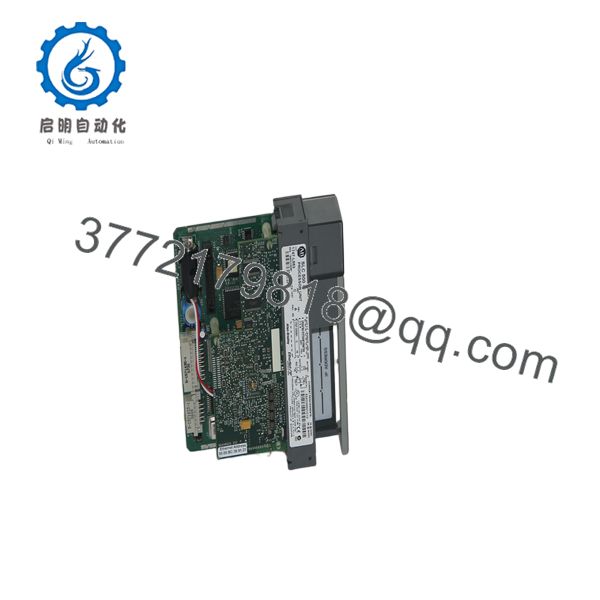
1747-L553
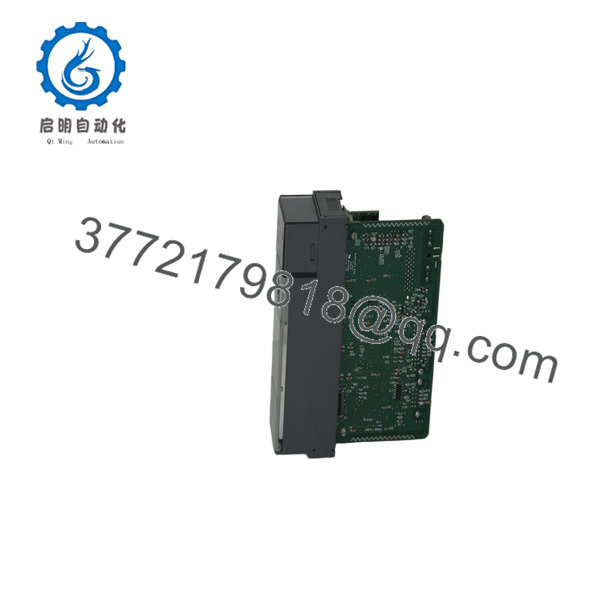
1747-L553
Firmware/Software Versions & Upgrade Notes
- Software Compatibility: Supported across all versions of RSLogix 500. Verify that the processor catalog number (1747-L553), OS series (Series A, B, or C), and OS revision level in your software project tree match the physical label on the side of the 1747-L553 module.
- Network Protocol Support: Series C firmware for the 1747- introduces support for 10/100 Mbps auto-negotiation, Modbus TCP client/server bridging (via specific OS revisions), and enhanced socket communication capability over Channel 1 Ethernet.
- Firmware Update Risks: Firmware updates on the SLC 5/05 are applied via ControlFLASH over the network or serial interface. Flashing firmware across a wireless or unstable Ethernet drop risks bricking the controller bootloader; always perform firmware updates using a direct, wired Ethernet connection or Channel 0 RS-232 cable.
Frequently Asked Questions (FAQ)
Why is this New Surplus 1747- priced higher than refurbished modules but lower than OEM list?
Our pricing reflects the strategic market value of original, unused OEM inventory from global industrial reserves. Refurbished cards are inexpensive because they utilize harvested electronics exposed to years of industrial thermal cycles. New Surplus guarantees 100% factory operating lifespan and network stability without the high markup or extended lead times of legacy OEM list orders.
Are these 1747- controllers genuinely new?
Yes. Every 1747- unit is genuine Allen-Bradley stock, completely unused, with clean edge connectors, zero pin wear, and pristine housing. Packages are opened only inside static-controlled ESD cleanrooms for visual checks and automated test-bench validation prior to shipment.
What is the difference between the 1747-L551, 1747-L552, and 1747- processors?
The core difference within the SLC 5/05 family is user memory capacity. The 1747-L551 features 16K words, the 1747-L552 features 32K words, and the 1747- features the maximum 64K words of configurable instruction and data memory. All three share identical Ethernet and RS-232 physical ports.
How do I set the IP address on a factory-default 1747- processor?
A new or factory-cleared 1747- processor has BOOTP enabled by default. You can assign an IP address using the Rockwell BOOTP/DHCP Commissioning Utility over Ethernet, or you can connect locally through Channel 0 using an RS-232 serial cable (1747-CP3) to configure Channel 1 IP settings directly inside RSLogix 500 / RSLinx.
What warranty coverage comes with this New Surplus processor?
We provide a comprehensive 1-Year replacement warranty (depending on your service agreement level). If the unit experiences any hardware malfunction during normal operation, we immediately dispatch a replacement unit from our dedicated strategic buffer stock.



