
 WhatsApp: +86 16626708626
 Email:
  Phone: +86 16626708626
Description
Key Technical Specifications
| Parameter | Value |
|---|---|
| Manufacturer | Allen-Bradley / Rockwell Automation |
| Catalog Number | 6186M-15PT |
| Product Series | 6186M Performance |
| Display Type | Color active-matrix TFT LCD |
| Display Size | 15.0 in. (381 mm) diagonal |
| Display Area | 304 × 228 mm (12.0 × 9.0 in.) |
| Native Resolution | 1024 × 768 |
| Display Colors | 16.2 million |
| Brightness | 450 cd/m² (Nits) |
| Contrast Ratio | 400:1 typical |
| Touch Screen | Resistive, antiglare |
| Bezel | Aluminum |
| Video Inputs | VGA, DVI-I |
| USB | 2 × USB 2.0 |
| AC Input | 100–240 V AC, autoranging |
| DC Input | 9–36 V DC |
| Line Frequency | 47–63 Hz |
| Maximum Power Consumption | 34 W |
| Operating Temperature | 0–55 °C |
| Storage Temperature | −20–60 °C |
| Relative Humidity | 10–90%, non-condensing |
| Vibration | 2 g peak, 10–640 Hz |
| Operating Shock | 20 g, 11 ms half sine |
| Non-Operating Shock | 30 g, 11 ms half sine |
| Dimensions (H × W × D) | Approx. 309 × 410 × 61 mm |
| Weight | Approx. 7.3 kg (16 lb) |
| Mounting | Panel, bench/tabletop, rack |
| Front Protection | IEC IP66 |
| NEMA Rating | Type 1, 4, 4X, 12 |
| Backlight | CCFT, approximately 50,000 hours to half brightness at 25 °C |
| Lifecycle | Discontinued December 31, 2022 |
The published Rockwell technical documentation specifies the 15-inch model’s 1024 × 768 native resolution, 450 Nits luminance, 34 W maximum consumption, 9–36 V DC input, and 100–240 V AC input.
The 6186M selection documentation identifies 6186M-15PT specifically as the 15-inch model with the touch-screen option, while the 15PN version does not include touch.
Product Introduction
The Allen-Bradley 6186M-15PT is a 15-inch industrial Performance Monitor designed for operator visualization and machine-control applications. It uses a color TFT LCD, 1024 × 768 native resolution, resistive touch input, and VGA or DVI-I video connections. The aluminum-bezel panel supports industrial enclosure applications with an IP66 front rating.
This model is primarily relevant when maintaining an existing Allen-Bradley HMI or industrial-PC installation. Its legacy VGA/DVI-I architecture can simplify replacement of an existing display, but the discontinued lifecycle status means buyers should verify physical dimensions, video interface, power arrangement, and available spare inventory before committing to a replacement strategy.
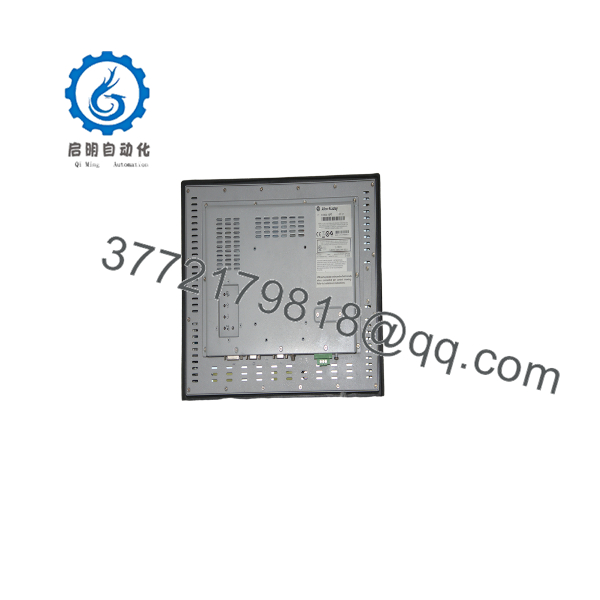
6186M-15PT
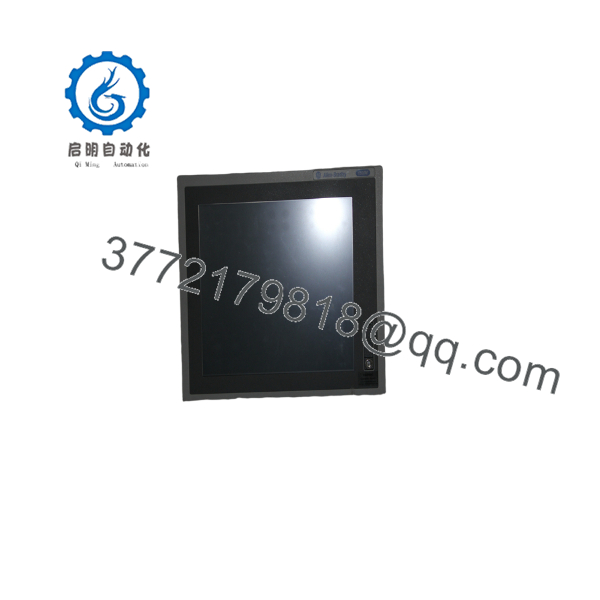
6186M-15PT
Installation & Configuration Guide
Stage 1: Pre-Installation Preparation — Approximately 10 Minutes
⚠️ Safety First: Notify operations before taking the HMI or industrial monitor offline. Place the controlled equipment in its approved safe state. Follow the site’s lockout/tagout procedure when required. Disconnect monitor power before removing electrical connections.
Tools Required:
- ESD wrist strap
- #2 Phillips screwdriver
- Calibrated multimeter
- Wire labels
- Smartphone for photographs
- Appropriate panel-mount tools
- Existing VGA or DVI-I cable
- Replacement power adapter or DC wiring, as applicable
Data Backup:
- Record the exact 6186M-15PT catalog number.
- Photograph the installed monitor and bezel.
- Record the video connection: VGA or DVI-I.
- Document the computer or HMI driving the display.
- Record display resolution and refresh rate.
- Photograph all rear connections.
- Record the power source and adapter arrangement.
- Measure the existing panel cutout before removing the monitor.
- Save HMI/PC configuration separately from the physical monitor replacement.
⚠️ The 6186M-15PT is a display, not the HMI application controller. Replacing the monitor does not normally replace the HMI project, PLC program, or SCADA configuration. The host computer remains responsible for generating the displayed graphics.
Stage 2: Removing the Old Monitor — Approximately 10 Minutes
- Shut down the HMI/industrial PC according to the site’s procedure.
- Remove power from the monitor.
- Disconnect the video cable.
- Disconnect the touch interface cable if fitted.
- Disconnect the power connection.
- Support the monitor from the front while releasing the panel-mount hardware.
- Remove the mounting clips or hardware.
- Carefully withdraw the monitor from the panel.
- Inspect the panel cutout and sealing surface.
- Check for corrosion, gasket damage, or deformation.
⚠️ Do not pull the monitor forward while cables remain connected. The VGA, DVI-I, USB, and touch connections can be damaged by pulling against the rear connectors.
Keep the old monitor until the replacement has completed visual and touch testing.
Stage 3: Installing the New Monitor — Approximately 10 Minutes
- Verify the replacement is 6186M-15PT.
- Confirm the 15-inch display and aluminum bezel match the required installation.
- Verify the panel cutout dimensions.
- Check the gasket and sealing surface.
- Carefully place the monitor into the panel.
- Install the mounting clips.
- Tighten the mounting hardware evenly.
- Do not overtighten the clips. Excessive mechanical force can distort the panel or damage the display assembly.
- Connect the VGA or DVI-I cable.
- Connect the touch interface.
- Connect the specified power source.
- Verify all cables have adequate strain relief.
Configuration Clone — Critical
The display itself does not store the HMI application. The important configuration resides in the connected industrial PC, HMI terminal, or control computer.
Verify:
- Native resolution: 1024 × 768
- Video interface: VGA or DVI-I
- Touch interface
- Operating-system display configuration
- HMI application resolution
- Touch-screen driver, where applicable
- Screen calibration
- Brightness setting
- Cable routing
- Power source
Rockwell’s user documentation specifically recommends operating the flat-panel display at its native resolution for the clearest image.
Self-Checklist:
- 6186M-15PT model verified
- 15-inch display confirmed
- Panel cutout verified
- Mounting clips secure
- VGA/DVI-I connection secure
- Touch cable secure
- Power connection verified
- Grounding checked
- 1024 × 768 resolution selected
- Touch operation tested
Stage 4: Power-On & Testing — Approximately 10 Minutes
- Verify the power wiring before energizing.
- Apply power to the monitor.
- Start the connected industrial PC or HMI.
- Confirm the display initializes.
- Check the image for flicker, missing pixels, abnormal colors, or distortion.
- Set the host output to 1024 × 768.
- Verify the image fills the usable display area correctly.
- Test touch input across the complete screen.
- Verify touch calibration.
- Test operator controls within the HMI application.
- Check the VGA/DVI-I connection for intermittent faults.
- Confirm the panel seal remains properly seated.
- Return the system to production only after the approved functional test passes.
⚠️ If the screen works but touch does not, do not immediately condemn the monitor. Check the touch cable, host driver, USB/serial connection, and operating-system configuration first.
Technical Pitfalls and Survival Guide
1. Video Interface Mismatch
❗ The 6186M-15PT provides VGA and DVI-I video inputs. A modern computer may provide HDMI or DisplayPort instead.
Do not order the monitor based solely on screen size. Verify the host’s physical video output and the required converter, if any.
2. Native Resolution
The native resolution is 1024 × 768. Running another resolution can produce scaling or image-quality issues. Rockwell specifically recommends operating the monitor at native resolution.
3. Touch Interface
The 15PT designation matters. The 15PN is the corresponding non-touch version. The 15PT uses a resistive touch screen.
4. Power Arrangement
The monitor can operate from 100–240 V AC or 9–36 V DC. Verify which arrangement exists in the installed panel before removing the original unit.
Do not connect AC and external DC power simultaneously. Rockwell’s installation documentation explicitly warns against using both sources at the same time.
5. Thermal Conditions
The specified operating range for the 15-inch model is 0–55 °C. Heat generated by adjacent equipment inside an enclosure counts toward the monitor’s ambient temperature.
I’ve seen plenty of “bad monitor” diagnoses that turned out to be enclosure heat. Measure the actual air temperature around the monitor, not the temperature in the control room.
6. Lifecycle Status
Rockwell Automation lists the 6186M-15PT as discontinued December 31, 2022.
That changes the procurement decision. For a critical HMI station, holding one tested spare may make more sense than waiting until the installed display fails and discovering that the exact panel cutout and legacy video interface are no longer easy to source.
Frequently Asked Questions (FAQ)
What is the Allen-Bradley 6186M-15PT?
The 6186M-15PT is a 15-inch Allen-Bradley 6186M Performance Monitor with a touch screen and aluminum bezel. It provides VGA and DVI-I video inputs and is intended for industrial panel and operator-interface applications.
Is the 6186M-15PT obsolete?
Yes. Rockwell Automation lists the model as discontinued effective December 31, 2022.
That does not mean existing units cannot be maintained. It means procurement should be based on available inventory, tested surplus, repair options, and the engineering requirements of the existing panel.
What is the difference between 6186M-15PT and 6186M-15PN?
The key difference is the touch function.
- 6186M-15PT: 15-inch display with resistive touch
- 6186M-15PN: 15-inch display without touch
Rockwell’s catalog documentation identifies the 15PT as the touch-screen variant.
If the HMI relies on operator touch input, do not substitute the 15PN simply because the display size is identical.
What resolution does the 6186M-15PT use?
Its native resolution is 1024 × 768 pixels, with approximately 16.2 million colors. Rockwell documentation recommends operating the monitor at its native resolution.
What power supply does the 6186M-15PT require?
The monitor accepts 100–240 V AC with 47–63 Hz input frequency or 9–36 V DC. Maximum power consumption is approximately 34 W.
Verify the existing installation before ordering because the power arrangement and adapter configuration affect the replacement procedure.
Can I replace the 6186M-15PT with a modern monitor?
Potentially, but do not treat it as a simple screen-size substitution.
Check at minimum:
- Panel cutout
- Mounting depth
- Video interface
- Native resolution
- Touch technology
- Touch interface
- Power supply
- Environmental rating
- Front sealing requirements
- HMI application compatibility
A modern HDMI touchscreen may display the same application while still requiring mechanical modifications and a video-interface conversion.
What is the front protection rating?
The documented enclosure rating is IEC IP66, with NEMA UL 50 Type 1, 4, 4X, and 12 ratings for the applicable panel-mounted monitor configuration.
Do not assume that an aftermarket replacement has equivalent protection simply because it has a similar 15-inch screen.
What condition should I specify when buying a replacement?
For this discontinued model, specify the condition clearly:
- New Original / New Surplus
- Factory Sealed
- Refurbished / Tested
For a critical production HMI, request photographs of the actual unit, including the front glass, aluminum bezel, catalog label, rear connectors, and power hardware. If the unit is refurbished, ask for the actual test report rather than a generic statement.
Is there a direct replacement?
Rockwell’s current product page identifies the discontinued 6186M-15PT as having a Direct Replacement category, but the page does not identify a specific successor catalog number in the product information returned.
For an installed system, I would not order a supposed replacement solely from a “direct replacement” label. Verify the replacement’s cutout, touch interface, video inputs, power arrangement, environmental rating, and HMI compatibility against the existing installation.
Why is surplus stock relevant for this model?
Because Rockwell discontinued the 6186M-15PT in 2022, exact-match inventory is now a lifecycle-management issue rather than a normal current-production purchase.
For a plant with several identical operator stations, keeping one new-surplus or professionally tested spare can be a practical way to avoid an unplanned HMI redesign. Verify the actual unit condition and serial/label information before purchase.



