
 WhatsApp: +86 16626708626
 Email:
  Phone: +86 16626708626
Description
Key Technical Specifications
| Parameter | Value |
|---|---|
| Product type | Measure interface module / PLC interface board |
| Manufacturer | Alstom |
| Model | SCN804C |
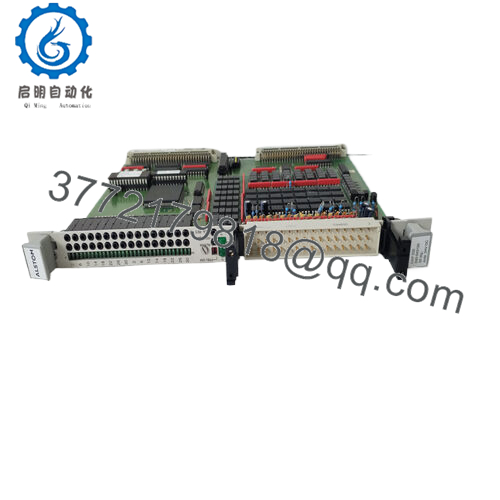
| Connector set | 28-position terminal block, 25-pin DSub connector |
| Power arrangement | Two power supplies |
| Application | Measurement interface between modules in industrial control systems |
| System role | Signal coordination and interface handling |
| Installation profile | Plug-in industrial module |
| Lifecycle profile | Legacy hardware; verify exact revision and mating hardware before ordering |
| Stocking strategy | Keep buffer stock for critical assets; consider cross-site sharing and last-time-buy planning |
Product Introduction & Supply Chain Strategy
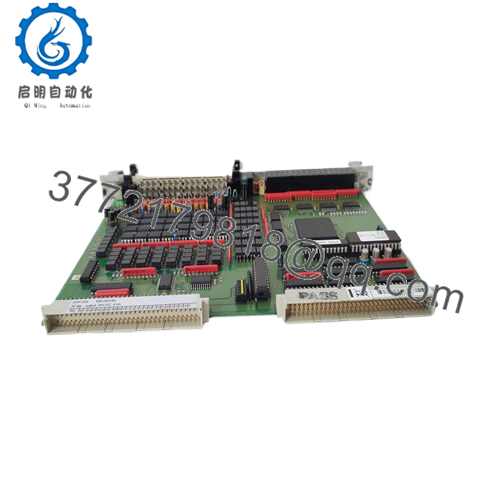
Alstom SCN804C is a measurement interface module used in legacy industrial control systems to coordinate signals between measurement hardware and other modules. It is the kind of part that often sits inside older installed bases where stable interface behavior matters more than feature expansion.
Buying SCN804C as New Surplus is a rational supply-chain move when the platform is aging and the exact part is becoming harder to source. It reduces stock-out risk, supports faster recovery from failure, and avoids the hidden reliability penalty of questionable prior-use inventory. For this class of spare, buffer stock usually beats waiting through lead time variability.

- SCN804C
Installation & Configuration Guide
Stage 1: Pre-Installation
- Apply lock-out/tag-out and confirm the cabinet is de-energized.
- Use an ESD strap, insulated tools, and a camera for documentation.
- Photograph the terminal block wiring, connector orientation, and any jumper or switch positions.
- Verify the exact SCN804C revision and mating hardware before installation.
Stage 2: Removal
- Check that all relevant control and signal circuits are safe to handle.
- Remove terminals carefully and label conductors if documentation is incomplete.
- Extract the module straight out to protect the backplane connector and pins.
- Inspect the board edge, connector, and cabinet interface for heat damage or corrosion.
Stage 3: Installation
- Replicate the original wiring, jumper positions, and connector orientation exactly.
- Seat the module evenly to avoid mechanical stress on the board or carrier.
- Reconnect the 28-position terminal block and 25-pin DSub interface per the recorded photos.
- Confirm all grounds and supply connections are correct before energizing.
Stage 4: Power-On & Testing
- Restore control power and check both supply rails for correct voltage and no abnormal current draw.
- Verify that the module initializes without interface alarms.
- Test signal continuity and I/O behavior with the connected measurement hardware.
- Confirm the system runs through a full functional check before returning to service.
Firmware/Software Versions & Upgrade Notes
SCN804C appears to belong to a legacy Alstom control platform, so the exact software or firmware relationship must be verified against the host system before replacement. The safest policy is to preserve the original configuration and avoid changing versions during a routine swap.
If the replacement board carries a different revision or parameter baseline, communication and mapping issues can appear even if the connector fit is correct. Upgrading can create compatibility problems, while downgrading may break newer board assumptions. Record the original board revision, terminal mapping, and host configuration before installation.
Frequently Asked Questions
Is this really new, or is it refurbished?
It should be treated as New Original / New Surplus inventory. For a module like this, that distinction matters because hidden wear can show up later as intermittent signal faults.
Why is it cheaper than OEM new but still not cheap?
New Surplus usually comes from excess inventory or dormant stock, not current factory production. That keeps it below OEM list pricing while staying above uncertain prior-use market stock.
Is SCN804C obsolete?
It should be handled as a legacy or EOL-risk spare until the installed base is confirmed. That means procurement should focus on continuity, not just price.
Can I hot-swap it?
Do not assume hot-swap capability. Isolate power and verify the cabinet is safe unless the site procedure explicitly allows live replacement.
Will my settings transfer automatically?
No. Mirror the original wiring, connector orientation, and any switch or jumper settings manually during swap.
What warranty should I expect?
Warranty terms depend on the supplier and traceability package. For legacy spares, written warranty, serial verification, and QC documentation matter most.
How should I stock it?
For critical systems, keep 1 to 2 units on-site as buffer stock. For slower-moving inventory, vendor consolidation, cross-site sharing, and last-time-buy planning usually deliver better Total Cost of Ownership.



