
 WhatsApp: +86 16626708626
 Email:
  Phone: +86 16626708626
Description
Key Technical Specifications
| Parameter | Value |
|---|---|
| Manufacturer | Applied Materials / Synergy Microsystems |
| Part Number | 0090-76133 |
| Product Type | VME Single-Board Computer |
| Board Family | Synergy V452 |
| Processor | Motorola 68040 |
| Reported AMAT Memory | 16 MB |
| System Bus | VMEbus / VME64 family |
| Ethernet | 10Base-T on the V452 platform |
| Flash Memory | Up to 16 MB on the V452 platform |
| Processor Architecture | 32-bit Motorola 68K |
| CPU Configuration | Single or dual CPU supported by V452 platform |
| 68040 Platform Speed | 25 / 33 MHz on the V452 platform |
| V452 Platform DRAM | Up to 128 MB, depending on configuration |
| Form Factor | Single-slot VME SBC |
| Associated System | Applied Materials semiconductor equipment |
| Known Equipment Association | Centura |
| Related Variant | 0090-76133A |
| Related Configuration | 0090-76133W |
| Lifecycle | Legacy |
The underlying Synergy platform supports Motorola 68040/68060 processors, VME64 extensions, 10Base-T Ethernet, and up to 128 MB DRAM. However, those are platform-level capabilities, not proof that every 0090-76133 board carries the maximum configuration.
For the specific AMAT part, semiconductor-equipment records identify 0090-76133 as an SBC Synergy 68040 CPU with 16 MB. That specific 16 MB configuration should therefore be verified against the actual board before procurement.
Product Introduction
The AMAT 0090-76133 is a Synergy VME single-board computer used as a computing/control assembly in legacy Applied Materials semiconductor-processing equipment. Parts records identify the board as a 68040 CPU assembly with 16 MB, with Centura equipment specifically associated with the part.
This is not a conventional PLC CPU. It is a VME-based computer board tied to the tool’s hardware and software environment. The exact processor, memory population, mezzanine hardware, firmware, and I/O configuration matter when selecting a replacement. The broader family supports several hardware configurations, so a generic description should not be treated as the exact specification of every 0090-76133.
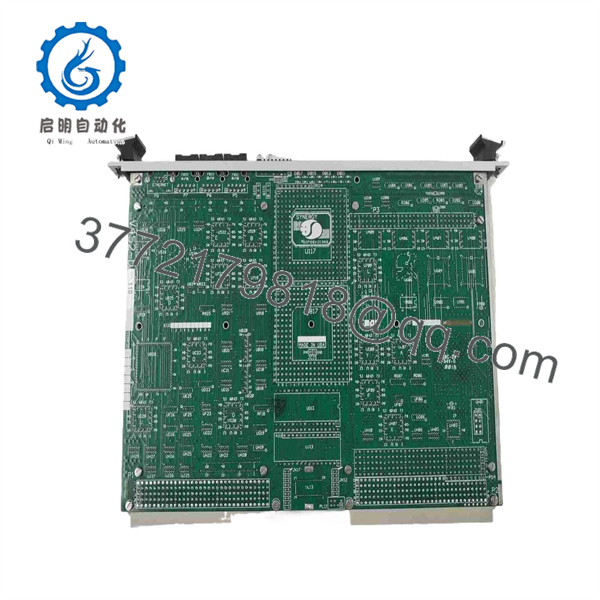
0090-76133
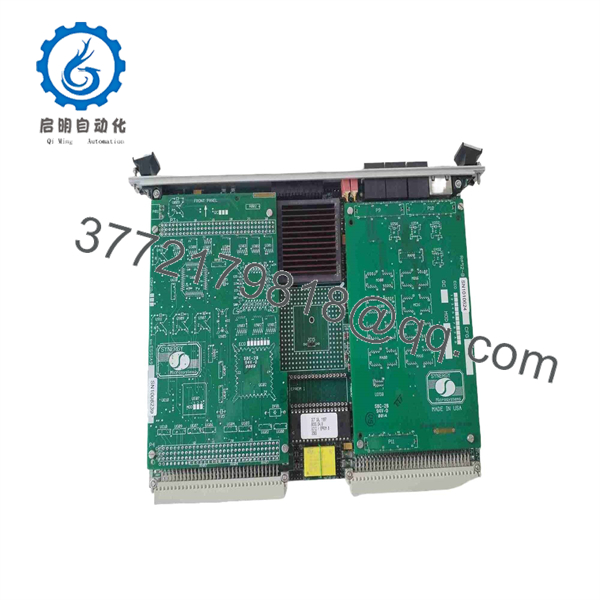
0090-76133
Installation & Configuration Guide
Stage 1: Pre-Installation Preparation
Estimated time: 20–30 minutes
⚠️ Safety First: This board belongs to semiconductor manufacturing equipment. Place the tool in the manufacturer’s approved maintenance state, isolate applicable power sources under LOTO procedures, and verify that the VME chassis is de-energized before removing the SBC.
Tools Required:
- ESD wrist strap
- ESD-safe work surface
- CAT-rated multimeter
- Appropriate screwdriver
- Wire/cable labels
- Smartphone or camera
- Current AMAT equipment documentation
- Backup media for tool configuration where applicable
Data Backup:
- Record the complete 0090-76133 part number.
- Photograph the board before removal.
- Record all visible board-revision markings.
- Photograph mezzanine/daughterboard assemblies.
- Record VME slot position.
- Record connected serial/Ethernet interfaces.
- Document the tool’s software and firmware revision.
- Back up tool configuration using the approved AMAT procedure.
⚠️ Do not assume every Synergy board is interchangeable. The family supports multiple CPU and memory configurations, while the specific 0090-76133 assembly is documented as a 68040/16 MB configuration.
Stage 2: Removing the Old Module
Estimated time: 10–15 minutes
- Place the semiconductor tool into the approved maintenance state.
- Apply LOTO to the applicable equipment power.
- Verify the VME chassis is de-energized.
- Allow the system to discharge according to the OEM procedure.
- Photograph the installed SBC and slot position.
- Label any external connections.
- Disconnect Ethernet and serial connections as applicable.
- Release the VME card-retention hardware.
- Pull the board straight out of the VME backplane.
- Place the original board in an ESD-safe container.
⚠️ Do not twist the board while removing it. VME backplane connectors can be damaged by uneven extraction.
Stage 3: Installing the New Module
Estimated time: 15–25 minutes
- Verify the replacement marking is 0090-76133.
- Compare the board revision with the original.
- Check the processor and memory configuration.
- Verify any mezzanine hardware matches the original assembly.
- Confirm the VME slot position.
- Inspect the backplane connector for bent or contaminated contacts.
- Install the SBC using ESD precautions.
- Seat the board evenly into the VME connector.
- Secure the card-retention hardware.
- Reconnect Ethernet, serial, or other external connections.
- Verify all connections against the photographs.
- Confirm no cable is under mechanical stress.
Self-Checklist:
- 0090-76133 verified
- Board revision checked
- 68040 CPU configuration verified
- Memory configuration checked
- Mezzanine hardware matched
- Correct VME slot confirmed
- Backplane connector inspected
- Card fully seated
- Retention hardware secured
- External connections restored
Stage 4: Power-On & Testing
Estimated time: 30–60 minutes
- Perform a final visual inspection.
- Verify the VME chassis wiring.
- Restore system power according to the OEM startup procedure.
- Observe the SBC boot sequence.
- Confirm the board reaches its expected boot state.
- Verify communication with the tool’s other controllers.
- Check Ethernet and serial interfaces.
- Verify tool configuration and application software.
- Confirm that connected I/O subsystems initialize correctly.
- Run the approved equipment diagnostic sequence.
- Check for VME, CPU, memory, or communication faults.
- Verify normal tool operation before returning the equipment to production.
⚠️ If the board powers up but the tool does not boot correctly, do not immediately condemn the hardware. Firmware, boot media, configuration data, VME slot assignment, and mezzanine hardware can all affect startup.
Frequently Asked Questions (FAQ)
What is AMAT 0090-76133?
0090-76133 is an Applied Materials Synergy SBC assembly based on a Motorola 68040 processor. Semiconductor-equipment parts records describe it specifically as an SBC Synergy 68040 CPU with 16 MB.
Is 0090-76133 a PLC CPU?
No. It is a VME single-board computer, not a conventional PLC CPU. It provides computing and system-control functions within legacy semiconductor equipment. The platform is a Motorola 68040/68060 VME computer architecture.
What processor does 0090-76133 use?
The specific AMAT part is documented as a Motorola 68040 CPU assembly. The broader platform can support both 68040 and 68060 processors, but that broader capability should not be used to assume that a particular 0090-76133 contains a 68060.
Does 0090-76133 have 16 MB memory?
Yes, 16 MB is specifically reported for the AMAT 0090-76133 assembly in semiconductor-equipment parts records. The Synergy platform itself supports substantially larger memory configurations, so the actual board should be checked before documenting the installed memory capacity.
Is 0090-76133 used in Centura equipment?
Yes. A semiconductor-parts supplier identifies the 0090-76133 as a Synergy SBC and lists CENTURA as the system type. Another Applied Materials parts reference associates the part with Applied Tools including Centura-related equipment.
Is 0090-76133 the same as 0090-76133A?
Treat them as related but separately identifiable part numbers. A current technical listing identifies 0090-76133A as a variant of 0090-76133, while the standard AMAT part is separately cataloged as 0090-76133. For a replacement, match the complete part number and board revision rather than assuming the suffix is interchangeable.
Is 0090-76133 obsolete?
It is a legacy semiconductor-equipment component and is primarily encountered through specialized surplus, used-equipment, and repair channels. One current supplier lists the unit as OEM used, while another lists inventory as sold out.
What should procurement verify before buying a replacement?
For 0090-76133, request photographs and documentation confirming:
- Exact part number: 0090-76133
- Board revision
- Motorola 68040 processor
- 16 MB memory configuration where applicable
- VME connector condition
- Mezzanine/daughterboard configuration
- Firmware or boot configuration
- Previous tool application
- Functional test results
- Condition: New Surplus, OEM Used, or Refurbished
- Warranty terms
This level of verification matters because the Synergy platform has multiple CPU, memory, and I/O configurations. A board described only as “” is not sufficient evidence of direct compatibility with an installed 0090-76133.



