
 WhatsApp: +86 16626708626
 Email:
  Phone: +86 16626708626
Description
Key Technical Specifications
| Parameter | Value |
|---|---|
| Manufacturer | Applied Materials (AMAT) |
| Part Number | 0100-09123 |
| Product Type | Wafer Sensor Board |
| Assembly Type | PCB / sensor interface assembly |
| Primary Function | Wafer presence / position sensing |
| Associated Equipment | Applied Materials Precision 5000 and legacy platforms |
| Application | Semiconductor wafer handling |
| Sensor Function | Optical/electrical wafer detection |
| Cross-Reference | 4043353-0023 reported by some listings |
| PCB Revision | Must be verified from physical board |
| Firmware | Tool/configuration dependent; verify before replacement |
| Communication Interface | Configuration dependent; verify against equipment schematic |
| Condition Available | New, surplus, used, and refurbished-market units |
| Lifecycle | Legacy semiconductor-equipment spare |
Technical caution: Public listings contain conflicting claims about the electrical interface, supply voltage, communications, dimensions, and environmental ratings for 0100-09123. One listing, for example, claims 24 VDC and Ethernet, while another claims DeviceNet/RS-485. These claims are not sufficiently consistent to treat them as authoritative specifications for the exact AMAT assembly.
For procurement, the board identification and target-tool documentation should take precedence over generic third-party specifications.
Product Introduction
The Applied Materials 0100-09123 is a Wafer Sensor Board used in semiconductor manufacturing equipment. Multiple parts databases identify the exact part number as a wafer-sensor PCB, with several listings associating it with AMAT Precision 5000 equipment.
This is a tool-specific electronics assembly rather than a general-purpose PLC I/O card. The board revision, sensor harness, machine configuration, and controller interface should be verified before replacement. One parts listing also cross-references 4043353-0023, but that reference should be confirmed against the physical board and OEM documentation before treating it as interchangeable.
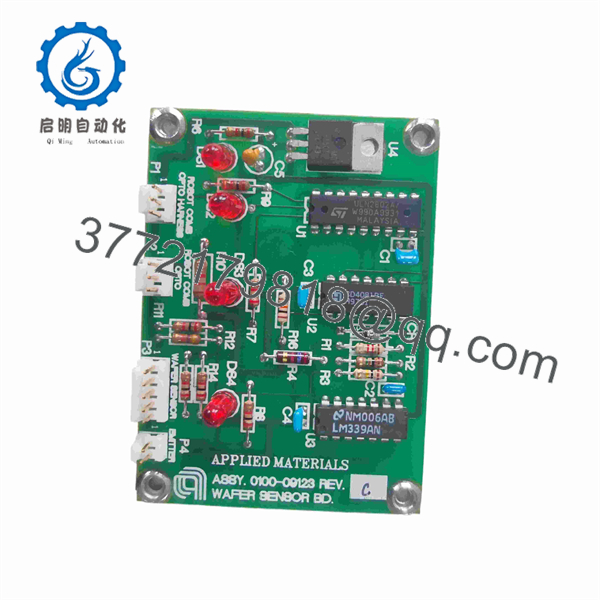
0100-09123
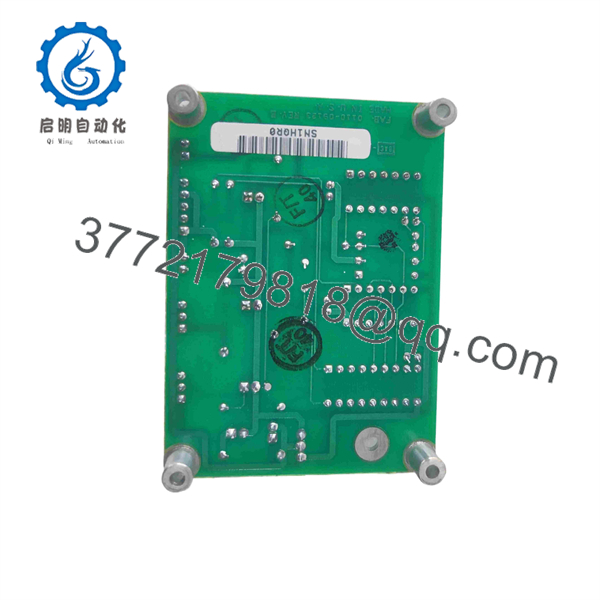
0100-09123
Installation & Configuration Guide
Stage 1: Pre-Installation Preparation
Estimated time: 15–25 minutes
⚠️ Safety First: Place the semiconductor tool in its approved maintenance state. Apply the equipment-specific LOTO procedure before accessing the electronics enclosure. Do not remove the board from an energized chassis.
Tools Required:
- ESD wrist strap
- ESD-safe work surface
- CAT-rated multimeter
- Appropriate screwdriver
- Wire labels
- Smartphone/camera
- Current AMAT equipment schematic
- Equipment-specific diagnostic software
Data Backup:
- Record the complete 0100-09123 part number.
- Photograph the installed board.
- Record PCB revision and serial number.
- Photograph every connector before removal.
- Record sensor harness routing.
- Document the associated AMAT tool model and configuration.
- Record current wafer-sensor diagnostic values.
- Save applicable tool configuration data.
⚠️ Do not assume that a board with the same base part number has identical configuration hardware. Compare revision markings and connector population before installation.
Stage 2: Removing the Old Module
Estimated time: 10–15 minutes
- Place the AMAT tool in the approved service state.
- Apply LOTO.
- Verify the relevant electronics supply is isolated.
- Use ESD protection before touching the PCB.
- Photograph the board and all connections.
- Label connectors if their positions are not mechanically keyed.
- Disconnect sensor and control wiring carefully.
- Release the PCB mounting hardware.
- Pull the board straight out.
- Place the removed board in an ESD-safe bag.
⚠️ Keep the original board until the replacement has passed the complete wafer-sensor diagnostic sequence.
Stage 3: Installing the New Module
Estimated time: 15–20 minutes
- Verify AMAT 0100-09123 on the replacement label.
- Compare PCB revision with the removed board.
- Compare connector population and component layout.
- Inspect the board for damaged connectors or contamination.
- Verify the sensor harness against the AMAT schematic.
- Install the board in the same physical position.
- Secure all mounting hardware.
- Reconnect each harness.
- Verify connector seating.
- Inspect the harness for pinched or stressed wiring.
- Restore ESD-safe handling until the enclosure is closed.
Self-Checklist:
- 0100-09123 verified
- PCB revision checked
- Connector layout matched
- Sensor harness verified
- Board fully seated
- Mounting hardware secured
- No damaged pins
- ESD precautions maintained
Stage 4: Power-On & Testing
Estimated time: 20–45 minutes
- Perform a final visual inspection.
- Verify all connectors against the equipment schematic.
- Restore power according to the AMAT maintenance procedure.
- Check for board-level faults.
- Enter the equipment diagnostic interface.
- Verify wafer-sensor status.
- Run the applicable sensor diagnostic.
- Test wafer-present and wafer-absent states.
- Verify sensor transitions at the expected position.
- Run a controlled wafer-transfer sequence.
- Check for false wafer-present, wafer-absent, or timeout alarms.
- Repeat the transfer cycle before returning the tool to production.
⚠️ If the replacement board powers up but produces incorrect wafer-status signals, do not immediately assume the PCB is defective. Check the sensor head, optical path, harness, connector seating, board revision, and tool configuration first.
Frequently Asked Questions (FAQ)
What is AMAT 0100-09123?
0100-09123 is an Applied Materials Wafer Sensor Board / PCB assembly. Multiple semiconductor-equipment parts databases use this exact description.
What equipment uses 0100-09123?
Public parts listings associate the board with Applied Materials Precision 5000 (P5000) and other legacy wafer-processing equipment. The exact tool compatibility should be verified against the equipment model, serial number, and board revision.
Is 0100-09123 an I/O board?
It is commonly listed as an I/O Wafer Sensor Board or Wafer Sensor PCB. Its role is associated with wafer sensing rather than general-purpose PLC I/O.
Is 4043353-0023 a replacement for 0100-09123?
Some equipment-parts listings cross-reference 4043353-0023 with 0100-09123. However, that should be treated as a reported cross-reference, not an automatically verified universal replacement. Confirm the PCB revision, connector layout, and target AMAT tool configuration before purchasing.
What electrical specifications should I use for procurement?
Be careful here. Public sources disagree on several electrical specifications. One listing reports 24 VDC, Ethernet, and 5 W, while another reports 24 VDC with DeviceNet/RS-485. These conflicting claims mean I would not put those values on a purchase order without checking the actual board documentation.
Is AMAT 0100-09123 still available?
Yes, secondary-market listings exist. Current listings show new, used, and surplus-market availability, although condition varies substantially. For example, one current listing identifies a unit as used and untested, while another lists used/new stock with a stated warranty.
What should I specify when buying a replacement?
For a production semiconductor tool, specify:
- OEM: Applied Materials
- Part Number: 0100-09123
- Description: Wafer Sensor Board
- PCB revision: Match existing unit
- Tool model: Provide exact AMAT equipment model
- Condition: New Original, New Surplus, Used Tested, or Refurbished
- Test evidence: Request actual functional-test results
- Photos: Request photos of the exact unit and identification label
- Cross-reference: Verify 4043353-0023 only against the target tool configuration
One current listing explicitly describes 0100-09123 units as used and untested/as-is, which illustrates why condition should be written into the purchase requirement rather than inferred from the part number.



