
 WhatsApp: +86 16626708626
 Email:
  Phone: +86 16626708626
Description
Key Technical Specifications
- Manufacturer: Applied Materials, Inc. (AMAT)
- AMAT Part Number: 0190-49518
- Common Description: PCB Assembly, Power PMAC 465 CPU
- Referenced OEM / Board Number: 604055-101
- Product Type: Motion-control CPU board / PCB assembly
- Controller Family: Power PMAC
- Platform Interface: CompactPCI (cPCI / CPCI)
- Primary Function: Real-time motion processing and multi-axis machine control
- Typical Installation: Applied Materials semiconductor process-tool control cabinet or cPCI subrack
- Processor Detail: Public reseller listings describe a 465 CPU configuration; confirm installed revision and processor specification from the physical board label before ordering
- Tool Compatibility: Must be verified by AMAT tool BOM, system software release, firmware level, cPCI slot assignment, and board revision
- Service Classification: Legacy semiconductor-equipment spare part; availability depends on surplus inventory
- ESD Requirement: Grounded wrist strap, ESD-safe work surface, and antistatic shipping packaging required
- Replacement Requirement: Match AMAT 0190-49518 and board number 604055-101 where applicable; do not substitute from appearance alone
Public parts listings consistently identify AMAT 0190-49518 as a PCB assembly / Power PMAC 465 CPU and associate it with board number 604055-101. Some reseller descriptions add processor-speed, platform, and application claims that are not verified by an Applied Materials datasheet; confirm those details from the physical unit and OEM documentation before committing to a replacement.
Product Introduction
The AMAT 0190-49518 is an Applied Materials Power PMAC 465 CPU PCB assembly used for real-time motion-control functions in semiconductor manufacturing equipment. It installs in a CompactPCI-based control architecture and processes the machine-control tasks required by the applicable AMAT tool configuration. Parts listings identify the assembly as “PCB ASSY, POWER PMAC 465 CPU,” with board reference 604055-101.
This board is selected when the installed motion controller has a confirmed hardware failure, boot failure, persistent processor fault, or repeatable communication issue that follows the CPU card. Exact part number, hardware revision, cPCI configuration, firmware, and tool software compatibility matter. A visually similar cPCI CPU board may boot but still fail when the tool attempts axis initialization or motion-control communication.
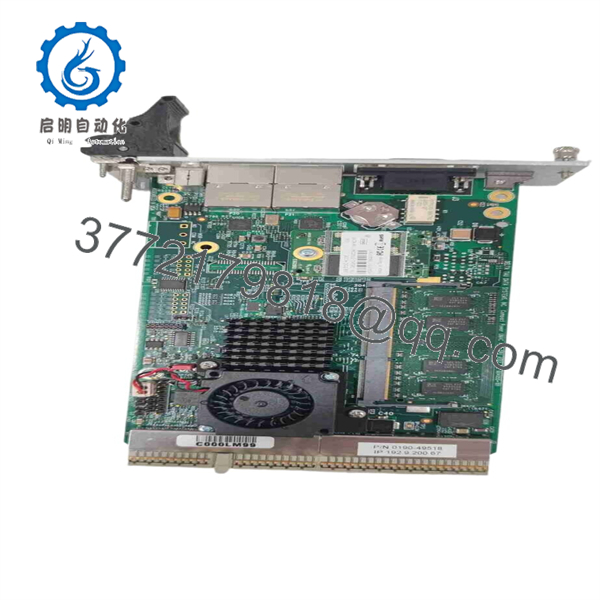
0190-49518
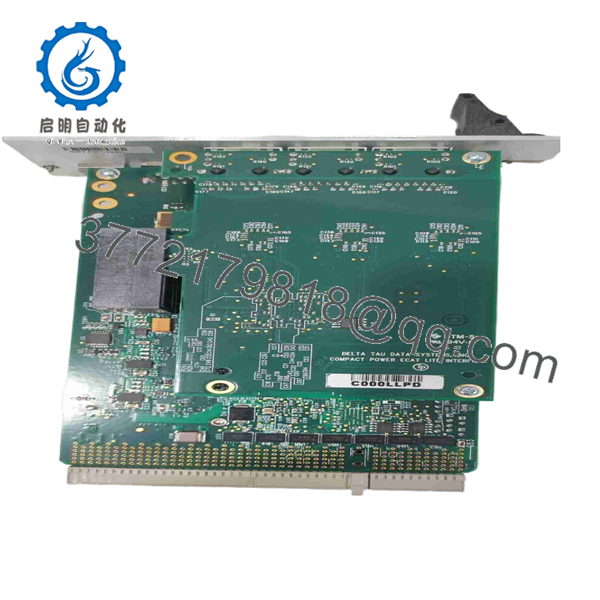
0190-49518
Troubleshooting Quick Reference
| Symptom | Possible Cause | Relevance to this Part | Quick Check Method | Recommendation |
|---|---|---|---|---|
| No CPU board LEDs during startup | Missing cPCI backplane power, failed power supply, open cabinet breaker, board fault | ⚠️ Medium | With power safely applied and using the tool electrical drawings, measure the specified supply rails at the cPCI backplane or designated test points; check PSU and breaker status | Verify all required rails and backplane power first; replace the CPU board only if correct power reaches the slot |
| Controller does not boot or stays at a fixed startup state | Corrupted boot media, failed CPU board, firmware issue, cPCI backplane fault | ✅ High | Record LED sequence, capture console or diagnostic output if available, reseat the card with power removed, and compare behavior in a known-good compatible slot only if approved by the service procedure | If the fault follows 0190-49518 after power and backplane checks, replacement is appropriate |
| Tool reports motion-controller communication timeout | Loose cPCI seating, damaged network/interface cable, software mismatch, CPU board fault | ✅ High | Inspect card retention hardware and connectors; review host-controller diagnostics; compare current board revision and firmware identifiers with the failed board | Confirm software and revision compatibility before replacement; do not assume a new board will communicate without configuration |
| Axes fail to initialize after board replacement | Firmware mismatch, machine configuration not restored, node addresses changed, servo drive or interlock fault | ⚠️ Medium | Check motion-controller diagnostics, axis-enable chain, servo-drive faults, limit switches, and configuration backup | Restore approved configuration and verify safety conditions before blaming the replacement CPU |
| One or more axes fault while the CPU remains online | Servo amplifier fault, encoder issue, motor cable failure, limit switch, mechanical obstruction | ❌ Low | Compare commanded versus actual position; inspect servo-drive alarm codes and verify feedback wiring | Troubleshoot the affected axis, drive, encoder, and mechanics before replacing the CPU board |
| System faults after several hours of operation | Thermal stress, marginal power supply, failing fan tray, cPCI connector issue, board hardware fault | ✅ Medium | Monitor cabinet temperature and supply voltage under operating load; inspect filters, fan operation, board condition, and connector seating | Correct cooling and power issues first; replace the board if the same fault follows it under load |
| Replacement card powers up but does not control the machine | Incorrect firmware, incompatible application image, missing license/configuration, wrong hardware revision | ✅ High | Compare all board labels, revision codes, firmware version, installed memory/storage devices, and controller configuration files | Request revision-matched stock and restore the validated tool configuration through the approved AMAT procedure |
| Intermittent controller resets | Supply droop, poor grounding, loose cPCI card, failing CPU board, electromagnetic interference | ⚠️ Medium | Trend supply rails during reset events; inspect ground straps and card retention; review logs for watchdog or brownout indications | Eliminate supply, grounding, cooling, and connection issues before ordering a replacement |
| Burn marks, corrosion, swollen components, or bent cPCI connector pins | Electrical event, liquid exposure, contamination, mishandling | ✅ High | Perform a power-off inspection with proper lighting and magnification; photograph all damage before removal | Do not power a visibly damaged card; replace it and identify the cause before installing the new unit |
❗ Do not hot-swap this board. CompactPCI supports hot-swap in some system designs, but that does not mean this AMAT motion-control implementation permits it. Follow the tool-specific service procedure, isolate power, and observe lockout/tagout requirements before removal.
❗ Take photos before removal. Record the card label, board revision, slot location, cable positions, jumper settings, installed memory or storage devices, and diagnostic screens. It is the most common way to avoid receiving a replacement that is electrically correct but not configuration-compatible.
❗ Do not wire or configure from memory. A machine can show a CPU-related alarm when the actual cause is a servo drive, safety chain, interlock, power supply, or damaged feedback cable. Check those first.
If the fault remains unclear, contact technical support with high-resolution photos of the old board, the AMAT tool serial number, cPCI rack location, controller logs, LED sequence, and the exact text of every active alarm.
Frequently Asked Questions
What is AMAT 0190-49518?
AMAT 0190-49518 is an Applied Materials PCB assembly identified in parts listings as a Power PMAC 465 CPU board. It is associated with a CompactPCI-based motion-control application in Applied Materials semiconductor equipment. Board number 604055-101 is also referenced in parts listings.
Is AMAT 0190-49518 a direct replacement for any Power PMAC CPU?
No. It is not safe to treat every Power PMAC or CompactPCI CPU as interchangeable. Confirm the exact AMAT part number, board number, hardware revision, slot assignment, boot configuration, firmware level, and tool software release. A nonmatching CPU may power up but fail to load the machine application or communicate with servo hardware.
Can I hot-swap AMAT 0190-49518?
No—unless your specific AMAT tool documentation explicitly authorizes it. To be honest, this is not the place to take a shortcut. Shut down the applicable system, follow lockout/tagout rules, wait for stored energy to dissipate, wear an ESD wrist strap, and remove the board using the approved procedure. An uncontrolled swap can damage the cPCI backplane or create a configuration problem that takes much longer to recover.
Will the machine program remain after replacing the CPU board?
Do not assume it will. The application and configuration may be stored on the CPU board, removable storage, a host controller, or another system component. Back up accessible configuration files, export diagnostic logs, and document firmware and switch settings before removing the old board. If the controller has tool-specific images or licensing, you may need an AMAT-approved commissioning procedure after installation.
Why did the replacement CPU create a communication timeout?
Revision or firmware mismatch is a common cause. I have seen a replacement controller boot normally, show healthy LEDs, and still fail during machine initialization because the host software expected a different firmware interface or configuration image. Compare the old and replacement board labels line by line, including board revision, firmware identifiers, installed daughterboards, and storage modules.
Is AMAT 0190-49518 obsolete?
It should be treated as a legacy semiconductor-equipment spare part. Current availability typically comes from surplus, decommissioned-tool inventory, or tested used stock rather than standard OEM catalog supply. At least one parts source lists the part as available in a limited quantity, while marketplace listings show it in used/new surplus channels. Confirm quantity, condition, revision, lead time, and warranty before issuing a purchase order.
Is the available unit New Original / New Surplus or Refurbished?
The condition depends on the individual unit offered. For New Original / New Surplus, request photos of the AMAT label, board number, revision markings, factory packaging, ESD packaging, and connector condition. For Refurbished (tested) stock, request the exact test scope: boot verification, CompactPCI communication verification, extended run time, thermal observation, and the resulting test report.
A credible inspection process starts with traceability and visual checks for corrosion, scratches, rework marks, missing labels, and connector damage. The board should then undergo controlled power-up and communication testing in a compatible fixture or cPCI test rack, with documented results. Test videos and photos should be available upon request.
Why is a surplus AMAT CPU board less expensive than a factory replacement?
Surplus stock can originate from unused project inventory, tool upgrades, decommissioned systems, liquidated maintenance spares, or distributor overstock. Lower cost does not automatically mean poor condition, but it does require better verification. Ask for the exact label photographs, board revision, test evidence, warranty period, return terms, and confirmation that the seller will supply the same unit or revision you approved.



