
 WhatsApp: +86 16626708626
 Email:
  Phone: +86 16626708626
Description
3. Key Technical Specifications
| Parameter | Value / Description |
|---|---|
| Product Type | Dead Man Alarm Panel (Engineer’s Alarm System) |
| Application | Marine unmanned machinery spaces / engine room safety |
| Function | Requires periodic manual acknowledgment; escalates to alarm on timeout |
| Timer Notes (typical series) | One timer commonly fixed ≈ 0.5 min; second timer adjustable (often 3–12 min range) – verify on specific unit |
| Power Supply | Shipboard supply (exact voltage to be confirmed on nameplate / schematic) |
| Mounting | Panel / bulkhead mount (marine style) |
| Indicators / Controls | Local accept buttons, visual/audible alarm outputs |
| Alarm Escalation | Local alarm → remote / bridge alarm on non-acknowledgment |
| Environment | Marine engine-room conditions (vibration, humidity) |
| Compatibility | KR-13A series systems; check interface wiring for exact variant |
| Condition Note | Units typically supplied as tested surplus or refurbished |
Exact electrical ratings, terminal assignments, and timer calibration values must be verified against the unit’s nameplate, internal documentation, or original Autronica schematic. Public datasheets for the specific -Y7H suffix are limited.
4. Product Introduction
The Autronica KR-13A-Y7H is a dead man alarm panel designed for marine engine rooms and unmanned machinery spaces. It forms part of the engineer’s alarm (dead-man) system that requires the duty engineer to periodically acknowledge presence. Failure to acknowledge within the set time window triggers progressive local and remote alarms.
This panel is used on vessels still operating KR-13A series equipment. The -Y7H designation indicates a specific hardware or timer configuration within the KR-13A family. It is selected when a direct functional replacement is required for an existing installation rather than a full system upgrade to newer Autronica or third-party platforms.
5. Installation & Configuration Guide
Stage 1: Pre-Installation Preparation (≈15 min) ⚠️ Safety First: Coordinate with the bridge and engine control room. Isolate the panel power supply and any associated alarm circuits. Apply lock-out/tag-out. Confirm the machinery space is manned during the swap. Tools Required: ESD-safe practices (panel electronics), multimeter, insulated screwdrivers, wire labels, camera for documentation. Data Backup / Documentation: Photograph all terminal wiring, timer potentiometer or switch settings, and front-panel labels. Note the existing acknowledgment interval and escalation sequence. Record any ship-specific wiring modifications.
Stage 2: Removing the Old Panel (≈10 min)
- Confirm power is isolated and verify zero voltage at the terminals.
- Label every wire before disconnection.
- Remove mounting fasteners and carefully withdraw the panel.
- Inspect terminals and enclosure for corrosion or heat damage. ⚠️ Retain the old panel until the replacement has been proven under operational conditions.
Stage 3: Installing the New Panel (≈15 min)
- Verify the incoming KR-13A-Y7H matches the required configuration (timer ranges, terminal layout).
- Configuration Clone (Critical): Set any adjustable timers or internal switches to the values photographed from the original unit. Typical series guidance places one timer near 0.5 min and the second in the 3–12 min range—confirm exact settings required by the vessel’s safety plan.
- Mount the panel and reconnect all wires according to the labeled scheme and original schematic.
- Torque terminals correctly and secure cable glands. Self-Checklist: [ ] Timers match documented values [ ] Wiring polarity and labeling correct [ ] Enclosure sealed [ ] Power still isolated.
Stage 4: Power-On & Testing (≈20–30 min) Pre-Power Check: Continuity and insulation checks on alarm circuits. Power-On Steps:
- Restore power and observe power-on indicators.
- Initiate a test acknowledgment sequence and verify the local accept function resets the timer.
- Allow a deliberate timeout and confirm local alarm activation followed by remote/bridge escalation.
- Reset the system and re-test under normal acknowledgment intervals.
- Log the test results for the vessel’s safety management system. ⚠️ Troubleshooting Note: Incorrect timer settings or reversed alarm polarity are the most common causes of nuisance trips or failure to escalate. Always test both normal acknowledgment and full timeout paths before returning the space to unmanned status.
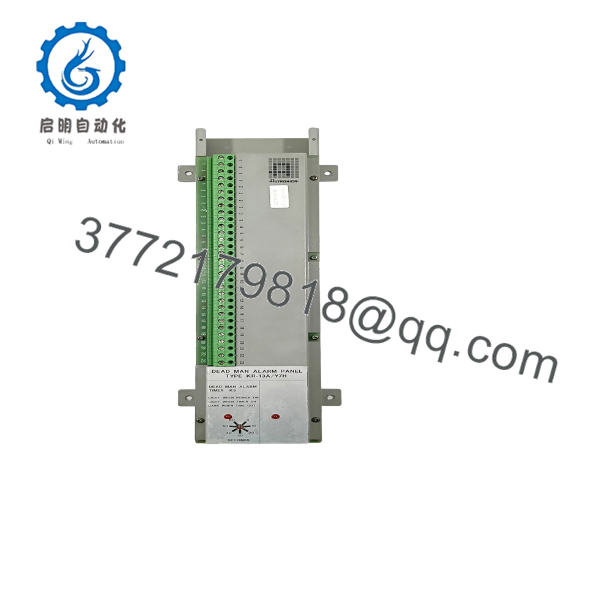
KR-13A-Y7H
6. Frequently Asked Questions (FAQ)
Q: Can the KR-13A-Y7H be hot-swapped under power? No. Isolate power and alarm circuits before removal or installation. Live work risks false alarms, equipment damage, and personal injury.
Q: Is this model still in production, and is stock new? The KR-13A series is a legacy Autronica marine product. Available units are typically new surplus or carefully tested used/refurbished panels. Exact condition and test records are supplied with each unit.
Q: What is the direct replacement if the -Y7H variant is unavailable? Other KR-13A variants (for example KR-13A/Y2H) may be functionally similar but timer ranges or terminal arrangements can differ. Always compare the specific unit documentation and the vessel’s approved drawings before substitution. A full system upgrade to a modern engineer’s alarm panel is the longer-term alternative.
Q: Will I lose existing timer or configuration settings? Yes—settings reside in the panel hardware. Photograph and record all adjustable values before removal and transfer them to the replacement unit.
Q: Why is the price lower than a new modern system? These are secondary-market or surplus panels for maintaining existing vessels, not current-production replacements from Autronica. Pricing reflects condition, testing, and residual market demand rather than OEM new-equipment pricing.
Q: What should I verify before accepting the panel? Confirm timer adjustment ranges, terminal numbering against the ship’s drawings, power supply voltage, and that both local acknowledgment and full escalation paths function correctly during testing.
Q: Are test reports available? Functional test results (acknowledgment, timeout, and alarm escalation) can be provided on request for the specific unit supplied.



