
 WhatsApp: +86 16626708626
 Email:
  Phone: +86 16626708626
Description
Key Technical Specifications
- Model: E300 04380
- Manufacturer: Beijer Electronics AB
- Product Type: Graphic operator terminal / HMI
- Display: Backlit monochrome LCD
- Resolution: 240 × 64 pixels
- Power Supply: 24 VDC
- Typical Current: Approximately 450 mA
- Serial Communication: RS-232C / RS-422
- Controller Platform: Beijer MAC/MTA family
- Memory: Approximately 400 KB Flash RAM is reported for the E300 family
- Installation: Panel-mounted operator terminal
- Manufacturer Status: Discontinued / obsolete
The 240 × 64 display, 24 VDC supply, approximately 450 mA consumption, and RS-232/RS-422 interfaces are supported by multiple current product references. Exact hardware revision should be checked against the unit nameplate before replacement.
Product Introduction
The Beijer Electronics E300 04380 is a programmable operator interface designed for machine-level monitoring and control. It uses a backlit 240 × 64 monochrome LCD and a physical keypad, with 24 VDC power and serial PLC communications.
This model belongs to an older Beijer HMI generation and is now discontinued. Its value in maintenance applications is mainly as a like-for-like replacement where the existing machine depends on the original E300 hardware, application program, and serial communication configuration.
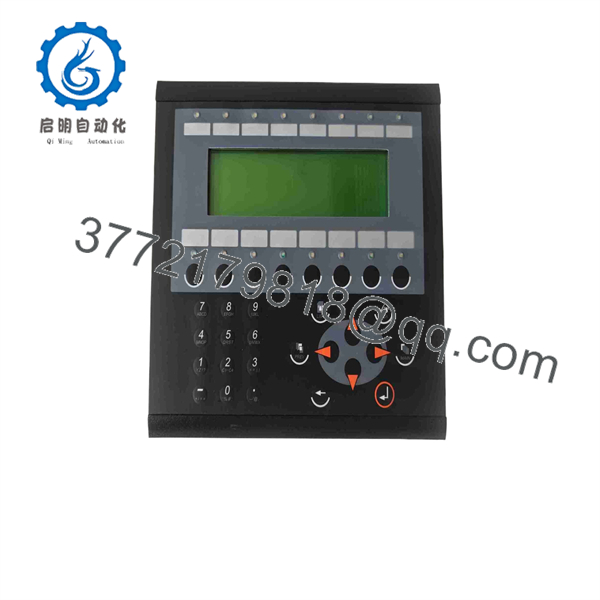
E300 04380
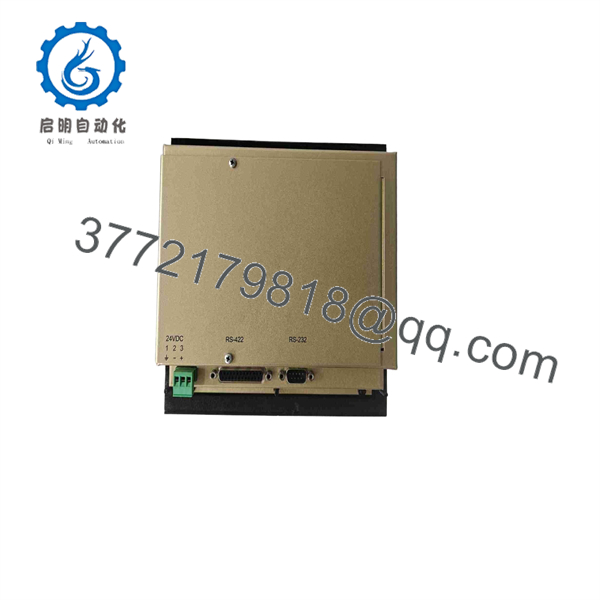
E300 04380
Installation & Configuration Guide
Stage 1: Pre-Installation Preparation — About 5–10 Minutes
⚠️ Safety First:
- Notify operations and obtain approval for the shutdown.
- Place the machine or process in a verified safe state.
- Apply lockout/tagout (LOTO) to the applicable power sources.
- Wait at least 5 minutes for stored energy and capacitors to discharge.
- Confirm the 24 VDC supply is actually de-energized with a multimeter.
Tools Required:
- ESD wrist strap
- PH1 screwdriver
- Digital multimeter
- Wire labels
- Smartphone or camera
- Appropriate terminal screwdriver
Data Backup:
- Save the existing HMI application if the engineering software and transfer cable are available.
- Record the connected PLC model and communication protocol.
- Photograph the complete rear terminal arrangement.
- Photograph every switch, jumper, connector, and label.
- Record the existing HMI firmware or hardware revision where accessible.
⚠️ Do not assume that another E300 variant is electrically identical to E300 04380. The 04380 and 04380A designations appear separately in secondary-market documentation. Verify the complete nameplate before installation.
Stage 2: Removing the Old Module — About 5 Minutes
- Remove the front bezel or access cover as required by the panel installation.
- Label every communication and power connection before disconnecting it.
- Disconnect the 24 VDC and serial communication wiring without pulling on the conductors.
- Release the panel mounting hardware or retaining brackets.
- Remove the HMI straight from the panel opening.
- Inspect the wiring for damaged insulation, loose ferrules, corrosion, or overheated terminals.
- Inspect the connector area for bent pins, oxidation, or contamination.
⚠️ Keep the old 04380 until the replacement has completed commissioning. It remains your best reference for wiring, configuration, and application identification.
Stage 3: Installing the New Module — About 5–10 Minutes
- Put on the grounded ESD wrist strap before handling the electronics.
- Verify that the replacement is marked , not simply “.”
- Compare the rear connector arrangement with the removed unit.
- Clone the original wiring exactly from your photographs and labels.
- Check the 24 VDC polarity before energizing the unit.
- Reinstall the HMI into the panel cutout.
- Secure the mounting hardware evenly; do not overtighten the enclosure.
- Reconnect the RS-232/RS-422 communication cable.
- Reconnect the power terminals and verify that no conductor is loose.
Self-Checklist:
- Exact model verified
- 24 VDC polarity verified
- Communication wiring matched
- Connector orientation checked
- Mounting hardware secured
- ESD precautions followed
Stage 4: Power-On & Testing — About 10 Minutes
- Measure the 24 VDC supply before connecting the HMI.
- Energize the HMI while keeping field equipment in a controlled state.
- Confirm that the display backlight and keypad respond normally.
- Verify the HMI application loads correctly.
- Check the PLC communication status.
- Confirm that displayed process values correspond to the PLC data.
- Test representative operator commands.
- Verify alarm indication and acknowledgment.
- Confirm that no unexpected PLC communication errors occur.
The 04380 is reported with RS-232 and RS-422 serial interfaces, so the physical serial connection and PLC protocol configuration are critical replacement checks.
⚠️ If the HMI powers up but does not communicate, do not immediately assume the replacement is defective. Check the serial interface selection, cable wiring, PLC protocol, baud-rate configuration, and application file first.
Technical Pitfalls to Check
1. Firmware or Application Revision Mismatch
An HMI replacement can power up correctly while still failing at the application or PLC communication level. Record the old firmware and application information before removing the original unit.
2. DIP Switch or Jumper Configuration
Older industrial terminals can depend on physical configuration. Photograph the original hardware before removal and reproduce the settings exactly.
3. Serial Wiring Differences
RS-232 and RS-422 are not interchangeable wiring arrangements. Do not wire the replacement from memory. Confirm the connector pinout and the PLC communication manual.
4. Power Supply Capacity
The is specified around 24 VDC and approximately 450 mA in available product documentation. Confirm that the 24 VDC supply can handle the HMI load together with the other connected devices.
5. ESD Damage
Use a grounded wrist strap and ESD-safe work surface. Older HMI electronics can be damaged before installation if the board or connector contacts are handled improperly.
Frequently Asked Questions (FAQ)
Can the Beijer 04380 be hot-swapped?
Do not treat it as a hot-swappable device. The available documentation identifies the unit as a 24 VDC operator interface rather than a hot-swap-rated I/O module. Shut down the applicable power source, verify zero voltage, and replace it under controlled conditions.
Is the 04380 obsolete?
Yes. Current secondary-market references identify -04380 as discontinued by the manufacturer. This means replacement availability depends on remaining new-surplus, unused, or refurbished inventory rather than normal current production.
Is 04380 the same as 04380A?
Do not assume they are interchangeable without verification. Both and -04380A appear as separate product designations in available inventory records. Compare the complete part number, rear label, hardware revision, connectors, and application requirements before ordering.
Will I lose the HMI programming when I remove the old unit?
The existing PLC program is not automatically transferred to a replacement HMI. The HMI application must already exist in the replacement unit or be downloaded using the appropriate engineering environment and transfer method. Back up the existing application before removing the old terminal.
Can the 04380 communicate with a Mitsubishi PLC?
It can be used with serial PLC communication, and documented installations include Mitsubishi MELSEC FX2N systems using serial communication. However, the exact PLC protocol, cable, port configuration, and application file must match the existing machine.
Is a replacement unit genuinely new?
That depends on the specific inventory lot. Because the 04380 is discontinued, suppliers may list New Original / New Surplus, unused repackaged units, or refurbished equipment under the same model number. Request photographs of the actual nameplate and packaging, plus a functional test report, before purchase.
What should I verify before ordering an 04380?
At minimum, verify , display type, rear connector arrangement, 24 VDC supply, serial interface configuration, hardware/firmware revision, and the required HMI application. For a production-critical replacement, also confirm actual physical condition and warranty terms rather than relying only on the catalog description.



