
 WhatsApp: +86 16626708626
 Email:
  Phone: +86 16626708626
Description
Key Technical Specifications
| Parameter | Beijer E300 04380A |
|---|---|
| Manufacturer | Beijer Electronics AB |
| Series | E300 |
| Type | 04380A |
| Alternate Reference | E300-04380A / E30004380A |
| Product Type | HMI / Operator Interface |
| Display | Backlit monochrome LCD |
| Resolution | 240 × 64 pixels |
| Text Capacity | 4 × 20 characters; 8 × 40 configurations reported |
| Function Keys | 8 user-definable keys |
| Numeric Keypad | 12 keys |
| Status LEDs | 16 dual-color LEDs |
| Supply Voltage | 24 VDC |
| Supply Range | Approximately 20–30 VDC |
| Current Consumption | Approximately 350–450 mA |
| Memory | Approximately 400 KB Flash RAM |
| Main Communications | RS-232C / RS-422 |
| Expansion | One expansion interface reported |
| Mounting | Panel mount |
| Application | Industrial machine and process HMI |
Specification caution: Available secondary documentation is not completely consistent. For example, one listing reports approximately 450 mA, while another gives a 350–450 mA range. Likewise, expansion communication options vary by installed configuration. Treat the table above as an identification and procurement guide rather than a substitute for the original E300 manual.
Display and Operator Interface
The 04380A uses a monochrome, backlit 240 × 64 pixel LCD rather than a modern color touchscreen. The operator interface is based around programmable function keys, a numeric keypad, and status LEDs.
This architecture is well suited to older machine-control systems where the HMI provides:
- Machine status indication
- Alarm acknowledgment
- Parameter entry
- Setpoint adjustment
- Recipe or operating-mode selection
- PLC diagnostic information
- Operator commands
Communications
The E300 04380A is associated with RS-232C and RS-422 serial interfaces. Some installations use optional communication hardware or protocol-specific interfaces, so the communication configuration must be checked against the original panel.
One documented marine application shows an E300 communicating with a Mitsubishi MELSEC FX2N PLC through an FX-series serial protocol. This illustrates why an electrically similar replacement HMI is not automatically a functional replacement: the application project and PLC protocol must also match.
Product Introduction
The Beijer Electronics 04380A is a legacy industrial operator panel intended for PLC-based machine and process control systems. Its 240 × 64 monochrome LCD, programmable keys, numeric keypad, and serial communication architecture were designed for straightforward operator interaction rather than modern graphical touchscreen applications.
The 04380A is particularly relevant as a maintenance spare for installed legacy machinery. Existing units can still be found in industrial automation, marine equipment, and machine-control applications. Current secondary-market availability includes used, refurbished, and repair-service units.
A replacement should not be selected solely by matching the front-panel dimensions. The critical compatibility factors are the application program, PLC protocol, serial interface, expansion hardware, firmware, and electrical configuration.
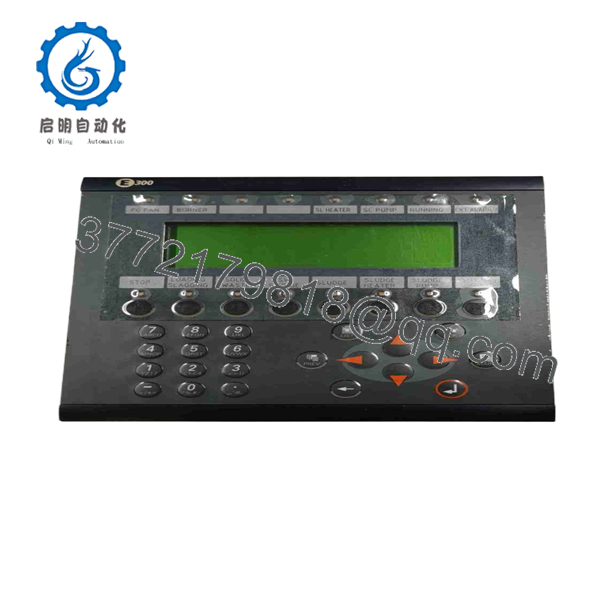
04380A
Installation & Configuration Guide
Stage 1 — Identify the Existing HMI
Estimated time: 10–20 minutes
- Confirm the front or rear nameplate identifies / 04380A.
- Record the complete serial number.
- Photograph the rear label and communication connectors.
- Record the power-supply rating.
- Identify the connected PLC.
- Identify the active communication protocol.
- Determine whether an expansion communication interface is installed.
- Back up the existing HMI project before removing the unit.
Warning: Do not assume that every 04380A contains the same communication hardware.
Stage 2 — Verify the PLC Interface
Estimated time: 20–30 minutes
- Identify the PLC manufacturer and model.
- Determine whether the connection uses RS-232, RS-422, or another interface.
- Record the cable pinout.
- Record the communication speed and protocol.
- Identify any protocol converter or expansion card.
- Confirm the replacement panel supports the same interface.
- Preserve the original communication cable where possible.
A documented application communicates with a Mitsubishi MELSEC FX2N using an FX-series serial protocol, but this should not be assumed for every 04380A installation.
Stage 3 — Install the Replacement
Estimated time: 20–30 minutes
- Isolate the 24 VDC supply.
- Verify the supply polarity before reconnection.
- Remove the original panel.
- Inspect the mounting cutout and hardware.
- Inspect the communication connector and cable.
- Install the replacement .
- Secure the panel mechanically.
- Connect the 24 VDC supply.
- Reconnect the communication interface.
- Confirm grounding according to the machine documentation.
Safety warning: Beijer operator-panel documentation emphasizes qualified installation personnel, correct supply polarity, separation of high-voltage and signal wiring, and appropriate grounding.
Stage 4 — Commission the HMI
Estimated time: 30–90 minutes
- Power the panel.
- Confirm that the LCD backlight operates correctly.
- Check the startup screen.
- Verify the loaded application.
- Confirm communication with the PLC.
- Check all programmable keys.
- Test numeric data entry.
- Verify alarm indications.
- Test machine status displays.
- Check parameter read/write operations.
- Verify communication after a complete power cycle.
- Save the final configuration backup.
For a replacement unit, successful display operation does not prove application compatibility. PLC communication and operator functions must be tested against the machine’s original operating sequence.
Frequently Asked Questions
What is Beijer 04380A?
04380A is a Beijer Electronics operator panel/HMI type number. It is also commonly listed as -04380A or E30004380A.
What type of display does the 04380A use?
The 04380A is associated with a backlit monochrome LCD with 240 × 64 pixel resolution.
What power supply does the 04380A require?
Available technical records identify the unit as a 24 VDC HMI, with approximately 350–450 mA current consumption depending on the source/configuration.
Is the 04380A touchscreen?
No. The commonly documented 04380A configuration uses a keypad/function-key operator interface, not the modern touchscreen architecture used by later Beijer HMI families. It has 8 programmable function keys and a numeric keypad.
What PLCs can communicate with the 04380A?
The answer depends on the installed communication interface and application configuration. RS-232C and RS-422 are reported for the base configuration, while various expansion/protocol options are associated with the family.
A documented installation used an with a Mitsubishi MELSEC FX2N PLC.
Is Beijer 04380A discontinued?
The 04380A/ is a legacy product, and secondary industrial inventories explicitly list the -04380A as discontinued. Current procurement is therefore primarily through existing inventory, refurbished equipment, or repair/exchange channels.
Can I replace a 04380A with a modern Beijer HMI?
Not as a simple electrical drop-in replacement. A migration requires checking:
- Panel cutout dimensions
- 24 VDC supply
- PLC communication protocol
- Cable pinout
- HMI project/application
- PLC addressing
- Alarm and recipe logic
- Communication drivers
- Operator-key behavior
- Firmware/software compatibility
For a machine that must remain operational with minimal modification, a tested 04380A/ replacement or repair may be preferable to an immediate HMI migration.
What should I verify before purchasing a replacement?
Request the following from the supplier:
- Exact marking: / 04380A
- Serial number
- Hardware revision
- Rear-panel photographs
- Display condition
- Keypad condition
- 24 VDC power test
- Communication test
- Installed application/project status
- PLC model used by the original machine
- Communication interface
- Expansion module, if fitted
- New original, surplus, used, or refurbished condition
- Test report and warranty
For a legacy HMI, a replacement with a blank display or missing application program may have little value even if the electronics are functional. Confirm whether the supplied unit contains the required machine project before purchasing.



