
 WhatsApp: +86 16626708626
 Email:
  Phone: +86 16626708626
Description
Key Technical Specifications
| Parameter | Value |
| Transducer Inputs | 4 channels (Supports 2-wire/3-wire accelerometers, velocity, or proximity probes) |
| Temperature Inputs | 4 channels (Supports Type E, J, K, T thermocouples and 2-wire/3-wire RTDs) |
| Relay Outputs | 6 independent Single Pole Double Throw (SPDT) relays |
| Recorder Outputs | 4 channels of isolated 4–20 mA current outputs |
| Communications | Ethernet, RS232/RS485 supporting Modbus protocol |
| Buffered Output | Dedicated BNC and terminal block outputs for raw sensor signals |
| Power Input Requirements | 18 to 36 Vdc, 1.0 A maximum |
| Operating Temperature | −20 to +70 °C (−4 to +158 °F) |
| Dimensions | 19.8 cm × 15.0 cm × 11.0 cm |
Product Introduction & Supply Chain Strategy
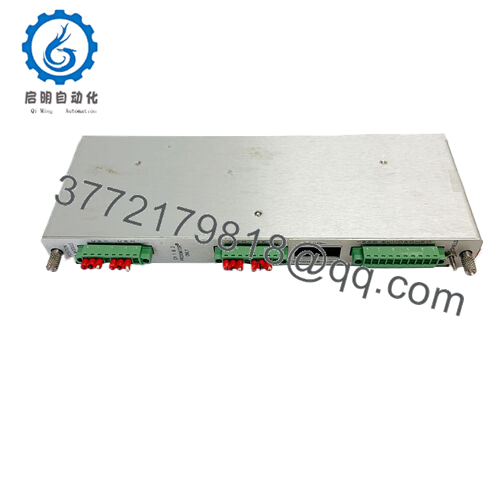
The Bently Nevada 167699-02 (Model 1900/65A) is a compact, standalone machinery protection system designed to continuously monitor and protect general-purpose, balance-of-plant assets. Unlike large-scale rack architectures, this module delivers cost-effective online protection for auxiliary hardware like cooling tower fans, centrifugal pumps, blowers, motors, and small compressors. It bridges the critical gap between periodic hand-held data logging and complex, expensive rack systems by processing four dynamic transducer channels alongside four temperature channels simultaneously.
From a supply chain lifecycle perspective, maintaining a 167699-02 as a New Surplus unit is a high-return insurance policy. Because these monitors are often deployed on standalone or skid-mounted machinery, a single module failure can instantly leave essential equipment completely unprotected or trigger an un-interlocked plant shutdown. Procuring factory-sealed surplus inventory maintains absolute OEM-level reliability while avoiding the long factory lead times associated with specialized machinery electronics. It completely eliminates the high Total Cost of Ownership (TCO) and unexpected failures tied to refurbished parts, which frequently suffer from latent circuit degradation or worn internal components.

- 167699-02 1900/65A
Installation & Configuration Guide
Stage 1: Pre-Installation (Prep & Safety)
- Execute a full lock-out/tag-out (LOTO) procedure on the power feed supplying the local monitor enclosure.
- Put on a grounded, static-dissipative wrist strap and connect it to a verified earth ground point.
- Access the 1900 Configuration Software on your maintenance PC and upload the existing monitor parameters via Ethernet before disconnecting the old hardware.
- Document, label, and photograph all field terminal wiring connections, noting shield grounding points.
Stage 2: Removal
- Disconnect all terminal block plug assemblies from the 1900/65A chassis face.
- Unbolt the module from its DIN rail or panel mounting plate by releasing the lower retention clips using a small screwdriver.
- Carefully pull the module outward, ensuring no tension is applied to the communication lines or field cabling.
Stage 3: Installation (Clone & Seat)
- Unpack the new surplus 167699-02 monitor within an ESD-protected zone.
- Secure the monitor back onto the DIN rail or backplate, ensuring that the ground continuity strap or grounding tooth makes clean contact with the metal rail.
- Plug the existing wired terminal block assemblies back into their corresponding headers on the new unit. Tighten any integrated locking screws.
Stage 4: Power-On & Testing
- Apply 24 Vdc source power to the monitor input terminals.
- Check that the system initialization sequence passes without errors. The green status light must stabilize to indicate normal runtime.
- Connect your PC to the built-in Ethernet port and download the saved configuration file to the new 1900/65A memory.
- Verify channel integrity by checking the real-time gap voltages for proximity probes, loop currents for 4–20 mA outputs, and live temperatures for RTD/thermocouple circuits.
Firmware/Software Versions & Upgrade Notes
The 167699-02 module relies on the 1900 Configuration Software utility to define channel mappings, alert thresholds, relay logic, and Modbus gateway register assignments. When doing a direct hardware swap, it is vital to check the firmware version stamped on the new surplus module casing or read via software.
A critical risk factor is firmware mismatch. If the new hardware contains an upgraded firmware version compared to your site’s legacy software tool, the configuration download may fail or corrupt the internal counter registers. Always verify compatibility matrix documents before altering firmware. Downgrading or upgrading a module’s firmware in the field should only be performed when the process line is down, as a interrupted flash write will brick the non-volatile memory of the device.
Frequently Asked Questions (FAQ)
What does the 167699-02 part number represent compared to the 1900/65A designation?
The 1900/65A is the overall system model series name for this specific Bently Nevada general purpose equipment monitor. The number 167699-02 is the precise manufacturer part number for the main monitor assembly base block. When buying spares, matching the 167699-02 ensures you receive the exact hardware block that accepts 4 transducer and 4 temperature inputs.
Is this unit a pulled or repaired component?
No. This unit is completely New Surplus, supplied in its original anti-static packaging. It has zero operating hours, zero wear on terminal connection tracks, and has never been installed in an industrial plant or exposed to field conditions. We enforce a zero-tolerance policy for refurbished or repaired hardware.
Can I mix different sensor types on the four transducer channels?
Yes. The 1900/65A is highly flexible. The 1900 Configuration Software allows you to independently set up each of the four transducer channels. Channel 1 can run a proximity probe system for shaft displacement, while Channel 2 runs an accelerometer for casing vibration, and Channel 3 tracks a velocity sensor.
Does this monitor provide automatic machinery shutdown protection?
Yes. The monitor contains six independent, programmable SPDT relay outputs. You can configure these relays using boolean logic within the software to trip or open according to the Alert, Danger, or Not OK statuses of any single channel or combination of channels. This allows for direct integration into emergency shutdown circuits.
How do I access raw vibration data for a portable analyzer if this is a standalone unit?
The 167699-02 features a dedicated buffered output design. It provides unconditioned, raw real-time dynamic voltage signals via physical terminals or front-facing BNC ports. This allows maintenance technicians to hook up portable vibration data collectors and diagnostic analyzers directly to the monitor without interrupting operations or disconnecting field sensors.



