
 WhatsApp: +86 16626708626
 Email:
  Phone: +86 16626708626
Description
Key Technical Specifications
| Parameter | Value |
|---|---|
| Manufacturer | Bosch Rexroth |
| Material Number | R911170255 |
| Type Code | CML40.2-SP-330-NA-NNNN-NW |
| Product Family | IndraControl L40 |
| Product Type | Control Main Unit / PLC CPU |
| Processor | AMD Geode LX800 |
| CPU Frequency | 500 MHz |
| DRAM | 64 MB |
| NVRAM | 128 kB |
| Mass Memory | 128 MB CompactFlash |
| Digital Inputs | 8 |
| Digital Outputs | 8 |
| Rated Supply Voltage | 24 V DC |
| Supply Voltage Range | 19.2–30 V DC |
| Maximum ULS Current | 2.6 A |
| Housing | Inline |
| Dimensions | 175.4 × 120 × 75.9 mm |
| Weight | Approximately 1.004 kg |
| Operating Temperature | 5 to 55 °C |
| Storage/Transport Temperature | −25 to 70 °C |
| Protection Rating | IP20 |
| Communication | Ethernet, PROFIBUS |
| Fieldbus Architecture | SERCOS II / PROFIBUS |
| System Availability | IL: 04VRS; MLC: 04VRS; MTX: 06VRS and later |
| Compliance | DIN EN 61131-2; UL508 / CSA C22.2 No. 142-M1987 |
The published material data identifies the unit as a 500 MHz AMD Geode LX800 controller with 64 MB memory, 128 kB NVRAM, 24 V DC supply, 8 inputs, and 8 outputs. The listed operating range is 5–55 °C and the enclosure rating is IP20.
One important compatibility point: Bosch Rexroth’s catalog explicitly associates this exact type code with IndraControl L40 using SERCOS II and PROFIBUS.
Product Introduction
The Bosch Rexroth CML40.2-SP-330-NA-NNNN-NW (R911170255) is an IndraControl L40 control main unit used as a PLC/motion-control platform in industrial automation systems. It combines a 500 MHz AMD Geode LX800 processor, 64 MB DRAM, 128 kB NVRAM, integrated Ethernet and PROFIBUS interfaces, and 8 digital inputs plus 8 digital outputs.
This is an older L40 generation, so software compatibility deserves attention before replacement. Bosch Rexroth community documentation describes this hardware as an early-generation controller that may require older IndraWorks/CODESYS tooling, while Bosch documentation identifies system availability around IL/MLC 04VRS and MTX 06VRS.
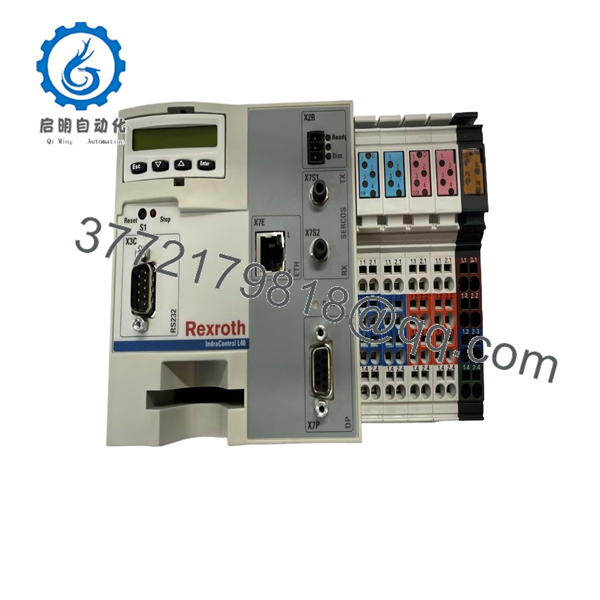
CML40.2-SP-330-NA-NNNN-NW
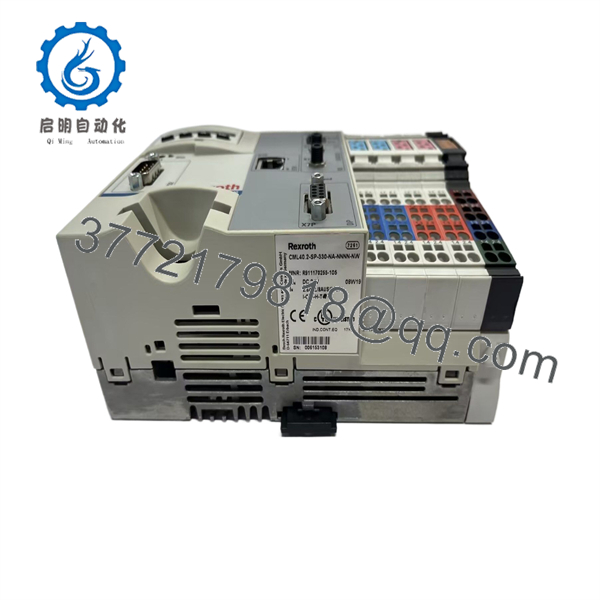
CML40.2-SP-330-NA-NNNN-NW
Installation & Configuration Guide
Stage 1: Pre-Installation Preparation — Approximately 5–10 Minutes
⚠️ Safety First: Place the machine in its approved safe state before removing the controller. Follow the plant’s LOTO procedure and the machine builder’s shutdown sequence. Do not rely on software STOP status alone when hazardous motion or stored energy is present.
Tools Required:
- ESD wrist strap
- PH1 screwdriver
- Digital multimeter
- Wire labels
- Smartphone for configuration photographs
- Engineering laptop with the appropriate Rexroth IndraWorks environment
- Backup media for the controller application
Data Backup:
- Record CML40.2-SP-330-NA-NNNN-NW / R911170255 from the nameplate.
- Photograph the complete controller and all connected terminals.
- Record Ethernet configuration.
- Record PROFIBUS station settings and network topology.
- Record SERCOS configuration where applicable.
- Record firmware/software versions.
- Back up the PLC/application project.
- Record any CompactFlash configuration or application data.
⚠️ Software version is a major replacement issue on this controller. Bosch Rexroth community guidance describes this CML40 generation as an early platform that can require older IndraWorks/CODESYS tooling. Do not assume a current engineering environment will communicate with it.
Stage 2: Removing the Old Module — Approximately 5 Minutes
- Confirm the machine is in the approved maintenance state.
- Apply LOTO where required.
- Verify the 24 V DC supply has been removed.
- Wait for the system’s stored energy to dissipate according to the machine procedure.
- Photograph all terminal and communication connections.
- Label Ethernet, PROFIBUS, SERCOS, and I/O wiring.
- Disconnect the wiring without pulling on conductors.
- Release the mounting/retaining mechanism.
- Pull the controller straight out.
- Inspect connectors and mating hardware for bent contacts, contamination, or mechanical damage.
⚠️ Keep the old CML40.2 unit until commissioning is complete. Its firmware, address settings, and physical wiring provide the most reliable reference during troubleshooting.
Stage 3: Installing the New Controller — Approximately 5 Minutes
- Attach the grounded ESD wrist strap.
- Verify the complete type code and R911170255 material number.
- Compare the replacement against the original photographs.
- Confirm the supply wiring and polarity.
- Confirm PROFIBUS address and termination settings where applicable.
- Confirm Ethernet configuration.
- Check SERCOS-related configuration if used by the machine.
- Mount the controller securely.
- Reconnect all terminals and communication cables.
- Verify that no connector is partially seated.
Self-Checklist:
- Type code matches
- Material number verified
- Firmware/software compatibility checked
- PROFIBUS address confirmed
- Ethernet configuration documented
- SERCOS configuration documented
- 24 V DC polarity checked
- Wiring secured
- Controller mechanically locked
Stage 4: Power-On & Testing — Approximately 10–15 Minutes
- Before energizing, check the 24 V DC rail with a multimeter.
- Verify polarity and absence of an accidental short circuit.
- Power the controller.
- Observe diagnostic LEDs and display behavior.
- Confirm the controller completes its startup sequence.
- Connect the engineering workstation using the validated Rexroth software environment.
- Verify controller identification and firmware.
- Load the backed-up project only if required.
- Check PROFIBUS communication.
- Check Ethernet communication.
- Check SERCOS communication where applicable.
- Test digital inputs and outputs.
- Perform a controlled machine dry run.
- Return the machine to production only after all required interlocks and motion checks pass.
⚠️ Do not immediately overwrite the replacement controller’s existing configuration. First save or document what is present. This can be important when diagnosing firmware, licensing, or configuration differences.
Common fault checks:
- Engineering software cannot connect: Check the IndraWorks/CODESYS generation before changing network settings.
- PROFIBUS station missing: Check address, termination, connector wiring, and GSD/device configuration.
- SERCOS fault: Check ring topology, optical connections, device order, and configured cycle parameters.
- Ethernet unavailable: Verify IP address, subnet, physical link, and controller communication configuration.
- Application will not run: Compare firmware and project compatibility.
- Unexpected I/O behavior: Compare the original I/O assignment with the replacement configuration before changing field wiring.
Frequently Asked Questions (FAQ)
What is the Bosch Rexroth CML40.2-SP-330-NA-NNNN-NW?
It is an IndraControl L40 control main unit, material number R911170255. It uses an AMD Geode LX800 processor at 500 MHz, with 64 MB DRAM and 128 kB NVRAM. The hardware includes Ethernet and PROFIBUS interfaces and 8 digital inputs plus 8 digital outputs.
Is .2-SP-330-NA-NNNN-NW an obsolete controller?
It is an older IndraControl L40 generation. Bosch Rexroth’s own community documentation describes this particular hardware as an early-generation controller, potentially requiring older IndraWorks/CODESYS tools. That makes software availability an important part of any replacement plan.
What is the material number for this .2 controller?
The corresponding Bosch Rexroth material number is R911170255. Bosch Rexroth catalog material also lists .2-SP-330-NA-NNNN-NW as the IndraControl L40 control hardware with SERCOS II and PROFIBUS.
Can I use current CODESYS to program it?
Do not assume that. The Bosch Rexroth community specifically notes that this is an early platform and that older IndraWorks/CODESYS tooling may be required. The exact engineering software depends on the controller firmware and application generation.
Does replacing the .2 erase the PLC program?
Replacing the physical controller does not inherently erase the project stored on the old unit. However, the replacement may not contain the same application, firmware, configuration, or machine-specific parameters. Back up the original controller before removal and verify the replacement software environment before downloading anything.
What should I verify before ordering a replacement?
At minimum, match:
- .2-SP-330-NA-NNNN-NW
- Firmware/software revision
- IndraWorks generation
- PROFIBUS configuration
- Ethernet configuration
- SERCOS II architecture
- Application/project version
- Existing function modules and I/O arrangement
The exact type code matters because the IndraControl L family contains multiple hardware variants with different processor, memory, and communication configurations.
Is a New Surplus .2 the same as a refurbished unit?
No. New Original/New Surplus indicates an unused or previously uncommissioned unit, subject to verification of storage history and packaging. Refurbished means the unit has been inspected, serviced, or tested after previous use. For an older controller, request photographs of the nameplate, serial number, firmware information, and a functional test report before purchase.
What is the biggest replacement risk with this controller?
Software compatibility. The physical replacement is relatively straightforward; the difficult part can be restoring an older IndraControl L40 application with the correct IndraWorks/CODESYS generation. Bosch Rexroth’s own technical community discussion specifically warns that early systems can require older engineering tools and potentially older Windows environments.



