
 WhatsApp: +86 16626708626
 Email:
  Phone: +86 16626708626
Description
Key Technical Specifications
| Parameter | Value |
|---|---|
| Manufacturer | B&R Industrial Automation |
| Material Number | 5PC720.1505-01 |
| Product Family | Panel PC 720 |
| Product Type | Industrial Panel PC |
| Display Size | 15 in |
| Display Type | TFT Color |
| Resolution | XGA 1024 × 768 pixels |
| Touch Screen | Analog resistive |
| Touch Controller | Elo serial 12-bit |
| Brightness | 350 cd/m² |
| Contrast Ratio | 1,000:1 |
| Display Colors | 10 million |
| Backlight Type | LED |
| Backlight Life | 70,000 h half-brightness time |
| Processor Support | B&R modular CPU board architecture |
| CPU Option | Intel Atom 1600 MHz CPU board available |
| Memory | DDR2 SO-DIMM, configuration dependent |
| PCI Slots | 2 × 32-bit PCI half-size, PCI 2.2 |
| Drive Slot | 1 × slide-in drive slot |
| CompactFlash | 1 × internal CF slot, optional second slot |
| Serial Ports | 2 × RS232, 115 kbit/s maximum |
| USB Ports | 3 × USB 2.0 Type A |
| Ethernet | 2 × 10/100 Mbit/s |
| Monitor Interface | DVI-I |
| Audio | AC97 microphone, line-in, line-out |
| Keyboard/Mouse | PS/2 combined interface |
| Supply Voltage | 24 VDC ±25% |
| Nominal Current | 3.8 A |
| Inrush Current | Typical 10 A, maximum 40 A <300 μs |
| Front Protection | IP65 / NEMA 250 Type 4X indoor |
| Rear Protection | IP20 |
| Dimensions | 435 × 330 × 151.3 mm |
| Weight | Approximately 6.7 kg |
| Battery | Renata 950 mAh lithium battery |
| Operating Altitude | Maximum 3,000 m |
B&R specifies the 5PC720.1505-01 as a Panel PC 720 with a 15-inch XGA color TFT touchscreen, two PCI slots, two RS232 interfaces, three USB 2.0 ports, two 10/100 Ethernet ports, DVI-I monitor output, AC97 audio, and 24 VDC supply.
Product Introduction
The B&R 5PC720.1505-01 is a Panel PC 720 industrial computer designed for machine visualization, operator control, and automation applications. It combines a 15-inch XGA resistive touchscreen with industrial PC functions, expansion slots, and multiple communication interfaces.
This unit is commonly maintained in existing B&R automation systems where the original panel PC architecture, PCI expansion hardware, and Automation Runtime environment must remain unchanged. Replacement requires verification of CPU board, storage media, operating system image, and application software compatibility.
Installation & Configuration Guide
Stage 1: Pre-Installation Preparation (~15 minutes)
- Notify production personnel of planned downtime.
- Apply lockout/tagout procedures.
- Disconnect the 24 VDC cabinet supply.
- Wait at least 5 minutes for capacitor discharge.
Tools Required:
- ESD wrist strap
- PH1 screwdriver
- Digital multimeter
- Wire labels
- Smartphone/camera
Data Backup:
- Backup the B&R Automation Studio project.
- Record:
- Automation Runtime version
- BIOS settings
- IP addresses
- Network parameters
- Storage device configuration
- Photograph:
- Rear connectors
- PCI cards
- CompactFlash installation
- Cable routing
⚠️ Do not remove the storage media without creating a backup. The operating system and machine application may depend on the original media image.
Stage 2: Removing the Old Panel PC (~10 minutes)
- Shut down the machine safely.
- Verify 24 VDC power isolation.
- Label all connected cables.
- Disconnect:
- Power connector
- Ethernet cables
- RS232 connections
- USB devices
- DVI/display cables
- PCI expansion wiring
- Remove panel mounting hardware.
- Carefully remove the unit from the enclosure.
- Inspect connectors and cabinet wiring.
⚠️ Keep the old unit available until the replacement has completed testing.
Stage 3: Installing the Replacement (~15 minutes)
- Wear an ESD wrist strap.
- Verify the complete part number:
B&R 5PC720.1505-01
- Compare:
- CPU board type
- RAM size
- Storage device
- PCI expansion cards
- Hardware revision
- Install PCI cards from the original unit if required.
- Mount the Panel PC into the cabinet opening.
- Secure mounting hardware evenly.
- Reconnect all cables.
- Verify protective earth and shield connections.
Configuration Checklist:
- Correct material number confirmed
- PCI hardware matched
- Storage media installed
- Network settings restored
- Power polarity checked
Stage 4: Power-On & Testing (~20 minutes)
- Measure the 24 VDC supply.
- Energize the Panel PC.
- Verify BIOS startup.
- Confirm operating system boot.
- Check Ethernet communication.
- Connect with Automation Studio if required.
- Verify:
- HMI visualization
- Machine control functions
- Field communication
- PCI device operation
- Alarm handling
- Perform a controlled production test.
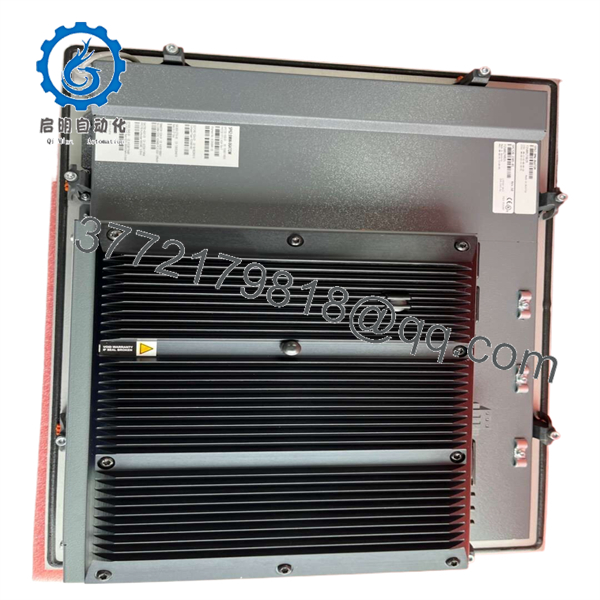
5PC720.1505-01
Technical Pitfall & Survival Guide
❗ CPU board and software image mismatch
The 5PC720.1505-01 is a modular industrial PC platform. The display chassis alone does not define the complete system. CPU board, memory, storage, and operating system configuration determine actual compatibility.
I have seen replacement industrial PCs arrive with the correct enclosure but the wrong storage image. The machine powered on, the screen worked, but the automation application would not start.
Avoidance:
Record the complete hardware configuration before removal.
❗ PCI expansion card compatibility
This model includes two PCI half-size slots. Many older machines rely on PCI communication cards for fieldbus or special equipment interfaces.
Avoidance:
Photograph and document every installed PCI card before replacement.
❗ CompactFlash dependency
Legacy B&R Panel PC systems frequently use CompactFlash media for operating systems and application storage.
Avoidance:
Clone or preserve the original storage device before replacing hardware.
❗ Power supply capacity
The unit requires 24 VDC ±25% and approximately 3.8 A nominal current. Confirm cabinet power margin before installation.
Frequently Asked Questions (FAQ)
What is the B&R 5PC720.1505-01?
The B&R 5PC720.1505-01 is a Panel PC 720 industrial computer with a 15-inch XGA resistive touchscreen designed for HMI and machine automation applications.
Is the 5PC720.1505-01 a PLC CPU?
No. It is an industrial PC platform. PLC functionality is normally provided through B&R Automation Runtime running on the configured system.
What display does this Panel PC use?
It uses a 15-inch TFT color display with XGA 1024 × 768 resolution and analog resistive touch input.
Can I directly replace another B&R Panel PC 720?
Only after verifying the complete hardware configuration. Check CPU board, memory, storage, PCI cards, software version, and communication interfaces.
Does this unit support PCI expansion cards?
Yes. The 5PC720.1505-01 provides two 32-bit PCI half-size slots according to PCI 2.2 specifications.
Is the B&R 5PC720.1505-01 obsolete?
It is a legacy industrial PC platform. It remains relevant for maintaining installed machines, but new system designs should evaluate current B&R hardware platforms.
Why is surplus pricing different from new OEM equipment?
Legacy industrial computers are often supplied through New Original / New Surplus or tested refurbished channels. Pricing depends on availability, condition, and lifecycle status.
What should I verify before purchasing?
Confirm:
- Full material number: 5PC720.1505-01
- CPU board configuration
- RAM capacity
- Storage media type
- PCI expansion hardware
- Touchscreen condition
- Display brightness
- Functional test report
For replacement projects, request identification-label photos and a powered test record before installation.



