
 WhatsApp: +86 16626708626
 Email:
  Phone: +86 16626708626
Description
Key Technical Specifications
| Parameter | Specification |
| Manufacturer | Emerson Automation Solutions (formerly Westinghouse) |
| System Architecture | Ovation Distributed Control System (DCS) |
| Part Number | 5X00063G01 |
| Input Voltage | 120 / 240 V AC (100–240 V AC nominal, 47–63 Hz) or 125 V DC nominal |
| Output Voltage | 24 V DC (Regulated backplane supply) |
| Configuration | Single or Parallel/Redundant modes |
| Form Factor | Ovation standard cabinet baseboard slot mount |
| Status Indication | Diagnostic LEDs (Power OK, Overvoltage, Fault) |
| Operating Temperature | 0°C to +60°C (32°F to 140°F) |
| Storage Temperature | -40°C to +85°C (-40°F to 185°F) |
| Humidity | 5% to 95% non-condensing |
| Cooling | Natural convection |
Product Introduction
The Emerson Westinghouse 5X00063G01 is a primary power supply module engineered specifically for the Ovation Distributed Control System (DCS) architecture. It converts primary AC or DC field power into regulated 24 V DC logic power required to drive local controller baseboards, processor modules, and adjacent I/O interface electronics.
Design engineers specify the 5X00063G01 for high-availability power generation and water processing infrastructure where unplanned controller restarts cause severe process disruption. Featuring built-in diode OR-ing circuitry, the module supports seamless diode-isolated parallel operation, allowing dual-redundant power configurations on a shared Ovation backplane without external decoupling hardware.
Installation & Configuration Guide
Estimated completion time: 20–30 minutes.
Stage 1: Pre-Installation Preparation
- ⚠️ Safety First: Obtain proper work permits. Notify operations before touching power supply hardware. De-energize the incoming power feed to the target power supply slot and execute Lockout/Tagout (LOTO). Wait 5 minutes for internal capacitors to discharge fully.
- Tools Required: Grounded ESD wrist strap, #1 and #2 Phillips head screwdrivers, Fluke 115 multimeter, terminal screwdriver.
- Data Backup: While replacing a power supply module does not clear non-volatile RAM on adjacent CPUs, record all current system alarm logs on the Ovation Engineer Station prior to maintenance.
Stage 2: Removing the Old Module
- Attach your ESD wrist strap to an unpainted chassis ground point.
- Disconnect the primary AC/DC input wiring terminal block from the module faceplate (if top/front fed).
- Loosen the top and bottom retaining screws securing the 5X00063G01 to the Ovation baseboard chassis.
- Firmly grasp the module handle, release the retention latch, and pull the unit straight out to disengage the rear edge connectors from the backplane.
- ⚠️ Note: Check the backplane connector pins for thermal discoloration or physical bending before sliding the replacement unit into place.
Stage 3: Installing the New Module
- Verify that the new 5X00063G01 part number matches the removed unit exactly, including group/revision suffixes.
- Align the module card edges with the cabinet rack guide rails.
- Slide the module in smoothly until the rear connectors mate with the baseboard receptacle. Press firmly on the faceplate until the module seats completely.
- Tighten the top and bottom captive mounting screws to hand-tight torque (approx. 0.8 Nm / 7 in-lbs).
- Reconnect incoming power wiring according to site schematics.
- Self-Checklist: [ ] Module fully seated, [ ] Retention screws torqued, [ ] Power terminal block locked in place.
Stage 4: Power-On & Testing
- Measure incoming AC/DC supply voltage at the terminal block with a multimeter to verify it falls within nominal operating limits before toggling breakers.
- Close the branch circuit breaker feeding the 5X00063G01 module.
- Observe the front panel status LEDs:
- Power / OK (Green): Solid ON indicates stable 24 V DC output.
- Fault / Alarm (Red): Must remain OFF.
- Verify on the Ovation Operator Station that power supply status drop diagnostics report normal status without hardware mismatch faults.
- ⚠️ Troubleshooting Note: If the power LED remains dark, immediately open the supply breaker. Check for reverse polarity on DC inputs or a short circuit across the local 24 V DC distribution bus.
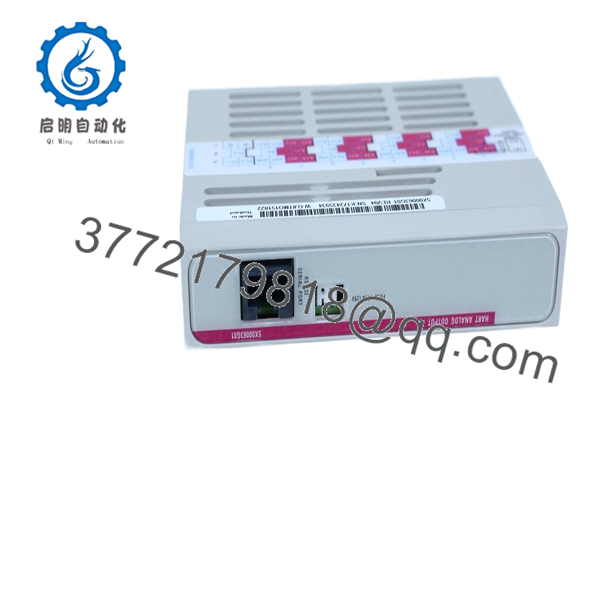
5X00063G01
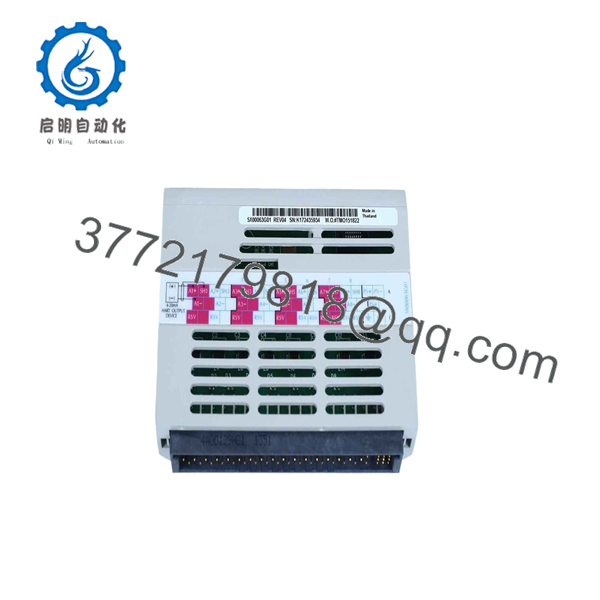
5X00063G01
SOP Quality Transparency
Every surplus or recycled 5X00063G01 module undergoes a five-stage verification process prior to warehouse stocking and dispatch:
- Inbound Inspection & Traceability:
- Serial number cross-referencing against OEM production logs to confirm component authenticity.
- Visual inspection for PCB discoloration, swollen electrolytic capacitors, backplane connector pin degradation, and enclosure casing wear.
- Live Functional Testing:
- Installed on an active Emerson Ovation test rack equipped with OCR1100/OCC100 controllers.
- Cold boot performance logging: Power-on sequence and voltage ramp-up timing checks.
- 24-hour continuous burn-in under a full resistive load (up to maximum rated current output) while monitoring thermal performance via FLIR thermal imaging.
- Electrical Parameter Testing:
- Insulation resistance verified at 500 V DC using a calibrated Megger instrument (>20 MΩ threshold).
- Ripple and noise output measurement using an oscilloscope under 0%, 50%, and 100% load states to ensure clean DC power delivery to sensitive logic boards.
- Firmware & Hardware Revision Tracking:
- Documentation of hardware revision levels, engineering change notices (ECN), and physical jumper configurations.
- Final QC & ESD Packaging:
- Final sign-off by a senior quality control engineer.
- Sealed inside anti-static shielding bags with moisture absorbent packets, wrapped in high-density foam, and boxed in heavy-duty wall corrugated packaging. Detailed bench test reports and photos are supplied upon request.
Technical Pitfall & Survival Guide
- ❗ Firmware/Hardware Revision Differences:
- Issue: Early production revisions of 5X00063 modules can exhibit subtle backplane pinout or power-sequencing variations when mixed with newer Ovation baseboard revisions.
- Avoidance: Match the revision code (e.g., G01) precisely. If swapping between generation steps, review Emerson technical bulletins regarding backplane revision compatibility.
- ❗ DIP Switch / Jumper Configuration:
- Issue: Some power distribution boards utilize internal configuration jumpers for auctioneering or failure signaling.
- Avoidance: Photograph the jumper layout of the dead unit before sending it to scrap. Ensure the replacement module matches these switch positions exactly.
- ❗ Shared Load Balancing Incompatibilities:
- Issue: In dual-redundant setups, pairing an aging, worn-out power supply with a brand-new 5X00063G01 can cause voltage imbalance. The unit outputting slightly higher voltage will handle 90%+ of the load, causing premature thermal stress.
- Avoidance: Adjust output trim potentiometers (if present) so both supplies share current equally, or replace redundant power modules in matching pairs during planned plant outages.
- ❗ Inrush Current Oversights:
- Issue: Energizing multiple 5X00063G01 modules simultaneously on a single branch circuit can trigger high inrush currents, tripping fast-acting upstream circuit breakers.
- Avoidance: Verify that upstream circuit protection uses C-curve or D-curve thermal-magnetic breakers sized for inductive/capacitive inrush loads.
- ❗ Electrostatic Discharge (ESD) Handling:
- Issue: Handling power modules without a grounded wrist strap can induce static discharge directly into power-monitoring logic ICs, leading to intermittent field resets weeks after installation.
- Avoidance: Always ground yourself to the panel enclosure frame before removing the module from its ESD protective shield.
Frequently Asked Questions
Can I hot-swap the 5X00063G01 power supply while the system is under power?
Yes, provided your Ovation cabinet baseboard is wired for dual-redundant power supplies and the parallel unit is actively carrying the system load. If operating in a non-redundant (single supply) setup, pulling the 5X00063G01 will instantly drop power to the controller and I/O modules, crashing the control loop. Always confirm redundant supply LED status prior to live removal.
Is the 5X00063G01 an obsolete part, and are your units genuinely new?
The 5X00063G01 has been transitioned by Emerson to legacy/limited lifecycle support in favor of newer Ovation hardware lines. We supply both Factory Sealed New Original units and thoroughly tested New Surplus stock sourced from plant spares inventory and canceled projects. Every module is verified on genuine Ovation test racks before dispatch.
Will replacing this power supply wipe the logic program on my Ovation controller?
No. The controller’s application program and system configuration are stored in non-volatile flash memory on the CPU module (such as an OCR1100 or OCC100). However, if power is lost entirely during a single-supply swap, volatile runtime data (registers, active timers, unacknowledged alarm states) will reset upon reboot.
Why is your price lower than purchasing directly through OEM channels?
We source surplus, excess project inventory, and certified clean-up stock from industrial sites globally. Because we bypass OEM distribution overhead and supply legacy equipment directly from inventory, we offer significant savings while supplying identical OEM hardware backed by our standard 1-year replacement warranty.
What happens if the Fault LED turns red upon initial power-up?
A solid red Fault LED indicates an internal overvoltage condition, an output short circuit on the 24 V DC bus, or a failed internal DC-DC converter stage. Immediately disconnect input power, unseat the module, and check the backplane contacts for debris or shorted pins. If the fault persists on an isolated test bench, contact our support team for an immediate warranty replacement.



