
 WhatsApp: +86 16626708626
 Email:
  Phone: +86 16626708626
Description
Key Technical Specifications
| Parameter | Value |
|---|---|
| Manufacturer | Emerson |
| Product Family | Ovation |
| Controller Model | OCR1100 |
| Part Number | 5X00481G04 |
| Module Type | Controller CPU Card / Processor Module |
| Processor Frequency | 1.1 GHz |
| RAM | 256 MB |
| Flash Storage | 1 GB |
| Ethernet Ports | 4 × 10/100 Mbps |
| Maximum Originated Points | Up to 32,000 |
| Control Tasks | Up to 5 |
| I/O Interfaces | Ovation and WDPF I/O |
| I/O Location | Local and remote |
| Sequence of Events | 1 ms resolution |
| Controller Redundancy | Supported |
| Operating Temperature | 0 to 60 °C (32 to 140 °F) |
| Relative Humidity | 0–95% RH |
| Power | 24 VDC, approximately 40 W* |
| Weight | Approximately 0.4 kg* |
*The 24 VDC/40 W and 0.4 kg figures are reported by an aftermarket technical listing rather than the Emerson data sheet reviewed here, so verify them against the applicable cabinet/system documentation before installation.
The OEM Emerson data sheet confirms the OCR1100 architecture, including the 5X00481G04 CPU card, 5X00226G04 IOIC card, 5X0025G01 controller base, Ovation/WDPF I/O interfaces, non-volatile application/configuration storage, and 1 ms sequence-of-events capability.
Product Introduction
The Emerson Ovation 5X00481G04 is the CPU/processor card for the OCR1100 controller, executing Ovation control strategies and coordinating data acquisition and connected I/O. Emerson specifies the OCR1100 for Ovation and WDPF I/O, including local and remote I/O architectures.
For high-availability installations, the OCR1100 supports redundant controller operation with automatic failover. The controller also provides non-volatile storage for application software, point databases, configuration information, and operating tuning constants.
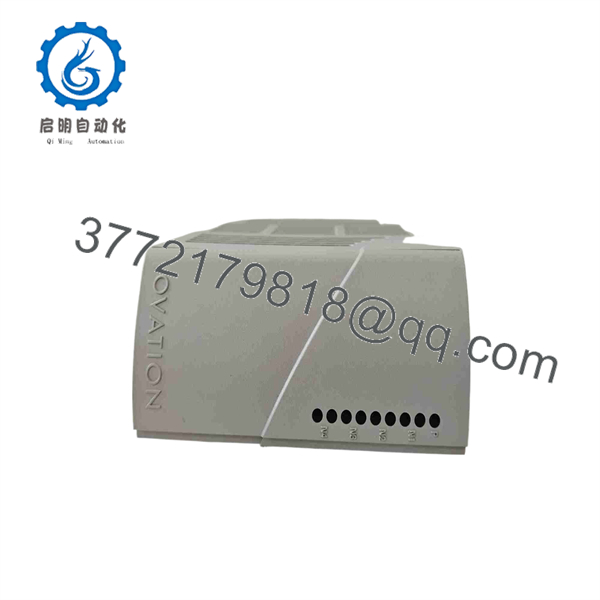
5X00481G04
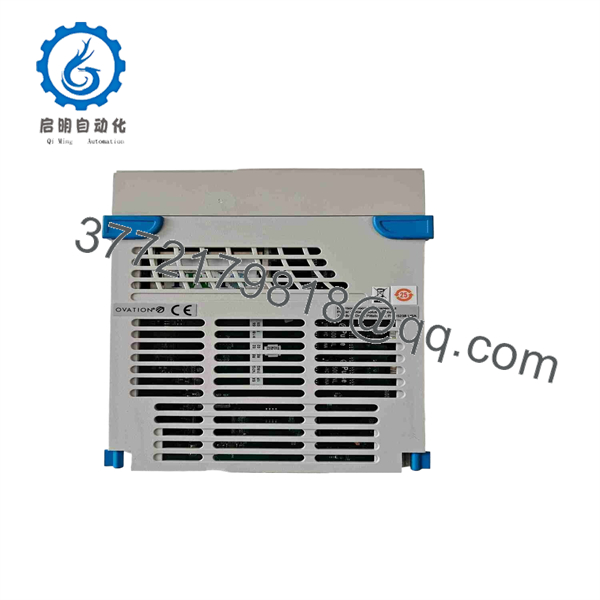
5X00481G04
Installation & Configuration Guide
Stage 1: Pre-Installation Preparation — Approximately 10 Minutes
⚠️ Safety First: Notify operations, place the process in its approved safe state, and follow the plant’s lockout/tagout procedure before removing the controller.
Tools Required:
- ESD wrist strap
- Appropriate screwdriver
- Digital multimeter
- Wire labels
- Smartphone/camera
- Approved Ovation engineering workstation
Data Backup:
- Record the complete CPU marking: 5X00481G04.
- Record the installed firmware/software revision.
- Photograph the controller front panel and rack position.
- Photograph Ethernet connections and cable labels.
- Record controller redundancy status.
- Confirm the associated 5X00226G04 IOIC and 5X0025G01 base configuration.
- Save the latest available Ovation application and configuration backup.
⚠️ If this is a redundant OCR1100 installation, determine which controller is primary and which is standby before removing anything.
Stage 2: Removing the Old Module — Approximately 5 Minutes
- Put the controller into the approved maintenance state.
- Isolate power according to the applicable Emerson/Ovation service procedure.
- Verify the relevant supply is de-energized.
- Label Ethernet and other connected interfaces.
- Disconnect the applicable cables carefully.
- Release the module’s retaining mechanism.
- Pull the CPU card straight out of its slot.
- Inspect the connector and backplane for contamination, bent contacts, or physical damage.
⚠️ Keep the removed 5X00481G04 until the replacement has completed commissioning.
Stage 3: Installing the New Module — Approximately 5 Minutes
- Wear an ESD wrist strap before handling the CPU card.
- Confirm the replacement is exactly 5X00481G04.
- Compare hardware revision and firmware information with the old card.
- Verify the correct slot.
- Insert the CPU card straight into the backplane connector.
- Engage the retaining mechanism.
- Reconnect Ethernet and other interfaces according to the photographs.
- Check cable seating and routing.
Self-Checklist:
- 5X00481G04 confirmed
- Firmware/revision recorded
- Correct slot confirmed
- CPU card fully seated
- Retaining mechanism locked
- Ethernet connections restored
- Redundant controller status verified
Stage 4: Power-On & Testing — Approximately 10–15 Minutes
- Perform a final visual inspection.
- Check the supply voltage before energizing the controller.
- Restore power following the approved Ovation procedure.
- Observe CPU and controller status indications.
- Confirm the controller boots normally.
- Verify Ethernet/network communication.
- Check controller identification from the Ovation engineering workstation.
- Verify firmware/software compatibility.
- Confirm the application, point database, and configuration are present.
- If operating redundantly, verify synchronization with the partner controller.
- Check I/O communication.
- Perform controlled process/I/O verification before returning the controller to normal service.
Emerson states that the provides non-volatile storage for application software, point databases, configuration information, and operating tuning constants. That does not mean a replacement CPU should be installed without a configuration backup; always verify the actual controller state after replacement.
❗ Firmware compatibility is the first thing I would check on a legacy controller replacement. If the replacement boots but refuses to join the existing controller/network architecture, verify firmware, Ovation software release, controller role, and configuration before assuming the CPU is defective.
Frequently Asked Questions (FAQ)
Q1. What is Emerson 5X00481G04?
The 5X00481G04 is the CPU card/processor module for Emerson’s Ovation controller. Emerson’s own documentation explicitly identifies it as the Controller CPU Card.
Q2. What modules make up the controller?
Emerson identifies three principal hardware elements in the arrangement:
- 5X00481G04 — Controller CPU Card
- 5X00226G04 — Controller IOIC Card
- 5X0025G01 — Ovation Controller Base
The CPU card should therefore be evaluated as part of the complete architecture rather than as an independent PLC CPU.
Q3. Does 5X00481G04 support redundant controllers?
Yes. The architecture supports redundant controllers and automatic failover. Emerson describes the design as providing automatic failover between redundant controllers.
For a live plant replacement, verify which controller is primary and which is standby before removing a card.
Q4. Can I hot-swap 5X00481G04?
Do not assume it is hot-swappable. The correct procedure depends on the specific hardware configuration and approved maintenance procedure. Unless your system documentation explicitly permits energized replacement, isolate power before extracting the CPU.
Q5. Does replacing 5X00481G04 erase the Ovation control program?
The 5X00481G04/ architecture uses non-volatile storage for application software, point databases, configuration information, and tuning constants.
However, never rely on that fact as your backup strategy. Before replacement, save the current Ovation application and configuration and record the installed firmware/software revision.
Q6. Is 5X00481G04 obsolete?
Current aftermarket references classify the part as discontinued/obsolete by the OEM, although suppliers continue to advertise new-surplus and reconditioned inventory.
For a plant running hardware, I would treat 5X00481G04 as a lifecycle-controlled spare and maintain at least one verified replacement if the process cannot tolerate extended controller downtime.
Q7. What should I verify before purchasing a replacement?
At minimum, provide the supplier with:
- Exact part number: 5X00481G04
- Hardware/revision information
- Existing Ovation software release
- Firmware version
- controller configuration
- Single or redundant-controller arrangement
- Condition required — Factory Sealed, New Surplus, or Refurbished/Tested
Do not accept a generic “Ovation CPU” as a substitute. The CPU, IOIC, base unit, firmware, and system software all need to be considered together. Emerson’s documentation specifically identifies 5X00481G04 + 5X00226G04 + 5X0025G01 as the controller arrangement.



