
 WhatsApp: +86 16626708626
 Email:
  Phone: +86 16626708626
Description
3. Key Technical Specifications
| Parameter | Value |
|---|---|
| Input Voltage | 85–264 VAC |
| Input Frequency | 47–63 Hz |
| Output Voltage | 12 VDC |
| Output Current | 1.0 A min.; up to 8.5 A or 13.0 A max. |
| Maximum Continuous Power | 102 W or 156 W (typically rated 150 W) |
| Redundancy | Yes – hot-swappable |
| Status Indication | Front-panel Status LED |
| MTBF | 300,000 hours |
| Dimensions (H × W × D) | 19.6 × 5.2 × 25.7 cm (7.7 × 2.04 × 10.1 in) |
| Net Weight | 1.75 kg (3.85 lb) |
| Mounting | Plug-in module for C2RPS-CHAS2 or C2RPS-CHAS8 chassis |
| Compatible Switches | SecureStack C2 non-PoE models (e.g., C2G124-24, C2G124-48, C2H124-48, C2K122-24) |
| Cable Interface | Keyed DC power/monitor cable (prevents PoE mismatch) |
Verify exact power rating and chassis compatibility with the target SecureStack C2 switch before ordering. Transformer/AC cord and DC cable are typically separate items.
4. Product Introduction
The Enterasys C2RPS-PSM is a hot-swappable redundant power supply module designed for SecureStack C2 Ethernet switches. It converts universal AC input (85–264 V) to regulated 12 VDC and delivers up to 150 W continuous power, providing automatic backup if the switch’s internal supply fails.
Network and plant engineers install the C2RPS-PSM in a matching RPS chassis (C2RPS-CHAS2 or C2RPS-CHAS8) to eliminate single points of power failure on critical industrial or enterprise LAN segments. The keyed DC cable interface ensures correct connection only to non-PoE SecureStack C2 switches. Because the product line is discontinued, tested surplus modules remain the practical route for maintaining existing high-availability switch installations.
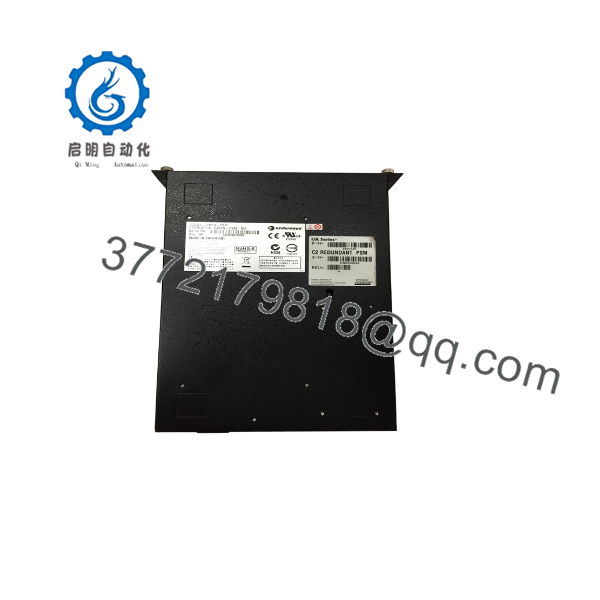
C2RPS-PSM
C2RPS-PSM
5. Installation & Configuration Guide
Stage 1: Pre-Installation Preparation (10–15 min)
⚠️ Safety First: Notify network operations. Confirm the target switch can accept external RPS power. De-energize the AC feed to the RPS chassis if already installed.
Tools Required: ESD strap, screwdriver set, multimeter, labels, smartphone for photos of existing cabling and LED status.
Data Backup: Photograph the current RPS chassis population, DC cable routing, and any labeled switch ports. Note which switch(es) the module will support.
Stage 2: Removing the Old Module (5–10 min)
- If the chassis is powered, observe the Status LED.
- Disconnect the keyed DC power/monitor cable from the rear of the module.
- Loosen the captive screws and slide the module straight out of the chassis slot.
- Inspect the chassis connectors and cooling path for dust or damage.
⚠️ Retain the old module until the replacement is online and the switch reports stable external power.
Stage 3: Installing the New Module (10–15 min)
- Confirm the unit is a genuine C2RPS-PSM (not the PoE variant).
- Align the module with the chassis guides and slide it fully home. Tighten the captive screws.
- Connect the keyed DC cable between the module rear connector and the corresponding SecureStack C2 switch RPS port.
- Connect the AC power cord to the module and to a properly rated outlet or PDU.
Self-Checklist: [ ] Module fully seated [ ] Keyed cable correct orientation [ ] Captive screws tight [ ] AC cord secure.
Stage 4: Power-On & Testing (10–15 min)
Pre-Power Check: Verify AC voltage at the outlet and no visible damage to the cable.
- Apply AC power. The front Status LED should illuminate green to indicate normal operation.
- Confirm the connected SecureStack C2 switch recognizes external/redundant power (check switch LEDs or management interface).
- If dual modules are installed, verify load sharing or failover by temporarily removing AC from one unit (in a controlled maintenance window).
⚠️ Troubleshooting: No LED usually indicates AC input or internal fault. Switch does not detect RPS power – check keyed cable seating and polarity. Over-temperature or fan issues require chassis airflow verification.
6. Frequently Asked Questions (FAQ)
Q: Can the C2RPS-PSM be hot-swapped under load?
A: Yes. The design supports hot-swap. The switch continues running on its internal supply or the remaining RPS module while the unit is exchanged. Always follow site lock-out procedures for the AC side when practical.
Q: Is the C2RPS-PSM still manufactured, and is stock genuine?
A: Enterasys/Extreme Networks has discontinued the SecureStack C2 RPS family. Available units are new original or carefully tested surplus. Serial numbers and condition are verified on intake.
Q: What chassis and switches does it support?
A: It installs in C2RPS-CHAS2 (2-slot) or C2RPS-CHAS8 (8-slot) chassis and supplies non-PoE SecureStack C2 switches such as C2G124-24, C2G124-48, C2H124-48, and C2K122-24. It is not compatible with PoE models (use the corresponding PoE RPS module instead).
Q: Will replacing the module interrupt network traffic?
A: When properly installed as a redundant supply, replacement should not interrupt traffic. The switch falls back to its internal supply or the second RPS module during the swap. Always schedule the work in a maintenance window if the network is critical.
Q: Why is the price lower than historical OEM list prices?
A: This is discontinued surplus inventory. Pricing reflects secondary-market availability of tested original units rather than current production cost.
Q: What testing is performed before shipment?
A: Visual inspection, power-on self-test, Status LED verification, and output voltage/current checks under load where possible. Test reports and photos are available on request.



