
 WhatsApp: +86 16626708626
 Email:
  Phone: +86 16626708626
Description
3. Key Technical Specifications
| Parameter | Specification Value |
| Manufacturer | Enterasys Networks / Extreme Networks |
| Model Number | 08H20G4-48P |
| Chassis Compatibility | Matrix N1, Matrix N3, Matrix N5, Matrix N7 Chassis Platforms |
| Port Density | 48 x 10/100/1000Base-T RJ-45 Auto-Sensing Ports |
| PoE Capability | Hardware-ready IEEE 802.3af / 802.3at PoE+ allocation |
| Uplink SFP Slots | 4 x Gigabit SFP Transceiver combo interfaces |
| Backplane Bandwidth | Scaled non-blocking multi-gigabit matrix switching |
| Packet Forwarding | Wire-speed L2 switching and advanced L3/L4 policy-based routing |
| MAC Address Capacity | 32,000 entries |
| VLAN Configurations | 802.1Q Tagged, Port-Based, Dynamic Policy-driven VLANs |
| Cooling Profile | Dependent on modular chassis fan tray intake airflow |
| Management System | Enterasys Command Line Interface (CLI) / NetSight Management |
4. Product Introduction & Supply Chain Strategy
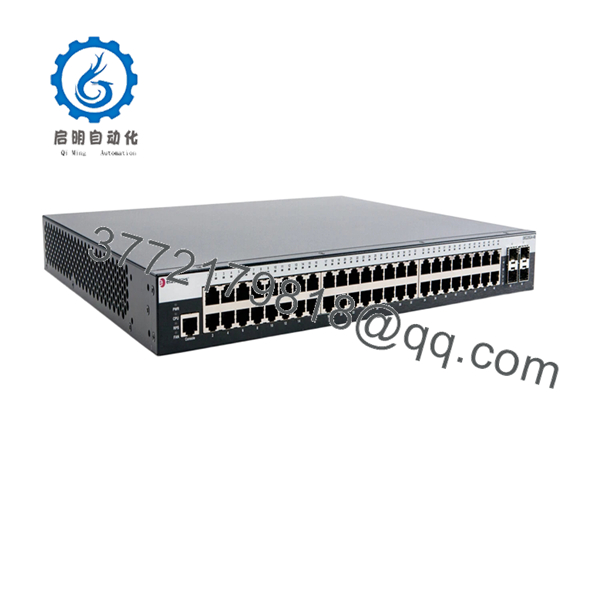
The Extreme Networks Enterasys 08H20G4-48P is a high-density, Power over Ethernet (PoE/PoE+) expansion line card designed for the Matrix N-Series modular chassis infrastructure. Featuring 48 gigabit Ethernet copper ports alongside 4 shared SFP slots for fiber uplinks, this module delivers line-rate Layer 2 switching and advanced Layer 3 routing directly into complex enterprise networks and industrial control hubs. It uses robust flow-based architecture to inspect and prioritize safety-critical automated control loops, IP surveillance paths, and terminal endpoints without inducing processing latency.
When managing legacy modular chassis networks, hardware condition directly influences facility availability metrics. Opting for a New Surplus 08H20G4-48P module entirely removes the severe financial risk brought by refurbished cards, which frequently harbor fatigued logic chipsets, micro-fractured solder traces, and degraded PoE power controllers from thousands of hours of prior service. For networks that run non-stop production loops, maintaining 1–2 factory-sealed New Surplus blades as an on-site insurance policy neutralizes lead time variability, secures obsolete systems against EOL stock-outs, and optimizes long-term Total Cost of Ownership (TCO).

- 08H20G4-48P
5. Installation & Configuration Guide
Stage 1: Pre-Installation (Prep & Safety)
- Put on a properly grounded anti-static (ESD) wrist strap and attach its clip to an unpainted grounded surface on the Matrix chassis rack.
- Establish a management connection to the active Matrix Chassis Management Module via serial console or secure network line.
- Execute a system diagnostic check using
show systemand backup the global operational configuration file to a secure, off-site location. - Verify that the chassis power budget has a 20% buffer remaining to accommodate the active PoE demands of the 48-port module.
Stage 2: Removal (If replacing a damaged module)
- Label and systematically disconnect all connected RJ-45 copper lines and optical SFP paths from the faceplate.
- Loosen the upper and lower captive thumbscrews on the 08H20G4-48P faceplate using a flat-head screwdriver.
- Pivot the dual injector/ejector levers outward simultaneously to unlock the card’s multi-pin backplane connector from the active chassis midplane.
- Smoothly slide the module straight out along the slot guide rails, supporting the lower edge of the PCB assembly, and place it inside a static-shielding enclosure.
Stage 3: Installation (Clone & Seat)
- Extract the New Surplus 08H20G4-48P module from its factory-sealed anti-static packaging and inspect the rear connector pins for absolute alignment.
- Ensure both injector/ejector levers on the front faceplate are fully opened in their outward positions.
- Align the blade edge with the designated chassis slot guides and slide the module carefully inward until the ejector levers contact the chassis lip.
- Push both levers inward firmly at the same time until they click flat against the module face, then secure the upper and lower captive thumbscrews.
Stage 4: Power-On & Testing
- Watch the module’s localized LED cluster during bootup; the power indicator should transition to steady green, confirming successful hardware registration.
- Log into the chassis CLI and execute commands to verify that the active system detects the new card, initializes its hardware tables, and loads the proper system parameters.
- Reconnect the RJ-45 copper lines and optical SFP transceivers into their designated port positions.
- Check the port status indicators and track live traffic statistics across active channels to ensure error-free packet negotiation and correct PoE distribution.
6. Firmware/Software Versions & Upgrade Notes
The Matrix 08H20G4-48P module relies on the embedded firmware operating software within the chassis’s primary controlling processors.
When inserting a New Surplus line card, the chassis manager automatically syncs the running firmware image directly onto the new blade. If there is an extreme generation gap between the boot loader revision currently flashed on the replacement card and your active chassis baseline, manual system validation via the bootROM layer may be required. Do not change or upgrade your global chassis firmware train while performing an emergency module replacement.
7. Frequently Asked Questions (FAQ)
Q: Are these 08H20G4-48P modules brand new, or are they refurbished parts? A: This inventory consists entirely of 100% Brand New Surplus units. They have never been deployed in an active network, used for bench testing, or subjected to third-party electronic repairs. Every card arrives in unused, factory-clean condition within original anti-static protective sleeves, ensuring that all midplane connection pins and onboard electronics are completely untouched.
Q: Why does a New Surplus blade carry a price premium over refurbished modules found online? A: Refurbished enterprise network blades carry a hidden history of operational heat exposure and component wear. Buying a verified New Surplus 08H20G4-48P module completely isolates your control infrastructure from unpredictable secondary component failures. This extra security prevents expensive emergency plant shutdowns, easily paying back the minor initial hardware investment.
Q: Can I hot-swap this line card into an active, running Matrix chassis? A: Yes. The Matrix modular chassis family fully supports Online Insertion and Removal (OIR). You can extract an old module and slide this New Surplus card directly into an open slot while the system is powered up and handling live traffic on neighboring blades without causing disruption.
Q: Are the 4 SFP ports on the faceplate completely independent interfaces? A: No. The 4 SFP slots are shared combo ports that tie directly to the corresponding copper RJ-45 ports. Connecting an active optical SFP transceiver into one of these slots will automatically disable the electrical copper link on its paired port number.
Q: How do you verify the functionality and authenticity of this legacy module? A: Every piece of incoming inventory goes through a strict quality control inspection. We confirm the integrity of the manufacturer’s anti-static seals, match physical serial numbers against factory shipping manifests, check for straight alignment on all rear midplane pins, and perform an electrical bench diagnostic test. A completed quality report is shipped alongside every unit.



