
 WhatsApp: +86 16626708626
 Email:
  Phone: +86 16626708626
Description
Key Technical Specifications
| Parameter | Value |
| Manufacturer | Extreme Networks |
| Part Number / MPN | 41515 / 700102-00-06 |
| Module Descriptor | G48Ta 48-Port 10/100/1000BASE-T |
| Port Configuration | 48 x RJ-45 copper ports |
| Data Transfer Rate | 10 Mbps, 100 Mbps, 1000 Mbps auto-sensing |
| Compatible Chassis | BlackDiamond 8800 Series (8806, 8810) |
| Connector Type | Standard RJ-45 |
| Cabling Requirement | Category 5e, Category 6, or Category 6A UTP |
| Form Factor | Plug-in hot-swappable line card module |
| Status Indicators | Link/Activity, Port Status, Module System LEDs |
Product Introduction & Supply Chain Strategy
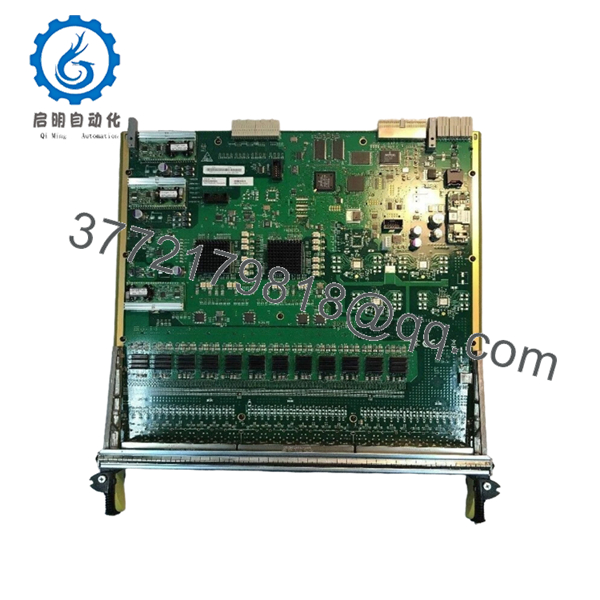
The Extreme Networks 41515 (Part Number 700102-00-06) is a high-density G48Ta line card module engineered for the BlackDiamond 8800 series chassis switch family. It delivers 48 wirespeed copper Gigabit Ethernet ports to support enterprise network aggregation and high-capacity industrial automation backbones. This module handles critical control system routing, localized data processing, and high-volume communication handshakes across manufacturing and plant operations.
From an inventory management perspective, securing this component as a New Surplus asset dramatically reduces your Total Cost of Ownership (TCO). Because the BlackDiamond 8800 series represents legacy network architecture, relying on secondary market repairs or waiting on reactive procurement channels creates an unacceptable risk of stock-out incidents. Maintaining 1–2 factory-sealed units as buffer stock acts as an insurance policy against catastrophic communication backbone failures, eliminating the severe technical risks and structural degradation common in lower-tier refurbished hardware.

- 41515 700102-00-06
Installation & Configuration Guide
Stage 1: Pre-Installation (Prep & Safety)
- Isolate the chassis area and perform standard plant safety reviews.
- Put on a grounded anti-static ESD wrist strap and connect it to the chassis ESD grounding jack to protect internal circuits from static discharge.
- Document the existing port assignments, network connections, and the slot location of the module being replaced.
- Ensure that the target chassis slot is clean, unobstructed, and free of physical debris.
Stage 2: Removal
- Disconnect all 48 RJ-45 network cables from the front panel of the failing module. Label each cable clearly to prevent rewiring errors.
- Loosen the captive thumbscrews on the left and right sides of the line card faceplate using a flat-head screwdriver.
- Flip the ejector levers outward simultaneously to disengage the module from the chassis backplane connectors.
- Slide the card smoothly out of the chassis slot, taking care not to scrape against adjacent modules or bend the alignment pins. Place the old card into an ESD-safe bag.
Stage 3: Installation (Clone & Seat)
- Remove the new Extreme Networks 41515 card from its anti-static protective packaging.
- Verify that all physical alignment rails, backplane interface pins, and ejector tabs are straight and uncompromised.
- Align the module with the chassis guides for the target slot. Slide the module into the slot until the ejector levers catch the chassis flange.
- Press the ejector levers firmly inward to fully seat the line card backplane connector into the chassis midplane. Hand-tighten the captive faceplate thumbscrews.
Stage 4: Power-On & Testing
- Reconnect the 48 network cables to their designated RJ-45 ports based on your pre-installation labels.
- Observe the module’s system status LEDs during initialization. Verify that the power LED glows steady green and that the error lights remain dark.
- Check the link and activity LEDs for individual ports to confirm immediate network handshakes with connected endpoints.
- Log into the management software (ExtremeXOS) to verify that the system registers the slot configuration as active and operational.
Firmware/Software Versions & Upgrade Notes
- Recommended Baseline: The G48Ta module functions optimally under standard ExtremeXOS (EXOS) firmware baselines designated for BlackDiamond 8800 systems. Verify that your core management modules run a matching version before installation.
- Compatibility Risks: Operating mismatching firmware revisions between line cards and the master Management Switch Processor (MSM) can induce protocol timeouts and packet drops. Do not introduce a module running legacy configurations into a chassis that utilizes updated EXOS software.
- Hardware Swap Precautions: Avoid performing firmware upgrades or downgrades directly during a hardware replacement window. Establish stable physical connectivity and a clean boot sequence on verified hardware before adjusting operational network code baselines.
Frequently Asked Questions (FAQ)
Why is this unit priced higher than typical refurbished network parts?
Our inventory consists entirely of genuine New Surplus hardware that has never seen live operational cycles in a production plant. Refurbished network modules carry a high risk of degraded copper ports, internal solder fatigue, and hidden component wear that cosmetics cannot reveal. The small premium for a New Surplus 41515 module buys you full OEM-level operational lifespans and protects your infrastructure from unexpected downtime.
Is this product an active OEM item or an EOL component?
The Extreme Networks BlackDiamond 8800 series and the associated 41515 line cards have reached End-of-Life (EOL) status with the manufacturer. Because original factory production has ended, these modules are highly sought-after parts. Procurement teams should maintain critical spare stock on-site to bypass the extended lead times and volatile pricing of the global legacy market.
Can I hot-swap this module while the chassis is powered and processing data?
Yes, the BlackDiamond 8800 chassis architecture supports hot-swapping for I/O modules like the 41515. However, while pulling or inserting the card will not disrupt power to other slots, all network traffic routed through these specific 48 ports will drop instantly during the swap. Schedule the physical replacement during an approved maintenance window to prevent data routing disruptions.
Do I need to manually configure the network settings on this new card?
The 41515 functions as an unconfigured array of interface ports upon initial insertion. Once it securely seats into the chassis, the active Management Switch Processor (MSM) automatically detects the module type and applies the slot-specific port, VLAN, and routing configurations stored in the active system memory profile.
How is the authenticity of this New Surplus product verified?
Every Extreme Networks 41515 module goes through strict tracking verification. We verify the factory tracking barcodes, cross-check the internal 700102-00-06 part numbers, and run physical diagnostic checks before shipping. The module arrives wrapped in anti-static materials and is accompanied by our verified QC verification paperwork.



