
 WhatsApp: +86 16626708626
 Email:
  Phone: +86 16626708626
Description
3. Key Technical Specifications
| Parameter | Value |
|---|---|
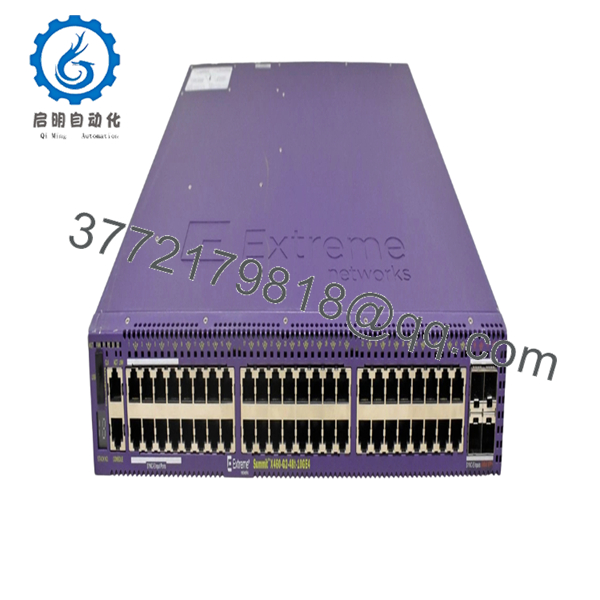
| Access Ports | 48 × 10/100/1000BASE-T PoE+ |
| Uplink Ports | 4 × 1G SFP (10 Gb capability available on supported 10GE models through licensing) |
| Switching Bandwidth | 176 Gbps |
| Forwarding Rate | 130.9 Mpps |
| PoE Standard | IEEE 802.3af / IEEE 802.3at |
| MAC Address Table | 16,000 entries |
| VLAN Support | Up to 4,092 VLANs |
| Jumbo Frame Size | Up to 9,216 bytes |
| Operating System | ExtremeXOS |
| Management | CLI, SNMP, Web, Extreme Management Center, ExtremeCloud IQ (supported models) |
| Stacking | Supported |
| Operating Temperature | 0 °C to 50 °C |
Compatibility Note: The X440-G2 family includes multiple hardware variants (GE4 and 10GE4). Verify the exact suffix on the product label before ordering because uplink capabilities and licensing differ between models.
4. Product Introduction
The Extreme Networks X440-G2-48P-10 is a managed enterprise Ethernet switch designed for campus access networks, branch offices, industrial facilities, healthcare environments, and education deployments. It provides forty-eight Gigabit PoE+ access ports for powering IP phones, wireless access points, surveillance cameras, and other IEEE 802.3af/at powered devices.
The X440-G2 platform runs ExtremeXOS, allowing a common operating system across multiple Extreme switching families. It supports advanced Layer 2 switching, Layer 3 routing features, centralized management, stacking, and enterprise security policies while maintaining high forwarding performance for edge deployments.

- X440-G2-48P-10
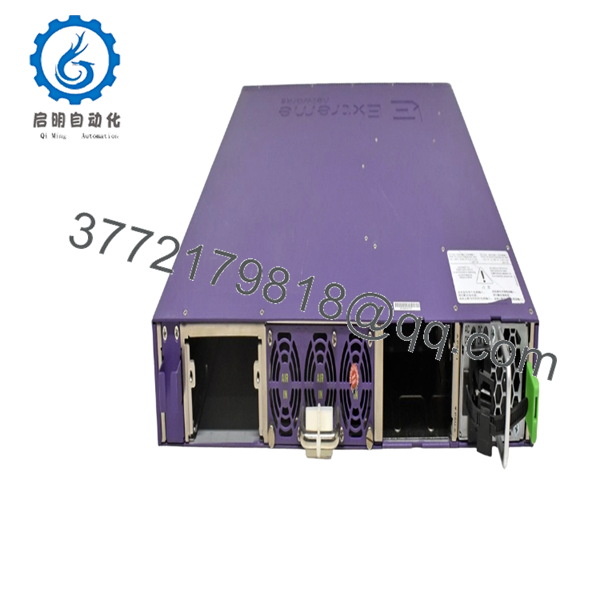
- X440-G2-48P-10
5. Installation & Configuration Guide
Stage 1 – Pre-Installation Preparation (10 minutes)
⚠️ Safety First
- Notify operations personnel of the planned maintenance window.
- Follow lockout/tagout procedures.
- Disconnect AC power.
- Wait at least five minutes before servicing equipment.
Tools Required
- Grounded ESD wrist strap
- Phillips screwdriver
- Digital multimeter
- Cable labels
- Smartphone for cable documentation
Data Backup
- Save the current configuration.
- Record the management IP address.
- Export VLAN configuration.
- Record firmware version.
- Photograph all copper and fiber connections.
Stage 2 – Removing the Existing Switch (5–10 minutes)
- Label every Ethernet and fiber cable.
- Disconnect PoE-powered devices.
- Remove rack mounting screws.
- Slide the switch out carefully.
- Inspect SFP cages, power connectors, and rack rails.
⚠️ Do not discard the existing switch until the replacement has completed functional testing.
Stage 3 – Installing the New Switch (10 minutes)
- Verify the complete model number before installation.
- Wear ESD protection.
- Mount the switch securely.
- Install approved SFP modules.
- Reconnect all network cables.
- Restore AC power.
Self-Checklist
- Correct hardware revision
- Rack securely mounted
- Fiber polarity verified
- Network cables labeled
- Ground connection confirmed
Stage 4 – Power-On & Testing (15 minutes)
- Verify input voltage.
- Apply power.
- Confirm Power and Status LEDs indicate normal operation.
- Log into the management interface.
- Verify firmware version.
- Restore the saved configuration if replacing an existing unit.
- Confirm VLANs, spanning tree, PoE allocation, and uplink operation.
- Test end-to-end connectivity for connected devices.
⚠️ Troubleshooting
- A solid fault LED often indicates firmware or hardware initialization problems.
- If SFP uplinks remain offline, verify module compatibility and licensing.
- If network communication fails after replacement, compare the restored configuration against the original backup before replacing hardware.
6. Frequently Asked Questions (FAQ)
Q1. Can the X440-G2-48P-10 be replaced while powered on?
No. Disconnect power before replacing the switch. Although Ethernet devices support hot plugging, replacing the chassis under power risks hardware damage and unexpected network outages.
Q2. Does this switch provide PoE+?
Yes. It supports IEEE 802.3af and IEEE 802.3at PoE+, supplying up to 30 W per powered port. The total available PoE budget depends on the installed power supply model.
Q3. Are the SFP ports always 10 Gigabit capable?
Not necessarily. Several X440-G2 variants include SFP ports that can operate at 10 Gb only on supported 10GE models and may require the appropriate software license. Always verify the exact hardware suffix before purchasing.
Q4. Will replacing the switch erase my network configuration?
The hardware itself does not preserve the previous configuration. Before removing the existing switch, export the configuration file and document management settings. Restoring that backup significantly reduces commissioning time.
Q5. Is the X440-G2 Series still suitable for new installations?
Yes. The X440-G2 remains widely deployed in enterprise edge networks where Gigabit access and PoE+ are sufficient. Many organizations continue using it because of its stable ExtremeXOS software, stacking capability, and broad protocol support.
Q6. Why are many units sold as New Surplus?
Large enterprise infrastructure projects often purchase spare equipment that is never installed. Those factory-sealed units later enter the surplus market. Always confirm whether the unit is New Original, New Surplus, or Refurbished (tested) before ordering.
Q7. What is the most common mistake during replacement?
The mistake I see most often is assuming every X440-G2 model has identical uplink capabilities. Some hardware revisions differ in 10 Gb support and licensing. Verify the complete part number, installed firmware, and license status before deployment. That five-minute check can prevent hours of troubleshooting.



