
 WhatsApp: +86 16626708626
 Email:
  Phone: +86 16626708626
Description
3. Key Technical Specifications
| Parameter | Specification |
| Processor Type | Motorola MC68000 or MC68010 16-bit microprocessor |
| Clock Frequency | 8 MHz or 10 MHz options |
| On-Board RAM | 128 KB or 512 KB dual-ported dynamic RAM |
| ROM/EPROM Capacity | 8x 28-pin JEDEC sockets supporting up to 512 KB |
| VMEbus Interface | Master/Slave capabilities, Compliance Level A24:D16 |
| Serial I/O Channels | 2x RS-232C multi-protocol serial ports |
| Parallel I/O Channels | 1x 24-bit parallel interface via PI/T 68230 |
| Timer/Counters | Integrated 24-bit programmable timer |
| Power Consumption | +5 V DC, ±5% |
| Form Factor | Standard Double-Height (6U) VMEbus board |
| Operating Temperature | 0 to +50 °C |
4. Product Introduction & Supply Chain Strategy
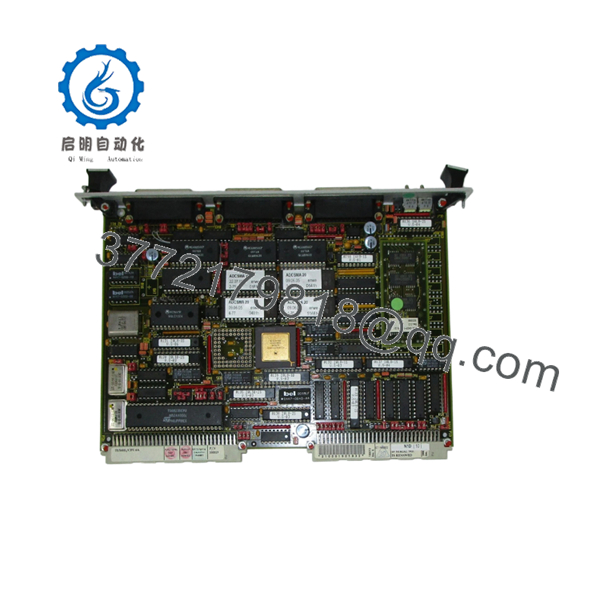
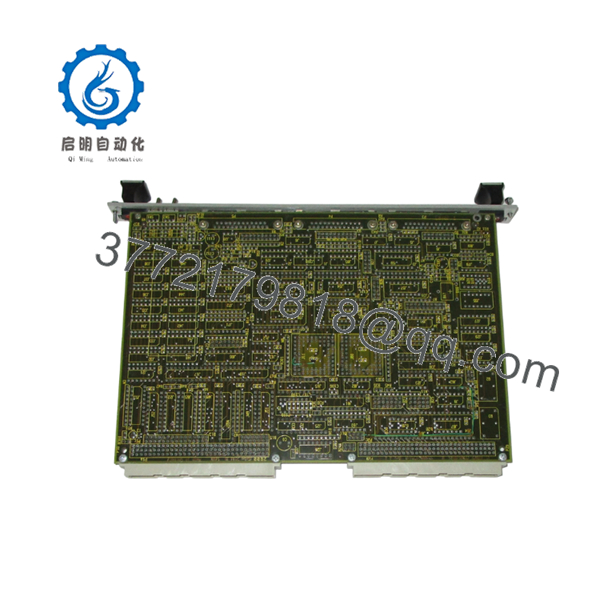
The FORCE SYS68K-CPU-6A is a legacy 16-bit VMEbus single-board computer built around the Motorola 68000 architecture, engineered for complex process control, maritime navigation, and aerospace simulation environments. As an independent VMEbus system controller, it manages real-time local processing, high-speed data transmission across backplanes, and extensive multi-protocol I/O routing.
Securing this hardware as a New Surplus asset represents a strategic insurance policy for your plant’s uptime. Because this component is obsolete, a single board failure on a critical line can trigger extended asset downtime while engineers attempt an expensive, unvalidated system migration. By acquiring verified New Surplus units rather than gambling on low-grade, third-party repaired boards, your operation avoids latent component failures, ensures identical timing characteristics, and locks in a lower Total Cost of Ownership (TCO).

- SYS68K-CPU-6A
- SYS68K-CPU-6A
5. Installation & Configuration Guide
Stage 1: Pre-Installation (Prep & Safety)
- Isolate the VME rack by executing standard lock-out/tag-out procedures on the primary power supply.
- Ground yourself using an ESD wrist strap connected to an unpainted chassis point; static discharge will instantly damage the board’s high-density CMOS components.
- Document the existing configuration. Take high-resolution photos of all onboard DIP switches, jumper matrix arrays, and front-panel serial/parallel cable attachments before removing the broken board.
Stage 2: Removal
- Unthread the upper and lower retaining screws on the front panel of the legacy module.
- Unlatch the injection/ejection levers simultaneously to pull the board out of the DIN 41612 backplane connectors.
- Slide the board out along the card guides, holding only the front panel and PCB edges; do not touch the rear gold backplane pins.
Stage 3: Installation (Clone & Seat)
- Place the new board on a grounded ESD mat. Mirror the jumper blocks and DIP switch positions (setting memory maps, interrupt levels, and base addresses) from the old unit onto the FORCE SYS68K-CPU-6A.
- Carefully align the new board with the upper and lower chassis guide rails.
- Push the module smoothly into the slot until the connectors meet the backplane, then lock the injector handles to firmly seat the board pins. Secure the retaining screws.
Stage 4: Power-On & Testing
- Disconnect any sensitive downstream I/O modules, then re-energize the VME chassis power supply.
- Measure the +5 V DC rail voltage at the test points to ensure the backplane power supply provides stable electricity under load.
- Monitor the front-panel status LEDs. The RUN indicator should illuminate steadily, and the ERR or HALT lights must remain unlit after the initialization phase completes. Connect your terminal to the serial port to verify the bootloader output.
6. Firmware/Software Versions & Upgrade Notes
The FORCE SYS68K-CPU-6A relies heavily on local firmware residing in its eight physical JEDEC EPROM sockets. Most legacy installations run specialized real-time operating system kernels (such as pSOS or VxWorks) or proprietary machine code built specifically for low-level firmware versions like V1.2 or V2.0.
⚠️ CRITICAL CONFIGURATION WARNING: A firmware mismatch between your original board and the replacement module will cause immediate protocol timeouts, system address space traps, or total failure to boot.
Do not attempt a standard hardware replacement without transferring the physical, socketed EPROM chips from your old board to the new board unless you have verified that the replacement board’s firmware matches your application’s software revision. Swapping hardware without matching firmware can create catastrophic memory map misalignment between the CPU module and adjacent VME I/O memory spaces.
7. Frequently Asked Questions (FAQ)
Q: What is the exact condition of this module, and how do you verify its authenticity?
A: This unit is verified Brand New Surplus inventory. It has never seen active duty in a production plant and is not a pull from a decommissioned line. It is shipped in original anti-static packaging (opened solely for standard intake quality control) with pristine, unmarred backplane pins and zero rework or solder modification. We verify serial numbers and confirm inbound traceability to ensure absolute OEM authenticity.
Q: Why is the price of this New Surplus module higher than options on auction sites?
A: Our pricing directly reflects the scarcity and verified reliability of unused legacy automation equipment. While auction sites feature used or unverified equipment that carries high risks of capacitor leakage and degraded logic gates, our inventory provides a 100% reliable drop-in solution. The small price premium buys an immediate reduction in unplanned downtime risks, saving your facility thousands of dollars in emergency engineering hours.
Q: Is the FORCE SYS68K-CPU-6A still supported by the original manufacturer?
A: No, this product has been officially discontinued and is categorized as End-of-Life (EOL). The manufacturer no longer provides technical support, repairs, or replacement inventory. This makes our verified New Surplus units a vital resource for plants executing obsolescence management programs to extend the operational lifespans of their current systems.
Q: Does this CPU card support hot-swapping while the VME chassis is powered up?
A: No. The VMEbus standard for this hardware generation does not support live insertion or hot-swapping. Attempting to install or extract the module while the chassis is powered on will cause voltage transients across the DIN connectors. This can permanently fry the onboard microprocessor, corrupt local RAM data, and disrupt neighboring modules on the backplane. Always isolate the power supply before removal or installation.
Q: Will this board retain its user program after a complete facility power outage?
A: Volatile user data stored within the on-board dual-ported RAM will be lost during a prolonged power outage unless battery-backup circuitry is explicitly configured on the backplane. Operating systems, boot code, and static application parameters must be burned onto non-volatile EPROM chips and seated into the JEDEC sockets to ensure permanent data retention.
Q: What warranty coverage comes with this New Surplus board?
A: To match the high-reliability demands of industrial operations, this module is backed by a comprehensive 1-year warranty. This extended warranty protection far outlasts the standard 30-day terms typically found on used alternative hardware, offering long-term risk protection for your asset investments.



