
 WhatsApp: +86 16626708626
 Email:
  Phone: +86 16626708626
Description
Key Technical Specifications
| Parameter | Value |
|---|---|
| Manufacturer | Foxboro, part of Schneider Electric |
| Model | FCP280 |
| Part number | RH924YA |
| Product family | EcoStruxure Foxboro DCS (Foxboro Evo / I/A Series) |
| Product type | Field Control Processor (FCP) |
| Primary function | Regulatory, logic, timing, and sequential control with connected Fieldbus Modules (FBMs) |
| Processor | 32-bit RISC / ARM-based processor |
| Memory | 128 MB SDRAM for control database and runtime; 128 MB Flash for checkpoint and images; newer firmware options support 2 GB / 4 GB |
| I/O capacity | Up to 128 Fieldbus Modules (FBMs) |
| FBM compatibility | Up to 128 200 Series FBMs, or up to 128 of a combination of 100 Series and 200 Series FBMs (with no more than 64 100 Series FBMs in a mixed configuration) |
| Fieldbus ports | Four PIO (HDLC) channels for 200 Series and 100 Series FBMs |
| Fieldbus speed | 2 Mbps to 200 Series FBMs; 268 kbps backward-compatible to 100 Series FBMs |
| Control network interface | 100 Mbps Ethernet via standard fiber-optic or copper cables through baseplate network adapters |
| Redundancy | Optional fault-tolerant pair with bit-for-bit synchronized operation and automatic bumpless switchover |
| Self-hosting mode | Supports self-hosting, allowing the FCP280 to boot and run with a valid control database even if its host workstation is unavailable |
| Online upgrade | Supports online image upgrade (OLUG) of a fault-tolerant FCP280 pair without shutting down the process |
| Power input | 24 V DC typical from baseplate |
| Power dissipation | Approximately 11 W maximum for a single module; approximately 20 W maximum for a fault-tolerant pair |
| Operating temperature | −20 to +60 °C (−4 to +140 °F) |
| Storage temperature | −40 to +70 °C (−40 to +158 °F) |
| Relative humidity | 5 to 95%, noncondensing |
| Environmental classification | Class G3 (harsh) per ISA S71.04 |
| Mounting | Foxboro baseplate; horizontal or vertical mounting; vertical mounting (RH924YF) recommended for better cooling |
| Dimensions | Approximately 105 mm H × 51.8 mm W × 147 mm D (116 mm height including mounting lugs) |
| Weight | Up to 0.8 kg for a single non-fault-tolerant module |
| Certifications | CE, cULus, ATEX Zone 2, UL Class I Division 2, ISA EDSA cybersecurity |
| Replacement requirement | Match FCP280/RH924YA, firmware level, redundancy mode, baseplate type, network adapters, FBM count, and DCS configuration |
Foxboro product data identifies the FCP280 RH924YA as a field-mounted controller that performs regulatory, logic, timing, and sequential control with connected FBMs. It supports up to 128 FBMs, optional fault-tolerant redundancy, self-hosting mode, and online image upgrade without process shutdown. The module connects to the control network via 100 Mbps Ethernet and communicates with FBMs over four HDLC fieldbus ports.
Product Introduction
The Foxboro FCP280 RH924YA is the core Field Control Processor for EcoStruxure Foxboro DCS (formerly Foxboro Evo). It executes control strategies, acquires process data from up to 128 Fieldbus Modules, handles alarm detection, and communicates over a 100 Mbps Ethernet control network.
The is selected where a distributed controller with optional fault tolerance, online image upgrade, and support for both 200 Series and legacy 100 Series FBMs is required. It can operate in self-hosting mode, which allows it to boot and run from a valid local checkpoint even if the host workstation or network is temporarily unavailable.
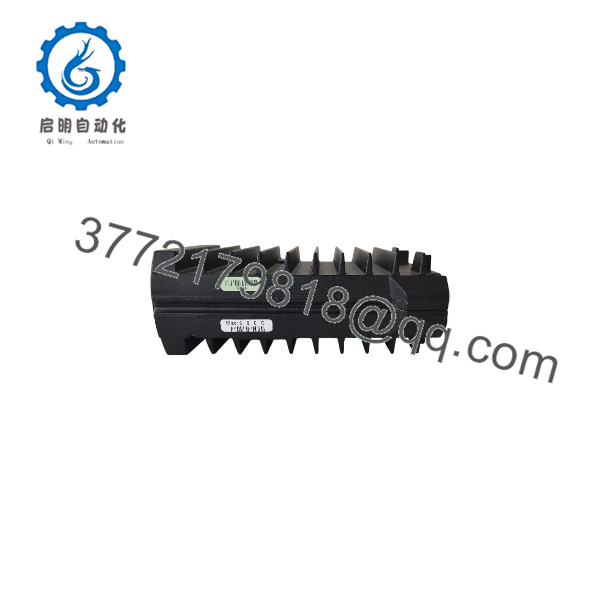
FCP280 RH924YA
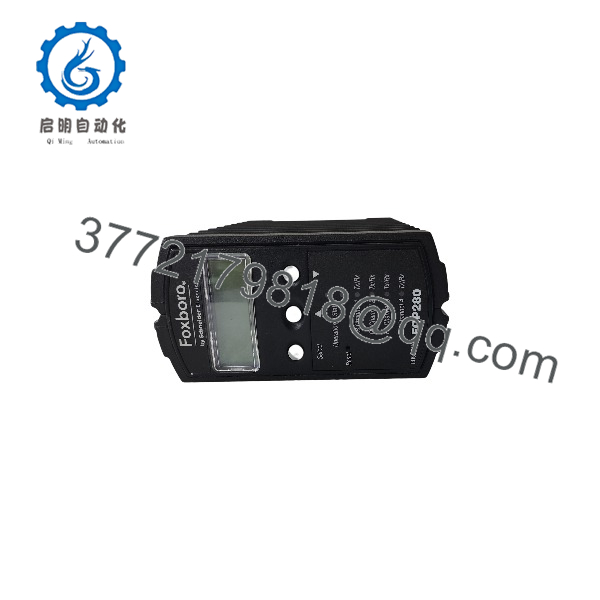
FCP280 RH924YA
Troubleshooting Quick Reference
| Symptom | Possible Cause | Relevance to This Part | Quick Check Method | Recommendation |
|---|---|---|---|---|
| is absent from the DCS or shows communication fault | Loss of 24 V DC supply, baseplate power issue, network adapter fault, fiber/copper link down, failed module | ✅ High | Check DCS diagnostics for controller status. Measure 24 V DC at the baseplate. Verify network adapter LEDs and link status. Inspect fiber or copper cabling and switch-port status. | Restore power and network connectivity first. Replace the only after known-good power and network still show a communication fault. |
| Controller boots but cannot download or synchronize | Network configuration mismatch, IP conflict, firewall/ACL block, wrong DCS project, firmware incompatibility, host workstation issue | ⚠️ Medium | Verify IP address, subnet mask, gateway, and VLAN settings. Test reachability from the engineering workstation. Confirm DCS project and firmware compatibility. | Correct network and configuration issues before replacing hardware. A lit link LED does not guarantee correct IP or DCS communication. |
| One side of a fault-tolerant pair shows standby or fault | Failed redundant module, baseplate or power issue, synchronization link fault, configuration mismatch, firmware difference | ⚠️ Medium | Check diagnostics for each module in the pair. Verify both modules are RH924YA with compatible firmware. Inspect baseplate, power, and synchronization connections. | If the fault follows the module during an approved swap, replace that module. If it remains with the slot or baseplate, investigate the mounting hardware. |
| FBM communication fails on one or more PIO channels | FBM power loss, fieldbus wiring fault, termination issue, FBM failure, PIO channel fault, configuration mismatch | ⚠️ Medium | Check FBM power and status LEDs. Inspect fieldbus cabling and termination. Review DCS diagnostics for PIO channel status and FBM presence. | Diagnose fieldbus power and wiring first. Replace the only after known-good FBMs and cabling still fail on the same PIO port. |
| Controller runs hot or thermal alarm appears | High ambient temperature, poor ventilation, dust buildup, failed fan in cabinet, vertical mounting not used where recommended | ⚠️ Medium | Check cabinet temperature, airflow, and dust accumulation. Verify whether vertical mounting (RH924YF) is used where recommended for better cooling. | Improve cooling and clean the cabinet. Persistent thermal issues can shorten module life. |
| Control strategies behave differently after replacement | Firmware revision difference, checkpoint or image mismatch, DCS project not fully downloaded, configuration not restored | ✅ High | Compare firmware versions and DCS project configuration before and after replacement. Verify checkpoint and image status. Review control strategy behavior and alarm settings. | Restore the approved firmware and configuration. Do not assume a new module will automatically match the existing control environment. |
| Module fails immediately after installation | Wrong baseplate, incorrect power, damaged connector, ESD damage, prior electrical event, contaminated cabinet | ✅ High | Isolate power safely. Inspect the module, baseplate, and connectors for damage, heat marks, or contamination. Measure supply voltage before re-energizing. | Correct the electrical fault before installing a replacement. Do not re-apply power to a damaged baseplate or connector. |
| Self-hosting mode does not work as expected | Missing or corrupted checkpoint, configuration issue, host workstation problem, network issue, firmware limitation | ⚠️ Medium | Check checkpoint status and DCS diagnostics. Verify host workstation availability and network connectivity. Review self-hosting configuration and firmware support. | Restore a valid checkpoint and verify configuration. Self-hosting requires a valid local control database and correct setup. |
Field note: The is often blamed when the real fault is network configuration, power supply, or FBM fieldbus wiring. Before replacing the controller, verify 24 V DC, network link, IP settings, and FBM status. I have seen hours wasted on a “bad FCP” when the problem was a single unplugged fiber or a wrong VLAN.
If you need technical support, provide photos of the /RH924YA label, baseplate type, network adapters, cabling, power supply, DCS diagnostics, firmware version, and any related alarm text.
Frequently Asked Questions
What does the Foxboro do?
The is the Field Control Processor for EcoStruxure Foxboro DCS. It executes regulatory, logic, timing, and sequential control, acquires data from up to 128 Fieldbus Modules, handles alarm detection, and communicates over a 100 Mbps Ethernet control network.
How many FBMs can one support?
A single can support up to 128 Fieldbus Modules. This can be 128 200 Series FBMs, 128 100 Series FBMs, or a mix of both with no more than 64 100 Series FBMs in a mixed configuration.
Does support redundancy?
Yes. The supports optional fault-tolerant redundancy with two modules running in lockstep with bit-for-bit synchronized message output. If one module fails, the other takes over automatically with bumpless switchover. The fault-tolerant pair consumes approximately 20 W maximum compared to 11 W for a single module.
What is self-hosting mode?
Self-hosting mode allows the to boot and run from a valid local checkpoint even if its host workstation or network is temporarily unavailable. This improves system availability by allowing the controller to continue operating independently for a limited period.
Can I upgrade the firmware without stopping the process?
Yes, for a fault-tolerant pair. The supports online image upgrade (OLUG), which allows one side of the pair to be upgraded while the other continues to run the process. After the first side is upgraded and synchronized, the second side can be upgraded.
What network interfaces does use?
The connects to the control network via 100 Mbps Ethernet using standard fiber-optic or copper cables through baseplate network adapters. It communicates with FBMs over four HDLC fieldbus ports at 2 Mbps for 200 Series FBMs or 268 kbps for 100 Series FBMs.
Can I hot-swap an ?
Do not assume it can be hot-swapped. Follow the approved EcoStruxure Foxboro DCS maintenance procedure and site operating rules. Removing a controller can affect all associated FBMs and control strategies. In a fault-tolerant pair, one side can often be replaced under controlled conditions, but this requires proper procedure, configuration backup, and operational approval.
Why is my running hot?
Check cabinet temperature, airflow, dust accumulation, and mounting orientation. Vertical mounting (RH924YF) is recommended for better cooling. If the module consistently runs hot, improve ventilation and clean the cabinet. Persistent thermal issues can reduce module life.
Is compatible with legacy 100 Series FBMs?
Yes. The supports up to 128 100 Series FBMs or a mixed configuration of 100 Series and 200 Series FBMs, with no more than 64 100 Series FBMs in a mixed setup. The fieldbus speed is 268 kbps for 100 Series FBMs and 2 Mbps for 200 Series FBMs.
Is this New Surplus or Refurbished?
The condition must be stated explicitly. New Original / New Surplus means unused inventory with verified labels, clean connectors, and documented storage inspection. Refurbished (tested) means a previously used module that has been inspected and functionally checked.
For a refurbished , request actual-unit photos, label verification, 24 V DC power-on test, network communication verification, FBM communication test, firmware version, checkpoint status, connector inspection, and a written test report. Test videos and photos should be available upon request.
What should I verify before ordering ?
- Exact module label: and
- Firmware version and DCS project compatibility
- Redundancy mode: single or fault-tolerant pair
- Baseplate type and network adapter configuration
- FBM count and type (100 Series, 200 Series, or mixed)
- Network configuration: IP address, subnet, gateway, VLAN
- Power supply: 24 V DC capacity and redundancy
- Self-hosting mode and checkpoint status
- Required condition: New Original/New Surplus or Refurbished (tested)
Keep these checks in mind and you will avoid most replacement rework.



