
 WhatsApp: +86 16626708626
 Email:
  Phone: +86 16626708626
Description
Key Technical Specifications
⚠️ Verification notice: Several aftermarket listings assign contradictory functions to the P0902YU, including display module, universal I/O, HART input, pressure transmitter, and Ethernet communication module. The most consistent marketplace record identifies it as a Foxboro/Invensys I/A Series termination cable assembly. Confirm the physical cable, connector ends, length, and revision marking before ordering.
| Parameter | Value |
|---|---|
| Catalog number | P0902YU |
| Brand | Foxboro / Invensys |
| Product type | FBM termination cable assembly |
| System platform | Foxboro I/A Series distributed control system |
| Primary function | Provides termination and cable interconnection for FBM hardware |
| Associated equipment | Foxboro I/A Series FBM carriers and termination hardware |
| Manufacturer status | Discontinued / legacy part |
| Connector configuration | Verify exact connector genders, pin count, and cable length from the installed assembly |
| Shielding | Maintain original shield continuity and shield-ground termination |
| Typical applications | FBM cabinet wiring, fieldbus termination, legacy I/A system maintenance |
| Reported condition examples | Used/tested or new surplus, depending on supplier |
| Replacement scope | Cable assembly only; FBM modules, carriers, and power supplies are separate components |
| Compatibility caution | Do not substitute P0902VY, P0902YU, or other P0902xx cables without verifying connector and termination compatibility |
The P0902YU is a Foxboro I/A Series termination cable assembly, not an electronic FBM module. Marketplace listings specifically categorize it as an I/O-series termination cable assembly, while several unrelated product descriptions appear to be inaccurate aftermarket content.
Product Introduction
The Foxboro P0902YU is a termination cable assembly used in Foxboro I/A Series FBM installations. It maintains the original cable routing and termination arrangement between FBM-related hardware in a legacy Foxboro DCS cabinet.
This assembly is selected for like-for-like repair when an existing cable is damaged, has failed continuity, or must be rerouted during FBM maintenance. Because it is discontinued, buyers should verify connector genders, conductor count, cable length, shield termination, and revision compatibility before ordering.
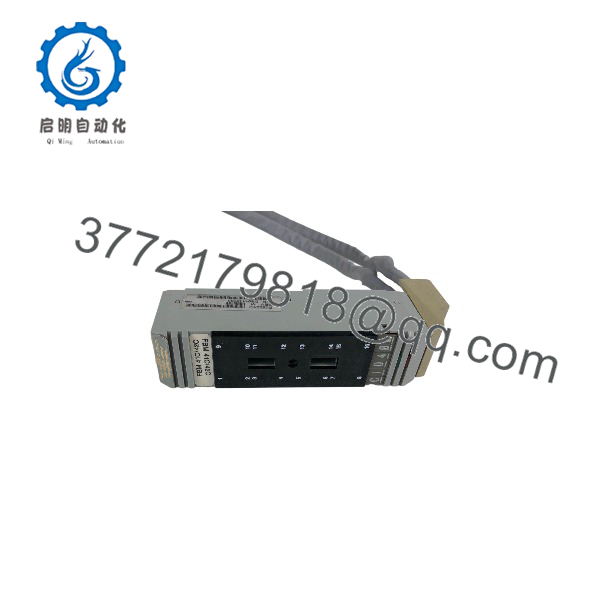
P0902YU
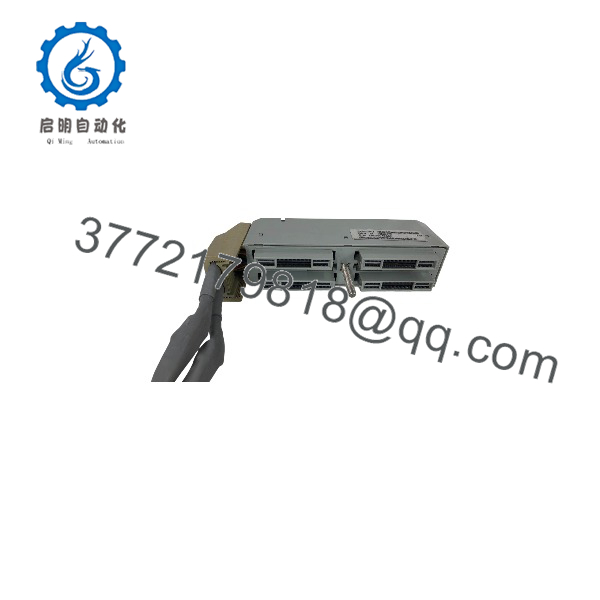
P0902YU
Installation & Configuration Guide
Stage 1: Pre-Installation Preparation
Estimated time: 15–30 minutes.
- ⚠️ Notify operations and obtain approval before working on the Foxboro I/A control network.
- Identify the affected FBM carrier, node, and cable route.
- Apply lockout/tagout where required; do not disconnect an active fieldbus cable without an approved outage or online-maintenance procedure.
- Prepare an ESD wrist strap, cable labels, multimeter or cable tester, small screwdrivers, and a camera.
- Photograph the installed P0902YU routing, connector orientation, shield-ground termination, and FBM carrier position.
- Record cable length, connector types, revision markings, and any printed date codes.
⚠️ Do not assume all Foxboro P0902xx termination cables are interchangeable. Connector gender, pinout, shielding, and cable length must match the installed assembly.
Stage 2: Removing the Old Cable
Estimated time: 10–20 minutes.
- Confirm the affected FBM carrier is safe to isolate or that replacement is permitted under the site’s controlled maintenance procedure.
- Label both ends of the existing P0902YU cable and the associated FBM/carrier positions.
- Disconnect connectors by their connector bodies; never pull on the cable jacket or individual conductors.
- Release cable clamps, ties, and strain reliefs.
- Remove the old cable while preserving its original routing path.
- Inspect FBM connectors, carrier connectors, and cable-entry hardware for bent pins, contamination, or damaged shielding.
⚠️ Keep the removed P0902YU until the replacement has passed continuity, shield-integrity, and communication checks.
Stage 3: Installing the New Cable
Estimated time: 10–15 minutes.
- Verify the replacement is a Foxboro termination cable assembly with matching connectors and length.
- Put on an ESD wrist strap before handling FBM connectors.
- Route the cable along the original path, maintaining separation from AC power and high-energy wiring.
- Connect each end fully and confirm that locking hardware or retention clips engage.
- Reinstall cable clamps and strain relief without over-compressing the jacket.
- Restore the shield-ground termination exactly as found in the original installation.
Self-checklist:
- Correct P0902YU cable and connector configuration confirmed
- Cable length and routing match the original
- Both connectors fully seated and secured
- Shield termination restored
- Cable strain relief installed
- FBM carrier and node identification recorded
Stage 4: Power-On & Testing
Estimated time: 15–30 minutes.
- ⚠️ Before restoring service, perform continuity and shield-integrity checks with the cable isolated from active electronics where practical.
- Restore the FBM carrier and communication path according to the approved Foxboro I/A procedure.
- Observe FBM and communication status indicators.
- Confirm that the control system recognizes the affected FBM and reports no communication fault.
- Verify live process values, output commands, and diagnostic status for the affected FBM.
- Monitor the communication path through at least one complete control-cycle period before closing the work order.
⚠️ If communication errors persist after replacement, check connector seating, cable shielding, ground bonding, FBM address/configuration, and the upstream communication module before condemning the replacement cable.
Frequently Asked Questions (FAQ)
Is the Foxboro P0902YU an FBM module?
No. It is a Foxboro I/A Series termination cable assembly. Some aftermarket pages incorrectly describe it as a display module, universal I/O module, HART input module, or pressure transmitter; those descriptions conflict with marketplace categorization and should not be used for procurement.
Is the P0902YU obsolete?
Yes. It is legacy Foxboro/Invensys I/A Series hardware, and availability is generally limited to used/tested, surplus, or exchange inventory.
Can I use a generic cable instead?
Only if it matches connector type, pinout, conductor count, shielding, length, and termination method. An incorrect generic cable can cause intermittent FBM communication faults or grounding problems.
Will replacing the cable erase FBM configuration?
No. FBM identity and configuration reside in the Foxboro I/A control system and FBM hardware, not in the cable. Record the node, carrier, and FBM positions before disconnecting anything.
Can I hot-swap the P0902YU?
Do not assume so. Cable replacement may be possible during controlled maintenance, but it depends on the FBM carrier, redundancy arrangement, and site procedure. Follow the approved Foxboro I/A maintenance method.
What should I inspect on a used P0902YU?
Check connector pins, insulation, jacket abrasion, shield continuity, bend damage, and secure terminations. A cable can appear cosmetically acceptable but still cause intermittent communication faults.
Why does pricing vary for this discontinued cable?
Price depends on condition, connector completeness, testing, warranty, and whether the supplier can verify the exact Foxboro I/A termination configuration. Used/tested assemblies typically cost less than verified new-surplus stock.



