
 WhatsApp: +86 16626708626
 Email:
  Phone: +86 16626708626
Description
Key Technical Specifications
| Parameter | Value |
|---|---|
| Model | RH916FL |
| Manufacturer | Foxboro (Schneider Electric) |
| Product Type | Type 4 Termination Cable |
| Cable Length | 10 m (32.8 ft) |
| Cable Construction | Type 4 |
| Jacket Material | Polyurethane (P/PVC) |
| Temperature Rating | −20 °C to +80 °C |
| Primary Application | FBM to Termination Assembly connection |
| Compatible Systems | Foxboro Evo™ / I/A Series DCS |
| Installation | Indoor industrial control cabinets |
| Replacement For | P0916FL |
| Typical Applications | FBM211, FBM217, FBM240 and other compatible FBMs requiring Type 4 termination cables |
Product Introduction
The Foxboro RH916FL is a Type 4, 10-meter termination cable used in Foxboro Evo™ and I/A Series distributed control systems. It provides the electrical connection between compatible Fieldbus Modules (FBMs) and their associated Termination Assemblies while maintaining the signal integrity required for industrial process control.
RH916FL supersedes the earlier P0916FL cable and is commonly specified for multiple FBM families, including the FBM211, FBM217, and FBM240. Selecting the correct cable type and length is essential because different FBMs require different termination cable families and connector configurations.
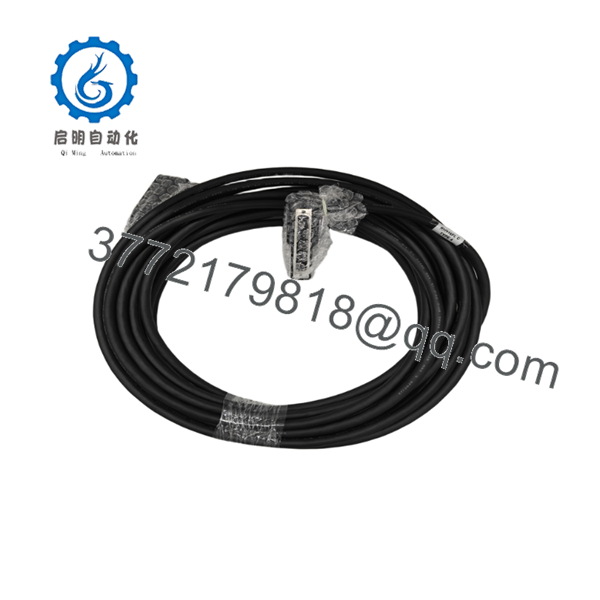
RH916FL
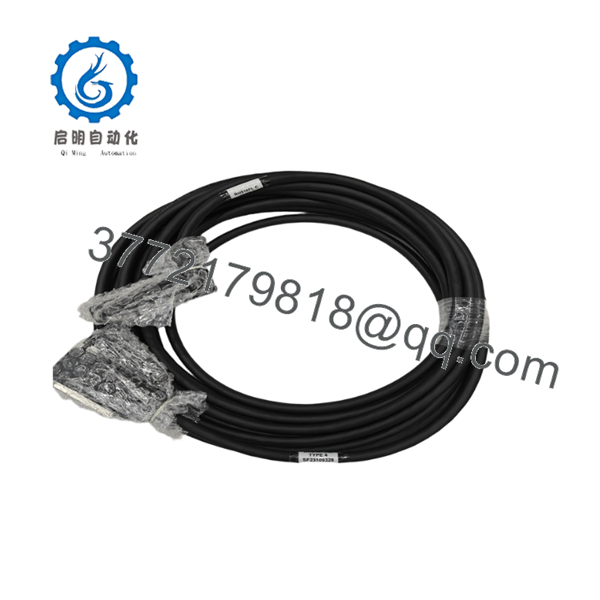
RH916FL
Installation & Configuration Guide
Stage 1 – Pre-Installation Preparation (5–10 Minutes)
⚠️ Safety First
- Notify operations before maintenance.
- Perform Lock-Out/Tag-Out procedures.
- Remove cabinet power.
- Wait several minutes for internal supplies to discharge.
Required Tools
- ESD wrist strap
- Phillips screwdriver
- Flashlight
- Cable labels
- Digital multimeter
Preparation
- Verify the cable part number is RH916FL.
- Confirm the required cable length is 10 m.
- Record existing cable routing.
- Inspect connectors for mechanical damage.
Stage 2 – Removing the Existing Cable
- Disconnect power.
- Label both cable ends.
- Release connector retaining hardware.
- Remove the cable without twisting the connectors.
- Inspect connector pins for contamination or bent contacts.
⚠️ Avoid pulling on the cable jacket. Always grip the connector body.
Stage 3 – Installing the RH916FL
- Verify connector orientation.
- Route the cable away from high-voltage wiring.
- Observe the minimum bend radius.
- Secure both connectors.
- Fasten cable supports to prevent vibration.
Installation Checklist
- ☑ Correct cable installed
- ☑ Connectors fully seated
- ☑ No excessive cable tension
- ☑ Cable routing verified
- ☑ Shield continuity maintained
Stage 4 – Power-On & Testing
- Restore cabinet power.
- Verify FBM communication.
- Confirm no communication alarms are present.
- Perform I/O functional testing.
- Monitor diagnostics during startup.
⚠️ If communication faults occur immediately after replacement, first verify that the installed cable type matches the FBM requirements before troubleshooting the controller or I/O module.
Frequently Asked Questions (FAQ)
Q1. What is the RH916FL used for?
is a Type 4 termination cable that connects compatible Foxboro FBMs to their termination assemblies in Foxboro Evo™ and I/A Series DCS installations.
Q2. How long is the ?
The standard cable is 10 meters (32.8 feet) long. Foxboro also offers the same cable family in lengths ranging from 0.5 m to 30 m for different installation requirements.
Q3. Which part number did replace?
supersedes the earlier P0916FL part number while maintaining the same cable function and length.
Q4. Which Foxboro modules commonly use this cable?
appears in the documentation for several FBMs, including FBM211, FBM217, and FBM240, as well as other modules that specify Type 4 termination cables. Always verify compatibility in the applicable Product Specification Sheet before ordering.
Q5. What should I verify before purchasing?
Confirm the following:
- Exact part number ()
- Required cable length
- Cable type (Type 4)
- Compatible FBM model
- Connector style
- Installation environment
- Whether P/PVC or LSZH cable construction is required
Verifying these details before ordering helps prevent installation delays and eliminates cable compatibility issues during commissioning.



