
 WhatsApp: +86 16626708626
 Email:
  Phone: +86 16626708626
Description
Key Technical Specifications
| Parameter | Value |
| Manufacturer | General Electric (GE) |
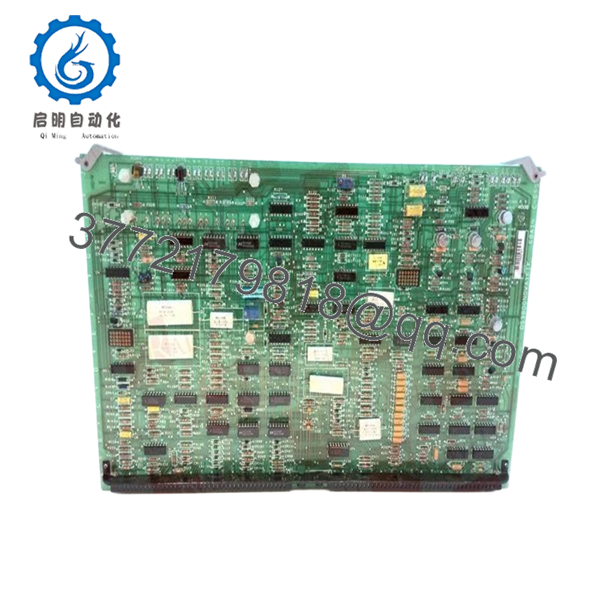
| Part Number | DS3800NOWA1K1K |
| System Compatibility | Speedtronic Mark IV Control Systems |
| Operating Voltage | 125 VDC / 24 VDC Control Logic |
| I/O Type | Pulse Accumulation / Relay Contact Outputs |
| Operating Temperature | 0 to 60°C (32 to 140°F) |
| Mounting Style | Rack-Mount Card Cage |
| Number of Channels | Variable based on firmware configuration |
| Hardware Revision | 1K1K (Enhanced reliability revision) |
| Connector Type | Multi-pin Edge Connector |
Product Introduction & Supply Chain Strategy
The GE DS3800NOWA1K1K is a specialized pulse input and relay output board designed for the Speedtronic Mark IV turbine control system. It plays a critical role in monitoring rotational speeds and executing discrete command logic for turbine auxiliary systems. Its ability to handle high-speed pulse signals makes it indispensable for maintaining precise governor control and overspeed protection.
From a supply chain perspective, the DS3800NOWA1K1K is a high-risk component due to its EOL status. Relying on refurbished units is a gamble; aged capacitors and mechanical relay fatigue on “repaired” boards are the primary causes of nuisance trips in older Mark IV panels. Procuring New Surplus units ensures you maintain an “insurance policy” of OEM-grade reliability, drastically reducing the Total Cost of Ownership (TCO) by avoiding the catastrophic costs of unplanned downtime.
Installation & Configuration Guide
Stage 1: Pre-Installation (Prep & Safety)
Ensure the turbine is in a “Cold” state and verify that the control cabinet is de-energized. Utilize a grounded ESD wrist strap before touching the hardware. Use a high-resolution camera to document the jumper (J) positions and any DIP switch settings on the original board. These settings define node addresses and signal scaling and must be replicated exactly.
Stage 2: Removal
Unlock the card cage ejector tabs. Gently slide the board forward out of the rack guides. Do not force the board; if resistance is felt, check for snagged wiring or loose terminal blocks. Store the removed board in an ESD-safe shielded bag immediately.
Stage 3: Installation (Clone & Seat)
Adjust the jumpers on the new DS3800NOWA1K1K to match your documented configuration. Align the board with the card cage rails and push firmly until the edge connector is fully seated. Lock the ejector tabs to ensure the board remains secure during operation-induced vibration.
Stage 4: Power-On & Testing
Apply power to the rack and check the diagnostic LEDs. Verify there are no “Voter” or “I/O” faults on the operator terminal. Use the control system’s diagnostic tools to confirm the board is correctly accumulating pulses and that relay outputs are toggling during the self-test sequence.
Firmware/Software Versions & Upgrade Notes
- Recommended Version: The 1K1K revision is highly stable and compatible with most mid-to-late generation Mark IV systems.
- Compatibility Notes: This board uses specific EPROM chips for logic execution. If your system requires custom logic, ensure the EPROMs are properly seated and match the firmware version expected by the Master Controller.
- Upgrade Warning: Do not mix different hardware revisions (e.g., 1A vs 1K) in a redundant rack without verifying that the firmware supports cross-revision parity. Doing so can cause “Data Mismatch” faults and system trips.

- DS3800NOWA1K1K
Frequently Asked Questions (FAQ)
How is this board different from a refurbished one?
A refurbished board has been previously stressed by heat and electricity, then “patched” to work again. This New Surplus DS3800NOWA1K1K is unused, meaning its components have zero operational wear. You are getting the full 10-15 year design life of a new part rather than the unpredictable lifespan of a used one.
Is this part still supported by GE?
The Mark IV series is in the “Legacy/Obsolete” phase of its lifecycle. GE no longer manufactures these boards. Our New Surplus inventory is one of the few remaining sources for original, unused hardware for these systems.
What happens if the jumper settings are wrong?
Incorrect jumper settings can lead to scaled signal errors or the board failing to communicate with the CPU. Always “clone” the hardware configuration of the unit you are replacing to ensure a seamless swap.
Does this board require any special software tools for installation?
No specialized software is required for the hardware swap, but you must ensure the existing system configuration in the Mark IV software matches the board’s I/O assignments.
Why is the price higher than some eBay listings?
B2B procurement for critical infrastructure requires traceability and quality assurance. Our pricing reflects the cost of sourcing genuine, verified New Surplus inventory that is guaranteed to work out of the box, backed by a 12-month warranty, unlike “as-is” listings from unverified sellers.



