
 WhatsApp: +86 16626708626
 Email:
  Phone: +86 16626708626
Description
Key Technical Specifications
- Model: DS3800NPVA
- Manufacturer: GE
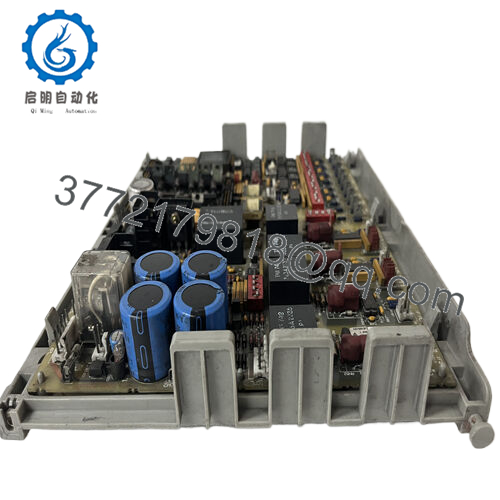
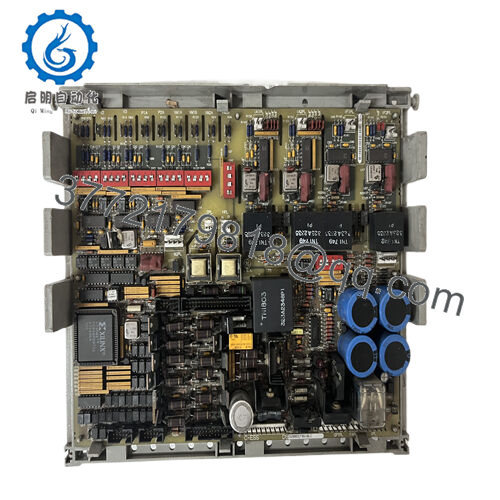
- Product Type: PC Board / Power Supply Board
- Series: DS3800 / Mark IV
- Function: Power supply board
- Availability: In stock listings
- Warranty: 2-year warranty listed by one reseller
- Condition: Discontinued / legacy stock
- Application: GE turbine control / machine
- Replacement Note: Verify exact suffix and rack compatibility before installation
Product Introduction
GE DS3800NPVA is a Mark IV family power supply board used in legacy GE turbine control and machine control systems. It is a board-level replacement part, not a modern retrofit module, so the exact suffix and rack match matter.
This part is usually bought to keep an existing GE cabinet running without redesigning the control architecture. In practice, the main risks are compatibility, condition, and sourcing a unit that has actually been tested rather than just listed as available.

- DS3800NPVA
Installation & Configuration Guide
Stage 1: Pre-Installation Preparation
- Notify operations and isolate the equipment. Confirm the cabinet is in a safe state, apply lockout/tagout, and wait at least 5 minutes for capacitor discharge.
- Gather tools: ESD strap, PH1 screwdriver, multimeter, wire labels, and a smartphone for photos.
- Record all cable tags, jumpers, and board positions before pulling the old unit.
Stage 2: Removing the Old Module
- Remove the front cover or access panel.
- Label and disconnect all wiring carefully. Do not force terminals.
- Release the mounting hardware and pull the board straight out to protect the pins.
- Inspect the backplane, connector fingers, and surrounding cabinet for bent pins, dust, or heat damage.
- Keep the old module until the new one is fully running.
Stage 3: Installing the New Module
- Put on the ESD strap and verify the exact model number matches before insertion.
- Clone the configuration exactly. Copy every jumper and switch position from your photo.
- Insert the board evenly until it seats fully.
- Reconnect wiring using the original labels and the correct torque for the terminal hardware.
- Check that all tabs are locked and the board sits flat.
- Self-check: [] settings match, [] wiring secured, [] connectors seated, [] tabs locked.
Stage 4: Power-On & Testing
- Measure the control rail with a multimeter before energizing.
- Power up the rack first, not the field devices.
- Watch the LEDs. Green RUN is generally good; red ERR means stop and verify.
- Connect the engineering software, confirm the hardware is seen correctly, and verify the firmware version if the system exposes it.
- Reload the backup logic if required.
- Run a dry test of the I/O and confirm no alarms, comms loss, or unexpected trips.
- If the ERR LED stays solid red, suspect a firmware mismatch first.
Frequently Asked Questions
Q: Can I hot-swap the DS3800NPVA?
No. Treat it as a powered-down replacement only. Pulling a live board can arc the backplane or take out the cabinet supply.
Q: Is this model obsolete?
Yes, it is a legacy GE Mark IV part. That is why stock tends to be limited and buyers should confirm condition before ordering.
Q: Is this genuinely new or refurbished?
For this family, you will usually see New Original / New Surplus listings. If a seller says refurbished, they should show test results and the actual condition.
Q: Will I lose programming when I replace it?
Usually no, because this is a power board rather than the main controller CPU. Still, back up the system and photograph the installation before removal. That saves time if the new unit behaves differently.
Q: Why is the price lower than OEM list price?
Because this is generally surplus or legacy inventory, not current production. Lower price is normal, but it should come with honest condition notes and a usable warranty.
Q: What is the direct replacement if this exact suffix is unavailable?
Do not guess from the family name alone. Verify the installed suffix, board revision, and rack fit. On GE legacy hardware, “close enough” often turns into extra downtime.
Q: What should I verify before installation?
Check the exact suffix, board function, mounting style, and cabinet power requirements. If any of those do not match, the replacement is not safe to install.



