
 WhatsApp: +86 16626708626
 Email:
  Phone: +86 16626708626
Description
Key Technical Specifications
| Parameter | Value |
|---|---|
| Model | DS3820MAUD1A1B |
| Brand | GE (General Electric) |
| Series | Mark IV (Directo-Matic Plus) |
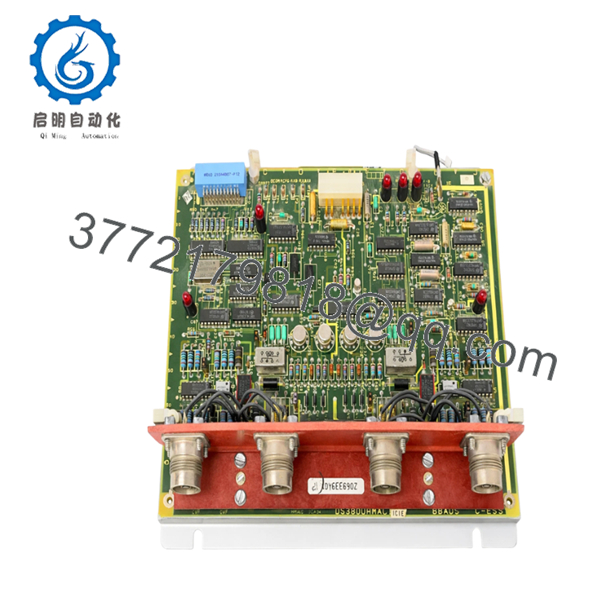
| Product type | Freeway Media Access Module |
| Primary application | GE Mark IV gas turbine control system communication interface |
| Cable connectors | 4 connectors: JB, JC, JD, JE |
| Supported cables | 2 cables (4 connections total) |
| Status indicators | Cable A OK, Cable B OK, Watch Dog Timer OK |
| LEDs | 6 LEDs for real-time status indication |
| Jumpers | 10 jumpers for system configuration and adjustments |
| Test points | 6 test points: RXA, RXB, RCFG, DCOM, OXMIT, 1RCV |
| PCB header | 6-pin header |
| PCB mating connector | 218A4837-P12 |
| Power connector | JG-Power Connector |
| Link controller connector | JA-Link Controller |
| Country of origin | United States of America (USA) |
| Mounting | Mark IV DS3800 backplane slot with faceplate connectors |
| ESD sensitivity | Static-sensitive (handle with ESD strap and ESD bag) |
| Condition | New Surplus / Rebuilt |
| Warranty | 12 months (typical) |
Product Introduction
GE DS3820MAUD1A1B is a Freeway Media Access Module developed for the GE Mark IV Directo-Matic Plus gas turbine control system. It serves as the communication interface between the Mark IV controller and the Freeway network, enabling data exchange with remote I/O and operator stations.
This module is chosen when replacing a failed media access card in a Mark IV turbine cabinet. Its built-in status indicators (Cable A OK, Cable B OK, Watch Dog Timer OK) provide quick visual diagnostics, while the 10 jumpers and 6 test points support precise configuration and field troubleshooting.

- DS3820MAUD1A1B
Troubleshooting Quick Reference
| Symptom | Possible Cause | Relevance to this Part | Quick Check Method | Recommendation |
|---|---|---|---|---|
| Cable A OK / Cable B OK LED off | Cable fault, termination issue, or controller fault | ✅ High | Check Freeway cable continuity; verify termination at both ends | Replace cable/termination first; replace module if LEDs remain off |
| Watch Dog Timer OK LED off | Module hang or firmware fault | ✅ High | Power cycle module; check for firmware corruption | Replace module if watchdog fault persists after reboot |
| No communication to remote I/O | Media access fault or network config mismatch | ✅ High | Verify network config; check JA-Link Controller connector | Replace module after confirming network settings |
| Module fails to boot (no LEDs) | Slot power failure or board fault | ✅ High | Measure 24 V DC at slot pins; check fuse/PSU | Replace board only after confirming slot power |
| Intermittent communication drop | Poor seating or dirty connector | ✅ High | Clean edge connector; reseat firmly; check for bent pins | Reseat and verify; clean contacts if needed |
| Configuration mismatch | Jumper settings wrong | ✅ Medium | Compare 10 jumpers to original unit photo | Restore correct jumper positions; reboot module |
⚠️ ESD Warning: This is a static-sensitive board. Wear a grounded wrist strap and handle in an ESD-safe area. I once watched a tech handle a $2,000 card in the dead of winter without a strap. Powered it up, and it immediately let the magic smoke out. Use an ESD strap.
⚠️ Cable Termination Warning: Verify Freeway cable termination and shielding at both ends before blaming the module. A missing terminating resistor or bad shield ground can cause intermittent faults that look like a dead board.
⚠️ Firmware Warning: Firmware revision mismatch between modules can cause communication timeouts. Document the old module’s firmware before pulling it, and request matching firmware ranges when ordering replacements.
Contact technical support with photos of the board, LED status, jumper positions, Freeway cable wiring, and controller diagnostic logs if the fault is unclear.
Frequently Asked Questions
Q: Is DS3820MAUD1A1B a direct replacement?
A: Yes within the same Mark IV cabinet generation, but verify board revision and jumper settings. Different revisions can have altered configurations or firmware requirements.
Q: Can I hot-swap this media access module?
A: No. Power down the rack before swapping. Hot-swapping can damage the backplane, corrupt Freeway network communication, or cause protection trips in the turbine system.
Q: Will my configuration stay intact after replacement?
A: Part of the config is set via the 10 jumpers on the board, not stored in flash. Take a clear photo of the old board’s jumper positions before removal, then mirror the exact configuration on the new unit.
Q: What condition is this part in?
A: This listing is New Surplus / Rebuilt. It is not factory-sealed OEM fresh, but it should pass visual inspection and live functional tests. Test reports, photos, and diagnostic logs are available on request.
Q: Why is it cheaper than factory-direct?
A: Surplus stock comes from excess inventory, decommissioned units, or unused spares. The Mark IV system is obsolete, so factory-new units are no longer available from GE. Pricing reflects sourcing from the surplus market.
Q: What should I verify before installation?
A: Confirm board revision, jumper positions, Freeway cable termination and shielding, and slot power. Calculate total rack backplane power consumption and leave a 20% buffer.
Also check the Freeway cable termination at both ends. I’ve seen projects where a tech swapped a module and the PLC threw a “Communication Timeout” for two days, just because the terminating resistor was missing at one end of the Freeway bus.
Q: How do I know the module is actually bad?
A: Look for failed watchdog LED despite stable slot voltage, Cable A/B OK LEDs that remain off after verifying cabling and termination, or persistent Freeway communication faults. If diagnostics still point to the module after those checks, replacement is justified.
Q: What are the test points used for?
A: The 6 test points (RXA, RXB, RCFG, DCOM, OXMIT, 1RCV) allow you to probe Freeway network signals with an oscilloscope or multimeter for diagnostics. RXA/RXB are receive lines, OXMIT is transmit, and RCFG/DCOM are configuration and ground reference points.
Q: Is the Mark IV system still supported by GE?
A: The Mark IV is obsolete. GE has moved to Mark VI and Mark VIe systems. Replacement modules are only available through the surplus market, so stock is limited and lead times can vary. Plan replacements early if you’re running Mark IV.



