
 WhatsApp: +86 16626708626
 Email:
  Phone: +86 16626708626
Description
Key Technical Specifications
| Parameter | Value / Specification |
| Manufacturer | GE Fanuc / Emerson Automation |
| Part Number | IC697BEM733 |
| System Architecture | Series 90-70 VMEbus Baseplate |
| Module Type | Genius Bus Controller (GBC) |
| Bus Compatibility | Genius Serial Bus (Shielded Twisted Pair) |
| Data Transmission Rates | 153.6 kbaud, 76.8 kbaud, 38.4 kbaud |
| Max Network Nodes | Up to 31 Genius I/O blocks or devices per bus |
| Backplane Current Draw | 1.2 A @ +5 V DC (from backplane) |
| Operating Temperature | 0 °C to +60 °C (32 °F to 140 °F) |
| Storage Temperature | −40 °C to +85 °0 (−40 °F to 185 °F) |
| Diagnostics | MODULE OK, BUS OK, and COMM FAULT Status LEDs |
Product Introduction & Supply Chain Strategy
The GE Fanuc IC697BEM733 is a high-performance Genius Bus Controller (GBC) engineered for GE Series 90-70 VMEbus PLC architectures. It serves as the primary communication bridge between the Series 90-70 central processor and remote Genius I/O blocks, motor starters, and power management units distributed across large-scale industrial plants.
Maintaining a New Surplus GE Fanuc IC697BEM733 module in reserve provides essential protection against extended system outages. Because legacy Series 90-70 components face shrinking OEM availability, a GBC card failure can isolate entire remote I/O drop networks and halt production across an entire facility. Sourcing genuine New Surplus guarantees pristine internal VMEbus logic, unaged optocouplers, and untarnished gold backplane edge connectors—eliminating the intermittent communication drops, data corruption, and premature bus faults typical of refurbished modules.
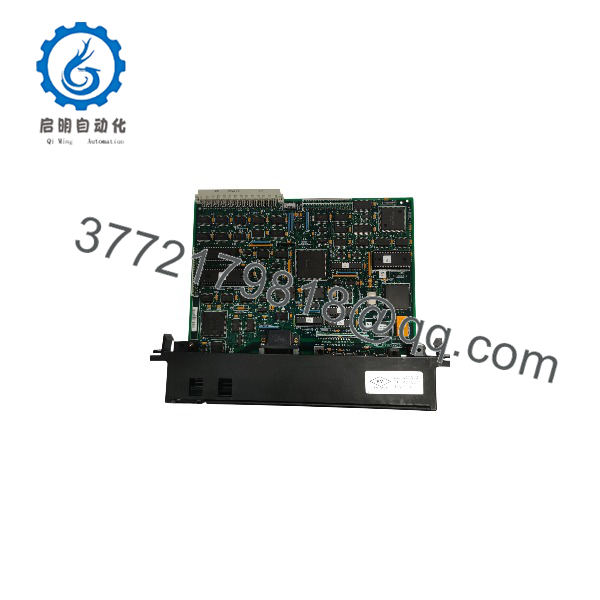
IC697BEM733
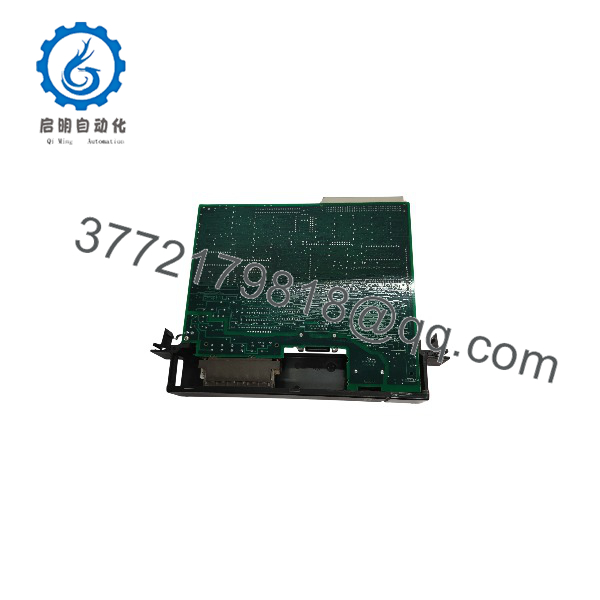
IC697BEM733
Installation & Configuration Guide
Stage 1: Pre-Installation (Prep & Safety)
- De-energize the Series 90-70 rack main power feed and follow strict Lock-Out/Tag-Out (LOTO) safety protocols.
- Put on an anti-static wrist strap grounded to the panel frame before handling the IC697BEM733 card to avoid ESD damage to sensitive VMEbus logic.
- Record the physical slot location and verify the Genius Bus Serial Address settings in Logicmaster 90, VersaPro, or Proficy Machine Edition.
Stage 2: Removal
- Unplug the Genius serial bus connector cables from the front port header of the existing GBC card.
- Unthread the top and bottom retaining screws securing the module faceplate to the VMEbus rack chassis.
- Pivot the card ejector handles outward to disengage the rear VMEbus backplane connectors, then slide the card straight out along its guide tracks. Store the old module in static-shielding packaging.
Stage 3: Installation (Clone & Seat)
- Unpack the new GE Fanuc IC697BEM733 unit from its static-shielded box.
- Align the top and bottom card edges with the guide rails of the designated Series 90-70 rack slot.
- Slide the card into the rack until the rear connectors touch the backplane, then press the faceplate ejector levers inward firmly to seat the card completely. Tighten upper and lower mounting screws.
- Re-attach the shielded Genius serial bus cable harness securely to the front port header.
Stage 4: Power-On & Testing
- Re-apply main power to the Series 90-70 rack.
- Observe front diagnostic LEDs: verify the MODULE OK LED turns solid green and the BUS OK indicator lights up, signaling active communication handshakes across the Genius network.
- Access PLC CPU diagnostics via programming software to confirm all online Genius I/O blocks report healthy data scan cycles without packet drops.
Firmware/Software Versions & Upgrade Notes
- Software Configuration: The IC697BEM733 relies on hardware configuration files compiled within Logicmaster 90-70, VersaPro, or Proficy Machine Edition and downloaded directly into the host Series 90-70 CPU.
- Firmware Revision Alignment: Verify that the onboard EPROM firmware revision on the supports all active features (such as datagram messaging or global data exchanges) required by your application project.
- Bus Termination: Ensure proper 75-ohm or 100-ohm termination resistors are installed across the physical ends of the Genius serial bus cable run to prevent signal reflection.
- Hot-Swapping Warning: Series 90-70 VMEbus backplanes do not support live hot-swapping of communication cards. Always disconnect power from the baseplate before removing or inserting the card to prevent VMEbus logic lockups and connector pin arcing.
Frequently Asked Questions (FAQ)
Q: How can I confirm that this GE Fanuc module is 100% Brand New Surplus?
A: Every unit we offer is 100% Brand New Surplus. It arrives in clean, original GE Fanuc factory packaging, complete with untarnished gold-plated backplane pin contacts, unblemished faceplate plastic, intact serial labels, and factory quality assurance seals. It has never seen field installation or energization.
Q: Why is buying New Surplus preferable to choosing a refurbished Genius Bus Controller?
A: Communication cards process continuous high-frequency data streams, placing severe stress on onboard signal isolation optocouplers and line drivers. Refurbished units frequently contain aged components near their breakdown point, resulting in intermittent network timeouts and loss of I/O drops. New Surplus guarantees original dielectric strength, factory component longevity, and total network stability.
Q: Can the be installed in any slot on the Series 90-70 backplane?
A: The can be installed in any standard VMEbus application slot (Slot 2 through 9) of a Series 90-70 main or expansion rack, provided the slot is mapped accurately in your software hardware configuration.
Q: How many Genius devices can a single module manage?
A: A single controller manages up to 31 active Genius nodes (such as discrete blocks, analog blocks, and motor starter interfaces) per bus circuit.
Q: Does this module require an external power supply?
A: No. The draws its operating power (+5 V DC at 1.2 Amps) directly from the backplane of the Series 90-70 chassis.
Q: What warranty coverage comes with this module?
A: We support this Genius Bus Controller with a full 1-Year Warranty. Every module undergoes visual, mechanical, and electrical backplane checks prior to dispatch.



